36 comments found.

Presales : 1. Is this plugin use official TaoBao API ? 2. Is this use woocommerce payment plugin ?
Hi,
Thank you for your questions!
This plugin does not use the official Taobao API. It works through our Chrome extension to collect the required data.
Also, ChinaDS doesn’t require any WooCommerce payment plugin and doesn’t depend on any specific payment gateway.
You can try the free version first to test how it works before purchasing: https://wordpress.org/plugins/chinads-dropshipping-taobao-woocommerce/
If you have any other questions, feel free to ask
Best regards.
Ok Thanks 1. Why you did not use the official api ? When use your plugin taobao will lock or block my account ? 2. Can you provide an url off your customers who use this plugin ?
Thanks for your questions. Do you have any documentation or reference to Taobao’s official API that you can share with us? If so, please send it over and we’ll review and check its applicability.
Regarding account safety, our plugin does not intentionally trigger any blocking behavior. However, to avoid potential restrictions from Taobao, we recommend normal browsing behavior – avoid opening too many tabs at once, switching tabs too quickly, or performing actions too aggressively. Using the plugin in a slow, steady, and natural manner helps reduce any risk.
And, we’re afraid we can’t share URLs or information about our customers. Customer data and usage details are private and confidential.
If you have any other questions, feel free to let us know.
Please check https://open.taobao.com/api.htm
Taobao Open Platform (Domestic China): This platform hosts the primary API documentation for the Chinese domestic market. The documentation covers a vast range of APIs for items, transactions, logistics, users, and more. Main Page: open.taobao.com API List/Docs: https://open.taobao.com/api.htm Taobao Global Open Platform (International): This version is an end-to-end integrated platform for developers outside of mainland China, offering documentation in English (and other languages). It provides APIs for accounts, commodities, orders, payments, and logistics tailored for global developers and dropshipping businesses. Main Page: https://open.taobao.global/ Developer Guide: https://open.taobao.global/doc/doc.htm API Reference: https://open.taobao.global/doc/api.htm
You can do for domestic
Thanks for sharing the links!
We’ve already had a look at the documentation and also reached out to the Taobao team directly. For now, to summarize in a non-technical way, there isn’t much we can practically use or integrate from the available APIs. That said, we’ll definitely keep an eye on any updates and consider integration in the future if it becomes possible.
Really appreciate you taking the time to share this with us
Does it support linking with the 1688 website?
Hi,
Thank you for reaching out to us. This plugin doesn’t support 1688 at the moment, unfortunately.
Best regards.
please update chrome extension, its not support latest Tmall store page
Hello,
Thank you for reaching out to us. Could you please create a support ticket on this Support Forum?
Best regards.
Hi, it’s asking me to pay for support, but this issue seems quite simple — your Chrome extension just needs an update.
Here’s an example store where the extension isn’t showing the import option: https://jiyoujia136351048.jiyoujia.com/shop/view_shop.htm?spm=a21n57.shop_search.0.0.38181ae1DW6dXf
Additionally, the extension needs to be updated for product pages as well, because some products are being imported without descriptions.
Please update the extension to ensure full compatibility with the latest Taobao and Tmall front-end layout changes.
No, it doesn’t cost you any extra money, the Forum is presale. Could you try again?
taobao is a local china market place right ? So how it will ship internationally when a custermer order products from our store ?
Hi,
Thank you for reaching out to us.
Yes, you’re correct — Taobao is primarily a local Chinese marketplace, mainly intended for customers within China. Most Taobao sellers do not directly support international shipping.
If you’re running a dropshipping store and want to source from Taobao for international orders, you can have items delivered from Taobao sellers to a fulfillment warehouse in China that supports international shipping. The warehouse handles export and delivery to your customer. That’s quite a common solution as far as I know.
Best regards.
do you provide that warehouse facility ? or shipping facility ?
Thanks for your message. Our plugin is designed solely for importing products — we don’t provide any warehouse or shipping services.
Let me know if you have any other questions!
Does it support linking with the 1688 website?
Hi,
Thank you for reaching out to us. This plugin doesn’t support 1688 at the moment, unfortunately.
Best regards.
I think taobao has flagged the plugin/extension. I am trying to import products but I get this error. My account was locked for a week, I had to verify with my passport. Anytime you import products like 4 or 10, taobao automatically log you out and ask you to verify your account and now cant import like before: 更多商品信息载入失败 您的浏览器可能存在违规插件,正在窃取您的个人信息,请尽快卸载;卸载后商品详情页将在24小时内自动恢复。 More product information failed to be loaded Your browser may have illegal plug-ins, is stealing your personal information, please uninstall as soon as possible; The product details page will be automatically restored within 24 hours after uninstallation.
Hi,
Thank you for reaching out to us.
After verifying with your passport, do you still get locked when you try to import multiple products?
Best regards.
After verifying real name authentication with passport, I get locked out of my account often after few imports and have to start verification again and then get this message: 更多商品信息载入失败 您的浏览器可能存在违规插件,正在窃取您的个人信息,请尽快卸载;卸载后商品详情页将在24小时内自动恢复。Which hide the products information and description. if you bulk import, your account get locked right away with a text saying there was suspected activity on your account, for security, verify.
Got it. Our dev team is currently in discussion with the Taobao dev team to figure this out. I’ll keep you posted – please avoid bulk importing in the meantime.
1: How to bulk import? 2: Image of attributes not import.
Hi,
Thank you for reaching out to us.
To bulk import, you can do so inside a category page on Taobao: https://docs.villatheme.com/wp-content/uploads/2022/06/import-on-cate.jpg
Regarding the matter of attribute (I supposed you meant variation) image upon importation, can you please share me a product URL?
As a note, if an item has more than one attribute and there’re attributes without images, our plugin won’t retrieve the image to variations.
Best regards.
2: Import list not import variation image check here:
https://i.imgur.com/BKScw0s.png https://i.imgur.com/7Et0bxt.pngProduct link to test: https://detail.tmall.com/item.htm?id=778927602101 Extention ver: 1.0.8
Hi,
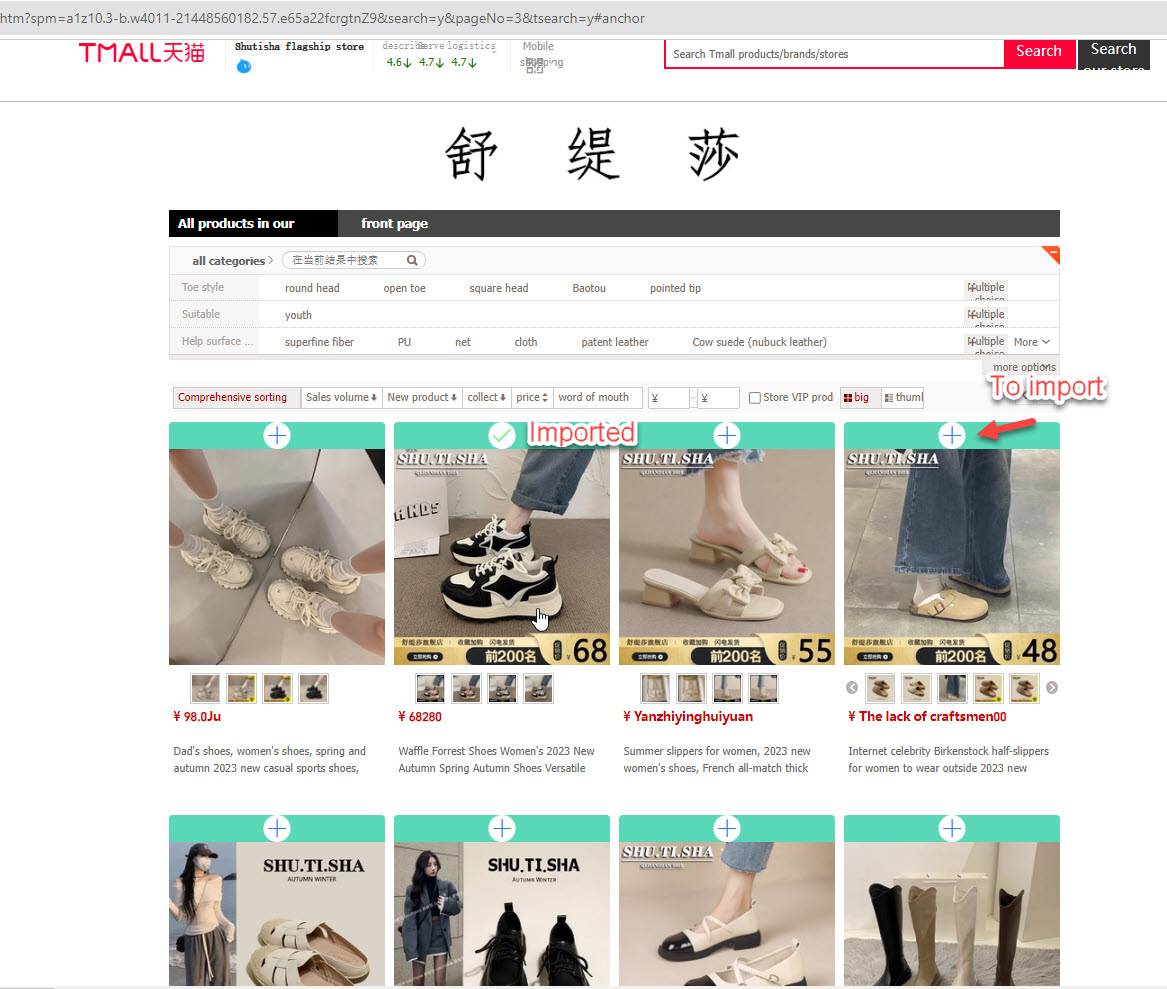
Regarding the bulk import button, it does not appear on pages where products load dynamically using lazy load. Since there is no pagination, the products continuously load as you scroll. Please try using this page instead: https://s.taobao.com/search?commend=all&ie=utf8&initiative_id=tbindexz_20170306&page=1&q=shirt&search_type=item&sourceId=tb.index&spm=a21bo.tmall%2Fa.searchSuggest.0&ssid=s5-e&tab=mallAs for the variation images, note that the product has two attributes, and the image of the first attribute (‘color’) is not a variation image but rather an attribute image. WooCommerce does not support attribute images, which is why they are not imported. This is exactly the note I mentioned in my previous reply.
If a product has multiple attributes but only one of them is an image swatch, there is a chance that those images won’t be imported as variation images. Please try testing with a product that has only one attribute with images, such as this one: https://item.taobao.com/item.htm?id=900737025623
https://snipboard.io/bqVder.jpgDo you have any plugins that support importing products to your own WooCommerce store from other WooCommerce stores?
Hi,
Thank you for reaching out to us.
If it’s from WooCommerce to WooCommerce, you can use CSV files. WooCommerce itself has option to import/export products to CSV files: https://snipboard.io/l7gzuY.jpg
Best regards.
Are there any solutions to import bulk products instead of one by one? on taobao to save time for huge products list
Hi,
Thank you for reaching out to us.
We have option to import all product inside the Import List page, but if you’re referring to the importing process from Taobao to WooCommerce, you can use this button: https://snipboard.io/dnIV1i.jpg
It’s available in Taobao product lists
Best regards.
did u mean taobao is option there right ?
Yes, is there any problem from your end when you tried importing on product list page?
Feature Request: Support for Importing from www.tmall.hk and Product Reviews Integration
Hello,
- 1 ## I would like to request support for importing products from the domain www.tmall.hk. Currently, the import functionality works for taobao.com and tmall.com, but certain products in specific categories are hosted on www.tmall.hk. Please see the steps and screenshot below for reference: (1) Visit https://www.tmall.com/ (2 )Select the category shown in the screenshot at https://prnt.sc/4TKmLD5DZuwa, which redirects to www.tmall.hk. Please make it support importing product from all of Ali Group domains by Domain Regex.
- 2 ## Additionally, we urgently need the ability to import product reviews for items via ChinaDS. We have previously submitted this request, but there seems to be no progress. Could you please prioritize this feature?
Thank you for your attention to these matters.
Hi,
Thank you for reaching out to us.
We’ll take the first inquiry into consideration. We’ll need to conduct some more tests, maybe in the future though.
As for the second inquiry, at the moment, the rating system of Taobao isn’t the same as WooCommerce, as far as I know. We found no criteria that we can refer for rating mapping to handle this matter. I appreciate if you have any idea for this? Due to language barrier, it’s hard for us to dig this deeper…
Best regards.
Thanks for your response.
Regarding importing reviews and ratings, I know there is a plugin of WooCommerce Photo Reviews https://codecanyon.net/item/woocommerce-photo-reviews/21245349. It works well with ALD but doesn’t seem compatible with ChinaDS.
We are looking to achieve the same functionality for importing reviews from Taobao and Tmall. Any methods or solutions to help with this would be greatly appreciated.
Thank you!
We’ll see what we can do. Still, we’re not familiar with the review and rating system of Taobao, it’s not the same as WooCommerce. We’re looking for a way to map it with WooCommerce rating system (1-5*) when importing reviews, but no idea so far. I appreciate your help if you have any idea for us
Thanks for your response. It would be greatly appreciated if the expected features could be implemented as soon as possible.
Here are additional details for reference:
.com Domain: When accessing the item, the extension displays as “Import” after loading. https://prnt.sc/_iIkHXMYtA5cHK Domain: When accessing the item, the page stays stuck on “Loading…” and auto-refreshes after several minutes, eventually showing “Cannot get product data.” This issue persists even when using a VPN (we have our own VPN server located in California, US).
https://prnt.sc/Vjaa-_mzo1-xPlease let me know if you need further information.
Thank you for providing the additional details.
We can certainly investigate the issue regarding the error message “Cannot get product data”. Please open a ticket with us on this Support Forum.
Regarding your inquiry about review importation, do you have any suggestions on how we can map the rating from Taobao to WooCommerce? Since the two systems have different rating structures, it’s crucial to determine an effective way to align the data. Rating system on Taobao: https://snipboard.io/8DtBkN.jpg
Looking forward to hearing your thoughts
is sitill taobao available for importing by category? if I want to import only two or three categories from the Taobao store?
Hi,
Thank you for reaching out to us.
I’m not sure if you want to import products in a category or the category itself, like ALD? If it’s about importing the categories itself, I’m afraid it’s not possible.
If it’s about importing products in a category, you can import it as usual: https://snipboard.io/tZcUCB.jpg
Best regards.
Yes, my first question is, is your plugin still working fine or not? Second question, I’m talking about import-specific categories, for ex: import all fashion categories totaly into my store, or should I use product by product to import?
For testing purpose, I would recommend trying our free plugin: https://bit.ly/chinads
I just checked our plugin again, it’s importing products from single product page, but indeed doesn’t import products from category page. We fixed our chrome extension and you can try this dev file: https://drive.google.com/file/d/1mC-Yun_3ijQarMTcilxOHjouYDOvk1pG/view?usp=sharing
Here’s our guide to activate a dev chrome extension: https://www.youtube.com/watch?v=7AUHDWfReRQ
Just to clarify, our plugin only helps import products, but not the category. You can import products in a category but can’t import a category itself.
will this work with https://www.temu.com/
Hi,
Thank you for reaching out to us.
This plugin doesn’t work on Temu, but we’ll build one for this platform soon. We appreciate your interest and for supporting our plugin.
Best regards.
Hello,
It does not import product now, the widget always show as Loading, after very long time, it show: can not get product data:
https://prnt.sc/hN7n2rM4CJgO1# I am not sure if it is out of compability with latest wordpress and woocommerce, and please update it and make it more compatible with latest Woocommerce.
2# If there is no bug or compatible issue, what is the condition for the extension to work? I am in China, but our server is in California, could you please clarify?
Thanks
Hi,
Thank you for reaching out to us.
I was able to recreate this issue at some point, but not entirely. Could you please try the solution provided in this ticket: https://codecanyon.net/comments/31072924
Or could you please open a ticket on this Support Forum? We may need to take a look from there and will definitely check it for you.
Best regards.
I used the extension above because It was loading and not displaying import button. After I installed manually it displays now but when you try to import, it returns this error message “Error: Unknown username. Check again or try your email address.”
Hi,
Thank you for reaching out to us.
I haven’t been able to replicate the “Error: Unknown username. Check again or try your email address” problem, but as for the “Loading” import button, could you please try the solution under ulpop3’s comment: https://codecanyon.net/comments/31072924 ?
Best regards.
I have done it as explained above but when importing, I get the error you can. check from screenshot. https://ibb.co/HXkTLVj
I can’t replicate that error. Could you please open a ticket on this Forum: https://villatheme.com/supports/forum/plugins/chinads-taobao-dropshipping-for-woocommerce/chinads-taobao-dropshipping-for-woocommerce-extension/
I solved the issue. I reinstalled the extension package and saw some errors. After cleaning it, it worked.
I’m glad to hear that. Thanks for updating me.
Hi, I see that REST API gets duplicated or generated everytime
I don’t quite understand, could you share some screenshots capturing the issue you’re facing?
My plugin cannot display the import button, it always shows loading, how to solve it
Hi,
Thank you for reaching out to us.
Could you check if your Taobao/Tmall product page has product description? If no description, please try this dev chrome extension version 1.0.7.6: https://drive.google.com/file/d/1PpqTCnipbwpEEeoEEt9GD9AOcsIHW2lZ/view?usp=sharing
Please visit our tutorial video for how to install chrome extension manually: https://www.youtube.com/watch?v=7AUHDWfReRQ
In this version, we make it bypass product description. With this dev extension, please set up the “Product Description” option “None” (under Dashboard >> ChinaDS >> Setting >> Product)
Best regards.
but Taobao/Tmall product page has product description
Can you recommend a guide on how to use Tmall-Taobao, since it does not support 1688?
Can you recommend a guide on how to use Tmall-Taobao, since it does not support 1688?
Hi,
Thank you for reaching out to us.
Generally, you can find more details of our plugin and how to use it on Tmall – Taobao in this documentation. If you need assistance with anything specific, please feel free to clarify, and I’ll be happy to help!
Best regards.
Regular License and Extended License difference
Hi,
Thank you for reaching out to us.
Basically, Extended license are for cases like, when you want to include our plugin to your product which you will sell, e.g. you make a theme and want to use our plugin in your theme >> That’s when you need an extended license. For more details, you can visit this article: https://help.market.envato.com/hc/en-us/articles/115005593363-Do-I-need-a-Regular-License-or-an-Extended-License
Best regards.
How to contact you?
You can contact us here. What else can I help you?
I want to customize some functions.
Would you please clarify what you’re trying to achieve? I’ll do our best to assist.
i am a taobao expert i bought this plugin and i wanted to achieve great results with this plugin. The plugin is great but it has its biggest downside. this is the lack of taobao api. since there is no api, you have to update the prices every day, which takes a long time. the plugin scans taobao and uploads the prices to your site. taobao will block your access in response. you can only update up to 20 products and you will be blocked. i lost a lot of money i asked them to replace this plugin with aliexpress plugin all my lost money is because of this plugin. I asked them for linice code for aliexpress plugin and they just removed my support and spat at me. don’t buy it you will lose a lot of money
i told them a lot about this problem and their answers are as follows 1. i don’t understand what you are saying 2. it’s the problem of taobao site our plugin works perfectly. why do we need this plugin if taobao blocks us for crawling the site? Is it to import 30-40 products through it or to waste my money? never buy
Hi,
We are sorry for this unexpected experience.
1. Taobao API Limitation: at the moment, our plugin has not supported Taobao API. 2. Data Update: at the moment, the plugin syncs data through an extension, but when you try to sync multiple products, Taobao might block access because they don’t allow bulk queries. Unfortunately, that’s a security measure on their end, and it’s out of our control. To avoid this, we suggest syncing products one by one or using the bulk sync button to sync one product at a time. This should help prevent any blockages.
3. Refund and plugin replacement: We received your request to refund the Taobao plugin and replace it with the ALD plugin on our forum on August 24, 2024, at 7:30 PM, which was outside our support hours. We want to assure you and all our valued customers that we take support requests very seriously and strive to provide the best service possible, we did not ignore your support request or treat you disrespectfully. We have responded to you this issue, kindly follow up on the ticket: https://villatheme.com/supports/topic/aliexpress-plugin-instead-of-taobao-dropship-plugin/
Best regards.
你好,用户付款完以后我们自己履行淘宝的订单吗?这样的话淘宝卖家是不会对海外卖家(我们)开发票的。对此你们提供代购服务吗?
Hi,
Thank you for reaching out to us.
Our plugin provides the feature to fulfill Taobao orders with the extension. The admin can add notes (In the plugin setting > Fulfill tab > Taobao order note) for the item seller regarding asking for invoices or any additional information. However, we are sorry that our plugin does not have the function to provice purchase service for this.
Best regards.