1076 comments found.

My client has purchased the plugin but it is not selecting the local currency based on geolocation. Here is an example https://kocoknitting.com/product/samplenew1/. If I use a VPN for India it still shows AUD.
Hi Kym,
Thank you for reaching out. Please try testing in incognito/private mode first. If that doesn’t solve the issue, switch to a different geo API in the plugin settings.
If the problem still persists, kindly ask your client to open a support ticket on this Support Forum. That way, we can check the license details and provide support directly to the license owner.
Best regards.
Bonjour,
Comment allez-vous? My name is Kym.
I am thinking of purchasing this for my agency and must know if your plugin is compatible with a few plugins I use for my client sites.
Firstly, is it compatible with WP Snippets AI: https://wpsnippets.ai
Also, is it compatible with Yoast SEO: https://yoast.com
Merci, Kym
Hi Kym,
Thank you for reaching out. We haven’t specifically tested our plugin with WP Snippets AI or Yoast SEO, so we can’t confirm compatibility with those at this time.
What we recommend is trying with our free plugin CURCY first to see if it works as expected in your setup. That way, you can test directly in your environment before making a purchase.
Best regards.
How do I set up automatic updates for exchange rates across different countries?
Hi,
Thank you for reaching out to us.
You can’t set up separate automatic exchange rates per country. The plugin updates rates globally — one set of exchange rates applies to all countries at once.
Best regards
Hello, I am using Elementor with WPC Food Menu Tab on my website (it is pulling WooCommerce product prices in BGN) and I have to add a second currency to the menu (EUR) and it has to look like this: 11,98 лв. / 6,13 €. I can see in the documentation that the paid version has the option to display multiple currencies at once, from the Currency price collate feature. My question is will this feature work alongside the WPC Food Menu Tab?
Hi,
Thank you for reaching out to us.
Yes, the multiple currency display feature works for WooCommerce products. Whether it will display correctly within the WPC Food Menu Tab depends on how that plugin pulls product data – this part is about compatibility between the two solutions.
As a quick test, you can try our free version using the Approximate Price option to see if the secondary currency shows up in your menu: https://docs.villatheme.com/woocommerce-multi-currency/#approximate-price
Best regards
Thank you for the fast response! The WPC Food Menu Tab is in fact compatible with the Approximate price feature.
Glad to hear the Approximate Price feature works well with the WPC Food Menu Tab. If that’s good enough for your needs, you can absolutely keep using the free version as is.
If at any point you’d like to upgrade to the premium version of CURCY for the Price Collate feature, we’ll be happy to help you check compatibility and make sure everything runs smoothly.
Hello! Do you have compatibility for WCFM Multi Vendor? They have not updated their pro plugins in a long time, maybe you still have it?
Hi,
Thank you for reaching out to us.
We did integrate with WCFM and make it partially compatible. However it’s quite long ago and both plugins have changed, would you mind trying the free version of CURCY first to see if it works for you: https://wordpress.org/plugins/woo-multi-currency/
Best regards
Ok thanks for the response, will look into it.
Hello,
The CURCY plugin is causing a duplicate filter issue that leads to incorrect pricing. Could you please check and fix it?
Here’s how to reproduce the error:
- Install the CURCY plugin and the WPC Product Bundles for WooCommerce plugin https://wordpress.org/plugins/woo-product-bundle/- Create a bundle product: https://prnt.sc/4OoOaNcCtxcG
- Switch to a secondary language and add the product to the cart
- The error occurs: https://prnt.sc/Gt2LLtPnxIXB
Thank you.
Hello,
Thank you for reaching out to us. Could you please create a support ticket on this Support Forum? No live Item Support or extra fee required.
Best regards.
My support period has already expired.
However, since this issue comes from the CURCY plugin, could you please check and fix it?
Yes, we’ll definitely help. But we need to take a direct look, specifically on your environment, just to ensure we’re on the same page investigating this compatibility so we can work it out together. No worries about the support period, it’s not required to open a ticket on the Pre-sale forum.
Would you mind opening a ticket on the Forum above? We can definitely take a look for you.
Thank you. I’ve created a ticket.
Hello sir, I have a presale question.
We need to show the price in 2 currencies together and also to choose default currency (only 1 default and accepted).
The idea is to receive the payments with only default currency, but to show the price in bulgarian lev (default) and EURO (informatively). After few months we must change default currency from bgn to eur. That`s the idea. The questions is : your plugins is able to do this? The perfect will be if can use shortcode.
Regards
Hi,
Thank you for reaching out to us.
Maybe the free plugin can help. Can you try the Approximate price that shows 2 currencies at once: https://youtu.be/_DV2XVETUzM?si=q1X_v8_4ywFMXMRQ&t=695
Please let me know if that helps or you need anything else.
Best regards.
Hi, when I save a change I get a pop-up window with the message “You can’t set all currencies to hidden.” How do I fix this?
Hi,
Thank you for reaching out.
Please set “No” for at least one currency in this table: https://snipboard.io/K51v2l.jpg
Best regards.
Thanks
Hello Angela and Team,
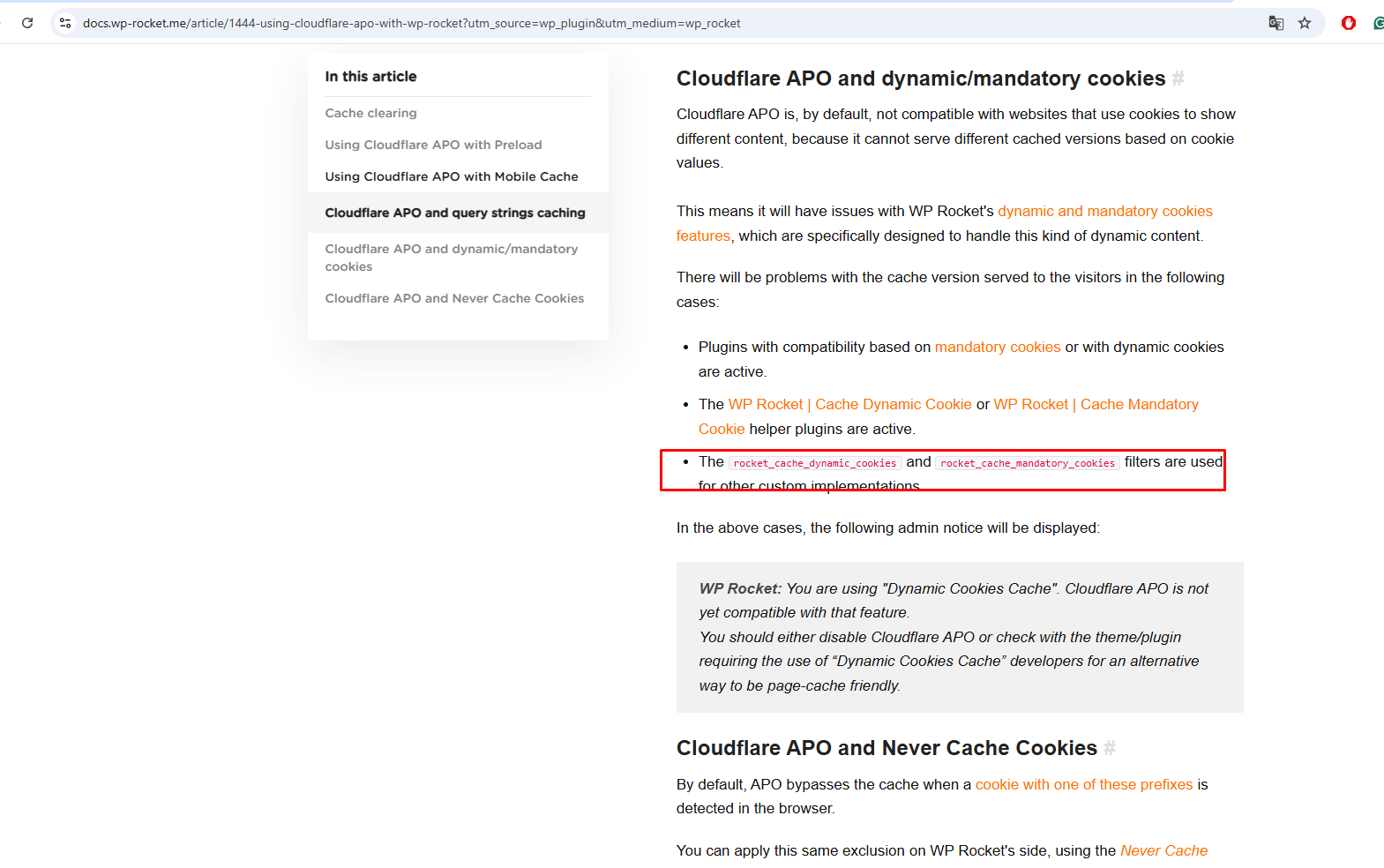
We are a bit concerned about the latest update (2.3.10) changelog mentioning : “Remove WP Rocket dynamic cache functions.”
Could you please briefly share what this change means ?
Hi,
Thanks for reaching out.
No worries – that changelog line just refers to removing an old internal compatibility snippet related to WP Rocket’s dynamic cache, which is no longer needed. It doesn’t affect core plugin functionality or performance.
If you notice anything unusual or have specific concerns on your site, feel free to open a support ticket and we’ll be happy to take a closer look.
Best regards.
Hi, I recently discovered that your plugin has some compatibility issues with the with Tiered Price Table for WooCommerce plugin (the prices you display are not the correct tiered prices when switching currencies).
Their plugin is perfectly compatible with your plugin, can you remove the compatibility with theirs in the new version? The problem seems to be in your plugin’s change_price_3rd_plugin.php (57): //Maybe compatible with tier-pricing-table //add_filter( ‘tiered_pricing_table/price/price_by_rules’, array( $this, ‘tiered_pricing_price_by_rules’ ), 10, 6 );
Can you just remove the relevant code in future versions? (I commented it out and it worked fine).
Thank you very much for your help.
Hi,
Thank you for reaching out. Yes, we’ll definitely consider that. Maybe in the future though.
Best regards.
Hey,
I noticed your plugin is still using the deprecated function woocommerce_get_price, which was removed in WooCommerce 3.0.
This causes issues with my integration (via API), especially with currency conversions — prices are getting distorted.
Hi,
Thank you for reaching out. However, after reviewing our plugin’s codebase, we can confirm that it does not use the woocommerce_get_price function – it’s not present in our plugin.
If you’re encountering issues with price conversion or integration, we’d be happy to help troubleshoot. Please share more details, and we’ll take a closer look.
Best regards.
i got always in console this error – Fri Jul 04 08:19:38.271100 2025 pid 2226255 mod_fcgid: stderr: woocommerce_get_price is deprecated since version 3.0.0! Use woocommerce_product_get_price instead., referer:
I have an integration that adds and synchronizes products. I installed your multi-currency plugin. Products are added in euros. However, for some reason, some products are multiplied using a different exchange rate. For example, a product that costs €100 ends up with a price of 39,863 because the plugin seems to apply the HUF exchange rate.
Why is it multiplying the euro price by the HUF rate and modifying it? I don’t understand why this is happening.
Please create a support ticket on this Support Forum.
Is there a way to activate the module only on selected pages so that it does not run everywhere?
Hi,
Thank you for reaching out to us.
Perhaps you can try the conditional tag feature: https://docs.villatheme.com/woocommerce-multi-currency/#page_section_child_menu_2997 ?
Let me know if that helps!
Best regards.
Hello dear team
Thank you very much for the feedback. Unfortunately, this is not really as feasible as expected. Can you please add this function, on which pages the module should be displayed. It would make it much easier for the customer
Best regards
Just to clarify – are you saying the Conditional Tags feature isn’t working as expected for you, or is it that you’re looking for something else entirely?
The feature I mentioned earlier is specifically designed to help control where the currency bar appears, based on page types or specific conditions. If it’s not hiding/showing the module correctly on certain pages, could you let me know exactly what’s happening? Or if you’re looking for more precise control beyond that, feel free to explain – I’d love to understand better what you’re aiming for so we can assist (or note it as a feature request if needed).
Exactly, unfortunately it doesn’t work quite the same as in your example. I have entered the following: is_shop(), is_product(), is_cart(), is_checkout() So it does not appear anywhere on the page, I have deleted the cache with the same result. If I only use “is_shop()”, then it appears on the respective page, unfortunately it does not work on several pages.
Please use || (for “or” condition) or && (for “and” condition) to combine two conditional tags.
hello, i am still need more than two tags I tried this with your “and” is_shop()&& is_product()&& is_cart()&& is_checkout()
this is not working.
Try using the OR logic – a page can’t be the shop, product, cart, and checkout all at once.
Okay, but what’s the solution then? It should only be displayed on these pages. Don’t you have another function you can integrate, besides your conditional tags, where you can specify on which pages it should be displayed?
The conditional tag is already the standard way to control where something shows. The logic you’re asking for already exists: it shows the Currencies Bar on any of those pages. There’s no single page that is simultaneously shop, product, cart, and checkout. So using || (“or”) between conditions is the correct way to specify multiple target pages. It just needs to be written correctly.
Can you please tell me how to spell it correctly so that it only appears on these pages?
Please try this tag: is_shop()|| is_product()|| is_cart()|| is_checkout()
Hello, thank you for your reply. I added it like this. It now appears on the shop page and product page, but not in the shopping cart or on the checkout page. The set currency also disappears on the checkout page. That shouldn’t be happening. Do you have a support email address I can send you the link to the website?
Do you enable these 2 options: https://snipboard.io/8sHpTy.jpg ?
Ahhhh, yes now it works
Hello Team
I need again your help. I have added a new page, but your Modul is not active on the page. Can you check this please?
Link: https://lanaritterart.com/courses/is_shop()|| is_product()|| is_cart()|| is_checkout()|| is_courses()
Could you please create a support ticket on this Support Forum?
I have sent you an mail through the support page, before around 8 days. Can you check, if you receive it?
I searched by your email address registered on our system VillaTheme *o@cagno-di.com but there’s no email. Still, I would need a support ticket so our production team can take a direct look, we can’t help with technical issue via email. Thank you for understanding.
Hello, it reports that latest version of premium plugin has security vulnerability that is not being fixed yet: https://patchstack.com/database/wordpress/plugin/woocommerce-multi-currency/vulnerability/wordpress-curcy-plugin-2-3-7-arbitrary-shortcode-execution-vulnerability?_a_id=473
Hi,
Thank you for reaching out to us.
The report above is for premium plugin only. And, the version mentioned is 2.3.7 and earlier – is outdated – our latest release is 2.3.8. We haven’t received any official notice from Patchstack yet, so if you’re experiencing any issues, please update to the latest version first.
The details in the current report are not sufficient for us to apply a permanent fix. We’ll be able to investigate further once Patchstack shares a full review with specific error information with the current version.
Best regards.
i am using litespeed cache plugin, and geo ip make so much trouble, the main problem is why default currency change to usd after 10-12 hours, For example our main currency is pkr, but after a day people from here start complain the currency is usd, but when i clear cache it works fine again, but i can’t clear cache after every hour it will eat so much hosting resources, What is best settings with cache plugin?
Hi,
Thank you for reaching out to us.
Could you please try whitelisting cookies and session? Our cookies are:wmc_current_currency
wmc_current_currency_old
wmc_ip_info
wmc_ip_add
wmc_wpml_lang
wmc_currency_rate
wmc_currency_symbol
Best regards.
and How can i do that?
The settings to whitelist cookie/session are often supported in a cache plugin/system. Please contact your cache support team if they have any.
upon investigating issues, all i see is wp rocket Clearly mentioned it’s not compatible, now i am very confused i switched from fox to this plugin because it was compatible with crilla flutter mobile app but it’s making troubles with wp rocket cache plugin.
https://docs.wp-rocket.me/article/1779-plugins-and-themes-not-compatible-with-wp-rocketCURCY – WooCommerce Multi-Currency Premium Prevents caching and optimizations by using mandatory cookies, but only setting some of them. Also prevents caching and optimizations, by not removing the mandatory cookies after the plugin is deactivated.
Thank you for providing the link and clarifying your findings. We’ve reviewed the WP Rocket documentation you linked. Regarding the information that our plugin prevents caching and optimizations by using mandatory cookies…”, we want to clarify that CURCY uses filters as guided by WP Rocket’s documentation to exclude its necessary cookies from being cached. This is an implementation to ensure that our currency-related cookies are not cached by WP Rocket: https://villatheme.com/wp-content/uploads/2025/06/image-11.png
It is essential that these cookies are not cached for CURCY to function properly.
Thanks for the update!
If you run into any issues or need further help, feel free to open a support ticket – we’ll be happy to assist: https://villatheme.com/supports/forum/plugins/woo-multi-currency/
hi, is there any problem, if i make none to using cache plugin in options. when i share my product on social media and it is fetching my non default currency. and i don’t know what to do here,
Hi,
I’m not entirely sure, but if the shared product URL includes a parameter like ?wmc=..., try removing that part of the link before sharing it. That way, it will show the default currency instead.
Could you please create a support ticket on this Support Forum?
Hi,
We are currently utilizing a multicurrency plugin, but it’s experiencing issues that negatively impact our website’s SEO.
The main concern is that it generates dynamic currency URLs ”/?currency=AUD”.
Below are some of the examples: https://www.snusdownunder.com/products/zyn-mini-dry-espressino-6mg/?currency=NZD https://www.snusdownunder.com/products/zyn-mini-dry-espressino-6mg/?currency=CAD https://www.snusdownunder.com/products/zyn-mini-dry-espressino-6mg/?currency=GBP https://www.snusdownunder.com/products/zyn-mini-dry-espressino-6mg/?currency=EURWe’re considering the CURCY – WooCommerce Multi Currency – Currency Switcher, but before making a purchase, we want to confirm that your plugin won’t encounter the same problem.
Could you please provide guidance on this?
Thanks, Naveen
Hi Naveen,
Thank you for reaching out to us. The option to hide the currency query in URL is “Switch Currency by JS”. But it’s available in the premium plugin only.
For more details, I recommend looking at our documentation or this tutorial video. Let me know if you need anything else!
Best regards.
Hi,
Thanks for your response.
I understand that the option is available in the premium version. My question is—once we configure the premium plugin, will the sitemap exclude dynamic currency URLs like /?currency=AUD?
Please confirm.
Thanks,
The JS option that hides currency query is for cases when you switch currencies, unless you have a multilingual plugin. And can I ask which solution you’re using for sitemap?
Hi, I would like to ask if your plugin supports custom currency symbols? For example, the Australian dollar is displayed as AUD$, not just $ (which can easily be confused with the US dollar)
Hi,
Thank you for reaching out to us.
Yes, and Custom symbol option is available in the free plugin as well, you can give it a try: https://wordpress.org/plugins/woo-multi-currency/
Best regards.
I have purchased your premium version, but I don’t know where to set a custom currency symbol
You can find it under General settings tab: https://snipboard.io/b3OUYM.jpg
I purchased CURCY about six months ago with the included 6-month support. The product page on Code Canyon states that the purchase includes “future updates”, which led me to assume this would cover lifetime updates including automatic updates.
However, I recently discovered that auto-updates only work as long as the support period is active. After that, one must download updates manually. This limitation is not clearly communicated on the product page and can easily be misunderstood. It feels misleading and is quite disappointing, especially compared to other software I’ve purchased through Envato, which offer lifetime auto-updates without tying them to support.
Transparency is key when it comes to licensing and updates and in this case, it’s lacking.
Hi,
Thank you for sharing your feedback.
To clarify: “Future updates” refers to the availability of new plugin versions that you’re entitled to download at no additional cost – This distinction is standard across many Envato products.
For auto update, you can still have your plugin auto-updated after Item Support using Envato Market plugin – of course with your license-verified domain only. Please see this guide: https://villatheme.com/knowledge-base/how-to-update-villatheme-plugins-from-envato/#outside-support-period
If you ever need clarification, feel free to reach out — we’re always happy to help.
Best regards.
Thanks for the clarification. You might want to review the wording in the account section of your website. Currently, it says “Date expired” next to “Auto Update Key”. If this refers only to support and not to the plugin itself, it should be stated more clearly to avoid confusion.
Thanks for the feedback. The “Date expired” label refers specifically to item support. As mentioned, you can still receive automatic updates via the Envato Market plugin, even after support has expired – just like before.
That said, we’ll review the wording on the account page to make this clearer and avoid further confusion. Appreciate you pointing it out!
In Wordpress I get this information: “Hello! Your CURCY – WooCommerce Multi Currency Premium has expired so you no longer receive automatic updates as well as support. Please go to renew now.”.
Hi there,
Yes, that message appears because your Auto Update Key has expired, which means you no longer receive automatic updates or support directly through the plugin.
If you don’t need support, you can simply dismiss the notice and continue updating the plugin manually using the Envato Market plugin following this guide: https://villatheme.com/knowledge-base/how-to-update-villatheme-plugins-from-envato/#outside-support-period
However, if you’d like to continue receiving updates and support, we recommend renewing your license.
Let us know if you need help with the update process!
Best regards.
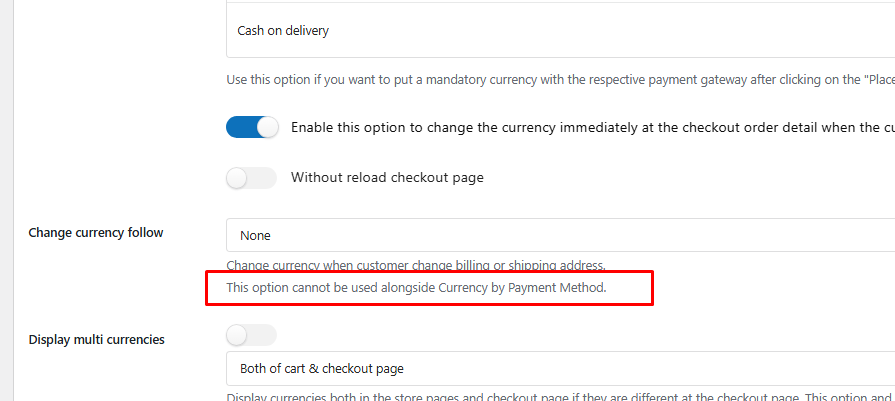
Option – Use this option if you want to put a mandatory currency with the respective payment gateway after clicking on the “Place orders” – is not working with paypal opened a ticket and seems like IA is answering me… do a me a proper solution i get paypal error
TICKET 237384
Hi,
Thank you for reaching out.
The feature you mentioned – Currency by Payment Method – is designed to enforce a specific currency for each payment gateway.
However, you’re currently using it together with the “Change currency follow” feature, and as we clearly stated in our documentation, these two features are not compatible when used simultaneously: https://villatheme.com/wp-content/uploads/2025/05/image-7-3.png
This conflict is the reason you’re encountering the PayPal error. As I said, showing one currency and process transaction in another currency during checking isn’t a supported behavior.
I know what you’re trying to achieve, and I would love to help if I could, still, this is not a bug and an extended behavior when you use an unsupported currency of PayPal.
Best regards.
Great work!
Thank you!
I’m currently using the Curcy plugin on my WordPress site and have encountered an issue where the decimal setting for Korean Won (KRW) is not applied correctly on the cart and checkout pages when KRW is set as the default currency.
Here are the details:
I set KRW as the default currency and configured it to use 0 decimal places.
I added USD as an additional currency, with 2 decimal places.
On most pages, the currencies display correctly — KRW shows no decimals (e.g., ₩10,000), and USD shows two decimals (e.g., $10.00).
However, on the cart and checkout pages, KRW displays with two decimal places (e.g., ₩10,000.00), even though it was set to 0.
When USD is set as the default currency, both currencies display correctly, including on the cart and checkout pages.
This appears to be a bug where the decimal setting for the default currency (KRW) is ignored specifically on the cart and checkout pages.
Could you please investigate this issue and let me know if there’s a fix or workaround?
Thank you for your support.
Hi,
Thank you for your detailed report.
We’ve tested the scenario on our end but were not able to replicate the issue — the decimal settings for KRW display correctly on the cart and checkout pages when set as the default currency.
Could you please check if the block-based Cart and Checkout pages are in use? If so, this could be related, as those blocks sometimes handle currency display differently.
Also, please try disabling other plugins temporarily and switching to a default theme (like Storefront) to rule out any theme or plugin conflicts.
Clear your site cache and browser cache, and check again.
Best regards.

This item was featured on CodeCanyon

Power Elite Author
Contact the Envato Market Help Team