683 comments found.

Hey basti, when adding an item to the menu, and then editing item, I am unable to save any attributes still because I am still getting the preparation time error. When clicking Submit/Save for the item I get “Preparation Time (minutes) minimum value is 1, Extra Time (Minutes) minimum value is 1” . This is an error from your old build as well, you promised to fix this. Merchants are unable to properly add items. What is the fix for this?
kindly use the latest update this is fixed
In the case of the Merchant App PWA, when visiting from a mobile phone, the Orders icon initially appears at the bottom of the screen. However, after selecting Add to Home Screen to create an app icon, the Orders icon disappears. Please help resolve this issue. I use an Android phone.
One more: How to use POS on the Merchant App?
am sorry not sure what you mean can you share screenshot?
temporary POS in merchant app is initially remove cause am re structuring the POS
Thank you, mate. We are waiting for the new POS system.
Using the app is more convenient if the icon is installed on the home screen of a tablet or mobile device. However, during the process of installing the PWA App icon on the home screen, the “Orders” menu disappears, making it impossible to check orders.
We request that this issue be resolved as soon as possible.
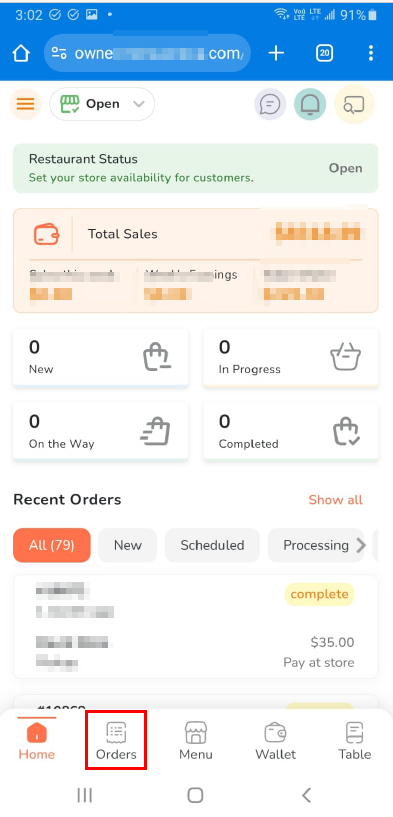
At the bottom of the screen, the “Orders” menu is visible.
https://menuone.net/ask/01.png
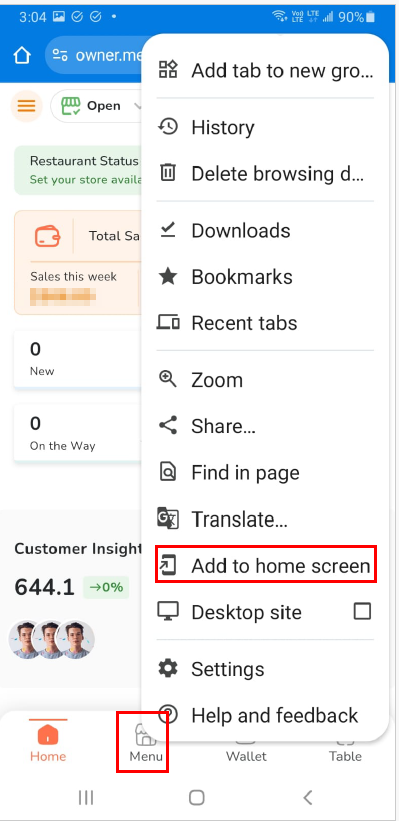
2) However, when clicking the “Add to home screen” button, the “Orders” menu at the bottom disappears.
https://menuone.net/ask/02.png
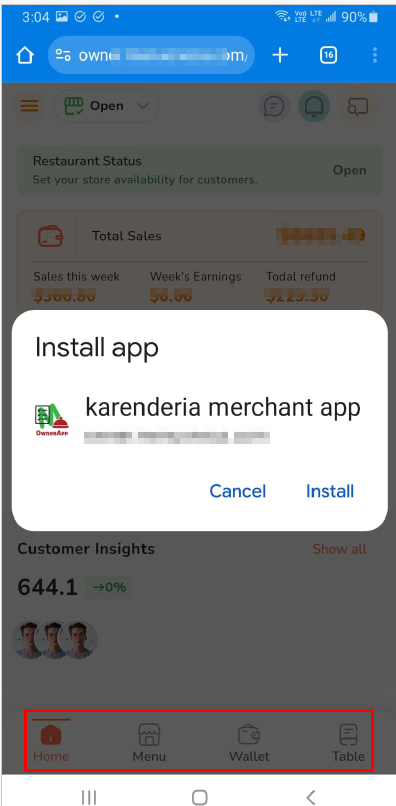
3) After clicking the “Add to home screen” button, the following screen is shown. Again, the “Orders” menu is missing at the bottom.
https://menuone.net/ask/03.png
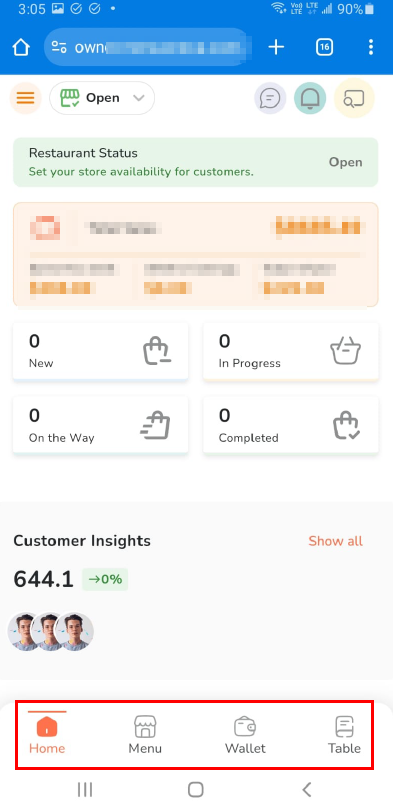
4) After clicking the “Install” button on the Install App screen, the screen appears as follows. The “Orders” menu is still missing.
https://menuone.net/ask/04.png
5) However, checking confirms that the app icon has been successfully installed.
https://menuone.net/ask/05.png
6) When clicking the created App icon, the following screen appears. Once again, the “Orders” menu is not visible.
https://menuone.net/ask/06.png
The above app was created with KMRS version 2.0.5. Are there any changes to the app in KMRS version 2.0.6?
I updated to ver 1.0.8 and it’s working. Thank you, mate.
cheers
Hello, Thank you for the update. However, there are currently two issues:
The language translation is not working — the app always appears in English and cannot be switched to another language.
The “Recent Orders” section is not visible.
For your information.
hi mate
there is new words added and i did not add yet this new words cause the full layout has been change
you can either copy this words in language or wait for new updates with this fixed
i needed to release the update cause of sdk 35 deadline
cheers
Thanks Mate, I translated what I could but I couldn’t translate some. When will the next update be?
wait this week i will release new update
Thank you , Mate 
welcome
For issues with deadlines on August 30, you can request an extension through your unread notifications. Just open View Details and select Request Extension. Approved requests will extend your deadline until November 1, 2025.
Mate, what is going on? one year before a new update ?
check the latest version
all has been change with new design and code
Even after uploading the privacymenifest file, getting this issue in appstoreconnect-
Please correct the following issues and upload a new binary to App Store Connect.
ITMS-91061: Missing privacy manifest – Your app includes “Frameworks/GoogleToolboxForMac.framework/GoogleToolboxForMac”, which includes GoogleToolboxForMac, an SDK that was identified in the documentation as a commonly used third-party SDK. If a new app includes a commonly used third-party SDK, or an app update adds a new commonly used third-party SDK, the SDK must include a privacy manifest file. Please contact the provider of the SDK that includes this file to get an updated SDK version with a privacy manifest. For more details about this policy, including a list of SDKs that are required to include signatures and manifests, visit: https://developer.apple.com/support/third-party-SDK-requirements.
already posted this before
please watch this read and watch
https://capacitorjs.com/docs/ios/privacy-manifesthttps://www.youtube.com/watch?v=NtPph4PPf7c
and you can use this to create your manifest here
Basti this is not the issue related to our privacymanifest file. This is related to the privacymanifest file of the plugins we’re using.
I followed the instructions you gave. This worked for the User app. But in case of merchant app, even after adding the manifest file its not working. It was showing 5 privacy issues even after adding the correct manifest file. Then I updated the firebase plugin using command, then privacy issues related to firebase disappeared, but issue related to GoogleToolboxforMac not solved yeti just submiitted the app merchant app and i don’t have issue like this
and i don’t know what are this GoogleToolboxForMac
only issue i know is for customer app cause of the social login deprecated
did you ever add any new plugin?
I haven’t added any new plugin. And for @capacitor/ios installation you using 4.7.1 version?
use this instead
npm install @capacitor/ios@6.0.0
any scheduled date for the update?
sorry i cannot promise exact date  but i needed to release the update cause of the sdk 35 deadline
any news?
am doing my best to finish them all this week hopefully cause deadline is getting near for sdk 35
Hi Basti, for each restaurant PWA App, do we have to provide separate Map API Key from Google? Or can we use the main configuration setting done under Admin Dashboard? Address lookup works on main customer site, however when I created a PWA for one restaurant, it not showing address completion. I have installed the PWA in same domain under TESTPWA folder. I gave same Map Keys, which I used for main Admin settings. 1] Do I have to provide different Map API keys for each merchant PWA?
2] Can we set a default location for each restaurant PWA just for testing purposes? So when I create new PWA for merchant’s restaurant, they can see the APP without providing the delivery address? Just to get the feel and see menu and ordering? [Where can I set this address setting method in code?]
hi mate
1. no it will use the keys in your backoffice
the auto completion will be use as the homepage api
2. am sorry i don’t understand the merchant app should be only one app and all your restaurant can login and manage the order to this app
cheers
Thank you for your response. I think I might have missed the explanation, which confused you.
Let’s say when I create a PWA for Single Restaurants, When user opens that PWA, Address is mandatory to show the content of the App. If user don’t give address, he cannot see any details in the PWA. I want to disable that Address required to use the PWA. Or Skip, if user wants to see the APP first and then Menu and then decide to Enter address, if they want to place Order.
This is for Single Website PWA, which customers use and place orders. I hope this explains the situation. I should have asked this question in different extension’s comments section.
Also for this User PWA, where exactly we enter the URL in Merchant Panel Settings? The documentation is not clear about it.
hi mate
first of all your not in single app
your in merchant app section
and for single app address is not required to see the menu only during checkout
and yes for single app you need to build each for your merchant only you need is the api url and token
merchant panel is this path https://demo.bastisapp.com/backoffice/merchant/
cheers
Hello, how do you get the order accepted through the merchant app (pwa) to be sent to the kds (kitchen screen)?
at the moment merchant app is not yet have this features next update this will be added
when merchant accepts an order a pop up says an amount will be deducted as commission. and then the balance is low and cannot accept. where do i change this setting?
Hi Basti,
I noticed an issue with how merchant earnings are being calculated in the app.
Currently, even if an order is cancelled and refunded, the “Earnings This Week” section still includes:
The full order value, and The reversed commission
This ends up inflating the total earnings shown to the merchant.
However, the correct calculation should be:
(Food Price + Packaging Charges) – Cancelled Order Value
In short, cancelled/refunded orders should be excluded from weekly earnings, since they don’t contribute to actual income.
Can we look into adjusting this logic?
i will have look into it, can you check the backoffice panel if has the same issue
In the backoffice also earning and sales is calculated this way.
ok thanks mate will do take note
btw can you share screenshot where is this?
In backoffice merchant dashboard homepage after autologin
thanks
PWA url area background color.
Hi, Basti, how do I change the color of the top area of the PWA covering the url area?
you can follow this guide
https://quasar.dev/quasar-plugins/addressbar-colorHI Basti Can you Do The attached For The Merchant app: Add the sunmi print liabray as a plugin. https://prnt.sc/XYl8Zg2aqOLy ; https://prnt.sc/lwWzHN0U7ohi ; https://prnt.sc/55_XV0KWoIcJ , let me know if you can add this please. Will also pay if you can add Thanks man
hi mate
where did you find this intructions? sure we can do this with a fee
email me here https://codecanyon.net/user/bastikikangCheers
hi basti I send you a Email. and printer problem also not solved for me if I use binary method. I get this with all device and install printer new
wait for my email thanks
Hi mate,
The restaurant is requesting changes due to a lack of clarity regarding the order time from customers. The issues are as follows:
1) ASAP orders must include a clear time in the order information. The displayed pickup time should be based on the order time plus the default preparation time.
For example, if the default prep time is 20 minutes and the order is placed at 1:00 PM, the pickup time should be shown as 1:20 PM.
Currently, the Merchant app does not display the pickup time for ASAP orders.
2) All same-day pickup orders must appear under “New Orders.”
For example, if a customer places an order at 1:00 PM and selects a pickup time of 4:00 PM on the same day, it should show in “New Orders.”
Right now, only the number of orders is shown under “New Orders,” while the actual order details are only visible in the “Schedule” section.
3) The “Schedule” section should only display orders for future dates (starting from tomorrow).
Same-day orders should not appear in the “Schedule” section.
hi mate
merchant app is not yet updated with this new features that was added in main kmrs panel
will be added next update
cheers
We know you’ve been working hard and truly appreciate your efforts. However, restaurants have been expressing frustration, so we kindly ask you to expedite the update. As you’re aware, it’s been nearly two years since this app was last updated.
i understand your concern almost there with the updates
i understand your concern, almost there with the updates—>Could you please let us know when it will be completed? The restaurant is becoming increasingly dissatisfied with the delay.
It has been two years since the new restaurant app was released, but unfortunately, even its basic functions still do not work properly. As a result, customers using the previous version are reluctant to switch to the new one.
Those who have migrated to the new version without knowing about these issues are now forced to use the web version instead. However, this is highly inconvenient, as their tablets have smaller screens.
Meanwhile, the server for the old version is almost full, making continued use increasingly difficult. Since the new app is not functioning properly, we are unable to transition to the new server fully, and we are now in a situation where we are paying for both servers.
We sincerely ask that these issues be addressed as soon as possible. Your urgent attention to this matter would be greatly appreciated.
Before adding new features, it is more urgent to ensure that the existing features work properly in the new system.
hi mate
i understand but i need more time to finish the update,
am not sure what you mean but you can use the merchant panel to manage the order
I am sincerely pleading with you — please update the app immediately so we can finally use it. We trusted your new system and rented a new server based on that trust, but we are unable to use it at all. You tell us to use the Merchant Panel instead — then why did you even release an app?
We began using the new system without being informed of these critical issues, and now we’re paying significant monthly costs for a server we cannot even use. This is unacceptable.
People are still buying the app, completely unaware that it doesn’t even work. This situation must be addressed urgently.
It’s been over two years since the app was released, and yet there hasn’t been a single update. This shows a complete lack of regard for your users. If you care at all about your customers, fix this problem now.
mate update will be out very soon hope you understand that am also working in single app update not only this
Thank mate, please..
thank you for your patience
Is it possible to update it by August?
am currently in the middle of finishing all the updates it supposed to be last week but looks like this coming week will be the update
i have to release the update before the deadline
so some features might not be there
cause if i include all i cannot release the update on time
I hope restaurants won’t have to face any more disappointments. I look forward to the updated results.
all you mention above is already added in the coming updates
Thank you so much. By the way, could you let me know how to disable the scheduled order feature? I would like to temporarily turn it off before the update and enable it again once the update is complete.
in admin panel -> merchant list -> edit merchant -> settings -> Checkout Time Selection = choose only asap
this same settings can be found in merchant panel under settings
Thank you, mate.
cheers
Hi basti i have a problem with Android App to print in binary. Esc/POS ist working but I have other languages and need Binary. don’t get receipt only merchant name and white paper https://prnt.sc/Lir572PcLdrM. And If want to print I get this error https://prnt.sc/SkIeelusbQv_ how to solve this thanks. I try with android 15
bests
hi mate
try to delete the printer you added and add again looks like the device name is missing
and also try to test print first
cheers
Hello,
I have set up the restaurant application and it’s currently running. However, orders are not showing up on the mobile app — as you can see in the screenshot. I believe the issue is due to the restaurant panel not being updated yet.
Could you please let me know which files I need to modify to fix this issue?
Thank you.
https://ibb.co/pjC4LTL6sent
wait for my email
thanks
Hi mate, When updating, do not allow the merchant to activate a status prior to the one the order is in. It often happens that it is already picked up or delivered and the merchant sets it to ready for pickup. This probably happens because on the merchant’s side the order does not show the updated status. Thank you Cheers
hi mate
am sorry what do you mean? can you share screenshot instead
Hi mate, This happened in previous versions: merchant received the order, accepted it. Then driver collected it or even the order had already been delivered. This order status information did not update automatically in the merchant app and by mistake the merchant set the status to ready for pickup. The order status should update automatically in the merchant app or when it tried to trigger a status prior to the one the order is in at the moment it showed an error saying “cannot trigger this status because order has already been picked up or delivered”.
ah ok you mean in merchant order is not refresh ?
yes, and by not automatically updating the order status, sometimes the merchant triggers a status prior to the current order status.
question in the list or when you viewing that order?
cause right now in the list it has already auto refresh when only your pusher is working
Great work!
Hi Basti. We got Sunmi V2 now just for printing but we cant save printer what is Service ID and Characteristics https://imgur.com/a/pbkpoUE when i click on this there is nothing to select how do i fix please.
HI Basti i spoke to sunmi theres no way the V2 i got can be updated i have 3.0.19 on my machine is there any way we can make it work on this ..
hi mate i don’t think there is that is the only way try to check in your sumni and update to latest version
and try again
not sure cause many customer was able to update there sumni version