1444 comments found.

Error: file_get_contents(https://vanquishplugins.com/activator/verify.php?verify_domain_activation=[omitted]): Failed to open stream: HTTP request failed! HTTP/1.1 429 Too Many Requests Empty UserAgent
Hi, I’m receiving this error on the order page where it is supposed to load tracking, please advise
It seems that you are overflowing the tracker wth requests, so the server is recognizing your requests as a DoS attack. Slow the number of requests and you will experience the issue no more.
Hmm weird I checked the firewall and only sees like 1 request happening at the moment (just me)
I’m fairly sure that currently I’m the only one using the website, yet the error still happening
Hello! Where can I download a previous version of your plugin? Since current version request allow_url_include in on, which is impossible on my hosting. And now your plugin does not work.
Hell,
I’m sorry, it is not possible.
the plugin was working fine but now its showing “You need to set allow_url_include to 1 on your PHP.ini”
I’ve just purchased this plugin and tried to activate the license, but I keep getting a “Purchase code is invalid!” error.
Please try using a fully HTML5 compliant browser like Chrome or Firefox. Ensure also that any of the other 3rd party plugins you are using are interfering with the activation process.
Hello there,
I purchased the product 6 months ago and there is an update Ver 42.2 available. I can not update it. it saying I need to by a license again. I thought this is one time purchase. Please help and thank you.
Hello, the automatic updater required a valid support license. The renewal costs few dollars and keep the development alive. If you do not wish to contribute, you can manually update the software via Codecanyon.
Hello there, would you be able send me the instruction how to update it manually using Codecanyon? Thanks
For that, you just need to redownload the plugin from codecanyon and reinstall. The version available is the latest.
Hi, I purchased the license, and now it’s says that it is expired. how many time does it last?? I thought it was a one time only. purchase.
Hi,
what expires is the support license that lasts 6 months.
Hi vanquish!
My website is having more traffic, so I needed to disable the default wp-cron because the website performance:
define(‘DISABLE_WP_CRON’, ‘true’);
I have created the task in my server to call wp-cron each 5 minutes.
All other tasks are working perfectly, except the bulk import that previously work.
I installed wp-control plugin to check if there is any error, but all it’s ok.
I tried to configure a specific hour to run but is not working.
But if from wp-control plugin I execute it the bulk task manually, it works and the trackings are imported correctly.
That plugin only can work with default wp-cron and no when it’s called externally?
Thank you! Regards
Hi,
It is because the bulk import relies on the wp_schedule_event(); and there isn’t any other way to trigger it.
Hi! and that is not executed when using a server cron?
I checked the url you share in the documentation: https://developer.wordpress.org/reference/functions/wp_schedule_event/This appears in that url: It should be noted that depending on how resource-intensive your hook is, the default behavior of “Waiting until a user visits the site” may not be suitable. Of course you should try to make your code as efficient as possible – but if you have a specific case where it’s still resource intensive you do not want to keep the user sitting on a white screen while your hook does it’s work.
For specific situations you might want to consider disabling WP’s internal CRON by placing this line: define(‘DISABLE_WP_CRON’, ‘true’); into the file: wp-config.php
Then create a CRON job with your hosting control panel to fetch the URL: https://example.com/wp-cron.php?doing_wp_cronOR execute: /usr/bin/php -q /path-to-your-wp-installation/wp-cron.php
If I have this: define(‘DISABLE_WP_CRON’, ‘true’); and using a hosting cron job, is not any way to configure that works as other plugins?
I am not a developer, so I don’t understand it very well what will needed to get it working.
Maybe it’s possible to run manually a php file, or calling a specific url using curl?
thank you
Because WP_Cron jobs are not managed as server cron, the wp-cron cannot be executed via URL by default. A specific script should be created in order to be executed via a URL.
Can you develope it?
The problem is that the Cron cannot just invoke a script. The scripts that are part of the plugin, when executed, invoke several functions that are part of the WordPress and WooCommerce core.
If you directly invoke one of those scripts without WordPress and WooCommerce having been initialized, they will crash.
These days I noticed that some days, the trackings were imported, and other days no. I don’t know how to identify why sometimes are imported and other times no. Is there any debug file to check possible errors while executing?
To clarify, what I did before starting issues was: modify wp-config.php: define(‘DISABLE_WP_CRON’, true);
In my server, I created a cron similar to this: 0 0 * * * wget—delete-after http://YOUR_SITE_URL/wp-cron.php
I tried other options: wget -q -O – https://example.com/wp-cron.php?doing_wp_cron >/dev/null 2>&1 php -q /home/path/public_html/wp-cron.php
All the options worked for my website, at exception of import the trackings that are imported randomly.
So it seems that the cron server it’s enough but not work all times with the tracking imports.
Using wp-control plugin or advanced cron plugin, I have the option to manually “run now” the “wcst_bulk_import_csv_data” task, and always works.
About possible fix using an url to call it:I have plugin to export orders to a CSV and upload by ftp. This plugin still working using only the wordpress server cron after disable wp-cron, but additionally provides another solution:
I can generate a new server crontab to schedule that next url will runned using curl or wget:
https://domain.com/wp-admin/admin-ajax.php?action=order_exporter_run&method=run_cron_jobs&key=XXXXDo you have any possible idea to help me to address the issue? Thank you Vanquish
I’m really sorry, unfortunately, I have no clue.
Hi Vanquish, good day,
I did not update the plugin since version 40.4 because I did some modifications to the code as you suggested to make the tracking link opens company page directly,
After updating the plugin to the latest on my test website, I noticed two issues:
1 – Built-in company tracking links (e.g., DHL, FedEx) no longer redirect to the company websites—only custom ones do.
2 – Built-in company IDs have changed and are disabled. For example, FedEx changed from “fedex” to “100003”. I couldn’t find the new ID for DHL among the many options. Is there a way to match old IDs to the new ones?
Thanks and regards
- This is because the tracking service changed. You can redirect to the original website (if available) by using the [original_url_track] shortcode
- Yes, this is due to the reason mentioned in the previous point. The only way to find the new matching ID is via the company page: https://ibb.co/B5hKNtDD
Hi vanquish, Thank you for the reply,
I am already using [original_url_track] , it works for custom companies only ! it does not work for built in companies.
Regarding the IDs , is there a table that mathces old IDs with new ones ? I was able to find all matching IDs for companies I used before except DHL , there are many options for DHL , what we were using was named exactly “DHL” ! could you please provide me with its new ID ?
Thanks and regards
It is because not all companies have a tracking URL associated with them (the URL is provided by the new tracking service).
I’m sorry, but I have any table that could help for that task 
Thank you for the reply, Looks like both issues are related to the ID change , becasue old orders tracking links are not working anymore unless I set the shipping company again in the order page !
The update should be backward compatable! I wonder if there is any method to fix old orders !
I’m sorry, unfortunately, there isn’t a way to fix the older orders.
I had this plugin for years, and I changed my shop to the subdomain shop, then it cannot be actived. How can I check which domains I have used to actived? any place that I can find the domains I had actived?
After more than ten minutes, I clicked on activate button again and it was activated successfully. I don’t know why, lol
Glad to hear that! It might be the Envato activation system was not properly checking the data!
Good morning,
Very good plugin. I just have one question: can I migrate the plugin to my updated website, for example, mycompany.com / mycompany.com.mx, or do I have to purchase another license and lose the old one?
Best regards!!
Hi,
Yes you can migrate unlimited times on the same domain. Just reactivate it.
The plugin seems to be causing Woocommerce Email Preview to fail (at Woocommerce > Settings > Emails). When the plugin is not activated, the preview shows fine. When the plugin is activated, the preview shows “There was an error rendering the email preview. This doesn’t affect actual email delivery. Please contact the extension author for assistance.” Debug shows an error in woocommerce-shipping-tracking/classes/com/WCST_Order.php
From my tests all seems ok: https://ibb.co/PLf9784
If you reporting which line of that script is creating the error and which specific error message you are getting, I can try investigating further.
Thanks for the speedy reply. The exact error shown is: Fatal error: Uncaught Error: Call to a member function get_meta() on false in /home/dscreative/public_html/wp-content/plugins/woocommerce-shipping-tracking/classes/com/WCST_Order.php:272 Stack trace: #0 /home/dscreative/public_html/wp-content/plugins/woocommerce-shipping-tracking/classes/com/WCST_ExtraDelivery.php(222): WCST_Order->get_delivery_and_times(12345) #1 /home/dscreative/public_html/wp-includes/class-wp-hook.php(324): WCST_ExtraDelivery->woocommerce_include_extra_fields_in_emails(Object(WC_Order), false, false, Object(WC_Email_Customer_Processing_Order)) #2 /home/dscreative/public_html/wp-includes/class-wp-hook.php(348): WP_Hook->apply_filters(’’, Array) #3 /home/dscreative/public_html/wp-includes/plugin.php(517): WP_Hook->do_action(Array) #4 /home/dscreative/public_html/wp-content/plugins/woocommerce/templates/emails/email-order-details.php(160): do_action(‘woocommerce_ema…’, Object(WC_Order), false, false, Object(WC_Email_Customer_Processing_Order)) #5 /home/dscreative/public_html/wp-content/plugins/woocommerce/includes/wc-core-functions.php(346): include(’/home/dscreativ…’) #6 /home/dscreative/public_html/wp-content/plugins/woocommerce/includes/class-wc-emails.php(446): wc_get_template(‘emails/email-or…’, Array) #7 /home/dscreative/public_html/wp-includes/class-wp-hook.php(324): WC_Emails->order_details(Object(WC_Order), false, false, Object(WC_Email_Customer_Processing_Order)) #8 /home/dscreative/public_html/wp-includes/class-wp-hook.php(348): WP_Hook->apply_filters(NULL, Array) #9 /home/dscreative/public_html/wp-includes/plugin.php(517): WP_Hook->do_action(Array) #10 /home/dscreative/public_html/wp-content/plugins/woocommerce/templates/emails/customer-processing-order.php(59): do_action(‘woocommerce_ema…’, Object(WC_Order), false, false, Object(WC_Email_Customer_Processing_Order)) #11 /home/dscreative/public_html/wp-content/plugins/woocommerce/includes/wc-core-functions.php(346): include(’/home/dscreativ…’) #12 /home/dscreative/public_html/wp-content/plugins/woocommerce/includes/wc-core-functions.php(365): wc_get_template(‘emails/customer…’, Array, ’’, ’’) #13 /home/dscreative/public_html/wp-content/plugins/woocommerce/includes/emails/class-wc-email-customer-processing-order.php(109): wc_get_template_html(‘emails/customer…’, Array) #14 /home/dscreative/public_html/wp-content/plugins/woocommerce/src/Internal/Admin/EmailPreview/EmailPreview.php(313): WC_Email_Customer_Processing_Order->get_content_html() #15 /home/dscreative/public_html/wp-content/plugins/woocommerce/src/Internal/Admin/EmailPreview/EmailPreview.php(245): Automattic\WooCommerce\Internal\Admin\EmailPreview\EmailPreview->render_preview_email() #16 /home/dscreative/public_html/wp-content/plugins/woocommerce/includes/admin/class-wc-admin.php(241): Automattic\WooCommerce\Internal\Admin\EmailPreview\EmailPreview->render() #17 /home/dscreative/public_html/wp-includes/class-wp-hook.php(324): WC_Admin->preview_emails(’’) #18 /home/dscreative/public_html/wp-includes/class-wp-hook.php(348): WP_Hook->apply_filters(NULL, Array) #19 /home/dscreative/public_html/wp-includes/plugin.php(517): WP_Hook->do_action(Array) #20 /home/dscreative/public_html/wp-admin/admin.php(176): do_action(‘admin_init’) #21 /home/dscreative/public_html/wp-admin/index.php(10): require_once(’/home/dscreativ…’) #22 {main} thrown in /home/dscreative/public_html/wp-content/plugins/woocommerce-shipping-tracking/classes/com/WCST_Order.php on line 272 There has been a critical error on this website. Please check your site admin email inbox for instructions. If you continue to have problems, please try the support forums.
Ok. Please try updating to the latest 42.2 version.
That’s done the trick! Thanks for sorting this so quickly. Very impressive.
Glad to hear that!
last but not least, I would ask you to help me: If you enjoyed my efforts to assist you and/or my plugin please consider leaving the 5 stars…It would help me with sales, I would really appreciate it! 
(to leave a rating: go to your profile page, click on “Downloads” and from there you can rate your purchases.
You can also leave the rating through the plugin description page: https://www.dropbox.com/s/v6zaoe0p6cs4x2o/rating.png?dl=0 )
Have a great day!
Done
I just tried installing. Got this message:
Installing plugin from uploaded file: codecanyon-SXXnjcv5-woocommerce-shipping-tracking.zip Unpacking the package…
Installing the plugin…
The package could not be installed. No valid plugins were found.
Plugin installation failed.
Go to Plugin Installer
It appears that you are attempting to install a package that contains both the plugin and the documentation. Unzip it, you will find a file named woocommerce-shipping-tracking.zip. That’s the one to install.
The purchase code should not be reported; other users could use it to activate the product.
Insert your user name (bsterman) and the purchase code. Ensure you are using a fully HTML5 compliant browser like Chrome or Firefox. Try also disabling the other plugins; one of them might be interfering with the activation process.
Can you activate my new purchase?
Activation must be performed by the customers
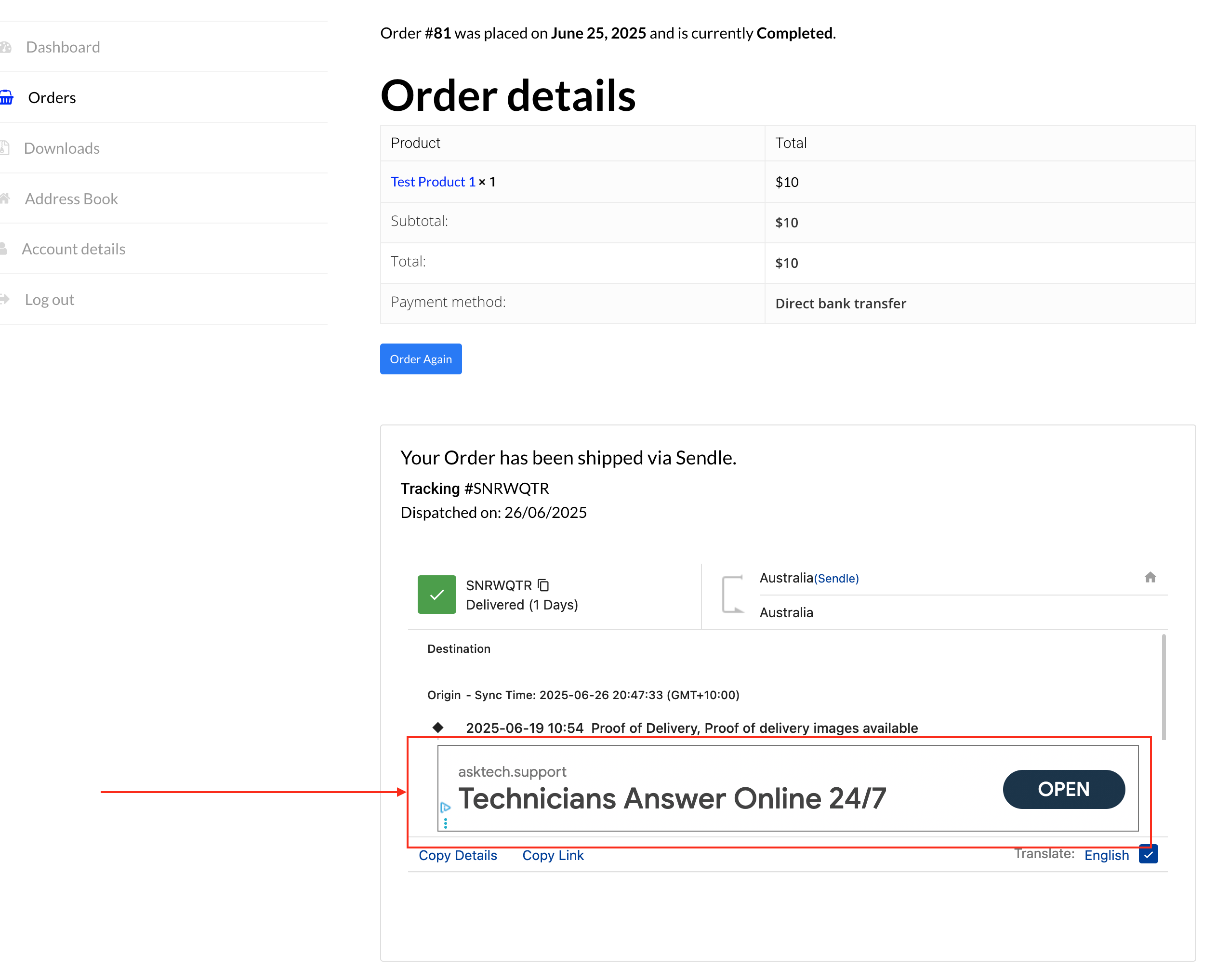
Why are there advertisements inside the my-account order in the tracking section? We cannot have this with our customers.
See screenshot: https://t6913876.p.clickup-attachments.com/t6913876/f8d8723d-f58f-428a-8275-aef5363da753/Screen%20Shot%202025-06-26%20at%208.50.00%20pm.png?view=openFrom my tests, all seemsto be working ok: https://ibb.co/2Y5mHSrd
If you send me via private message (click on my name and then use the low-right box) the following data:- your email address
- full admin access to the wp-admin area
- FTP access
- A detailed step-by-step guide on how to experience the issue
I can perform some further tests to see if it is possible to determine the cause.
NOTE: all the requested points are mandatory, do not forget to report any of them.
Thank you for your collaboration.
Error on tracking page.
Delhivery Additional info is required.
Additional information Add destination postcode
When i enter postcode it says Incorrect destination postcode format.
Hi,
That issue depends on the carrier, which seems to be unable to recognize the data. This doesn’t depend on the plugin.
Hey please make some sense, its a billion dollar largest courier company in south asia, you’re saying your plugin is fine but they are not able to recognize the data? Please check your codes and fix it. If you cant just say you;re not interested in providing the support. I will look for some other plugin
I’m sorry but plugin displays the data provided by 17track. If the post code you enter is not recognized by the service, there isn’t anything I can “fix” on the data provider.
Yes. You can try creating a custom company with that URL, or try using the [original_url_track] shortcode. The latter one will print the original website link (if provided by 17track).
Never Mind.
Ensure to use a fully html5 compliant browser like Chrome or Firefox.
Excellent suggestion, i will switch from internet explorer 7 now.
Hi Support Team,
I hope you’re doing well.
It seems that our purchase code is no longer working. Could you please assist us in identifying the issue and help us resolve it?
Thank you in advance for your support.
Hi,
What do you mean if is no valid? Please note that purchase cose are generated and validate by Envato.
If you are experiencing issue while activating ensure to be using a fully HTML5 compliant browser like Chrome or Firefox.
Hello, I have been receiving these errors in the logs: UTC] PHP Warning: Undefined array key ‘SERVER_NAME’ in /home/u234611706/domains/midominio/public_html/wp-content/plugins/woocommerce-shipping-tracking/classes/com/WCST_Global.php on line 53 UTC] PHP Warning: Undefined array key ‘SERVER_NAME’ in /home/u234611706/domains/midominio/public_html/wp-content/plugins/woocommerce-shipping-tracking/classes/com/WCST_Global.php on line 101, what is the reason for this?
Hello,
the SERVER_NAME is a global PHP variable (https://www.php.net/manual/en/reserved.variables.server.php). If not set you need to check your PHP configuration.
Hi, I upgraded my server and migrated the website to a new server (same domain), and now I cannot activate the plugin. I get Max number of domains reached!
Hi,
If you have already enabled on two domains, you need to purchase another usage license.
Hi, According to Envato’s license terms, a Regular License allows use on a single end product, but it does not restrict reactivation on the same domain after a server migration. I only upgraded my server—my domain has not changed. Forcing an additional license purchase for this seems to go against Envato policy. Can you please clarify or reset the domain lock?
The activation has no restriction on the same domain. You can re-activate ultimited time on the same domain (including subfolders and subdomain).
If you send me a private message with the purchase code and the name of the domain you are trying to activate, I can check which domain the purchase code has been activated in. Note that only one domain can be the production domain; the other must be a testing domain.
I’ve been testing the demo you provided and I have two questions before purchasing:
1.In the demo, there’s an airplane icon that appears. I would like to know if it’s possible to change it to another icon. The airplane gives the impression that the shipment is international, but in our case, deliveries are only domestic and usually done by truck, not by plane. Would it be possible to replace it with a truck icon?
2.When opening the tracking link on an iPhone, the text appears very small. I tested it using both Safari and Chrome browsers on an iPhone 14 Pro Max, and in both cases, the text size was very difficult to read, especially for older users.
If I purchase the plugin, will it display like that as well? Or is it possible to adjust the text size?
I’m also leaving a screenshot taken from my phone to better explain both points:
https://drive.google.com/file/d/1NjKNIDwfcQt1IPs0KY3s1vH40CnWfgcN/view?usp=sharingHi,
I’m sorry, but neither point can be customized. The tracking feed is provided by 17track and cannot be customized in any way.
Hi. I am using the automatic cron schedule to import trackings to the website and send emails to the customers. Some days ago stopped to change the order status to completed, but still sending email to the customers. If I import the csv file manually from your plugin, it changes the order status correctly. Only don’t update the order status when using the cron. Is not any error generated in the cron logs. I am using last plugin version. Maybe the extra plugin for crons that you provide in direct link, need any update to compatibilize with latest woocommerce? thanks
oh! and the tracking info is not added in the woocommerce order, only email is sending to the customers
Hi,
without any further clues, it is quite hard to determine the cause. If you say that tracking info is not stored on the order, it might be a 3rd party plugin interference (try disabling them) or a PHP max_input_vars issue (try raising it to higher values of the one you are currently using).
- your email address
- full admin access to the wp-admin area
- FTP access
- A detailed step-by-step guide on how to experience the issue
I can perform some further tests to see if it is possible to determine the cause.
NOTE: all the requested points are mandatory, do not forget to report any of them.
Thank you for your collaboration.