915 comments found.

Hi, First of all ,thank you for a very awesome plugin!
I’ve upgraded to v2.9 and encountered a situation. I figured out the why and downgraded to v2.8 again to have a working sitd. The same situation still happened in v2.8. I then repeat the steps I took for v2.9 and my situation happens in v2.08 as well.
My theme is Avada and I use nextgen for my galleries with terms; when I use the wordpress editor and a nextgen gallery everything is fine. When I use the Avada builder to style the term with a nextgen gallery the glossary index page loads the term page. From there the ui is all messed up.
I have screenshots but can’t attach them to this mail.
Could you look into why the combination of Avada Builder and a NextGen Gallery load the term into the glossary index page?
Thank you so much! Bob
Hi Bob,
Thanks for purchasing this plugin. I would be happy to help you.
Please provide me following details so that I can look further into it and can fix it for you:
1. Glossary Index Page URL
2. Admin URL and login details
3. FTP credentials
4. Steps and a few screenshots showing me the exact issue you are facing
You can email these details at wpinstinct@gmail.com
Thanks, WP Instinct Team
Thank you for the swift reply! The requested information is send.
I have sent you a reply at your email, please check. Thanks!
Hi,
I have two short questions about the WP Glossary features:
1. Can I build a German Glossary with it, with the option of creating an English translation later, if needed?
2. The demo Page and the screenshorts show the options of EITHER filtering by Alphabet OR by categories. Is there an option that allows filtering by alphabet AND categories? (for example choosing a spefific categoy first and then looking up all the words starting with “R” within that category.)
Best H.
Hi there,
Thanks for your interest in this plugin. I would be happy to assist you.
1. I didn’t get a chance to test it with German language yes but I believe it will work fine with this language too. Still you face any issues, you can reach out to me and I will look into it.
2. No, you can’t use both the filters in combine for same glossary 
Thanks, WP Instinct Team
Hi, I’m helping a client with their Glossary plugin. Is there a way to only show “A” listings – in order to keep the page shorter? But also have the A-Z options at the top so that a visitor can select B-Z?
Hi there,
Thanks for purchasing this plugin. I would be happy to help you.
You basically want to show only “A” alphabet based list in the start instead of loading a full list of terms just to keep the page shorter but still an option where users can switch among alphabets B-Z, right?
I will help you on this but for this, I would require following details:
1. Your website URL
2. Admin URL and login details
3. FTP credentials
4. And as I can see, your support for this plugin has been expired. You have to renew it before we continue further on this.
You can email these details at wpinstinct@gmail.com
Thanks, WP Instinct Team
Hello, How to set synonyms for terms. Per example, in french, I have to redirect the terms “caduque”, “caduques”, “caducs” to the main term “caduc”. And also matching these terms in the linkify function. Thanks for your help.
Hi there,
Thanks for purchasing this plugin. I would be happy to help you.
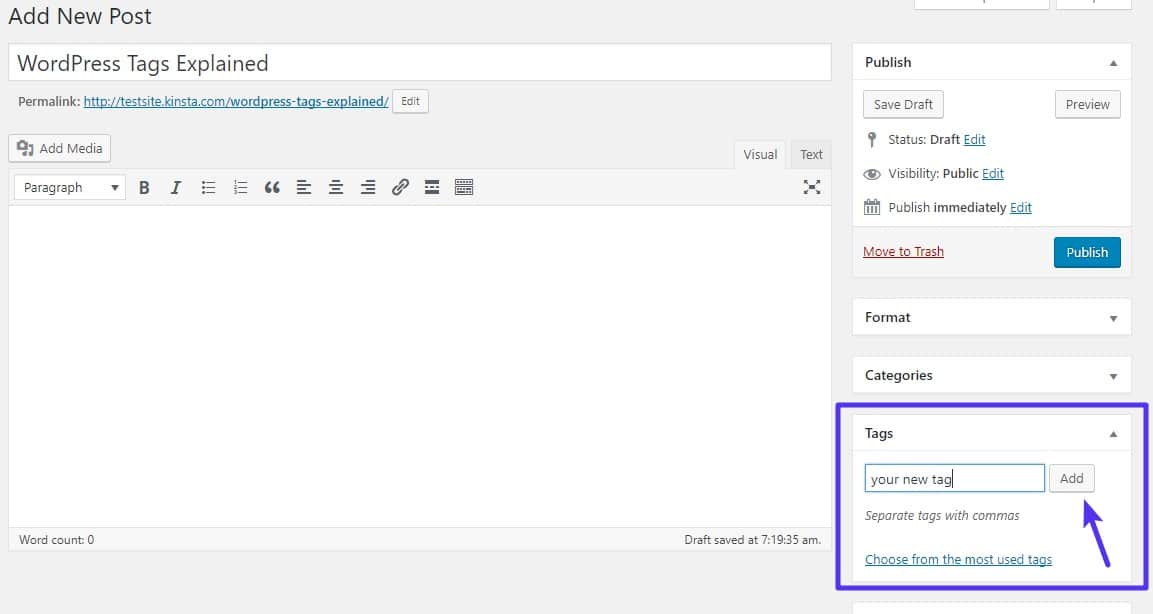
You can use “Tags” section in order to setup synonyms for a term. Here’s how you can add tags for a post/term: https://kinsta.com/wp-content/uploads/2018/01/what-is-a-wordpress-tag-1.jpg
Please let me know if it helps. I will wait for your feedback.
Thanks, WP Instinct Team
Tags did the job but it would be useful that the plugin matches automatically plural of single words, and variants like “caducs” and “caduc”. How to do that ?
Sorry but at the moment, its not possible to auto match the plurals until you type those within the tags yourself.
Hi, I bought your great plugin. Unfortunately there is an incompatibility with the loop grid widget of Elementor. The ‘filter_text’ function in the ‘class-wpg-linkify.php’ causes the query to be confused and also outputs posts twice. Specifically, line 362 causes the error: “$replaced = preg_replace_callback( $glossary_term_titles, array( $this, ‘preg_replace_matches” ), htmlspecialchars( $node->wholeText, ENT_COMPAT ) );’ Do you have a solution for this?
Best regards
Florian
Hi Florian,
Thanks for purchasing this plugin. I would be happy to help you.
Regarding the conflict with Elementor you are facing, no one brought this issue in my notice before. It means that happens in some specific cases only.
Can you please provide me following details so that I can look into it and fix it for you:
1. Your website page URL where you face this issue
2. Admin URL and login details
3. FTP credentials
4. Steps or a few screenshots by following which I can see the issue on my end
You can email these requested details at wpinstinct@gmail.com
Thanks, WP Instinct Team
Hello,
I’m considering purchasing WP Glossary – Encyclopedia but need to confirm compatibility with the The7 theme.
My previous experience with another glossary plugin ended in layout failures on the index page – the A–Z filter overlapped content, making entries unclickable, likely due to the theme’s Masonry script. Despite hours of tweaks, it remained unusable.
Your plugin mentions built-in index filtering and supports template overrides. Can you confirm:
1. That the Präfix index is correctly displayed (not overlapping) with The7?
2. That template overrides (for archive/single) fully support disabling Masonry or customizing layout?
3. If there are any known issues with The7 compatibility?
Thank you – I want to avoid another plugin that breaks my layout.
Best regards, Thomas
Hi Thomas,
Thanks for your interest in this plugin. I would be happy to assist you.
I haven’t tested this plugin with The7 theme yet but I believe it should work fine without any major conflicts.
Still if you face any issue, you can reach out to me and I will look further into it. If I also fail to help you on any conflict/issue related to my plugin, I would be happy to refund for your purchase. I hope if will help you to take a decision for this plugin and give it a try.
Thanks, WP Instinct Team
After some initial difficulties with theme compatibility (The7 in my case), I can now say the plugin works great. A small setting change and some guidance from the documentation did the trick. Glossary terms, tooltips, and the A–Z index are working smoothly. Thanks for the solid plugin!
Great!
Please leave a 5 star rating on CodeCanyon if you like this plugin. Thanks!
Hello,
I’m interested in purchasing WP Glossary – Encyclopedia and would like to know whether it’s fully compatible with the WordPress theme The7 (by Dream-Theme). I recently had major issues with a different encyclopedia plugin that caused layout conflicts when used with The7 – for example, the A–Z index overlapped the content and some entries became unclickable due to styling or JavaScript conflicts (possibly Masonry/Isotope-related).
Before purchasing, I want to be sure that your plugin works well with The7 – including proper display of glossary indexes, responsive behavior, and support for grid layouts without visual issues.
Best regards
Hi Thomas,
Thanks for your interest in this plugin. I would be happy to assist you.
I haven’t tested this plugin with The7 theme yet but I believe it should work fine without any major conflicts.
Still if you face any issue, you can reach out to me and I will look further into it. If I also fail to help you on any conflict/issue related to my plugin, I would be happy to refund for your purchase. I hope if will help you to take a decision for this plugin and give it a try.
Thanks, WP Instinct Team
Hi, pre purchase question. Is the linking system also possible within Bricks Builder? or only in acf fields, gutenberg and stuff? thanks
Hi there,
Thanks for your interest in this plugin. I would be happy to assist you.
This plugin uses the WordPress default hook ‘the_content’ in order to auto add links to matching terms. And in case it doesn’t work, I will be available to help you.
Thanks, WP Instinct Team
How can I prevent linkify in a specific class or id? For Example: h1,h2,h3,h4,h5,h6,button,.shheading br
Hi there,
Thanks for purchasing this plugin. I would be happy to help you.
As I can see, your support for this plugin has expired. Please renew the support before I can assist you on your queries.
Thanks, WP Instinct Team
Hello!
We enabled Linkify for only the Glossary-Pages. But even that we disabled Linkify for normal “Pages” and “Posts” in the “Post Types” it appears everywhere.
Here are the current settings: https://share.cleanshot.com/SBVftXSnBest regards Daniel
Hi Daniel,
Thanks for purchasing this plugin. I would be happy to help you.
I would require following details in order to troubleshoot the reason and fix it:
1. Your website URL
2. Admin URL and login details
3. FTP credentials
4. A few screenshots/steps showing me the same issue on my end
You can email these details at wpinstinct@gmail.com
Thanks, WP Instinct Team
Hi Daniel,
I replied to your email yesterday but today I got a notification from Gmail saying:
Delivery incomplete
There was a temporary problem delivering your message to d.kapovic@xxx-xxxxxx.xxx. Gmail will retry for 46 more hours. You’ll be notified if the delivery fails permanently.
Can you please confirm if you received any email from my side or not? If not, can you please provide me your alternative email ID where I can try to send you a response?
Thanks, WP Instinct Team
Hi! I was wondering whether it is possible to tooltip words that are displayed on a page via a shortcode. For example, I have a quiz on my website for which I would like to add some tooltip explanations, but the quiz can only be added to a page via a shortcode. Wondering if the tooltip should work in this scenario. With kind regards 
Hi there,
Thanks for purchasing this plugin. I would be happy to help you.
You want to add tooltip for some words which are not even the part of glossary terms panel, right? Sorry but it’s not possible at the moment. You can auto linkify the glossary terms on a page but that too without a shortcode.
Thanks,, WP Instinct Team
Hi, sorry maybe I’m writing this question twice. I am not sure if you got my question because there was no approval from themoforest.
Just to be sure, I will write it once more.
Subject: Glossary entries leave parent page and appear in News section
Message:
Hello,
I’m using your WP Glossary plugin on a WordPress site with a clearly structured page hierarchy. The glossary index is located at a URL like /a/b/c/ and displays the glossary terms correctly using the [wpg_list] shortcode. The page is published and its ID has been properly entered in the plugin settings under Glossary Page/Post.
Problem:
As long as I stay on the glossary index page, everything works as expected. However, when I click on a glossary term (e.g. “Aggregatebau”), the single entry opens outside the defined structure — at /c/term, without reference to the parent page.
In addition, the sidebar suddenly switches to display the News section (e.g. yearly archives). The glossary entry itself loads correctly, but when clicking on “Back to Glossary” or using the breadcrumb link, I’m redirected to a general News page instead of the actual glossary index.
Question:
How can I ensure that: • Entries remain linked to the assigned glossary index page, • Breadcrumbs and “back to glossary” links correctly point to that page, • and the layout doesn’t shift to unrelated sections like News?
Thanks in advance for your support!
Hi there,
Thanks for purchasing this plugin. I would be happy to help you.
Please provide me following details so that I can troubleshoot the reason and fix it for you:
1. Glossary Index page URL
2. Admin URL and login details
3. FTP credentials
4. and if can, please share a few screenshots showing the issues you are facing
You can email these requested details at wpinstinct@gmail.com
Thanks, WP Instinct Team
Hello, I love Your WP Glossary plugin, but I couldn’t find information on how to import glossary terms from a csv file (one with just term and description columns). I have a glossary of more than 300 words to finish and would love to find an automated way of updating it. Or is there a way from the sql db to import glossary terms? Many, many thanks for your help on this!
Hi there,
Thanks for purchasing this plugin. I would be happy to help you.
This plugin uses a custom post type for glossary terms. You can try any import plugin which allows you to import the terms for a custom post type and the same should work for this plugin too. I have heard a lot about “WP All Import” plugin from my clients so you can give this plugin also a try.
Thanks, WP Instinct Team
Hello,
I’m using your WP Glossary plugin on a WordPress site with a clearly structured page hierarchy. The glossary index is located at a URL like /a/b/c/ and displays the glossary terms correctly using the [wpg_list] shortcode. The page is published and its ID has been properly entered in the plugin settings under Glossary Page/Post.
Problem:
As long as I stay on the glossary index page, everything works as expected. However, when I click on a glossary term (e.g. “Aggregatebau”), the single entry opens outside the defined structure — at /c/term, without reference to the parent page.
In addition, the sidebar suddenly switches to display the News section (e.g. yearly archives). The glossary entry itself loads correctly, but when clicking on “Back to Glossary” or using the breadcrumb link, I’m redirected to a general News page instead of the actual glossary index.
Question:
How can I ensure that:
Entries remain linked to the assigned glossary index page,
Breadcrumbs and “back to glossary” links correctly point to that page,
and the layout doesn’t shift to unrelated sections like News?
Thanks in advance for your support!
Hi there,
Thanks for purchasing this plugin. I would be happy to help you.
Please provide me following details so that I can troubleshoot the reason and fix it for you:
1. Glossary Index page URL
2. Admin URL and login details
3. FTP credentials
4. and if can, please share a few screenshots showing the issues you are facing
You can email these requested details at wpinstinct@gmail.com
Thanks, WP Instinct Team
hello,
can you please provide me a wp-functions script to remove the /glossary_cat/ from the category page – thank you!
Hi there,
Thanks for purchasing this plugin. I would be happy to help you.
This plugin uses a custom taxonomy for Glossary Categories and the behavior you are talking about where it shows the category base keyword in the URL, this is driven from WordPress itself.
You have to find a plugin or a script which allows you to remove the category base keyword from the URL and the same should work for this plugin too. I haven’t done it before but looking into Google for this, I quickly found a couple of solutions:
1. https://stackoverflow.com/questions/5656285/remove-category-base-from-wordpress-category-url
2. https://wordpress.org/support/topic/removing-category-base-from-url-adds-category-to-my-blog-posts/
See if any of these helps you.
Thanks, WP Instinct Team
On Desktop view all is fine, but on mobile devices the terms are not clickable. Can you help me here?
Thanks Karsten
Hi Karsten,
Thanks for purchasing this plugin. I would be happy to help you.
As I can see, currently it opens the link on double click on mobile device.
Please disable the “Touch Devices” option in backend panel under “Glossary > Glossary Tooltip” tab and let me know if it helps or not. I am talking about the last option on this page: https://s3.envato.com/files/510094603/screenshots/14_screenshot.png
I will wait for your feedback.
Thanks, WP Instinct Team
Hi,
The default page editor in WordPress does not load when the Glossary plugin is active. We disabled all plugins and activated them one by one, and we found that the Glossary plugin was causing the issue. This problem started occurring 2-3 days ago.
Could you please guide us on how to resolve this? We are currently using Version 2.8.
Thank you!
Hi there,
Thanks for purchasing this plugin. I would be happy to help you.
Please provide me following details so that I can troubleshoot the reason and fix it for you:
1. Your website URL
2. Admin URL and login details
3. FTP credentials
4. Steps or a few screenshots by following which I can see the issue on my end too
You can email these details at wpinstinct@gmail.com
Thanks, WP Instinct Team
Hi! At first, i love your app.
I just have one important question according a buckup.
How can i backup all my words and the whole set up. for example if i want to migrate or the is a fatal error on the page? Or if there are some updates?
This would be very important?
Hi there,
Thanks for purchasing this plugin. I would be happy to help you.
This plugin uses a custom post type and a custom taxonomy for the glossary terms/categories. You can try any plugin which allows you to migrate posts for a custom post type, and also the terms for a custom taxonomy and the same plugin should work fine for my plugin too.
I haven’t used much but have heard a lot about “WP All Export” and “WP All Import” plugins from my clients for the similar purposes. You can give these two plugins also a try if you want.
Thanks, WP Instinct Team
Hi, I’d like to use your plugin on a new website, but I have a few questions I’m unsure about:
The website supports multiple languages, including Arabic and Japanese, and uses the Polylang plugin. Do you think it’s possible to use the dictionary for entries in those languages as well?
Would it be possible to add a “category” filter to the dictionary? For example, I’d like to display only the terms belonging to a specific category and have them sorted alphabetically. In other words, I’d like to use WordPress taxonomies as filters within the dictionary.
Thanks in advance for your help!
Hi there,
Thanks for purchasing this plugin. I would be happy to help you.
1. Please make sure you purchase a new license for each new website where you want this plugin to use.
2. This plugin uses a custom post type for all the Glossary terms. If your multi-lingual plugin supports the custom post types, the same should work for this plugin too without any problem.
3. Yes, you can differentiate different glossaries for different set of categories within the shortcode easily.
Please let me know if you have any further questions for me.
Thanks, WP Instinct Team
on 3. I am not sure, I mean, I would like to use the same glossary with terms (posts) that can be filtered A to Z but also by means of categories. So for example I am in the dictionary page, I see all my posts (A to Z) then I click on category “cat X” and only posts belonging to that category will appear (still ordered alphabetically)... does it work like that? Thank you.
Ah ok! That wouldn’t be possibe with it. You can either use categories filter or can use alphabet filter at once, not in combine both the filters
However, you can create multiple glossaries for different categories on different pages which can help you to achieve what you want in other way around.
Please let me know if it helps. Thanks!
Hi, Happy user for many years now. While investigating another problem I found many entries in the error_log like this :
[proxy_fcgi:error] AH01071: Got error ‘PHP message: PHP Warning: Attempt to read property “ID” on null in /var/www/[...]/wp-content/plugins/wp_glossary/includes/wpg-core-functions.php on line 852’
The error I was investigating relates to null objects being passed into methods and the wp_glossary could be the reason for my error. I tweaked the wpg-core-functions as follows:
function wpg_glossary_after_post_content( $content ) { }
if( ! is_admin () ) {
    global $post;
if ( !($post == null) ) // I know
{
// The rest of the original function
}}
return $content;I see this as a temporary fix, not sure what the impact is but the warning I mentioned does not appear in the error_log anymore.
Hope this helps, Bob
Hi there,
Thanks for bringing this issue in my notice. You have applied a correct solution for this for the time being.
I will keep an eye on this and will wait for atleast one more buyer to come up with the same request before I consider this as a permanent solution.
Thanks, WP Instinct Team