2309 comments found.

I’m setting up a restaurant for a client who bought your plugins. Their menu includes several products, including up to three different proteins. However, those proteins need to be stocked. Is there a way to avoid doing this by variations, since when I load them, they generate up to 50 variations, and I have to load the material for each one, which is very laborious.
You can use addon/ option instead variable. If your customer want more information, pls inform your client drop a support ticket on support.openswatch.com to get suggestion.
What plugins would be compatible with the plugins?
You can check at https://wpos.app/openpos-addons/
Hi there, pre-sales questions!
- I don’t see mention of the tipping feature anywhere, but I see comments referring to it. Will it allow for preset percentages of tipping at checkout in a retail setting?
- Is there a way of prompting a user to join your email list after the checkout process has completed? We use Kit (formerly Convertkit), and would like to know if this can be accomplished.
- We currently use the WooPayments payment method with the Stripe M2 reader. I understand this usually requires a native app to function, but would this work with the PWA at all? Or would we need to buy one of the Stripe Terminal hardwares?
Thanks in advance!
https://wpos.app/addons/woocommerce-openpos-stripe-terminal/
Thanks for the quick response! Is it easily customizable if you have a decent but not developer-level understanding of WP? Will it require going into the PHP of the plug, or are there areas for shortcodes to be dropped in, or some sort of screen builder?
the customize often in php code , on a independent plugin or snippet code . not relationship to core plugin file. Thank you!
I bought and set up the plugin, but I’m not exactly sure where this could be accomplished. Since there’s already an email field for the receipt, I would like to add a checkbox that says something like “Join our mailing list?” that a user can check, which would then submit the email to join our Kit.com mailing list.
https://share.cleanshot.com/nTlk5GwjTo the best of my (limited) ability, the code for this screen exists within the main.js file and it’s all basically encoded within the js. It doesn’t seem extremely easy to modify for someone who’s not familiar with javascript.
Please drop a support ticket on support.openswatch.com to get help. Thank you
Hi
Pre-sale question
Does it work with: 1- Orderable 2- Sequential order numbers for WooCommerce by WebToffee?
i don’t know those plugin, so, i haven’t any answers. btw, we accept refund any time, so, you can buy and try , if dislike , just open a refund to get back your money. Thank you!
Tuyệt vời. Bạn có module quản lý kho nguyên vật liệu cho từng món đã chế biến không?
https://codecanyon.net/item/inventory-module-for-tabletrack/57274242?s_rank=3
Mình sẽ chạy trực tiếp trên nền web à cho máy tính, máy POS?
hay cài ứng dụng cho iOs? Android?
Thanks
we have two Outlet 1 & Outlet 3 Same Stock Available product Pepsi 500 ML
in Outlet 1 Price is : 10 in Outlet 2 Price is : 15
how can we add seperate price in PEPSI 500ML. please tell me.
You can try https://wpos.app/addons/woocommerce-book-price/
is there a way in add customer name in Orders and Sales Report?
I don’t get it. Can you more explain?
sorry, there was a typo in my statement.
It is possible to add “Customer Name” column in the Orders Page or in the Sales Report Page.
oh, currently it not exist, we will note to try improvement for future update. thank you!
I have a very simple question. My WooCommerce store is available in two languages (Spanish and English), and I’m using the WPML plugin for translations.
On the website, I want to keep both languages visible for users. However, in the POS panel, I would like to display products only in the default language (Spanish) to avoid duplicates and confusion.
Is there a way to configure OpenPOS so that only the default language products are shown in the POS interface, even if the site is multilingual?
Thank you in advance for your help.
Best regards, Javier
Setting choise language to auto to use language follow browser language setting. Thanks
Hello Anhvnit and thanks for your answer but…
Sorry, I think I didn’t explain myself clearly. I don’t mind which language the POS is displayed in. What I really want is for only the products in Spanish to be visible, and for the linked English products not to be shown. That way, I can avoid duplicates.
Just drop a support ticket on support.openswatch.com to get help. Thanks
SYNC ISSUE NOT FIXED IN LATEST VERSION — NO PRODUCT LISTING IN POS INTERFACE
I’ve spent hours trying to fix this issue and followed all documentation and updates — nothing works.
The Issue:Products are NOT syncing or loading into the OpenPOS product list.
The search by name or barcode only shows individual products, and I must manually click each one to add it — this defeats the purpose of a point-of-sale system.
No products appear in the product grid, even though they are published and valid.
This issue is a new one and was brought by some new update and not an issue i did configure! so what’s going on ?
Please drop a support ticket on support.openswatch.com to get help. Thank you!
Hi! Does this work with any payment gateway installed in woocommerce?
yes, but in type offline , it mean cashier should do it , pos just markup with that method only. if you want auto, you need integrate base on payment api or use some free addon to do it . Thank you!
Hello, does it support a cash drawer? (That opens when paying with cash?)
default, it open cashier base on printer event. if you use thermal printer, you can use cash drawer like this https://www.youtube.com/watch?v=_N5NtK7b0vw&list=PL5HioxGp7f8bbtcro2qdSm1EhPQnHPiQ9&index=57 Thank you!
Is there a button on the interface to open the cash drawer? For example, for employee shift changes, or does it only open when something is printed? I’m about to buy the add-on, I just want to know these details.
yes, it have https://prnt.sc/64RwltpJ9G9P
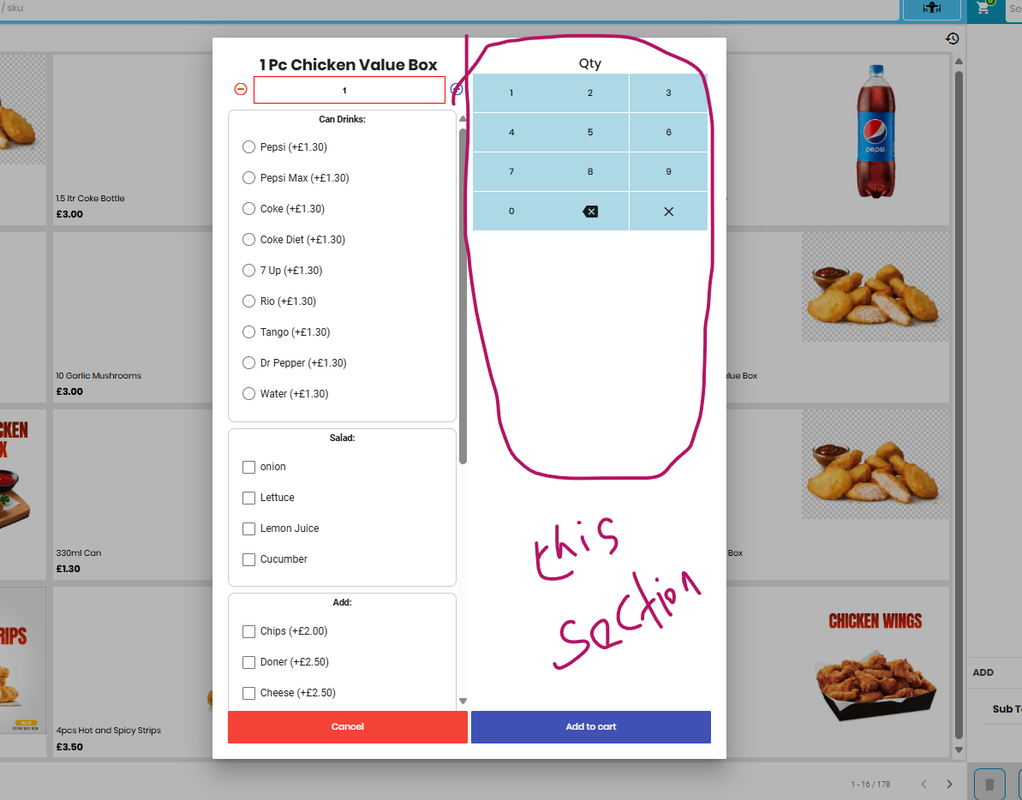
dear Team i have purchased it and i and one thing to resolve the POS checkout is showing keypad while selecting the menu in POS the keypad is on right hand side can we remove it https://i.postimg.cc/DZCscWrx/Screenshot-2025-05-19-230835.png
you can remove with custom css. if you can’t do it , pls drop a support ticket on support.openswatch.com to get help. Thank you!
where do we go to download the latest update and view the changelog? Thank you
you can download latest version at codecanyon and view log at addon description. thank you!
hi anh, từ 01/6/2025, phải sử dụng hóa đơn điện tử khởi tạo từ máy tính tiền, tương lai mình có thể tích hợp thêm tính năng khởi tạo hoá đơn điện tử từ máy tính tiền được không ạ?
Điều này phụ thuộc vào bên cung cấp dv hóa đơn điện tử và api từ họ chứ ko phải của pos. Chúng tôi sẽ xem xét, nếu có thể sẽ xây dựng phần mở rộng ( addon) cho chức năng đó, nó sẽ ko dc tích hợp vào pos mặc định mà thông qua addon. Thanks
Vâng em cám ơn ạ!
dạ để em thử, cám ơn anh nhiều ạ!
ok, np
Hi Support Team ! I renewed my product support and need to download some addons. My Item purchase Code not being detected as support on your website. Can you please help me.
You can try again now, or open a support ticket on support.openswatch.com to get help. Thanks
Hello! When activating the plugin, the following text appears in both the home and back pages.
Notice: Function _load_textdomain_just_in_time was called incorrectly. Translation loading for the openpos domain was triggered too early. This is usually an indicator for some code in the plugin or theme running too early. Translations should be loaded at the init action or later.
OK, pls drop a support ticket on support.openswatch.com to get help. Thank
Send! Ticket no 270647
Ok, thank you!
Pre-sales question:
- Is it linked to WooCommerce? Or can it be managed independently?
- Do you accept cash payments? The customer can pay in-store and generate a receipt for their purchase by paying in cash.
- Can I create a product and mark the available quantity per warehouse within the product? Or do I have to duplicate the product?
- What tablets is it compatible with? – Can it be used on an iPad?
- Can the point of sale colors be changed? Is the design customizable?
- Can access be limited per user? So they can’t see all the options.
Thank you very much.
#1. yes. it complete link to woocommerce
#2. cash is default payment method in our plugin
#3. yes, you can create product and mark the qty / available on each warehouse. NOTE: in our plugin , online website is a special warehouse, when you all product and default woocommerce product exist on this outlet .
#4. our plugin is webpos , it mean can run all device support web, you you can use ipad and tablet.
#5. you can change by put your custom css style at admin/pos/setting/custom css only.
#6. default, our plugin have 3 mode with limited functions on each register: cashier , seller , customers.  only.
I have another question. In your online demonstration, I don’t see the possibility of printing an invoice when a table’s customer requests it without going through the payment button, which would allow you to continue taking orders from other tables. Is it possible to have a page of payment requests in progress so that you can return to them when the customer is ready to pay?
TKS
that is normal , you can print by composer receipt you want with quick print follow this https://prnt.sc/wyBl5LD_PHMb
Thank You for your resonse. I have many other questions. I’m going to buy your pos solution, so i can reach you via your support. Do you speak French? Regards
Yes, you can. Thank you
Hello, my restaurant does not use online payments. 1/ You offer cash payment, can we add credit card payment, mobile payment which will appear in the receip as a payment method? 2/ In the case of a cash and credit card payment for the same invoice, can we detail the payment methods?
Sorry for my bad english, hope you understand my needs, Regards
Can you confirm?
yes, thank you!
Hello, I updated to last version and now when I add items to a table of my restaurant, it says below each item: by “posuser”
I don’t want to use it since it takes a lot of space. How to disable? I only have 1 user in my open pos, so not needed to know who is taking the order.
Thank you
You can use custom css in admin / pos/ setting/ custom css to hide it. If you can’t do it, you can ask support from support.openswatch.com to get help . Thank you!
It should be easy to config without much support, since it is something added and not needed to be compulsory. In settings a “yes / no” will be easier and better for a lot of your customers. Thank you
It have custom css to remove it right now. Thank you!
Where? Paste the custom css here 
If you want get support. Please drop a support ticket on support.openswatch.com to get help. Thanks!