541 comments found.

The plugin’s filtering feature isn’t working properly. We filter products by category, and it works on the first page. But when I go to the second page, it opens the second page as if no filtering had been applied. This issue has been going on for about a month.
Hello
Read please: https://pluginus.net/support/forum/woobe-woocommerce-bulk-editor-professional/
If it will not resolve the problem: renew the support and create ticket here https://pluginus.net/support/forum/woobe-woocommerce-bulk-editor-professional/
Hola, acabo de comprar la licencia premium (ya tenía la gratuita) pero me da error al instalarla ¿alguna sugerencia o solución? Si no puedo instalarlo de ninguna forma ¿hay plazo de devolución? Muchas gracias de antemano
Hello
Read this please: https://bulk-editor.com/i-just-bought-the-plugin-and-cant-install-it-error
¡Perfecto! muchísimas gracias 
Welcome
Hi, is it a lifetime version? Or price is for 1 year only?
Hello
Lifetime updates
Howdy, BEAR is a great plugin, just bought it yesterday. No problems so far. I wanted to ask how can WOLF be downloaded as a gift. I saw that in the BEAR item description.
Hello
Sure, download please BEAR zip file -> unzip -> and you will find there GIFT folder with WOLF https://share.pluginus.net/image/i20260129123345.png
Welcome!
Thanks for your kind explanation, just found the gift there. Congrats on your work they´re awesome plugins.
Thank you and Welcome
Hi, is this compatibile with woocommerce v10.3.4?
Hello, yes
Hi! Before buying, I’d like to confirm if your plugin can do this: Apply a specific attribute (for example “Weight” → ½ kg, 1 kg, 2 kg) only to all products in one selected category (not the entire store). Automatically create product variations for those attribute values for every product in that category. Allow different prices per variation (for example +€X for 1 kg, +€Y for 2 kg). Work with both simple and variable products, or convert simple products into variable ones in bulk if needed. Can your plugin handle this complete workflow? Thanks! — Rafael
Hello
Looks like you mean creating new attributes for some filtered products inside BEAR – unfortunately not, bulk edit implies editing data of already created data structure. Converting of product type is possible, but here is question by what logic should be assign any new attributes to the product, system not has knoweledge about what admin want. Looks like you need AI products shop manager, not bulk edit But idea is good, but the idea is good, although a bit complicated.
Is there any way to sort by Brand? I have Brands turned on, but it would be very helpful to be able to sort by that column as well. My products have a single brand.
Hello
Unfortunately, the plugin does not have sorting by taxonomy, only filtering
Hi Is there a way to edit ACF Pro checkbox field in BEAR? I followed your video tutorial about meta fields but it doesnt work… Ty.
Hello
It depends on how ACF stores this data on the product side.
Please watch this video – https://bulk-editor.com/video#video_3044 – very often this is stored as a serialized array
Hello!
Our client wrote:
We use CTX Feed plugin, and we need to edit the fields it adds to products, (EAN and Custom Field 0). I have been able to add them for simple products by entering a product ID and identifying the correct strings.
However, I do not seem to be able to find them for variable products. Am I doing some thing wrong? How do I add these meta strings for variable products?
Thanks.
Screenshot: https://www.awesomescreenshot.com/image/53306050?key=75cbfa1526498c5be43070b0e112ca6e
Hello
Please watch these videos – https://bulk-editor.com/video#video_1290 and https://bulk-editor.com/video#video_3044
It is possible that in variable products this field has a different key. Try to get all the fields for one of the variable products. How to do this is shown in the video I gave you
I have the free version and it is working well but when I bought the premium version, I could not see all the products ( two languages I am using wpml ) and I could not search meta . please assist
i think i messed up i was using the free wolf . the Bear is good and is working thanks
Hello
ok! Great
Hi, I’m using the free version of your product but my Shop Manager role can’t edit in table. Is premium version different? Thanks
I tried role manager plugin. didn’t help/
Hello
User must have the right – manage_options – to edit products. This is in all versions of the plugin.
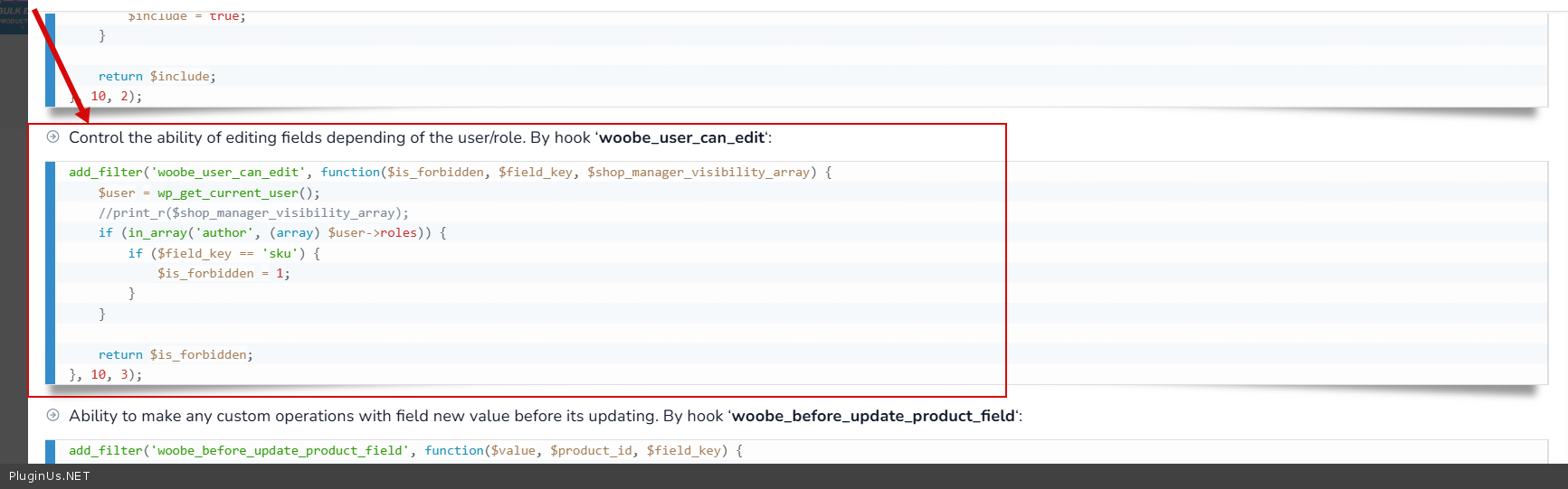
But you can turn it off ( https://c2n.me/4mpNLcN.png ) – https://bulk-editor.com/document/more-settings-implicit In your case, you can change the code to:
add_filter(‘woobe_user_can_edit’, function($is_forbidden, $field_key, $shop_manager_visibility_array) { $user = wp_get_current_user(); if (in_array(‘shop_manager’, (array) $user->roles)) { $is_forbidden = 1; } return $is_forbidden; }, 10, 3);
Thank you. That was very helpful.
Great! Welcome;)
For the “Add fields to the quick search” option, how do I add the “Product Short Description” so I can search by this field. I have tried “product_short_description: Description” which does not appear to work. Thank you
Hello
Please try to use: post_excerpt
Perfect! Thanks again for your time with the plugin, incredible.
How about adding a category filter? I have tried “post_category: Category”. Ultimately I just want to filter the list by a particular category.
Hello
This only works for text fields.
To filter by taxonomy try to use the filter tab – https://bulk-editor.com/video#video_2500
Perfect! I didn’t even see the filter drop down at the top!
Great! Welcome;)
Hi there,
In the latest version the “select all” checkbox is gone and there is this error in the console: Uncaught TypeError: $(...).pointer is not a function
Can you check it out?
Cheers!
Hello
We will fix this in the next version.
If you need a quick fix, write to support please – https://pluginus.net/support/forum/woobe-woocommerce-bulk-editor-professional/
Hello, I’m interested in buying this plugin, my question is regarding variable produce prices. I need to increase all prices across the site by 3%. I’ve tried the inbuilt WooCommerce Bulk edit feature and it doesn’t update my variable products. I have 160 products each with up to 80 variations. Will your plugin all me to apply a 3% price increase easily? Cheers Jon
Hello Jon
Yes. Please watch these videos – https://bulk-editor.com/video#zTCi99ThEwo AND https://bulk-editor.com/video#video_2502
Try to do it with the free version – https://wordpress.org/plugins/woo-bulk-editor/
perfect, thank you
Welcome;)
Enabled / Disabling fields from settings not working after disabling field I press the save settings button and page refresh but the fields is still on check the screenshot attachment here : https://paste.pics/2e1051c81350c9b75897e1053f74cf88
Hello
Please write on the support forum – https://pluginus.net/support/forum/woobe-woocommerce-bulk-editor-professional/
Please paste your license key here – https://share.pluginus.net/image/i20230222134241.png -> https://share.pluginus.net/image/i20230222134511.png and ftp+wp-admin access – https://share.pluginus.net/image/i20230222134615.png
where to find _global_unique_id meta key? the default woocommerce gtin field.
Hello
If you have a meta field key, please add it to the meta fields tab – https://bulk-editor.com/video#video_1290
is it free ? is it one time payemnt or annually ? if i do not need support any less charges ? can i get any discount cuupon code for pro plugin purchase ? will you support if i purchase extra technical support ? in my website plugin issue is ther any money back guarantee ? what if your plugin is not compatible with my website ? how many number of product of this plugin capecity ? does this plugin use heavy resources of my hosting ?
Hello
https://bulk-editor.com/downloads – pay once, get foreverpay for support if you need it, no periodic charges
Test BEAR with your site using free version https://bulk-editor.com/downloads
Buy now button is not working , page not reload , popup and again desappear
if in my website , plugin make issue, is there any money back guarantee ?
Hello
Please write me here – https://pluginus.net/support/forum/woobe-woocommerce-bulk-editor-professional/ And describe in more detail what exactly doesn’t work
Read this – https://themeforest.net/page/customer_refund_policy
Short Desc. is textarea field , but i want Short Desc. as textinput , in data field
Hello
Please write me here – https://pluginus.net/support/forum/woobe-woocommerce-bulk-editor-professional/
Hello,If I create a filter in your app, such as one where the product title contains the word ‘Nike’ and I want to add it to the ‘Nike’ category, will the new products matching this condition be automatically added to the category, or will I need to manually perform a bulk edit every time?
Hello Yes. Every time you want to change any product you have to perform an operation in the plugin. The plugin cannot change the product on its own
I used previous versions of wordpress normally. But when I upgraded to the latest wordpress version 6.6.1, when I searched and filtered products by category through the plugin, I got the following error: DataTables warning: table id=advanced-table – Ajax error. For more information about this error, please see http://datatables.net/tn/7 Please check for me and other users
Hello
Please write me here – https://pluginus.net/support/forum/woobe-woocommerce-bulk-editor-professional/
Paste your license key here – https://share.pluginus.net/image/i20230222134241.png -> https://share.pluginus.net/image/i20230222134511.png and ftp+wp-admin access – https://share.pluginus.net/image/i20230222134615.png – I will check it
Hello, we have been using the plugin and it works great, but we have to add “cost price” on the products. looks that it is not shown in the plugin
Hello
You should add it in section Meta, ask meta key please from developers of that “cost price” plugin

This item was featured on CodeCanyon

Power Elite Author
Contact the Envato Market Help Team