15 comments found.

Hello,
Thank you for bringing this to our attention.
Kinldy try the demo again.
Thanks.
Hi Author!
Thanks for the brilliant module. This module should help us a lot in reducing technical support ticket from out your SaaS module.
However, we have some issues using this module. We have faced the issue as Dot-Net where the tour keep displaying pop-up even after finished. This issue happen when we open in new tab. We also applied the ‘Finished Tours’ ‘Does Not Contain’ ’<own tour ID>’ but the issue still persists.
Hope you can help us regarding this issue. Thanks Author!
Best regards, Your longtime supporter.
Hello,
Thank you for reaching out. We appreciate your feedback.
We made an update v1.0.2. Kindly download and apply this version, hopefully it solve the issue.
Kindly reachout to support@perfextosaas.com if further assistance is needed.
Thanks.
Hello, I want the user to see the full tour only once and not automatically again. In the documentation, it says I should activate the field “Complete on Finish:”, but I can’t find it in the settings.
Hello,
Thank you for reaching out.
The “Complete on Finish” option is now by default true and tour finished (exited on the last slide or clicked finished) should only be launched only once as default behaviour.
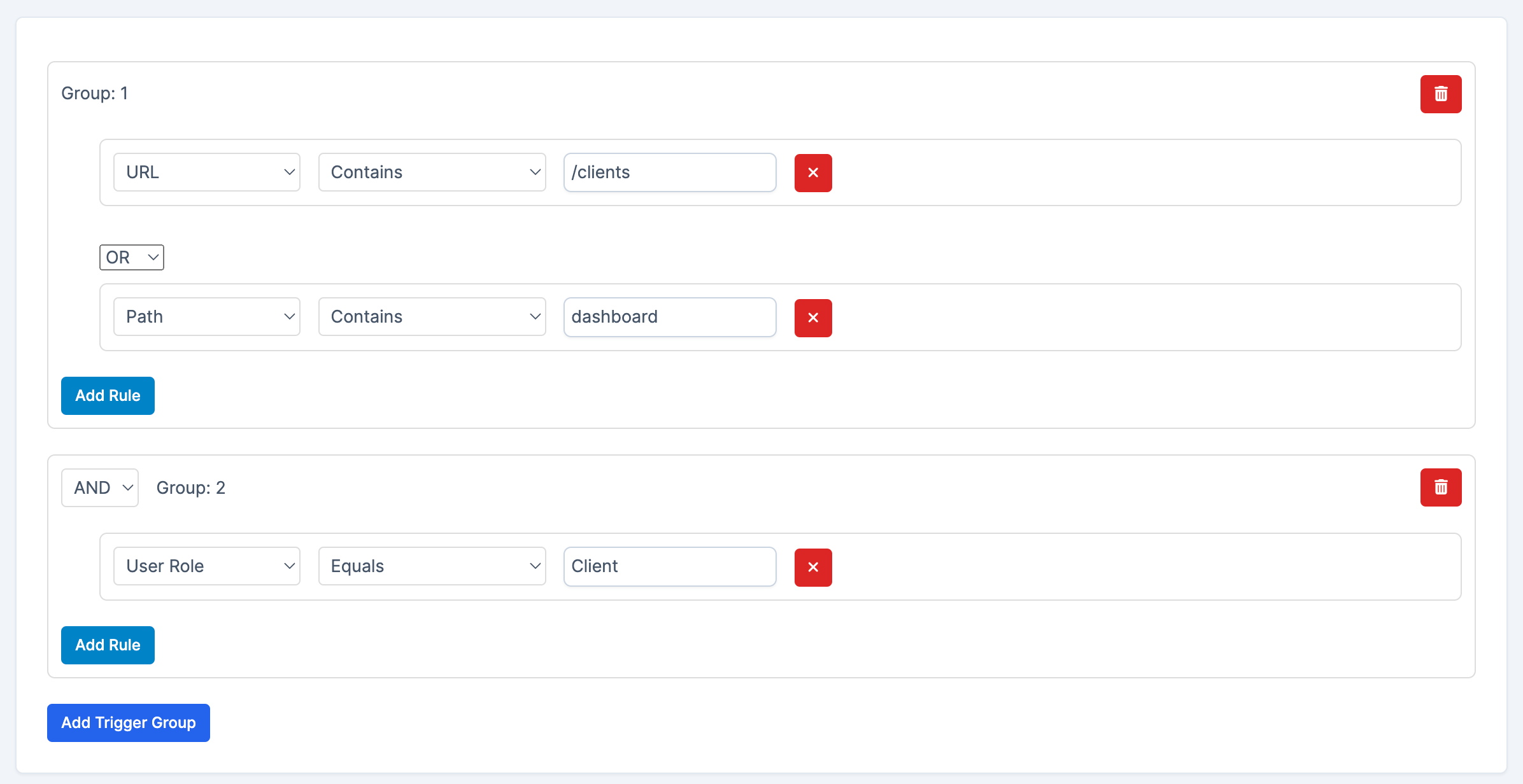
Alternatively, you can add trigger rule for “Finished Tours” ensuring the current tour “Does not contain” the tour.
The documentation will also be updated to remove that option.
Thanks.
I have really tried everything, but the problem is that after a certain time, the tour automatically starts again. Can’t you set a flag in the database to mark the tour as already seen? It looks very unprofessional and is annoying for my customers when the tour restarts every few days.
Hello,
We already made provision for that and works fine on our end. As such we have suggested adding finished tours exclusion trigger.
You mentioning works and then restart again suggest an underline issue potentialy relative on. You need to observe how this issue reproduce, you can check your browser console for any error and tell us about that.
If the issue is persistent or reproducible, please share us the details https://codecanyon.net/user/ulutfa . Alternatively, you can send request support from above URL for us to check.
Thank you.
Hello, how do I prevent the customer from having access to the guided tour? Like the tour through the menu as customers, invoices, these same things in the admin, when the customer logs in through the saas, the guided tour does not appear for him.
Hello,
Thank you for reaching out.
You can prevent customer from accessing a tour by applying User role rule.
Edit the tour > Add group tirgger (if empty) > Add rule > Then select “User Role” – “Equal” – “Admin”
Something like this : https://perfextosaas.com/documentation/tour_guide/media/02.png but in your case you want User Role Equals Admin.
Thanks.
Does it works for saas users. If perfex is saas and then can users of it can see tour?
Hello,
Thank you for reaching out.
Yes, user can see tours.
To share your tours with the tenant admin dashboard, you need to share them with tenant through seeding blueprint or sharing the table from the SaaS > Settings > Tenant seeds.
Thanks.
demo not work
Hello,
Please check again.
Demo reset every hour.
Thanks.
`Hi there,
I’m going to open a support ticket in couple days.. I’m still trying to figure it out  I’m kinda lost when does it record the triggers and when it doesn’t..
I’m wondering if i just want to have a tour guide open up when the client visit the leads tab and if he visit the projects tab to have two seperate tour guides?
Is this achievable? also I tried to use the URL trigger to /leads and nothing pop up
Hello,
Thank you for reaching out.
Please use the item support tab: https://codecanyon.net/item/interactive-tour-guide-builder-for-perfex-crm-zerocode-onboarding-walkthroughs/54969625/support
or reach out through https://codecanyon.net/user/ulutfa for support.
Thank you.
Hello, can tours get triggered on button click? E.g. if I add custom button ‘View How’ with id view_how can I trigger play tour on it? thanks
Hello,
Thank you for reaching out.
The builder do not have this option through drag and drop but you can archeive this a certain class and attribute to the button.
Thanks.
Great work! We share the same point of view on the idea <3
Combining with a Chrome Extension will allow the tour guide to work outside the system!

Thank you very much 
This looks awesome but i found i bug on demo page.
If i start tutorial on different page (not dashboard) this part “Sales overview” is bugged it doesn’t redirect me to dashboard hence element highlight is not shown.
Also wish it had video/image support.
Hello,
Thank you for reaching out.
This is not a bug. The demo tour is not a mutipage one. You can edit the tour and make it multi-page by updating “Step Navigation (Multi-page behaviour)” to “Yes”
Image/video can be added to a tour step using html tag. The WYSIWYG editor already provide direct option for image tag.
We will add video tag also in next update and perhaps expand the demo steps showing these options.
Hopefully, if you mean different thing with video/image support, kindly let us know.
We appreciate your feedback.
Thanks.
I will give WYSIWYG editor a try. adding separate tag for video is a good idea give more cleaner approach.
What i mean by bug is that if you go to leads page and click question mark icon on bottom right it will not show ui it is programed to show, it ether should be multi page by default or not shown on other pages.
Anyways i love this product, i love the builder amazing job! final pre-sales question will this work on your saas? meaning is there a possibility to add tutorial that will automatically be synced to all tenants specially new ones ?
I can add it in tenant seed to include pre built tutorials but it is crucial to have sync functionality for new tutorials that i create.
Hello,
The “question mark icon” is only meant to show any available tours for the user.
A multipage tour need to be explicitely enabled in the tour edit form.
Yes you can add this to your tenant seed or preset.
We are investigating about a new module to sync certain data with all tenants. Hopefully that will help.
You can reach out through profile for contact for futher support or request.
Thanks
Hello, good day.
1 – Do you plan to implement a control system that allows users to visualize their progress in using the software and modules? This could help them identify which actions they’ve completed and which ones they’re stopping using.
For example:
- Sales: 50% complete - Budgets: 30% completed - Goals: 100% completed - Email templates: 80% - Company data configuration 100% completed
2- Also, would it be possible to create interactive guides within other developers’ modules?
3 – Will it be possible to export and import the workflows??
Hello,
Thank you for reaching out.
1. We will improve the UX regarding this. Currently the tours only show with completed one with green button and others with primary color button (perfex blue).
2. Yes. Tour Guide can be created on any pages.
3. We will consider option to import/export a tour for easy sharing of flow.
Thanks.
Dude, I can’t tell you how much I love you! we were looking to have a developer hired to develop something like this.. will purchase it soon
thanks for doing this, I just wish it came part of the SAAS 2 package
Hello,
Thank you very much for the wonderful feedback.
We do not have any current plan to include this in the SaaS packages based on prosposed heavy milestone for this item.
We appreciate your love and support.
Thanks.
Hello, Good job, I wish you many sales. Does this tour work only on the dashboard interface? Or can I make it work on internal pages such as tasks, projects, etc.? Also, can I make it work on modules?
Hello,
Thank you for reaching out.
It works on any perfex pages including modules.
Thanks.