541 comments found.

Hi, does this plugin support expired product reminder and product management, as I am creating an e-commerce for groceries.?
Hello
This is a field editing plugin and does not add new functionality to products.
If these are some fields that are stored on the product side, this plugin can edit this field.
Hello and thank you for your plugin! A quick question: is it possible to filter products based on sales percentage? For example show products with 30% discount and up. Thanks!
Hello
Unfortunately the plugin does not have such a filter.
Anyone have problems that plugin become slowly at recent times nearly 1-2months , and can not go to next page if we choose 1 special Product categories (for 100 items/page) ???
Hello
Please write me here – https://pluginus.net/support/forum/woobe-woocommerce-bulk-editor-professional/ – I will check it
Try this ( https://share.pluginus.net/image/i20240722120324.png ) – https://bulk-editor.com/document/more-settings-implicit
it ok, but it hang when load some taxonomy like product Taxonomy (both just have < 10 categories) , before it not happend
Hello
Please write me here – https://pluginus.net/support/forum/woobe-woocommerce-bulk-editor-professional/
This plugin was working really good the last few months, but after I updated it recently, it lost a critical piece of information in variations which made it almost unusable. Before, when turning on variations, it displayed the title and attributes next to it in this format: Title [attribute info] now it only displays only the title for all variations repeatedly but does not display [attributes] anymore. Because of this I’m unable to do any bulk editing on variation because I don’t know which I’m editing, defeats the purpose.
Is it possible to edit quantities to one decimal place using BEAR?
I manage a shop that sells wallpaper by the metre, with customers able to order lengths up to one decimal place – for example 2.5m of X.
Can BEAR accept stock levels to one decimal place?
Hello
In fact, our plugin does not prohibit the use of decimal numbers for this field.
But it depends on how woocommerce handles this field.
I mean if wocommerce doesn’t have such functionality then edit fields plugin won’t add this new functionality for woocommerce
Hello, it would be more convenient for your business to trade not in meters, but in centimeters. This would also be more user-friendly. I suspect that your minimum purchase may be half a meter, but allowing sales by the centimeter could facilitate even smaller purchases.
“Compatible with – WPML”.But actually it is not. When prices for goods change, prices in WPML translations do not change.” Please remove information about the plugin compatibility so as not to mislead people. Or register https://wpml.org/documentation/support/go-global-program/ and make your plugin truly compatible.
Hello, if you have problems please create support request here https://pluginus.net/support/forum/woobe-woocommerce-bulk-editor-professional/
Sorry. I am wrong. I found it in your technical support
Please add in functions.php: add_filter(‘woobe_wpml_sync_prices’, function($do){ return true; });
And this solved my problem. Sorry again.
Why I bulk edit the catagoriy of 120 products filterd by title, but the whole 1000 products in the same catagory changed as well?
Hello
I’m not sure I understand you correctly. Please describe this in more detail
Are you using a caching plugin?
The plugin was working well all the time but the last two weeks I have trouble with import to update variations stock of the products. The bar stops loading and the import never ends! Could you please help me to solve that asap? I can’t update the stock of my products and I’m loosing orders from my clients!
Hello
Please read this – https://pluginus.net/support/forum/woobe-woocommerce-bulk-editor-professional/
Please paste your license key here – https://share.pluginus.net/image/i20230222134241.png -> https://share.pluginus.net/image/i20230222134511.png and wp-admin access – https://share.pluginus.net/image/i20230222134615.png I will check it
but this is woocommerce functionality, I’m not sure if it depends on my plugin
I opened a ticket as you asked. Please help me to solve this issue!!!
Hello
I answered you on the forum
try free version, but can you add “variables” support for taxonomies ? , i want it for product tag , to bulk add tag as variables . Add it to cart now
Hello
I’m not sure I understood you correctly.
Variable products can only be created based on attributes. A variant cannot contain another taxonomy
i mean that https://i.imgur.com/VF3pv0e.png , i want create bulk tag for bulk product like {TITLE} Abcxyz, abc {TITLE},...
Hello
Unfortunately the plugin does not have such a feature
There is a possibility only for attributes and meta data – https://share.pluginus.net/image/i20240315144736.png
that why i request you
Ok! I’ll pass this on to the developers
@pabloborysenko ; does it done ?
Hello
This has been added to the developer todo list. I think it will be included in the next version of the plugin.
hope so
Hello
If you need additional information on this task, you can write to the forum – https://pluginus.net/support/forum/woobe-woocommerce-bulk-editor-professional/
Getting this error on free and paid version: DataTables warning: table id=advanced-table – Ajax error. For more information about this error, please see http://datatables.net/tn/7
Hello
Please write me here – https://pluginus.net/support/forum/woobe-woocommerce-bulk-editor-professional/
paste your license key here – https://share.pluginus.net/image/i20230222134241.png -> https://share.pluginus.net/image/i20230222134511.png and wp-admin+ftp access – https://share.pluginus.net/image/i20230222134615.png – I will check it
but I can’t find the private data button of the current support request. I am logged in but the button is not on the page.
Hello please create a topic and then you will see this button at the top right of the page
Hello!
Could you update the changelog in your item description?
I see that version 2.1.4.2 is available, but can’t find the changes.
Hello
Sure, just posted the link there instead code: https://bulk-editor.com/changelog
simple question… if i filter for example for PUBLISHED status after filtering if i click on pages to show other results the filter disappear and return all products… IS IT POSSIBLE to mantain the filter while clickiong on other pages results?
Hello
This looks like a conflict with the caching plugin
Please try this (https://share.pluginus.net/image/i20240109124110.png) – https://bulk-editor.com/document/more-settings-implicit
add_filter(‘woobe_storage_type’, function($type) { return ‘session’;//session, transient });
ok but where i must put this code? thanks
Hello in functions.php of the current theme
hi yes seems works thanks (added with snippets plugin)
Hello Great welcome;)
Hu, we just purechased the plugin, but encountered a problem. Mostly it works very good, but when filtering “some” categires, no products are shown. It works on most categories, displaying correct products, but for one category, no products are shown when filtered against it.
Any suggestions?
I was able to get it to work, but I can not filter products with “no sale price”. Sorting columns from low to high, does not start with 0 as low, starts with first instance of sale price number (not 0.00). Any suggestions?
Hello Please try to filter by sale price – https://c2n.me/4jQa30X.png
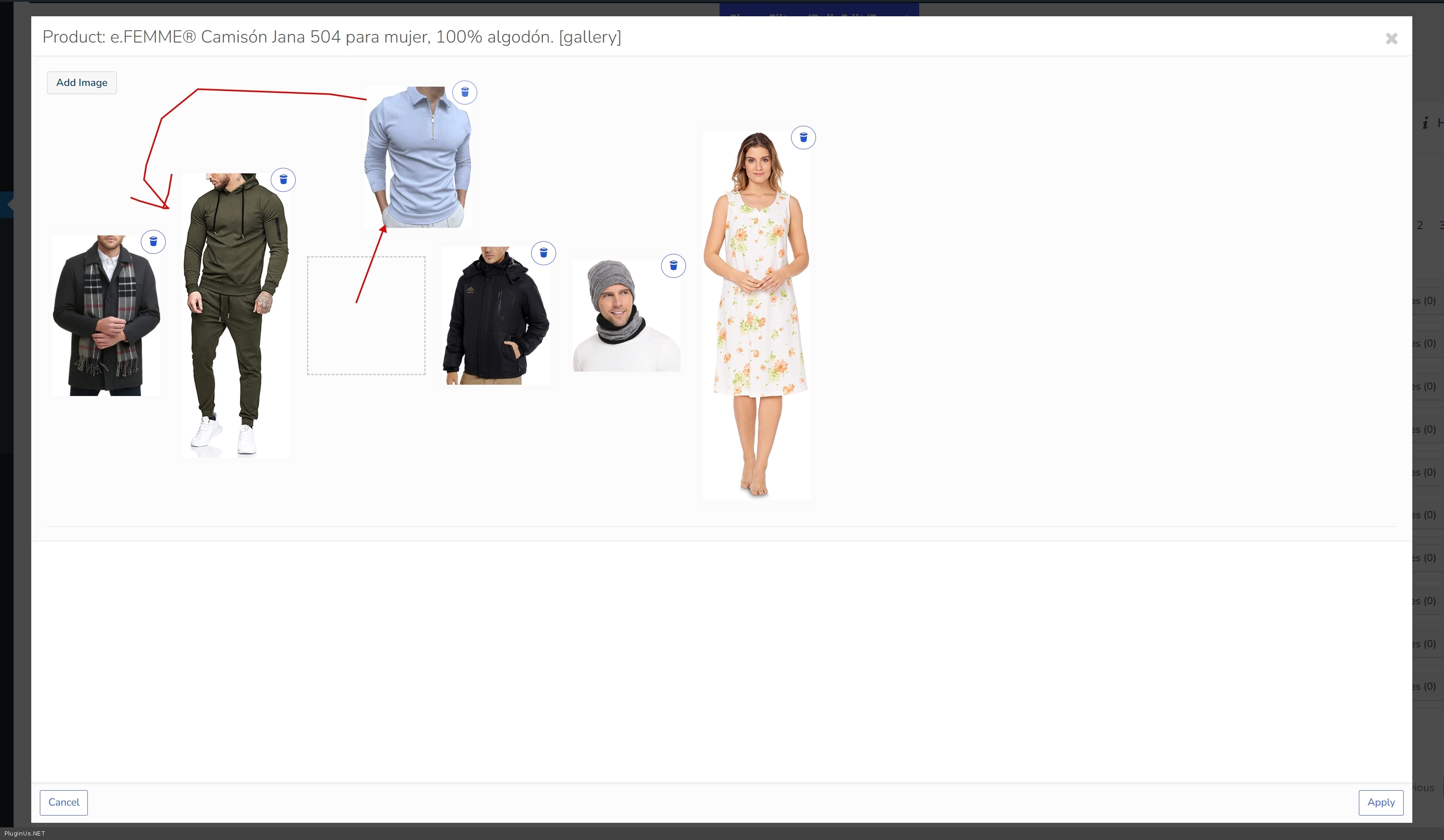
Hello, iam interested in buying this plugin, my question is for the product images, i need organize them by changing the product image on with another image in the gallery of the product, can i do that with draging and dropping?
Also for multilingual i use Polylang, does the plugin support Polylang? If it is yes to both questions i will go ahead and buy the plugin.
Thanks
Hello
1 Unfortunately no 2 This should work. We have no data on incompatibility
You can try a free version – https://wordpress.org/plugins/woo-bulk-editor/
Hello
Drag and drop process has 3 steps:- click https://share.pluginus.net/image/i20231128111640.png
- click https://share.pluginus.net/image/i20231128111711.png
- drag and drope https://share.pluginus.net/image/i20231128111735.png
Results: https://c2n.me/4jQv2IE.jpg + https://share.pluginus.net/image/i20231128111942.png
Thanks for the clarification, for the drag image for sorting i had a plugin on Opencart before that i used for sorting images, i could sort images, both main featured image and the rest of the images by draging, i havent found a plugin so far for woocommerce with the same function without needing to open the media library, it would be nice if you implemented such a function for sorting images.
For the Polylang i need to be sure that it works with no issues or bugs when switching between languages that it can find all products correctly.
Hello
I will pass your suggestion to the developers
For the Polylang i need to be sure that it works – Please try a free version – https://wordpress.org/plugins/woo-bulk-editor/
Thanks, iam trying out the free version, when clicking to change the flag on the top for the Polylang plugin it will show the products for English languages and not for the other language as in the standard woocommerce editor, the only way to be able to show in other language is when filtering the products in BEAR editor for the other language it will show, i really like the BEAR editor great for productivity, hope you can make it work with Polylang and they make it compatible with BEAr editor. Also is it still possible to get it for the same price as Black Friday offer? Iam on a budget 
If possible to get it together with the FOX – WooCommerce Currency Switcher with the Black Friday offer prices.
Hello Unfortunately the discount period has already ended
[PROBABLY BUG]
When I set the publication of products to 12:00 (schedule), the products are published at 1:00 p.m. I checked and CRON events have an hour delay in my case. Local time and server time are CET (+1), CRON events fire according to the UTC time zone.
My case: WP CRON disabled and I use the server CRON. Adding “TZ=Europe/Warsaw” to the server CRON settings does not help.
Best, Alex
Hello Alex
Please write me here – https://pluginus.net/support/forum/woobe-woocommerce-bulk-editor-professional/
Please paste your license key here – https://share.pluginus.net/image/i20230222134241.png -> https://share.pluginus.net/image/i20230222134511.png and wp-admin access – https://share.pluginus.net/image/i20230222134615.png – I will check it
Hi, I want to set sale prices on specific products from day A till day B. When the sale expires, I want the products’ price to revert. Now it just says expired. Thanks
Hello
after setting the sale price you should edit these fields – https://share.pluginus.net/image/i20231120125356.png
If this doesn’t work for you – please write to me here – https://pluginus.net/support/forum/woobe-woocommerce-bulk-editor-professional/
paste your license key here – https://share.pluginus.net/image/i20230222134241.png -> https://share.pluginus.net/image/i20230222134511.png and wp-admin access – https://share.pluginus.net/image/i20230222134615.png
Im using your free version at wp org, look like it not compile with last wp 6.4.1 and woocommerce 8.3.0, like all custom taxnomoxy for woo product (created by metabox.io) can not edit
Hello
The plugin is compatible with the latest versions
Please read this – https://share.pluginus.net/image/i20231120124122.png
You can do a test – https://bulk-editor.com/bear-backend-demo-request
Hello
Try this one https://wordpress.org/plugins/custom-post-type-ui/ – works perfectly
Hello, I found that there’s a notice/warning at the top of my plugins page saying that “woocommerce-bulk-editor/index.php has been deactivated due to an error: Plugin file does not exist”, but the file exists and the plugin is active and working as expected with no errors. I tried uninstalling and reinstalling the plugin several times but the notice remains, do you know what’s wrong? I have 63 active plugins and only this one has this “problem”. This is an screenshot of it. https://ibb.co/5MJJwWV Thank you!
Hello
please write me here – https://pluginus.net/support/forum/woobe-woocommerce-bulk-editor-professional/
Please paste your license key here – https://share.pluginus.net/image/i20230222134241.png -> https://share.pluginus.net/image/i20230222134511.png and wp-admin+FTP access – https://share.pluginus.net/image/i20230222134615.png – I will check it
Hello, I have a woocommerce shop with automatic updated products. I’m looking for a editor that can automatically change the tax class for products of a certain category. Is this possible? Like every day at 2 am that the plugin will go to every category affected and change the tax class.
Thanks
Hello
Unfortunately the plugin does not have such a feature
Hello
Task is created
Hello!
You probably changed the name of the plugin folder, which prevents automatic updates from appearing in the Wordpress dashboard. Additionally, when you try to manually update and enable it, a critical error appears.
Hello
Yes, name of the folder changed from woocommerce-bulk-editor to woo-bulk-editor to synchronize translations from wordpress.org
Please remove old version of the plugin manually then install it from codecanyon bundle as usual plugin. From this moment auto update from Envato will work as it worked before

This item was featured on CodeCanyon

Power Elite Author
Contact the Envato Market Help Team





)