4908 comments found.
Hello Everyone!!
We just released a new version 3.5.0:
New Feature: New Profile Header Statistics: Activity Posts Count, Activity Comments Count, BBpress Forum Posts Count, BBpress Forum Comments Count, WooCommerce Products Count.
- Fix: Social Login Cache
Best Regards.

Can you add new feature of post scheduler, or it is already
Hello mr2mostafa,
Thank you for your interest in our plugin.
Unfortunately, in the current version, the feature is not available. It’s already on our plan but we have no exact date when it will be released.
Please let me know if you have any other questions.
Best Regards, KaineLabs Team.
Hi there. Love this plugin. Used it for years the switch to buddyboss and now decided to switch back. How do I stop Yousify stealing the search each time my users search Custom Post Types on the site? With Yousify the search keep redirecting to the activity feed. When I disable it, it gives me proper search results for posts and CPT
Hello ShareLearnTeach,
Thank you for reaching us.
Could you please try to disable Youzify temporarily but keep BuddyPress active, and see if the issue persists or not?
Best Regards, KaineLabs Team.
Hi there That’s what I said in my message. When I disable it, it gives me proper search results for posts and CPT. When I re-enable Yousify it keeps directing search results to the Activity page
Hi ShareLearnTeach,
There could be several reasons why this issue happens and it will require us to check the issue directly from your back-end. If you consider to renew your support license, you can have an access to our Premium support forum:
https://kainelabs.ticksy.com/
Our agents will be happy to investigate the issue and try their best to find a solution.
Best Regards, KaineLabs Team.
Hi KaineLabs team,
There is an option to hide the activity page filters. But I could not find the same for the member directory page. Is there an option or a shortcode to hide “All Members” or “order by” filters on members’ directory?
Hi aliadli,
Thank you for reaching us.
By default, there’s no such option. However, it can be achieved with a custom snippet. You can request it through our support forum from the URL below:
https://kainelabs.ticksy.com/
Our agents will be happy to help you with this request.
Best Regards, KaineLabs Team.
Hello KaineLabs Team, I have a small problem. I set sidebar widgets on both activity and member directory pages. They both appear at the bottom in mobile/ipad view. I need to keep them on top of the page. Any advice?
Hi aliadli,
Thank you for reaching us.
Unfortunately, in the mobile view, both sidebars only can appear at the bottom below the main body.
Please let me know if you have any other questions.
Best Regards, KaineLabs Team.
Thanks for your reply!
You’re welcome aliadli.
Best Regards, KaineLabs Team.
Hello! I’m reviewing the free version. The application is great and can do many things. I have a question: There are things that I can’t do, such as uploading multimedia, but I have seen that first need to create an album, or publish a post and I can’t. Is this because it is the free version or should I be able to create an album without a problem and be able to publish a post? And, to publish a post from the front-end I need the premium version, right? Thanks in advance!
Hi mdroca,
Thank you for your interest in our plugin.
1. For the album feature, it will require a Youzify Advanced Album add-on that can be purchased separately from Youzify:
https://youzify.com/downloads/buddypress-albums/
This add-on can allow your Members can create and manage their albums. Also, can upload any Media directly to the album.
2. Could you clarify, please? Do you mean Article Post or Activity Post?
For activity posts, members can post them both from the Global Activity page and their Profile page >> Activity tab.
But if you mean Article Post, it will require Youzify Frontend Post Submission:
https://youzify.com/downloads/wordpress-frontend-posting-plugin/
Please let me know if you have any other questions.
Best Regards, KaineLabs Team.
Once again, I try to renew the license of one of the extensions where I am offered a 30% discount to renew, but I’m directed to a no-longer-existing page on kainelabs.
If I come in to Youzify site and login to purchase there, I am being asked to pay the full price with no discount.
Sorry, but I sent you a message on Monday via your contact form on Youzify site but haven’t heard back.
Please advise.
Hi Lalalua,
Sorry for the inconvenience.
We did not receive our message. Could you please clarify what plugin you want to renew the license?
Kindly shoot us an email at kainelabs.team@gmail.com. We will be happy to discuss this further.
We are waiting for your email.
Best Regards, KaineLabs Team.
Thank you. Emailed.
Hi Lalalua,
We’ve received your email. We have forwarded this to our Finance team. I will be back shortly with an answer.
Best Regards, KaineLabs Team.
Still no reply???
Hi Lalalua,
Sorry for the late reply. Our team just back from holiday.
We have sent a discount code to your email. Please let me know if you have any other questions.
Best Regards, KaineLabs Team.
Hello, is there a shortcode for multisite to embed the sites the sites list at https://some-site.com/sites ?
that does show and looks good if going to the link from a menu but I am unable to find any settings for sites or create a page without header and footer.
I have tried using [youzify_sites] but this doesn’t work .
The reason is I need to customise some additional elements and show some sites on my homepage.
Hi Gameznet,
Thank you for reaching us.
Unfortunately, in the current version, the shortcode for Sites Directory is not available. We will consider adding it in the next few updates.
Please let me know if you have any other questions.
Best Regards, KaineLabs Team.
Dear KaineLabs Team, I purchased the Olympus theme and got a premium version of this plugin. Once installed and all, I am having user activation issues. The email link when clicked says, ” An error occurred during the activation
Could not create user”. Please can you help? I cant create a support ticket but can email.
Hello graphitegr,
Thank you for reaching us.
Youzify does not require any activation thing to be activated on the website. If you find an issue related to activation, I think it comes from the Olympus Theme. I recommend you to reach out to Crumina the Olympus Author and ask them regarding this.
Please let me know if you have any other questions or concerns.
Best Regards, KaineLabs Team.
Hello,
I have two questions.
First: I want to show some buddypress activities in the future, so I just change the submitted on date in wp-admin and I wrote a snippet that basically fetch only the activities before the current date (which works fine), but I can’t figure it out how to hide the thumbs from the media widget as well (only fetch those submitted before the current date). .
Would you be able to help me with this if I renew the support or for a fee?
Second – Is there any reason you could think of why users can’t upload videos larger than 100MB? The limit in Youzify plugin is set to 250MB, PHP max input variables 1000 PHP time limit 120 PHP memory limit 512M Max input time 120 Upload max filesize 512M PHP post max size 512M
I can upload a 98MB video without issue, when I tried to upload a 103MB the upload progress bar won’t do anything at all.
Thank you.
Hi Quasimodo88,
Thank you for reaching us.
1. Could you please send us screenshots or screencast to our email contact[at]youzify.com? So we can have a clear idea regarding your requirement.
2. This happens because your server limits the file size allowed. You may contact your hosting provider and ask them to increase the limitation from their side.
Best Regards, KaineLabs Team.
Hi,
Thank you for this great plugin!
I would like to make a suggestion and hope you’ll consider implementing it, as it looks like an important design flaw to me.
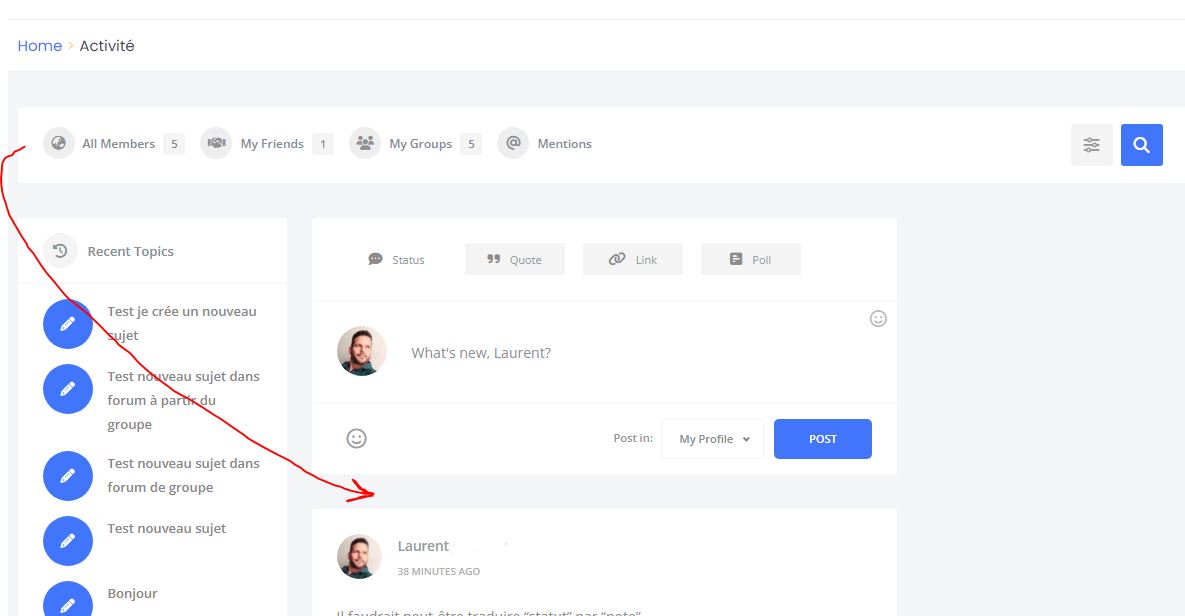
The activity filtering options (<div>youzify-wall-nav</div> element) are being shown outside the main content area, above the main column and sidebars. I’ve found this to be extremely confusing to be honest. They actually look more like a global navigation menu, rather than filtering options for the activity wall itself.
Both BudyPress and its fork show these filters into the main content area, below the “What’s new” form. And it looks much more intuitive that way, especially for the users that are not familiar with BuddyPress and your plugin.
https://i.postimg.cc/t49fx87G/youzify-wall-nav.jpg
Please could you put these filters back in their original place, or offer an option to show them inside the main column (ideally below the “What’s new” form? This will greatly improve the usability of the activity page for the average user.
Perhaps you could take the opportunity to add an optional header (with title) to the activity page, to make its design more consistent with the other pages?
P.S. If you don’t want want to consider this improvement suggestion, please help me move these filters back to their original place. 
Hi Lorange,
Thank you for reaching us.
Since you have an active support license, could you please submit your concern through our support forum:
https://kainelabs.ticksy.com/
Although we can’t make any promises to achieve your custom requirement, however, please let our agents check the possibility first.
Best Regards, KaineLabs Team.
Love the plugin when its working but our whole members section is blank now. What can we do?
Hi Wise_IT,
Thank you for reaching us.
Please make sure to update your Youzify to 3.4.9 and BuddyPress to 12 version. In addition, if you install the BP Classic plugin, please uninstall it.
Please let me know if the issue persists.
Best Regards, KaineLabs Team.
1. Which membership plugin has better compatibility with your plugin? I need a paywall system (Ultimate Membership Pro—is it compatible?). 2. Which LMS plugin?
Hi adsbizz,
Thank you for reaching us.
1. We saw many of our clients use Paid Membership Pro together with Youzify. However, I recommend you test the Free/Trial version of the plugin first, if it fits your needs and works fine with Youzify on your side or not.
2. The latest version of Youzify (3.4.9) is integrated already with Tutor LMS, Lifter LMS, LearnPress, and LearnDash. You can check this article for the details:
https://kainelabs.ticksy.com/article/19837/
Please let me know if you have any other questions or concerns.
Does/can this extend to WpForo?
Hello amys,
Thank you for your interest in our plugin.
Unfortunately, WP Foro is not integrated with Youzify. At the moment, only bbPress can be integrated 100% with Youzify.
Please let me know if you have any other questions.
Best Regards, KaineLabs Team.
I’m planning to buy this plugin for my under construction website, now I’m wondering if youzify has loyalty program reward something that integrates with maybe All phases of sales funnel rewarding people for referring friends buying branded merch or being rewarded with the branded merch or being rewarded for support or giving a testimonial or attracting friends to be new fans or evangelist second point is do you offer private invitation feature (closed community)
Hi mr2mostafa,
Thank you for your interest in our plugin.
Youzify integrates with myCred and GamiPress for rewards, points, and gamification purposes:
https://kainelabs.ticksy.com/article/16397/
https://kainelabs.ticksy.com/article/17512/
I suggest you try the Youzify Free version first and see if it is what you are looking for or not:
https://wordpress.org/plugins/youzify/
The Free version already includes the myCred integration feature.
Please let me know if you have any other questions.
Best Regards, KaineLabs Team.
Hello, While I’m testing the possibilities of Youzer, I have the free version installed and a few weeks ago the user page and the user profile page started giving me errors similar to those on the official Youzer page: » https://youzer.kainelabs.com/members/ » https://youzer.kainelabs.com/members/admin/
I managed to correct php errors, however the page continues to appear unconfigured (although I managed to correct some of the things) and it also does not allow you to customize the profile or make adjustments to the user registry.
» https://baruagrupo.es/miembros/barua/
Why is this happening? It has a solution?
Before purchasing it I would like to make sure it works well and know what problem is causing the current version to give me an error.
Regards
Hi Alfredo-Covados
Thank you for your interest in our plugin.
The demo pages you share are old versions. You can see the new demo pages from these URLs:
https://demo.youzify.com/members/
https://demo.youzify.com/members/youzer/
If you have a similar error on your website, I think, it is because you install the Youzer version instead of Youzify.
Youzify is the old version where we no longer support it. At the moment, it has already been replaced by Youzify.
If you purchase the license, you will get the newest version of Youzify which will fix the error for sure. You will also access Youzify support where our agents are ready to assist you.
Please let me know if you have any other questions.
Best Regards, KaineLabs Team.
OK. Thank you very much
Yes, is youzer. I’m going to install youzify. Thank you very much
Hi Alfredo-Covados,
You’re welcome. Feel free to reach out if you have any other questions or concerns.
Best Regards, KaineLabs Team.
Hi, I need that when a user logs in he/she is redirected to his/her profile, how to do it?
Hello centrowebs,
Thank you for reaching us.
You can set it on Youzify Panel >> Membership Settings >> Login Settings >> Redirect Settings box.
If you need further assistance, feel free to submit tickets on our support forum from the URL below:
https://kainelabs.ticksy.com/
Our agents will be happy to assist.
Best Regards, KaineLabs Team.
Hello,
I noticed that when a user upload a video to their profile, sometimes the static/poster/thumbnail for the video is not generated and it displays the video player instead.
When I inspect the div class, this “preload=”metadata” type=”video/quicktime” poster= is missing in some of them (even if all videos are in .mp4 format), is there any reason why is that?
Is it the problem with the videos itself or is it something with the my server configuration, with the plugin, or…?
Thank you.
Hello Quasimodo88,
Thank you for reaching us.
We did some tests and uploaded some videos on our staging website. Unfortunately, we can not replicate this issue. All videos uploaded contain “poster” meta.
There are several possible reasons why this issue happens on your website. Maybe server, conflict with another plugin, or from the video itself. It will require a deeper investigation to pinpoint the issue.
Best Regards, KaineLabs Team.
Thanks for the prompt answer, however I noticed there is the same issue on your demo website, as you can see from this screenshot:
https://imgur.com/a/qXZN6JbI believe(d) if there is no cover in video metadata, it will “break” the media widget. It won’t show video thumb with they play and keychain icon, but it will embed the video in iframe instead, so basically the video will play only in the small iframe.
Hope it makes sense why I brought this up now.
Thanks,
Hi Quasimodo88
I will cross-check this with our developer team. If we can replicate the issue on our end, we will fix it in the next updates.
Best Regards, KaineLabs Team.
Thanks again for your response… However, I am not sure what you mean by “if we can replicate the issue on our end…” The screenshot I took is from your website, not mine.
Here is the same issue on another user profile from your demos: https://demo.youzify.com/members/nathan/media/Hi Quasimodo88
We need to make sure if this is a bug or just happened because of conflict with another plugin/theme or even misconfiguration. On our demo page, we also installed some of the plugins that may potentially cause this conflict.
If we already make sure this is a bug, we will fix it in the next release.
Best Regards, KaineLabs Team.
Hi, 2-3 more question pls, 1. if i will buy from here codecanyon 49$ User Profile Plugin – will be included the BuddyPress Who Viewed My Profile, BuddyPress Activity Reactions, and BuddyPress Social Share ?
2. which pack of amazon included on your plugin ? Storage pricing S3 Standard ? 3. if i will install amazon s3 storage plugin, will be need any extra configurations ? or just installation and api key from amazon ? 4. after installation all files will be stored on amazon with no extra configuration? is there any case to face compatibility with hosting (hostinger) ?
Hello nio1978,
Thank you for your interest in our plugin.
1. It does not include add-ons that can be purchased separately on our website:
https://youzify.com/buddypress-addons/
2. You can purchase the Amazon S3 add-on single license from the URL below:
Or purchase the All Access Pass which includes all of the add-ons from the URL below:
Please note, that add-ons and All Access Pack do not include Youzify itself as a core plugin. For Youzify, you can purchase it separately here on CodeCanyon.
3. You just need to create an Amazon S3 IAM User and Amazon S3 Bucket and then connect it to your website through the Youzify panel settings.
4. After installation and connecting your website to Amazon S3, all media will be stored on the Amazon S3 server. So far, we have not found any conflict between Amazon S3 and the hosting server.
Please note, media that are stored to Amazon S3 by Youzify Amazon S3 add-on, only media on BuddyPress and Youzify environment not the entire of your WordPress site.
Please let me know if you have any other questions or concerns.
Best Regards, KaineLabs Team.
Hi, 1 question pls, is there any way to limit upload size per user per hour or per day or total-generally ? as i check on free version only support max file size(and max file items) for each upload on the wall, but i want to limit upload per user totally, because if my network supports thousands of users, and each of them upload 5-10 giga , then thats a problem, is this feature supported on Youzify premium ? also can i give membership levels with payment for let users to be able to upload more upload sizes ? thank you
Hello nio1978,
Thank you for your interest in our plugin.
Unfortunately, the limit upload size per user per hour or day option is not available. At the moment, you can limit Max File Size per upload.
Regarding membership levels with payment for let users to be able to upload more upload sizes, such option is also not available unfortunately.
Please let me know if you have any other questions.
Best Regards, KaineLabs Team.

This item was featured on CodeCanyon

Elite Author
Contact the Envato Market Help Team