520 comments found.

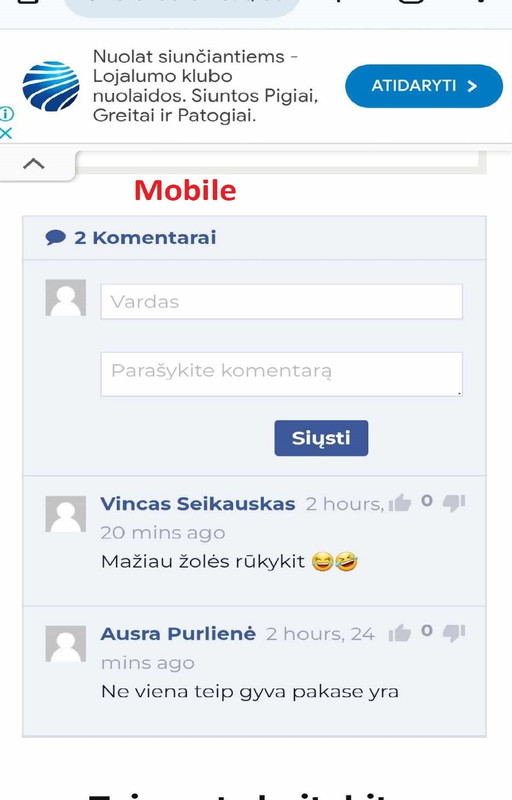
I believe that the “Send” button on the mobile device is poorly positioned and could be placed on the right side. Additionally, the display of the posting time is not visually appealing.
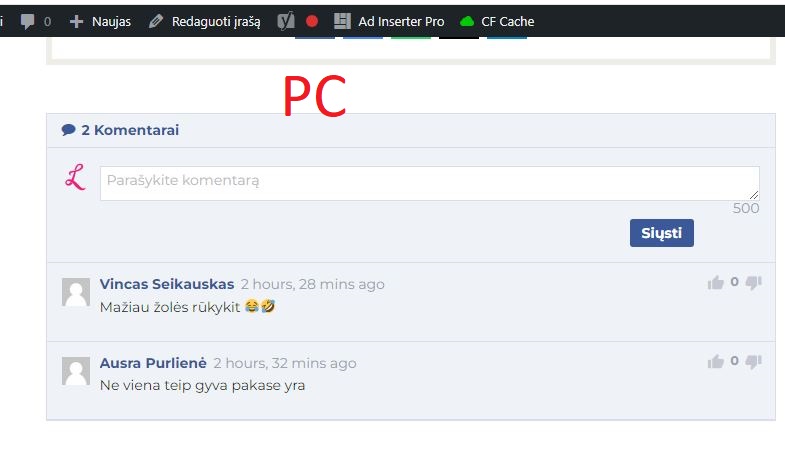
On the computer, everything is fine, but I would like to have the “Send” button on the right side.
Updated screenshot:
mobile: https://i.postimg.cc/5y68HDFN/k1.jpg pc: https://i.postimg.cc/WpHGRpQD/k2.jpg
Hi.
Provide your website URL
give me your e-mail I will write
Hi there, I’m unable to get this plugin to work when I click “Send.” It does nothing.
Please advise. Thanks, Ashley
Already solved.
No it is not solved. It does not work, nor does your example form on your example site. Nothing happens.
I am having issues with the plugin,I already sent a mail
I sent you a message.
Thank you , issue still not resolved yet.
I sent you a message.
Replied
waiting
over 72 hours and no response on how to resolve this issue
Hi
The comment form is displaying correctly. https://prnt.sc/jipikpiQ8wQlYes this is because i solved the issue myself , i fixed that two hours ago.You didnt respond on time . Shortcode i used didnt work Comments were closed despite enabling comment in the my post/page
I had to lmprovise another option using elementorHow do i disable this link here https://prnt.sc/5i1a1ezA5XxV when you click on it, it redirects you to archives
I sent you a download link to your email. The solution to the problem you mention.
Received….Well done.Now am happy .I will let you know when i have anny difficulties using your plugin.Many thanks once more
Hi,
RTL or Arabic language supported? or ALL LTR?
It should work fine.
Go to plugin settings:
https://prnt.sc/V7G3du5AHZ0Pwill all the comments on my wordpress post persist and render according to your system?
Of course. Our plugin will show all current comments.
hello the plugin has the option to login with social media like instagram or tiktok ?
No. Sorry
Just purchased CommentPress but the name and email doesn’t show on the comment box. It only shows the comment area. When I tested it, I got a message saying there is missing information.
Hi.
Verify that the following option is activated.
https://prnt.sc/Xh07wEm7Il8N
If the problem persists, we will try to check it ourselves. Please send your wp-admin credentials to our email.
support@codexhelp.com
Hi, thanks again for grat plugin. Only one BIG issue: when Comment Press is activated, BuddyBoss theme doesn`t work properly – create new activity post popup doesn`t appear – there is a white screen then. This is properly looking post creation popup when Comment Press is deactivated prtsc – https://share.getcloudapp.com/kpuAxw0g
This is screen when Comment Press is activated prtsc – https://share.getcloudapp.com/9ZuKpBwe
It took me a long time to identify the problem but I finally tracked down the plugin. I tried different sets of settings in Comment Press but nothing helps… Please help
Best regards
Hi.
Most likely there is a javascript error.
Please send your wp-admin credentials to our email. support@codexhelp.comHello
I purchased and installed your plugin.
I put a shortcode on this address:
https://tkc-croisiere.fr/%C3%A9v%C3%A8nement/viree-deteWhen posting a comment, a white window opens pointing to this URL:
https://tkc-croisiere.fr/wp-comments-post.phpComments are open. I am using the WaveRide theme
https://waveride.qodeinteractive.com/Thanks for your help Regards Pascal
Hi, I have a problem setting the number of comments to display I want to display only 5 main comments, but the code is counting reply comment, how to exclude it.
Sendinblue integrated?
Sorry, we don’t plan to add any integrations.
So all collected emails are useless?
Can you integrate it with Sendinblue? so each comment added to specific list in email marketing
Is there a way that you can possibly add a “Topic” field in a later version of this plugin?
Having many comments without being able for a person to highlight what the topic is about makes it nearly impossible to continue a conversation. Maybe make a future version of this plugin that will have the topic field displayed first followed by the author who started it and lastly all the comments that are made for that topic. Just a suggestion. 
Thanks for the suggestion. But that would already be like a discussion forum. This is just a simple comment plugin
Hello, I installed the plugin but I can’t place comments. All it says is “Comments are closed”.
What am I missing here to get this plugin to work?
Thanks
Hi.
Maybe you have disabled the option to comment. Follow any of these guides:
https://rankmath.com/blog/comments-are-closed/https://visualmodo.com/fix-closed-comments-problem-wordpress/
Thank you. Those links helped me out and it is now working.
Hi.
Try to activate the following option.
https://prnt.sc/dUA6aTUhpEcR
If it does not work. Contact to our email: support@codexhelp.com
Hi. Compatible with 6.1.1 ?
Hi. Yes of course.
Hi, the script is not showing the comments, i have installed it in here https://bristolairporttransfer.co.uk/comments
Can you advise what to check ?
Thank you
Hi.
We will review the problem. Please send your wp-admin credentials to our email.
support@codexhelp.comHi, i have email you 7 days ago but didnt get a reply. I will email you again now
Hi.
It’s fixed. I replied to your message.
Hi,
“Comments Disabled” how can I get this removed?
I’ve gone through the comments and screenshots and followed the guides.
Thanks
Hi.
Below each post/page there is an option to enable/disable comments.
https://prnt.sc/bIjlIHDZT8VDI have that selected. Also under “discussion tab” also.
Hi.
We will review the problem. Please send your wp-admin credentials to our email.
support@codexhelp.comwhy is the jquery being loaded on the homepage of the website how can l only show it in the post only not everywhere in the website, is a performance hit
It’s not possible. Many of the websites display the comments on the home page.
can you tell me which code to edit to only display it on post
Add the following code to the “comment-press.php” file
https://prnt.sc/5bkBxy6I5ulK
if( !is_singular( 'post' ) ){
            return;
        }
thank you