133 comments found.

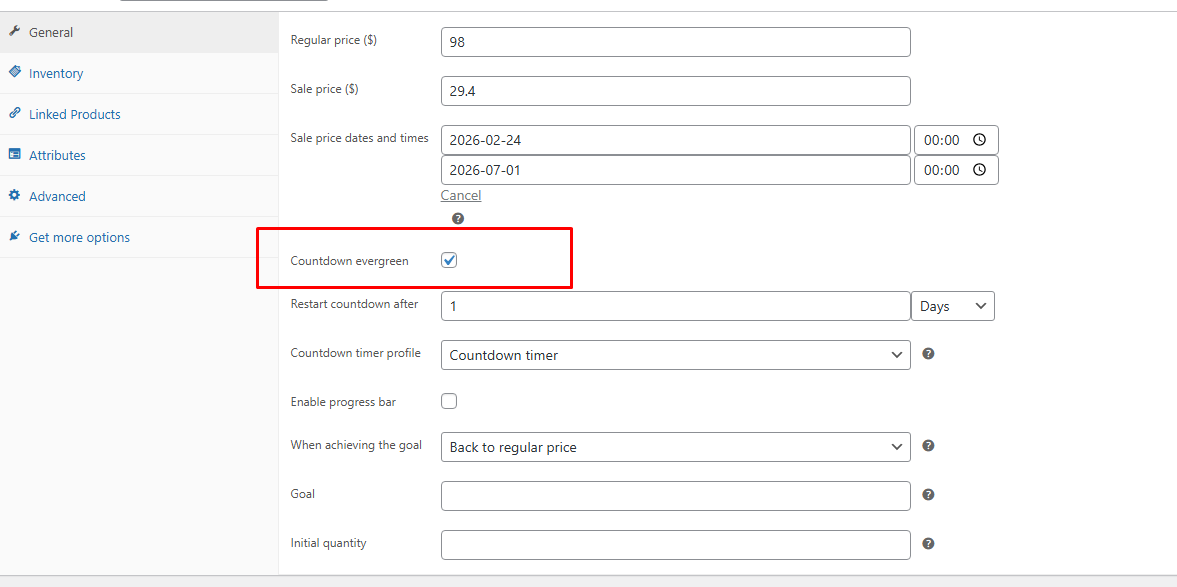
Hello, may I know how could I show the sales price also when restart the sales?
You can achieve this by using the “Countdown Evergreen” feature.
Hi, this plugin have shortcode:
1- To display directly on product page?
We have a different product page build with elementor…
2- Can we add countdown on different product loop layout? To display on main page, shop page, category page…
Thank you
Hi,
Thank you for reaching out.
Yes, the plugin provides a shortcode for each countdown timer that you can use to display it anywhere, including on a custom product page built with Elementor.
For the countdown, you can also place it in different product loop layouts (shop page, category page, homepage, etc.), depending on how your theme/templates are structured.
I’d recommend trying the free version first and following this guide for setup details: https://docs.villatheme.com/sales-countdown-timer/#configuration_child_menu_3029
If you run into anything unclear while testing, just let me know
Best regards
The counter isn’t running in WordPress 6.9.1
Hello,
Thank you for reaching out to us. Could you please create a support ticket on this Support Forum?
Best regards.
I don’t understand why you treat the shopping cart page differently from the checkout page.
The shopping cart page should have the same options for displaying the counter, just like the checkout page.
In the cart, buyers decide whether or not to buy a particular product and can even add others taking advantage of the discount.
Add the same options to the shopping cart page.
But on the checkout page, you show the counter in the middle of the form, either below or above the page (it appears twice). This doesn’t make sense.
Do it this way. On both the shopping cart and checkout pages:
I can choose to place the counter above, below, or in the middle of the form (the latter as it already does on the checkout page).
It only appears in one location.
Hi,
Thanks for reaching out.
You can show the checkout countdown on Cart page: https://snipboard.io/09DvO7.jpg
As well as deciding its position on those pages using these options: https://snipboard.io/6jefpD.jpg and https://snipboard.io/7I69tc.jpg
Best regards.
Hello, I have a presale question. I have installed the free version of the plugin on my website. I can si on my shop page the shortcode but I can’t see the countdown that in the products that are on sale and I have scheduled the sale period. Any idea of what could be happening? Thank you,
https://donosteam.eus/entradas/Hi,
Thanks for reaching out. I just tested the free version on my localhost and didn’t see the same behavior. Typically, issues like these are caused by a conflicting plugin or theme installed on the site. In order to troubleshoot this further, would you mind taking the following steps?:
– Ensure you have a current backup of your site.
– Make sure all software is up-to-date. This includes WordPress, WooCommerce, your plugins and your theme.
– Temporarily switch to one of our default themes, such as Storefront, to ensure that this isn’t a theme compatibility issue. Once you switch themes, does everything function as expected?
– If not and we can rule out the theme compatibility issue, we also recommend deactivating all plugins except for WooCommerce (and our plugin) to see if this resolves the issue at that point. If it does, then you would need to activate each plugin, one at a time, to see if you can find the conflicting extension/plugin.
If you don’t want to perform these tests on the live site, I would recommend reaching out to your web host to see if they offer a staging site as part of your hosting package. If not, then I’d recommend using the WP Staging plugin to duplicate the site.
Let us know how this goes!
Best regards.
Thank you.
Hi. I was going to try this out and if I like it, I would like to use it on more than one site. How much is it to add more sites. Also, I don’t have a woo-commerce site but I heard you can just use a shortcode.
Hi,
Thank you for your interest in our plugin!
Yes, if you install the plugin on your site, you can use its shortcode anywhere on that same site. However, the shortcode won’t work on another site unless the plugin is also installed and activated there.
Regarding licensing: each license is valid for a single site, as per Envato’s rules. If you’d like to use the plugin on more than one site, you would need to purchase an additional license for each site.
I hope this clarifies things, but please let me know if you have any other questions – I’ll be happy to help!
Best regards.
Hi,
can you explain better the important note about your plugin using eval(). What we should be careful of, and what to avoid.
One more thing, The Countdown Timer after expiration shows the message, but is it possible to restart it automatically after expiration or after hours/days?
Thank you
Hi,
Thank you for reaching out to us.
It’s an input field inside the admin dashboard where you enter code. You can use it if you know about coding, but if you’re not familiar, I suggest refraining from doing so.
As for the countdown restart, yes, it’s the Ever green option. This option is available inside the settings of both the countdown itself and also product sale schedule. You can read more of it in our documentation: https://docs.villatheme.com/sales-countdown-timer/#set_up_child_menu_3035
Best regards.
Hello, I’m encountering an issue with this plugin. Specifically, it seems that the countdown timer is not working correctly for Variable Products.
When I try to set up the timer on the product edit page for a Variable Product, the settings do not save properly. It appears that the countdown timer works fine for simple product type, but not for Variable Products.
Could you please take a look into this issue?
Thank you for your time and support.
Hi,
Thank you for reaching out to us.
We received your ticket. I’ll keep you updated there.
Best regards.
hi! are you planning to make this plugin compatible with Dokan? or is it already?
Hi,
Thank you for reaching out to us.
Currently, this feature is not available in our plugin.
However, we will take this feature into consideration for future updates. We appreciate your suggestion. If you have any other questions or need further assistance, please feel free to reach out.
Best regards.
Hi, is it possible to schedule this timer? Just using the shortcode – I’d like a timer on the website that counts down to 3:00pm every day (and auto resets) but only Monday to Friday.
Hi,
Thank you for reaching out to us.
You may try this settings: https://prnt.sc/K4nafggLFN-E
It’ll countdown in 5 days, no countdown on Saturday and Sunday. Then it’ll restart the countdown timer in new week.
However, in case you meant, the countdown resets every day at 3pm (under 24 hours), and no countdown on Saturaday/Sunday, I’m afraid it’s not possible.
Best regards.
Hi, I’m currently using the free version to see if it works for my purposes. I’ve set up several different countdown timers, but it’s not possible to save them all in the products section. They show up in the product dropdown, but after saving changes, it’s all back to the first countdown timer. So before I buy the plugin, I’d like to know if this is a feature (as I’m using the free version) or a bug?
Hi,
Thank you for reaching out to us.
I would recommend testing for conflicts by taking the following steps: https://docs.woocommerce.com/document/woocommerce-self-service-guide/
I’ve tried on my site, set up multiple countdown timers and assigned them to different products under Product data, there was no problem. For the problem on your site, this could be a conflict that makes the product settings (at least the timer selection) can’t be saved.
Best regards.
Thanks! I identified the plugin that is causing the error. The developer of the plugin told me that you should add a code to your plugin, since it is not supporting bundle products. Thats the code they gave me:
add_action( ‘woocommerce_process_product_meta_easy_product_bundle’, array( $this, ‘woocommerce_process_product_meta_simple’ ) );
Is it possible to add that? P. S. I´ve got no idea what that is 
Okay, can you ask the dev to confirm if it’s the function woocommerce_process_product_meta_simple in sales-countdown-timer\sales-countdown-timer\admin\product.php file?
Yes, that´s it!
Got it, thank you.
Please try again this free plugin: https://drive.google.com/file/d/1GCpyoSmJx23yn5C2sXi9n30DgU1BepkL/view?usp=sharing
I just bought the plugin and installed successfully and am not able to access anything in the WP dashboard. The sidebar menu item for the plugin doesn’t show up. I tried out the free version of this plugin and it worked. I am not able to see the Also, I don’t have a woocommerce site. Not sure if this affects anything.
Hi,
Thank you for reaching out to us.
Our plugin doesn’t require WooCommerce to work. Since you mentioned it works with the free plugin, I supposed it’s a conflict. Can you please create a support ticket on this Support Forum. I’ll be checking.
Best regards.
Thank you for the reply. I just opened a support ticket on the Support forum.
Hi We want to setup sale on bulk items via CSV file, can you help us in this regard? Thanks
Hi,
Thank you for reaching out to us.
I’m afraid Sales Countdown Timer for WooCommerce and WordPress itself doesn’t have this feature. But we’ll consider its feasibility.
Best regards.
Hi, is it possible to use only pre-sale countdown?
Hi,
Thank you for reaching out to us.
By pre-sale countdown I supposed you meant the Upcoming sale countdown timer, which counts down the time remaining until the sale begins, is that it?
I’m afraid it’s not possible. Any product which has sale price must have sale schedule set to make the countdown timer visible. Otherwise you need to change the sale start date manually to keep the Upcoming sale countdown timer always visible.
I would recommend testing our free version for a better view: http://bit.ly/sales-countdown-timer
Best regards.
yes, you got it right. The thing is that the theme I use has its own integrated timer for active sale, so there is a conflict at the moment when the activation time coincides.
So the theme also has countdown timer features, is it possible to disable the countdown timer feature of your theme? You only need one party with this feature, you can use the countdown of active sales in our plugin.
Hi again, i have issue with plugin. Demo was working great with Porto theme. After activation of pro version, it started to do conflicts and crashing. I had to turn off the plugin.
Hello,
I can definitely take a look for you. Can you please create a support ticket on this Support Forum?
Best regards.
I see a lot of issues with paid version. So, i dont feel like entering some kind of test period to figure out how to solve issues. I’m in production area and there is no time for solving problems like this. I will request a refund. Wish you well in future, but foe now this is not for us.
As far as I know, the Porto theme also has feature that supports countdown timer.
While we respect your decision to request a refund, we genuinely want to understand the issues you’re facing so that we can work towards resolving them and enhancing the overall user experience.
If you’re willing, we would greatly appreciate it if you could share more details about the specific issues you’ve encountered or provide us with access to your theme for further investigation. Rest assured that we’ll handle your request promptly and provide you with a response by tomorrow at the latest.
Once again, we apologize for any inconvenience you’ve experienced, and we thank you for considering our plugin. We remain committed to your satisfaction, and we hope to have the opportunity to address your concerns and improve your experience with our plugin in the future.
again, you don’t seem to be reading. I really don’t want to explain what happened after the email correspondence we had. You know it all. I left a comment here primarily because you persistently claim one thing, but in reality it is different. If someone decides not to buy your plugin, my day is a success. A lot of issues, you forum is full of it. Please work on it and have fun with our 20€. Best regards – over&out
I understand your frustration and your perspective. However, as per our refund policy and Envato’s policy, we are unable to issue refunds in cases where the plugin has already been downloaded unless there is a bug that we cannot fix.
It’s important to note that we cannot issue refunds for conflict issues or vague claims of “issues” without proper validation.
Just like with physical products, there must be a valid reason for a refund. Our product, being a digital plugin, cannot be returned like a physical item. Once downloaded, you retain the plugin even after a refund, which is why we must adhere to strict guidelines.
If you have a specific, verifiable issue with the plugin, please provide detailed information so we can investigate and resolve it.
Our team always do our best to address any issues promptly and effectively. If you encounter any specific problems, we encourage you to provide details so we can assist you further.
a good excuse is worth its weight in gold
I’m sorry for the negative experience. Please know that we’ll always do our best and never meant to disappoint our customers.
Hi, is it possible to have a floating pop up for this plugin so users know about the expiring time all the time on screen?
Hi,
Thank you for reaching out to us.
We don’t have popup at the moment. You can use the countdown shortcode, like place it in the header/footer, or insert to the popup of another plugin: https://docs.villatheme.com/sales-countdown-timer/#configuration_child_menu_3029
Best regards.
With the Evergreen feature, is it possible to offer any visitor 20% off a particular product for 1 hour from the moment they land on a page. Then after the hour the offer is gone forever (depending on Cookies or User IP I guess)? Can the plugin actually alter a woocommerce products price for users individually for a set time?
Hi,
Thank you for reaching out to us. And thank you for the interest in our plugin.
I’m afraid the feature you want is not possible. It works on the site universally, not for each user individually, I’m afraid.
Best regards.
Good morning
You can set the start and end date of the clock to appear in a specific category. Even if the product has no promotion date or end date. if it’s always on sale
Hi,
Thank you for reaching out to us.
Currently, this option is not available in our plugin, but you can use a shortcode to display a countdown with a specific time and set a conditional tag to display on the category page you want.
Best regards
WooCommerce has detected that some of your active extensions are incompatible with currently enabled WooCommerce features. Can you make your plugin compatible please…
Hi,
Thank you for reaching out to us.
I’m using Sales Countdown Timer for WooCommerce and WordPress ver 1.1.2 and WooCommerce 8.4.0, there’s no problem on my site. Can you please clarify what issue you’re encountering?
And can you please create a support ticket on this Support Forum. Our team can take a direct look for you.
Best regards.
Is it possible to start a countdown when the customer enters the website? Instead of setting a fixed date, use an end date relative to the client session (no wp login)
Hi,
Thank you for reaching out to us.
We have Checkout countdown function, it’ll start counting down when customer visit a specific page: https://prnt.sc/QJ5MmPX1FxhP
Best regards.
Thank you very much for your answer. And can I create a countdown for more than one specific page? on each landing page? Or will I only be able to create it on one page?
You can create multiple countdown, but for the Checkout countdown that starts counting when customer visits a certain page, there’s only one, I’m afraid. All other countdown timers you can create must have schedule set
This checkout countdown function is in the pro version only. But you can test the free version for other features: http://bit.ly/sales-countdown-timer
Thank you again very much for your response. Alternatively is it possible to create a countdown on any page only if there is a certain parameter in the URL? If I link to my website with a certain parameter (for example from an ad) will a countdown be created? What I’m looking for is that only the landing pages have a countdown, but I have more than one. Is there a way to get it for more than one?
At the moment, we have settings that display checkout countdown on specific pages using conditional tags: https://prnt.sc/AwnHL7H6fOdi
But I don’t quite understand what you need. Can you please clarify?
On my website I have several landing pages. Is there a way to create a 1h countdown that starts when the user enters the page? This countdown should only start when the user visits a landing page but not when they visit the main page, the blog, etc.
You can use the conditional tag as marked in my previous image. It’ll start counting down right when customer visits the page you selected.
Hello, a few days ago I bought this plugin but since yesterday the counter does not work, it remains static, the idea is to count down. I look forward to your prompt response.
Hi,
Thank you for reaching out to us.
Frozen countdown could be caused by different reasons, I can’t say for sure without testing thoroughly. Can you please create a support ticket on this Support Forum?
I’ll be checking shortly.
Best regards.
HELLO, I ALREADY SENT MY TICKET I AM WAITING FOR A RESPONSE PLEASE…
Hi, I got it. Please keep me updated via your ticket.