2203 comments found.

Hi there, I want to allow user to upload images when they ask or answer,but I couldn’t found how to do.No any option in setting.Please give me some surpport. Thanks.
Hello,
Thank you for using Sabai Discuss.
Yes, you can add a custom “Image” type field from Questions (or Answers) -> Fields -> Manage Form.
Thank you.Another problem,please.How can I sort the tags in the filter,it looks like it’s sorted by Id, very messy, can I sort it in my own order?
Or is there any plugin can sort the tags?
Nobody can answer me?
Unfortunately, currently it is not possible to sort tags in custom order.
Hi, is there actually a feature planned where users can report abuse?
Hello,
Thank you for using Sabai Discuss.
That is already implemented. You can flag questions/answers from the frontend.
Hi,
how to configure the captcha? I have keys but I do not know where to configure, where are the Field add-on settings?
You write:
reCAPTCHA site/secret keys must be obtained from Google and configured in Field add-on settings.
Thanks!
Hello,
Thank you for using Sabai Discuss.
Please go to Settings -> Sabai -> Sabai Add-ons and then click the gear icon in the row of the Field add-on, which will display a form to enter reCAPTCHA API keys.
1. only admin can answers to question or any one can answer 2. as a admin can i give special permission to third party person to answer all question as my employee
Hello,
Thank you for your interest in Sabai Discuss.
> 1. only admin can answers to question or any one can answer
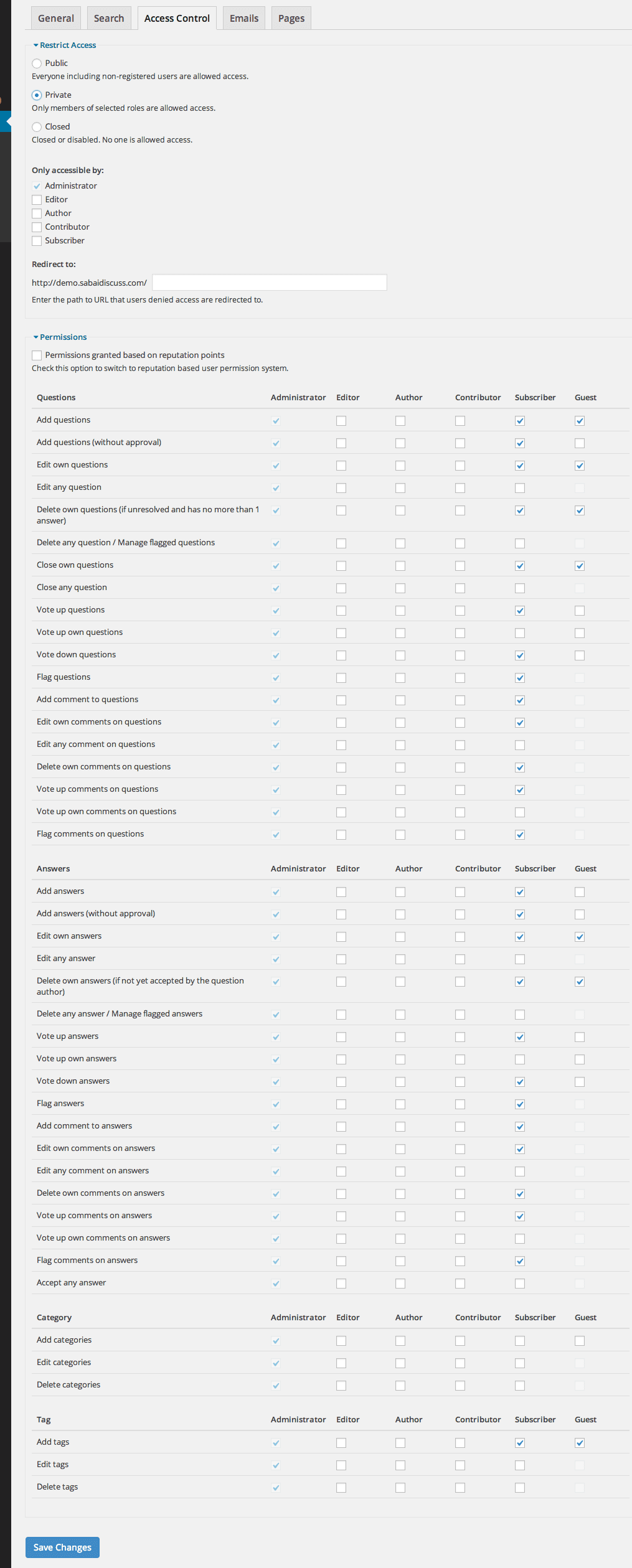
By default, anyone, however, you can configure permissions to let users with certain user roles be able to post answers.
> 2. as a admin can i give special permission to third party person to answer all question as my employee
You can configure permissions to let users with certain user roles be able to post answers.
Please have a look at the permission configuration screen – https://s3.envato.com/files/144927226/screenshots_discuss/admin_settings_acl.png
Ok
hi, i have bought you plugin years ago and now searched for forum and found you again. I can’t understand why you don’t invest into a modern design. You can sell so much more, but your plugin design is on year 1999 standstill… there are so many design sites where you can set a price and xx designers will create a design for you.
Hello,
Thank you for your suggestion and we will see what we can do.
Is it possible to modify the meta title/description formula (like you can do with Yoast for posts, categories, etc..) instead of individually like your FAQ instructions provide?
Hello,
Thank you for using Sabai Discuss.
Unfortunately, no.
“I love this plugin, but I don’t think the developers are actively developing it. So, I have a suggestion. It would be nice to develop a plugin that automatically uses GPT-3 AI to answer users’ questions. It would be great to release a new plugin and even better to release upgraded versions.”
Hello,
Thank you for using Sabai Discuss and for your suggestion. We will see what we can do in the later version of the plugin.
The title of the question doesnt show up on mobile, how do you change that?
Hello,
Thank you for using Sabai Discuss.
Are you referring to the title on the single questions page? If so, the title is displayed by your theme as the page title, and not by Sabai Discuss, so we recommend looking into your theme settings first. If you need further support, please contact support. https://codecanyon.net/item/sabai-discuss-plugin-for-wordpress/3455723/support/contact
hello, i recently bought it, but i want to paste “code” and the editor has only “blockquote”, is there any way to paste “code” ? any plugin recommended to do it?
Hello,
Thank you for using Sabai Discuss.
If you wish to display codes nicely, our plugin is compatible with Google Code Prettifier – https://github.com/googlearchive/code-prettify. You will need to first install https://wordpress.org/plugins/prettify-code-syntax/, and you can simply paste code wrapped with <pre> tags and the prettyPrint CSS class. You can see an example that we posted here: https://demo.sabaidiscuss.com/questions/question/prettyprint-test
Is there an easy way to rename certain text?
E.g. I want to rename:
“asked” to “posted” “Ask question” to “Add Prompt” “Your Answer” to “Your Comments” “Post Answer” to “Post Comment”
Hello,
Thank you for using Sabai Discuss.
Unfortunately no, and will require code modifications.
On the product page, the update history is version 1.4.14, but the download file is version 1.4.13!!!
Hello,
Sorry about that, we just updated the file on this site.
is it possible to turn off, or just remove extra fields options E:G check boxes, radio fields, social networking accounts and range options? when posting a question?
Hello,
Thank you for your interest in Sabai Discuss and we’re sorry for the late response.
Yes, those fields are added for demo purposes, and you can edit/delete those fields as well as add other fields. For more on custom fields, please see https://codecanyon.net/item/sabai-discuss-plugin-for-wordpress/3455723/faqs/18757
HI I am trying add a menu item to the WordPress Navigation for a user to get to their profile page. Which would be domain.com/questions/users/xxxxxx xxxxxx being the username of the logged in user. How would one do that?
Any update here?
Hello,
Thank you for using Sabai Discuss.
Menu items are generated by WordPress and displayed by the theme. Sabai Discuss isn’t able to do anything about them, so you will need to look for a 3rd party plugin with such a feature or contact the theme developer if that is possible with the theme.
Thanks for the response, I am not sure how one would dynamically create a link to a users profile, seems like a standard feature.
So how does it work with BuddyPress then? I’ve installed it locally and in Sabia, I can click on a user then to Users Profile, but the profile doesnt have any of the activity I would expect from Sabia https://www.screencast.com/t/5VLicz0WS
Anything?
Make sure the activity options are selected in Settings -> Sabai -> Sabai Add-Ons -> QuestionsBuddyPress (click the gear icon). Also, please note that only activities that were created after installing Sabai Discuss (and the above settings enabled) will be shown on the BubbyPress user profile activity page.
Hi! I have a wordpress website with Resido – Real Estate WordPress Theme, is it compatible with this theme?
Hello,
Thank you for your interest in Sabai Discuss.
Technically it should work fine since Sabai Discuss is a plugin. If you encounter issues using Sabai Discuss with the theme, we will help you resolve the issues as much as we can.
Hi, I have wp members in my intranet website, do you think your plugin is compatible ? Thanks
Hello,
Thank you for your interest in Sabai Discuss, and sorry for the late response. Sabai Discuss uses the same WordPress user accounts, so we do think it is compatible.
How can I disable the login to send comments? I want to everyone open to send any comments
Hello,
Thank you for using Sabai Discuss.
Unfortunately, that is not possible.
ask question button redirect to wordpress default login page or show a 404 not found how to solve this
Hello,
Thank you for using Sabai Discuss.
If your WordPress default login page is returning a 404 not found error, then that is an issue with your WordPress and not Sabai Discuss, so you will need to look into your WordPress setup what is causing that issue.
Hello, I brought this plugin. What is the shortcode for showing the user his /her question/answers ? Also, how could user find other others’ question/answers ?
I mean how could I add shortcode for every user to check their own questions and answers?
How could I add the shortcode for every user?
The issue is that how I use the shortcode for the page for users? [sabai-discuss-questions-username] ?? How I add the shortcode so that each user could check their questions and answers??
pre-sale question: “Add comment to questions” is disabled for guess post
Hello,
Thank you for your interest in Sabai Discuss.
Yes, it is disabled for quests.

This item was featured on CodeCanyon

Elite Author
Contact the Envato Market Help Team