

83 comments found.

A quick question before purchasing: Does this plugin work with all builders? Also on Thrive and Divi? (I bought a plugin for tours here and only realized too late that it only works on Elementor.) Thanks in advance.
Hello,
Yes, it works with any page builder 
Hi I would like to get it for my walking tour guide site https://www.vibenyctours.com/ quick question for you, how it will work, as Short Code Embed or a separate page, I have to embed it in different pages with multiple tour details for each location. Will it work?
Hello,
You don’t need to use a shortcode to integrate a tour.
You can choose to start the tour either automatically or when a specific element (like a button) is clicked. The plugin has a visual selection tool allowing you to easily define the target element that should start the tour.
Hi would this work in a site running Youzify/buddypress WP site. With Youzify there’s a lot of blocks which we can’t change (Youzify is here on Code Canyon too) Would we be able to build tours OVER a page and not have to insert the code in specific parts of the page – since with youzify a lot of the elements are not editable in a builder but controlled from settings of the plugin itself.
Thanks in adv. very interested
Hello,
Yes, it should work with this content, if it is displayed on the page upon loading and not after an Ajax load.
If there is ever any problem, do not hesitate to contact me from the support page, I will help you or offer you a refund if it does not correspond to what you want.
Thanks for the fast response. I’m keen to purchase. Only concern is that we’re on WP WordPress 6.7.1 I noted you don’t intent to update but plugins for earlier versions can be more vulnerable, and concern is about any exploit opportunities. Also not sure if it’s on a current version of PHP. Can you let me know on that?
Thanks in adv.
Also would it work on mobile? for cell users?
My plugins are all maintained and updated when necessary. This plugin perfectly supports the latest versions of WordPress.
Great thanks. You didn’t mention if works for mobile users? (mentioned above).
Yes, it is possible to create different tours specifically for mobile and for desktop, if the layout of the site differs.
perfect thanks I will give it a try
The user roles section of this plugin does not work, please update it.
Hello,
For support requests, please simply contact me from the support page, I will help you.
Bonjour. Nous avons deux licence de WP Light Tours Builder. Mais les plugins semblent avoir été remplacé par celui-ci. Je ne vois pas beaucoup de différence étant donné que la démo est très limitée. Mais de ce que je comprends, c’est que le principe est le même? Est-ce possible aussi de voir la backend en visite guidée?
Bonjour,
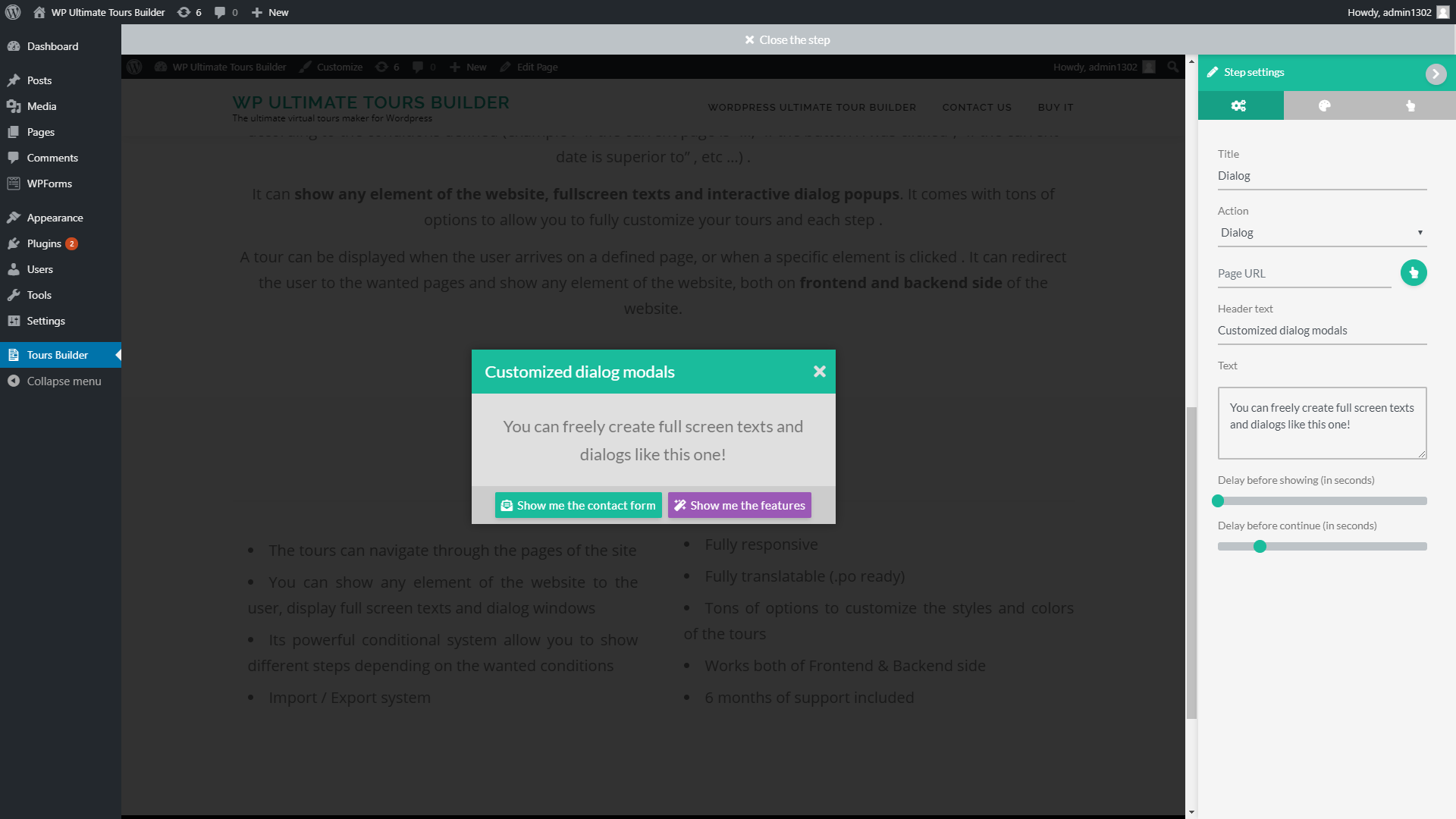
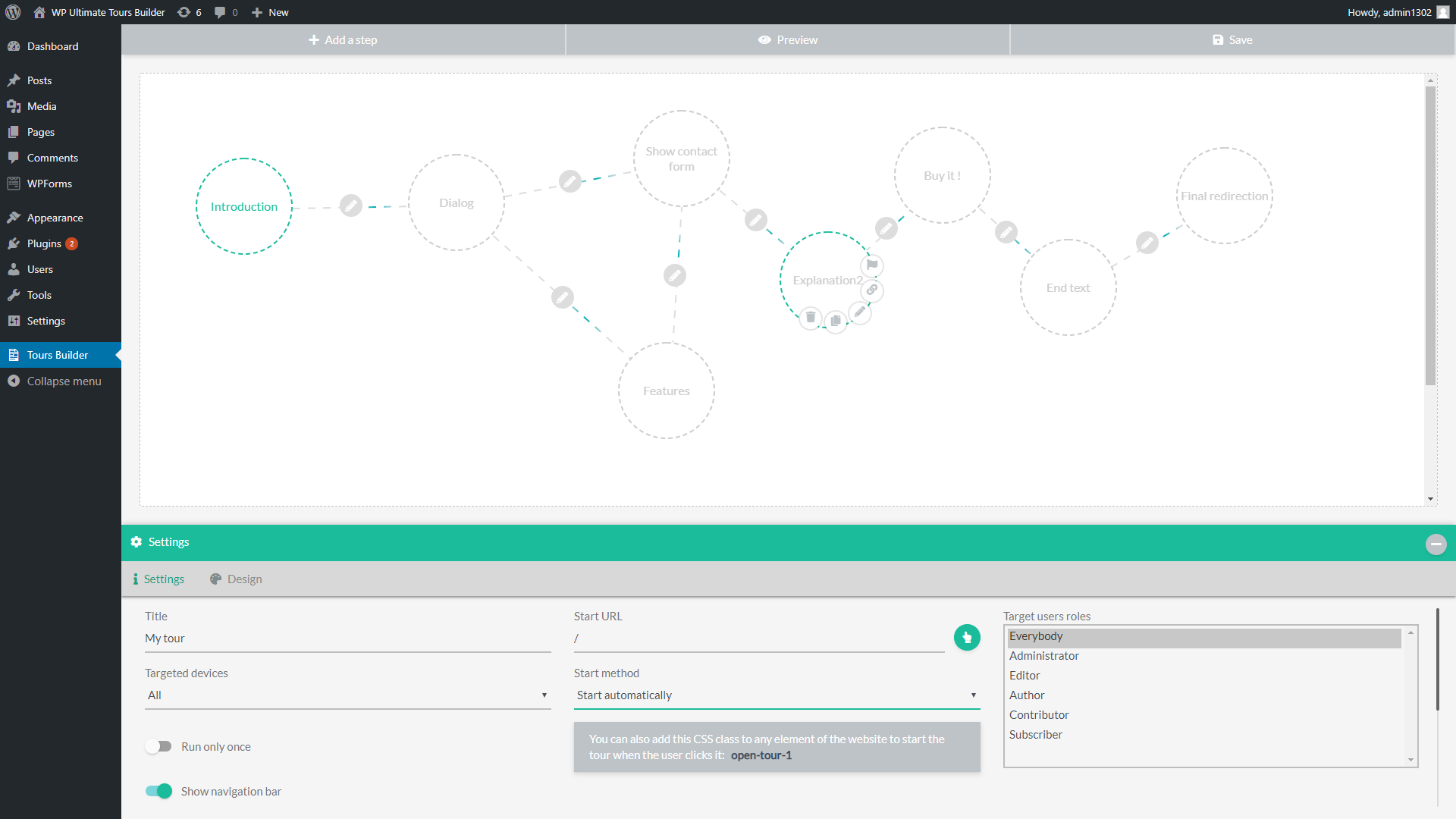
Cette version possède de nombreuses options supplémentaires (https://s3.envato.com/files/332002961/screen_7.png) , ainsi que d’un système conditionnel d’étapes avancé (https://s3.envato.com/files/332002961/screen_5.png).
Il n’y a pas de visite guidée du backend, désolé, mais il est visible dans les captures d’écran du plugin.
Je voulais dire,mais je peux me tromper, cela date un peu l’achat et l’utilisation de vos plugins par nous, mais il me semble que nous pouvions également utilisé votre plugin pour faire une démo du backend. Histoire par exemple de montrer comment fonctionne WordPress, ou un plugin. Bref, je crois que tu comprends ?
Ah oui, tout à fait ! Il est possible de créer des visites du backend comme du frontend.
Toutes les options de la version précédente sont incluses dans celle-ci , avec de nombreuses améliorations en plus.
Bon alors c’est réglé. Si je ne m’abuse, vous habitiez le Québec avant la France non? Je me souviens que nous avions discuté plusieurs fois par courriel.
Oui, nous avions échangé par email et dans les commentaires J’étais déjà en France, je n’ai jamais habité le Quebec.
D’accord, je croyais. De toute façon, merci beaucoup, si j’ai des questions, je vais te contacter via courriel. @+
Hi, is there a way to put a panorama as background in elementor? i want to make somethinf similar to this: https://storage.net-fs.com/hosting/6406328/115/ (clic on the initial image lo load the panorama and menu)
Hello,
No, sorry, there is no such option currently. Thank you for the suggestion.
Hi
How are you?
1- Did you stop updating this product? I’m going to purchase
2- Do you have any video tutorials for this?
Hello,
1. This product is a complete solution, I make sure it works with all WordPress updates and provide support. There are no updates currently planned.
There are no updates planned at this time.
2. No, sorry, there is no video tutorial, but there is a documentation in the plugin. It is very intuitive, and I am here to reply to your questions if you need support.
Hi, I’ve send a support question by email Thanks
Hello,
Well received, I replied.
Hi there, is the development of this project abandoned?
Hello,
No, this is a full plugin, which I continue to maintain and support.
I have created a step where plugin points out specific input. Then I want that user types something in that and presses OK to continue on next step. Is that possible?
Hello,
No, sorry, there is no specific option to do that currently. Thank you for the suggestion.
Question. I have multiple member types on my site. a lot of them are similar which I wanted to see if it is possible to create 1 tour for multiple member types?
Hello,
Yes, you can allow a same tour for several user roles .
Thank you for the response. My apologies as I wasn’t specific enough. I have more than 20 different member types which 10 of them have the same capabilities. I create a tour that fits for those 10 so I went into the settings where the target user roles option is. I just highlighted all 10 of them. Will the plugin allow that to work for all highlighted roles? or would I have to clone it 10 times to make sure all those members get the tour?
Yes, you can freely define the multiple roles allowed to see the tour. This option uses a multi select component to allow you to select several roles.
Where is the changelog for this plugin? I am on version 1.054 and there is a bug that throws a PHP error and none of my tours are displayed. I have a valid license, but am out of the support period. Thank you.
Hello,
There is no changelog currently. For support requests, please contact me from the support page by using the account that has active support rights, I will help you : https://codecanyon.net/item/wp-ultimate-tours-builder/24096901/support
Hello, is it also possible with your plugin to define a specific pixel area or does the selection only work via css elements?
Hello,
No, sorry, it can’t target a specific pixel area currently.
it is possible to start a tour on website a from an external link on website b? and can I jump in a tour to different menu items (pages)?
Hello,
1. There is no direct option to do that, but you can choose to start the your on website B when the url has a specific GET variable ( https://.../page/?startTour=1) and call this url from the tour on website A .
2. Yes, the tour can navigate between the different pages of the website
hello. is it possible to show different tours for mobile devices and desktop? thanks!
Hello,
Yes, you can choose if each tour must start on computer or mobile device (or both).
Hi there
For a multisite, is it possible to create a tour in backend of a site and show it on all subsites?
Hello,
No, sorry, the plugin works individually on each website of the multisite installation.
Hi there, will this plugin work on pages that are generated from shortcodes? like the woocommerce “My Account” page. We want to customize the “My Account” page and provide a tour to our customers on how to use it. How do we build tours when the content is dynamically generated from a short code? Also, I see the last update was April 2021, do you plan to keep updating this plugin into the future? Thanks kindly,
Hello,
Yes, it works with pages generated by shortcodes. It is a complete plugin, there is no specific update planned currently.
Hi there,
Just a pre-sales question if I may – will this plugin work with URL’s that are dynamically generated such as BuddyPress eg. Buddypress member profiles where the URL is something like https://mysite.com/members/NAME where the name is the specific user’s username?
Kind regards Francois Wessels
Hello,
Yes, it works with dynamic url generated by Buddypress. You simply need to use the shortcode [USERURL] in the step url or tour url option to start it when the user arrives on his profile page. For the other url, you can use the shortcode [USERNAME] and the plugin will automatically replace it by the detected username. Ex: https://myWebsite.com/[USERNAME]/something .
Thank you very much for the quick reply! Will go ahead a purchase a copy for our project
How does “click on the element” suppose to work? – This step is stumping me. I set the step that the element should be clicked to continue and it continues whether the element is clicked or not. Also, if you try to click the element, nothing happens while it is still highlighted. I am not sure if this step is to allow the user to click or does the action of “clicking” is activated by the tour. Either way, it’s not working.
Hello,
When this option is enabled in a “Show element” step, the user must click the highlighted element to continue to the next step of the tour. Feel free to contact me from the support page if you need help : https://codecanyon.net/item/wp-ultimate-tours-builder/24096901/support
Hi there,
What is the latest app version and where can we expect the new build to be released (any ETA)?
Thank you!
Hello,
The last version of the plugin is 1.058. There is no specific update planned currently.



)
.)