9 comments found.

I downloaded the attached apk trial version, but there are some errors in it 1. The main interface of the application does not appear as it appears in the pictures 2. The calculator does not work. As soon as I perform any calculation, it takes me out of the application 3. When hiding images, it takes a lot of time Can you solve these problems and send me a copy of the application so I can purchase it? Can you see the application’s control panel from the inside?
Hello, the app is poorly created, for example if you add 1 + 1 the app crashes and closes, also if it puts multiplication etc, only if you enter the coultar code it works fine, but your thing is that you could also use the calculator or don’t cresh and stop working
i will check and very sorry for inconvenience
Play Store: Your app currently targets API level 30 and must target at least API level 31 to ensure it is built on the latest APIs optimized for security and performance. Change your app’s target API level to at least 31. Please update it
just replace 30 to 31 no issue dear because no any changes
crashes while calculating
i will check and inform you
Working well
And when changing the package, the same error appears
it’s working for us and also for other user dear
when i try to hide photos it takes lots of time in processing.
OK i will check and let you know
crashes while calculating.
i will check
Hi When Generate Signed APK , i see this Error: /Users/manas/Downloads/MOBILE-APPS/Calculator-Vault-APP/Calculator Vault-Code/app/src/main/java/com/vault/calculatorlock/video/VideoActivity.java:30: error: package com.example.demo does not exist import com.example.demo.R; How can i fix it ?
when you change your package name so you also have to change imported “R” below step to change.
“com.example.demo.R;” to “your.package.name.R;”
There are 100s of place to change, how can i change in one short ? Please reply on skype .
just click by Ctrl+Shift+R or Ctrl+Shift+F with “com.example.demo.R;” and replace with “your.package.name.R;”
ok, Thanks
Welcome
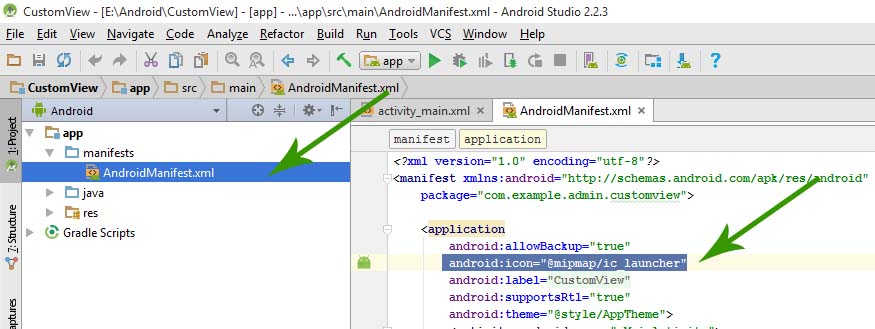
Hi, How & where can i replace my Ico Launcher icon ? Still the app shows Andoird icon, Thanks
then you have to replace icon200.png with your icon in drawable or mipmap where you want and then go to Manifest file and in application you can find icon where you have to change then it will show your icon.
https://abhiandroid.com/androidstudio/wp-content/uploads/2016/12/Change-App-Icon-In-Android-Studio.jpgWhen doing a calculation, the application stops working
I checkout dear it’s work well
When doing a calculation, the application stops working
I will checkout and inform you here.
Please let me know when the issue is resolved
we trying but not found any library
??
it’s resolved
I downloaded the trial application and it does not work and when I enter a secret number, the application stops
i will check again
i don’t know where you got issue but it’s work perfectly, and if you getting problem after buying then contact on Skype i will solve your problems so don’t worry.
you have any problem if you connect with us on Skype or Mail ?
just try to understand
Do you understand what the problem is?
Yes
Did you fix the problem?
Check your self sorry
I’ve tried a lot and still the same problem
.
working fine