15 comments found.

Is this plugin updated/alive?
Hello there,
I hope you are doing well, We will release an update to our Restrict Dates In Gravity Forms addon next month.
Thank you
I wanted to download the newest version, but when i click on download, i only got 1.2.0 instead of the 1.2.2 version.
Hello there,
Please open a support ticket on our website so our technical team can share the updated plugin with you.
Click here: https://wpexperts.io/support-envato/
Thank you
Hi, i will open a ticket but your plugin breaks a lot of function of Gravity form, i didn’t checked all but it already breaks drop down field (choice, default value, ...) Is this plugin up to date with last version of Gravity Form ???
Hello ButterflyPixel,
Yes this plugin is compatibile with Latest Gravity Forms.
You can check our recent release and let us know if you facing any problem.
The Conditional logic depending on the input on another field works great, on desktop. But i can’t get it to work on mobile. Anyone has any idea why?
Hi there,
Please open a support ticket on our website so our technical team can help you.
Click here: https://wpexperts.io/support-envato/
Thank you
Can’t edit checkboxes and radiobuttons anymore either. When I deactivate your plugin everything works fine again within Gravity Forms. Please address this issue. Thanks.
Hi there,
Please open a support ticket so our technical team can help you.
Click here: https://wpexperts.io/support-envato/
Thank you
Hi!
Using this plugin and now it seems to break the editing of checkboxes and radio buttons in the form editing. Can you please provide a new working version!
Thanks
Hi there,
Please open a support ticket so our technical team can help you.
Click here: https://wpexperts.io/support-envato/
Thank you
Does this also work with a date drop-down list?
And can I block multiple dates / date ranges?
Hi
Does this also work with a date drop-down list?
At the moment it works with just the Date picker option.
And can I block multiple dates/date ranges?
Yes.
Thanks
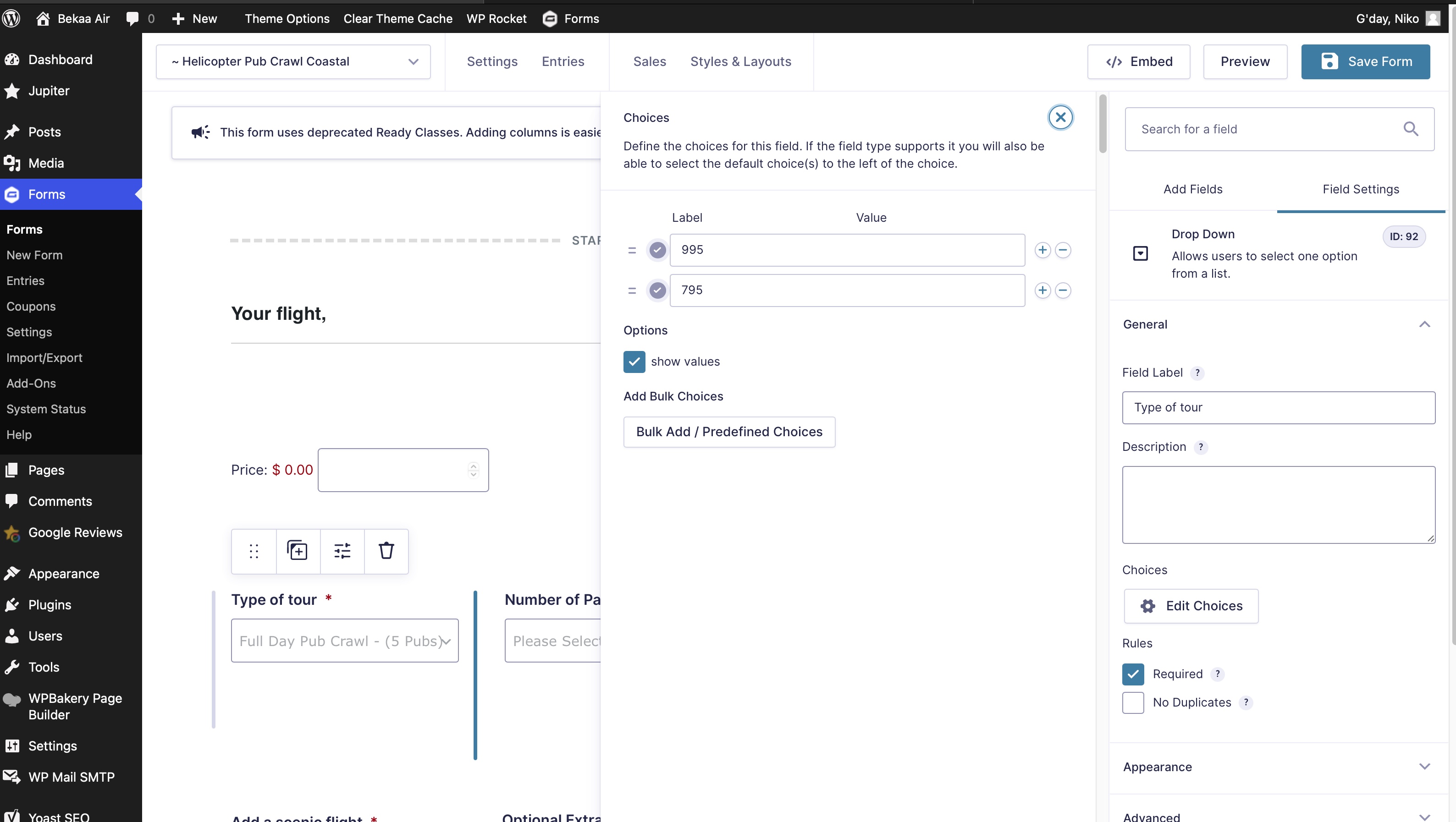
Hey folks there is a bug with your plugin. It removes the ability to edit labels of products when it’s activated. This was discovered by Gravity Forms Support themselves. Please see this screenshot – https://bekaaair.com.au/gravity.jpg are you able to please advise and fix
Hi
Please open a support ticket so our technical team can help you.
Click here: https://wpexperts.io/support-envato/
Thanks
hi does this work with the latest version of gravity forms?
Hi there,
Yes it will work with the latest version of Gravity Forms if you have any questions feel free to contact at support@wpexperts.io
Hello, this script looks awesome and appears to be almost perfect for what we need, but I just want to confirm something before I purchase. Is it possible to set the “earliest” date (using the min/max functionality) based on another date field that they’ve selected?
What I mean is, we want to allow the user to select a check-in and checkout date. They will have 2 date picker fields. There is a 7-day minimum stay, so the checkout date must be at least 7 days after whatever they select in the check-in date field.
I see from the screenshots that for Minimum and Maximum dates, you can choose between “current date” and “specific date” and then add 7 days to that, which is beautiful—but can we set the specific date to the date the user entered in the check-in field (and add 7 days to that)?
Thank you!
Hi there,
Thanks for sharing your requirment, it is possible with this add-on. if you have any questions let us know.
Thanks
Great, thanks!
Thank you
Hi,
I just purchased the plugin, but I’m not sure if the issue is with Gravity version 2.5 (is this plugin compatible?) or a bug—but with this plugin installed, it breaks all of my conditional logic on the form. If I disable this plugin, the conditional logic works normally again. Could you let me know if this is a known issue and/or if there is a fix?
Secondly, exactly HOW do you select an “already selected date” from another field? Just as you answered yes above, I see that the documentation also confirms that yes, “Link Date to another defined past field” is an option. But when I select a date field, I do not see any option to set the minimum date to the date specified in a past field. I only see Current Date and Specific Date. Could you please clarify how to set this?
Thanks so much!
Hi there,
Kindly share the issues with our technical team at support@wpexperts.io so they will assist you properly.
Thank you – email sent!
Thanks
Is it possible to allow only the first Wednesday of the month and not allow if current date is two days before that wednesday?
Hi there,
Thanks for sharing details of your requirment, kindly share this with our technical team at support@wpexperts.io
Thanks
Hi, I’ve just installed the plugin and working great for restricting the date picker for tomorrow … but I can’t seem to set this for the default date. Is that possible? I may be in trouble if it’s not and need to find another solution.
Please open support ticket so our technical team can help you.
Click here: https://wpexperts.io/support-envato/
Thanks
Fantastic, thank you for the excellent support and custom code fix for what we wanted to do.
Thank you for using our plugin.
Hi, does this work for the “Date Drop Down” option? Or just the “Date Picker” option?
Hi there,
At the moment it works with just Date picker option. please share your requirement with our technical team at support@wpexperts.io
Hi wpexpertsio,
I really like your plugin. All is working. I have just one request. I’m using the “No Duplicates” option within Gravity Forms to limit folks from selecting a date that’s already been selected once the form has been submitted.
Could you add a feature so that when the “No Duplicates” option is checked it would gray out / not allow folks to select those dates on the calendar.
Currently how it works is the user thinks that date is available and selects it and tries to submit the form but an error message pops up saying the date has already be selected.
Would be great if those dates were already grayed out and not able to be selected in first place.
Let me know your thoughts – great plugin otherwise.
Thanks in advance!
Hi there,
Thanks for the appreciation, we will look into this request for future features. also, open a support ticket here: https://wpexperts.io/support-envato in case if our technical team have any questions.
Thanks
When activating the plugin, gravity form layout in backend changes, and makes it impossible to scroll. Besides that it dosnt seem to work
Hi There
Please open support ticket so our technical team can help you.
Click here: https://wpexperts.io/support-envato/
Thanks