390 comments found.

Hello Pavel. I bought the module, activated it, deactivated the free version of ACF at the request of the module. Fields are not added. Clicking on the add field button does nothing. If I added a field to ACF, then deactivate free ACF, change the field type to Visual Composer, then this custom field cannot be used anyway. Posted a message on your profile.
Hey, I’ve just replied you
Hello. Great plugin! This is what I need!
It would be great if you would consider adding: 1. a separate tag (h1 – h6 etc) for main labels in ACF Field Picker. This is very useful when using the repeater in entries where not everything is filled. Then the label (in ACF Field Picker as section title) appears only where content is present. Now the header must always be there because you can’t put it in a snippet, so I have to add section title in my page template which is not conditional.
2. Can you consider adding the option to display fields (eg repeater fields) as a list? Another useful thing. In VC snippet the option “show as list item” could appear and in ACF Field Picker show as a list or ul / ol wrapper (or any other implementation).
3. Last wish  to add prefix and suffix for Field Picker elements. A very useful solution when you need to add, for example, currency or other pre / post label. I know you can add it in a snippet, but it doesn’t always look as it should and is separated by unnecessary tags. When you combine this with WPML, then life would be easier.
Hi, many thanks for your feedback. I’ll add this to the consideration list.
Great. That would be huge! In a meantime is there any way to modify wrapper of Field Picker label only to get heading like h2? Maybe hook?
The plugin allows you to redefine every output of the Field Picker using filter hooks vc_acf_field_picker_render_field_type_x.
You can read more about it here https://wpacfvcbridge.com/acf-field-picker/
Also you can check the /includes/vc-acf-field-picker-filters.php file to see how the current filters are written, so you can follow the pattern and write your out filter hook.
Hope this helps.
Best, PR
Yes, I’ve tried to use add_filter( ‘vc_acf_field_picker_render_field_type_repeater’, ‘vc_acf_field_picker_render_field_type_repeater_filter’, 10, 3 ); and I’ve seen code, there is no access to field template. I can only pass field_content[‘label’] to function and modify it inside and then use it with $value, but can’t change label itself. It seems there is no hook to access and modify field template. Or am I missing something?
Hi Author,
Actually I am facing one issue with the WP ACF – VC Bridge. When I am using ACF bridge plugin with the WP Bakery and add the Extra Class name on that then will will automatically shows null(This page field:null) value every time. I search a lot but I can’t find the solution on the internet. Can you please help me to resolve the issue. I already talk to the WP Bakery plugin support but they are saying it’s not our end please talk to the ACF – VC Bridge support.
I am using:- - Latest version of version 5.8 - Latest version of WP Bakery – Purchased from WP Bakery (6.6.0) - Latest Version of ACF – VC Bridge – Purchased – VC Bridge (1.7.4)
I test on the same on fresh WordPress with default twenty twenty one theme but its not working.
There is no option to attach the screenshot here.
Can you please help me to resolve
Thank you!
Hi Author,
Actually I am facing one issue with the WP ACF – VC Bridge. When I am using ACF bridge plugin with the WP Bakery and add the Extra Class name on that then will will automatically shows null(This page field:null) value every time. I search a lot but I can’t find the solution on the internet. Can you please help me to resolve the issue. I already talk to the WP Bakery plugin support but they are saying it’s not our end please talk to the ACF – VC Bridge support.
I am using:- – Latest version of version 5.8 – Latest version of WP Bakery – Purchased from WP Bakery (6.6.0) – Latest Version of ACF – VC Bridge – Purchased – VC Bridge (1.7.4)
I test on the same on fresh WordPress with default twenty twenty one theme but its not working.
image – https://ibb.co/hgqpJHy
Can you please help me to resolve
Thank you!
Hi Author,
I can’t receive any email from your side.
Hi there,
The description/screenshot provided is not enough to understand the issue. Please send a private message with the WP admin credentials, so I can explore.
Best, PR
Hi Author, I have sent you the details on the private message. Please check
Replied
Hi Author, I have checked my email but I can’t get any response at you end. Can you please help me to resolve this issue?
Also, when I logged IN in WordPress admin panel which I have shared with you on Private message, I can’t see any plugin on that.
Plugin Name – WP Bakery – Latest Version ACF Bridge – Latest Version
Hi Author, Can you please update me regarding the issue?
Hi,
Ok, so I see that you’ve installed the plugins and it seems that you’ve added a Field Picker to the Sample page. I’m not sure what you’re expecting to see there as you didn’t send me any description of your expectations. From what I see, you’ve added the ACF Field Picker in order to pull some ACF fields, but you didn’t create any ACF fields at all and didn’t assign any to the page. Therefore, I can’t imagine what you’re really trying to achieve.
Please provide the exact description as I’ve already asked you about. I need to know exactly:
1) What you’re doing?
2) What are you expecting?
3) What is the problem? Screenshot, link, description.
Looking forward to your reply.
Meanwhile, I’ve: 1) Created a sample ACF group, see ss https://markuphero.com/share/nIMU9N4qem63g5KAMbeR2) Picked that sample field in the ACF Field Picker https://markuphero.com/share/aTgGBHX7A6Fa43n3B4bK
So, it displays properly on frontend, no issues https://markuphero.com/share/2kYO3PkM5gBYHkTCMon8
Hope this may answer your question by just looking at this sample setup.
Best, PR
Hello pavelreva. Please help right away.
I am setting up a new website everyone is excited about, but cannot figure out how to have a simple linked button from ACF field (button text and URL) I’ll have to start all over without the plugin if I can’t solve this.
I need help urgently. Thank you!
Brian McAlpin brianm@egcgroup.comHi Brian, I’ve sent you an email
Hello. I registered on the website but I cannot find where to open a ticket etc…
Your plugin is great. One question so far… how do I use a button for s download from custom fields? Normally there is text for link/button text and a URL for download… in a group… but I cannot figure out how to use the licker to display the button text only and have it link/.download the link.
Thanks again!
Brian McAlpin EGCgroup brianm@egcgroup.comHi Author,
I have a multisite installed with wpml. In a page, i have an ACF field of type image. I uploaded an image to that ACF field and published the page. Then i duplicate the page to another language via wpml. All the contents of the page gets duplicated, but the image information(such as title, description etc) doesn’t shows up.
I have reported the issue to the WPML team, but they told that since we are not using ACF plugin and instead we are using ACF VC bridge, so it might be the problem with this plugin. Can you please help.
Hi there,
Sounds strange because WP ACF-VC Bridge uses the original ACF PRO plugin. Anyways, I need to investigate this. Please send me a private message with WP admin and FTP credentials.
Best, PR
I have emailed you in private
Replied
I have replied on to your mail. Any updates on that?
Replied via email
I have emailed you the ppk file. I have mailed you from my corporate email id “debobratok@happymarketer.com”. Please help me sort out the issue as soon as posssible.
replied
Hi Pavel,
Just bought your amazing plugin. I’m so happy with it.
Is there any chance to show a nested repeater field’s content with your plugin?
I have this (CPT):
Product category (repeater)
- category name (text)
- category logo (picture)
—Product (repeater)
- product name (text)
- product logo (image)
- product description (text)
We like to use more products and categories too.
Thank you. Frank
Hello,
We are using the7 theme with their bundled WP Bakery plugin. VC Snippets does not appear in the menu so we are unable to create the layouts that we need.
Is there a way to get VC Snippets to be accessible?
Hi there,
Most likely there is a conflict in admin menu position number, so something from The7 overwrites the VC Snippets. The easiest way to test this is to change the menu position number from 90 to something else, for ex. 91, see the screenshot https://markuphero.com/share/9LNHs6wpzUI9cCEozARB
If you can’t do it, please send me a private message with FTP and WP Admin credentials, so I can check it.
Best, PR
Thank you! That did the trick. Is there a way we can permanently fix this or will we just need to reapply the fix if we update the plugin?
Hi, im used The7 Theme When put a visual composer field. The first time works perfect. But when i back to open the admin page, dont show the visual composer again if you send me your email i show it in a screen capture
Hi,
Just send me it via private message that you can send from my profile page.
Best, PR
Hi Pavel Please check your private message. I have send a message last week an today Thanks
Hi Marco, just replied.
Hi so i have added flexible content to Single Products with some data in a product.
i have created the VC Snippet for with the 6 sub fields i created in flexible content with ACF Pro, now i have created a page called: Offers and inside there tried to use the ACF Picker to choose the fields but i am getting no output.
I also went into flexible content and made sure the VS snippet template i created was selected. any idea? as what i am trying to do si.
Add infromation to single products and displaying it on a page?
Hi,
In order to investigate this issue, I need to get access to your wp admin and see myself what you did. Please send me a private message with the access and links.
Best, PR
Hello, I’ve recently bought your plugin but i need to use it with a custom WP-Bakery bundled with the theme UNCODE.
Unfortunately the plugin is telling me i need to have Visual Composer active and it’s not recognizing this custom version of visual composer bundled on that theme.
Is there any way we could support it?
Thanks in advance
Hi there,
I need to check it. Could you please send me a private message with the access to WP admin and FTP access?
Best, PR
The ACF Field Picker in WP Bakery Page Builder does not output the field-content anymore when viewing the website. I have contaced you via private message with the URL to the website.
Thanks in advance.
Hi, replied to your private message.
It appears once, then I publish the page but the ACF block (which is based on visual composer is not re-enabled.
Hi there,
Thanks for the screenshots.
I didn’t get the #3 point… Could you send me a private message with WP admin access and links to the pages? I could then quickly check what’s going on.
Best, PR
Presale question: Hi there, is there a way to configure fields to display or hide based on a user’s response to other fields? (logic conditional form)
Yes, ACF supports conditional logic.
Hi,
On our client’s website the WP Page Bakery on custom field is only loading sometimes, other times it just show blank popup with blue Done button.
We have WP ACF-VC Bridge version 1.6.9 installed and WPBakery Page Builder version 6.6.0 installed.
I don’t see any error in console, I also tried deactivating other plugins.
Let me know if you need more details.
Thanks.
Hello, I could not use the plugin because there is no acf pro on my site. If it is suitable for you, can you make a refund.
Hi, you don’t need ACF PRO because it is bundled with the plugin. Make sure you’ve disabled ACF Free version if you have it installed and activated. If not, please send me a private message with wp admin access and the screenshot of the issue.
Best, PR
I sent it as a private message.
Replied
Hello, I’m having exactly the same problem as the comment here describes:
https://codecanyon.net/item/wp-acfvc-bridge-integrates-advanced-custom-fields-and-visual-composer-wordpress-plugins/19622052/comments#comment_25907760I have the latest version of WPBakery Page builder (6.6) and the latest version of your plugin. 1.7.4
My client complains that sometimes the editor doesn’t load, and sometimes it is blank when it loads, even though there is content in the database.
I think it’s something to do with the speed the page is loading. I’m not sure the js error is anything to do with the editor not loading correctly, as the error is always there, regardless of if the editor loads correctly.
I’m really not sure how to debug it further, and I would appreciate your help.
Thanks, Tim Ross
Hi Tim,
1) Would it be possible to get access to wp admin panel? If so, could you send me credentials via private message?
2) Do you know what browser and operating system your client is using?
Best, PR
Hi, yes, sure I can give you access. I will set up an account for you and send you a message. The client is using windows, but I use a mac and I can see the issue in multiple browsers (chrome, firefox).
I sent you a private message with the login details. Did you recieve it?
Yes, received, thanks. Will update you soon.
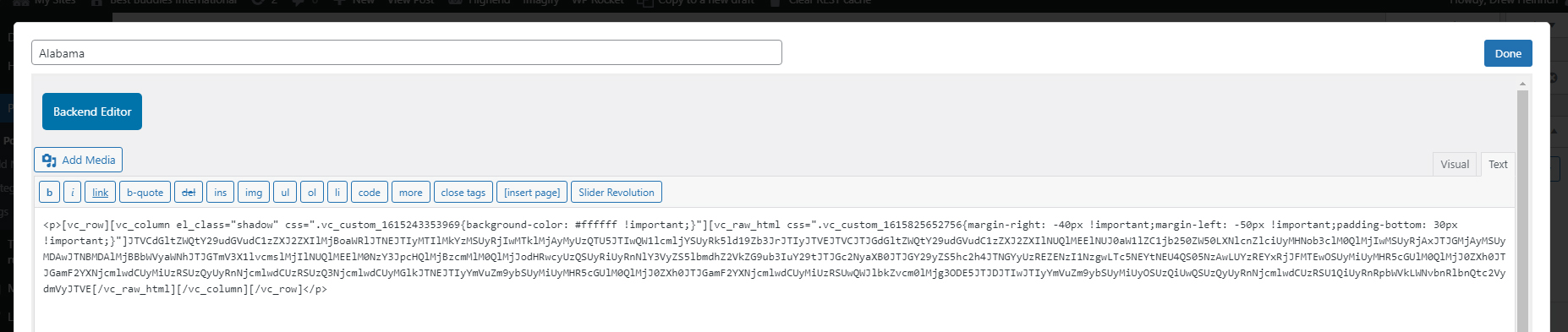
Hello, Great plugin but there seems to be one bug. If you save the Visual Composer (VC) content with the Text Tab Open and click “Save” It will strip the contents in the VC and will leave it blank. But if you Click the Blue Backend Editor Button and the Blue Button Changes to the title Classic Mode, and Save, everything is fine. If I were to click Done and save the VC like this (see URL) I would lose the contents: https://www.bestbuddies.org/wp-content/uploads/2021/03/strips-content.jpg . A restore feature would be nice too.
Hi there,
Could you please provide the following details as I can’t replicate this behavior: 1) What browser/version you’re using? 2) Are you on Windows or Mac? 3) What WP ACF-VC Bridge plugin version do you have installed? 4) Where is the VC field added to: post/page, taxonomy term or option page?
Thanks, PR
The latest version of Chrome, Windows Pro 10, ACF-VC Bridge Plugin Version 1.6.7, added to Post.
Also, a co-worker had the same issue using Chrome 89.0.4389.90, Mac, ACF-VC Bridge Plugin Version 1.6.7, added to Post. too.
Hi. Do I need the Envato Market plugin installed to receive the plugin updates or does it work like a normal plugin in wp-admin without Envato Market?
Hi there, you need Envato Market plugin or update manually.