638 comments found.
A bug was detected. The tour was created, the number of available places is 10. 10 seats booked. All woocommerce orders have been deleted. Reservations is Expired. If you delete orders, bookings must be removed. What do I do now?
This is not a bug, all booking plugin will restore ticket when admin cancel order and it will not restore ticket when you delete order, please try default product of WooComemrce to see the result
Best regards, ExThemes.
Okay, thank you!
I also need to get a condition in the custom template product. eg. if is_tour: echo …. an alternative to this if is_page
Hi,
There is no function to check product as tour or not, if you want to check product as tour or not, please use this custom code:
function _is_tour() {
   $tour = false;
   if(is_singular('product')){
       global $wp_query ;
       $post_id = '';
       if(isset($wp_query->queried_object_id)){
           $post_id = $wp_query->queried_object_id;
       }
       $wt_main_purpose = get_option('wt_main_purpose');
       if($wt_main_purpose=='meta'){
           if($post_id !=''){
               $def_sg = get_option('wt_slayout_purpose');
               $s_layout = get_post_meta( $post_id, 'wt_layout_purpose', true ) ;
               if($def_sg=='tour' && $s_layout!='woo' || $def_sg=='woo' && $s_layout=='tour'){
                   $tour = true;
               }
           }
       }elseif($wt_main_purpose=='custom'){
           $classes[] = 'wt-mode-custom';
           if($post_id !=''){
               $s_layout = get_post_meta( $post_id, 'wt_layout_purpose', true ) ;
               if($s_layout=='tour'){
                   $tour = true;
               }
           }
       }else{
           $tour = true;
       }
   }
   return $tour;
}All right, I did it! Thank you very much
Hello! I need one of the fields not to take into account the quantity when booking, so that it does not affect the remaining free seats.
Hi,
There is no field like you mentioned available, you need to custom code or you should use the addon of WooCommerce to create custom field as you want
Best regards, ExThemes.
Hello! I need the number of babies taken into account in the price, but not deducted from the number of booking places. Babies don’t need beds or accommodation.
p.s. I meant infants, not babies
It is not possible by default, you need to custom code
ok how to add custom code, do you do that? how much is it?
Please give us a message via support link: https://codecanyon.net/item/wootour-woocommerce-travel-tour-and-appointment-booking/19404740/support
We will provide some custom code for you.
P.S. Woocommerce edit tour order
Hi,
You can not change those order items metadata, because that is fixed item meta key, we use it to manager data from user for order item and it start with underscore because that is hidden item metadata
Best regards, ExThemes.
Javascript
<?php
add_action( ‘admin_footer’, function () { ?>
<script> var html=document.getElementById(‘order_line_items’).innerHTML; html = html.replace(/_adult/g,”Квадроциклы”); document.getElementById(‘order_line_items’).innerHTML=html;
</script>
<?php } );

Hi
Nice plugin. I cant find out how to set 4 or 5 stars for the tours. Also although I have enable comments I dont see the reviews tab. How can I enable the review tab.
Thank you
Leonidas
Hi,
You need enable reviews in WooTour setting page and in WooCommerce > Settings > Products > Enable reviews
If it still does not work, please give us your url + admin login info via support tab, we will check it for you
Best regards, ExThemes.
I tried that but stil doesnt work. I sent you url + admin login. Thanks
Hi,
We have replied to your message, you can check it
Best regards, ExThemes.
Problem resolved, thanks for the support
Glad to hear that!
Thanks.
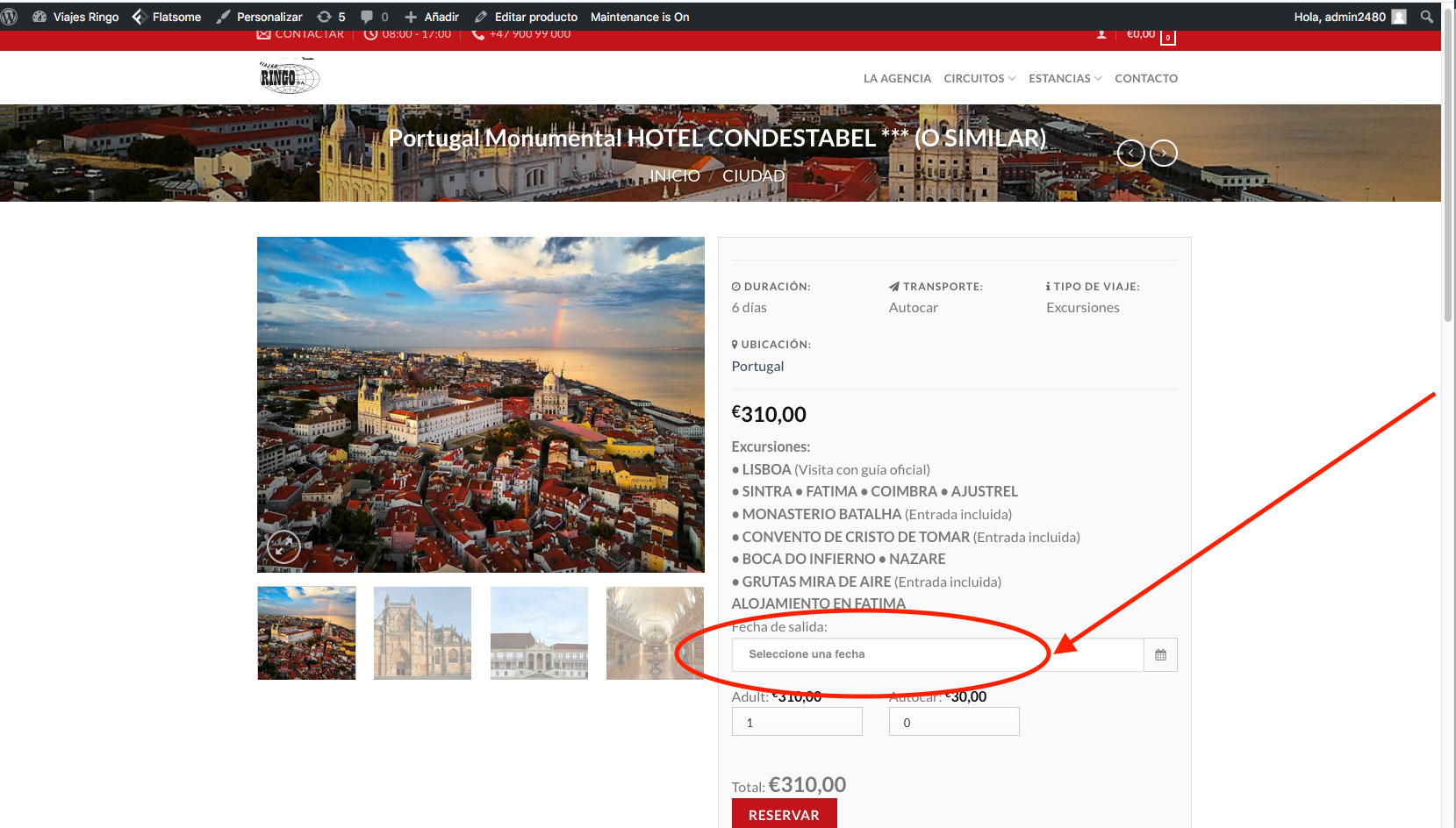
Hello, Would it be possible to put the text in the blank field of the date picker that appears by default: “select a date” instead of leaving it blank? https://viajesringo.com/wp-content/uploads/2021/05/Captura-de-pantalla-2021-05-25-a-las-10.53.05.png
Hi,
You need to use some custom js code in this case, please give us a message via this url: https://codecanyon.net/item/wootour-woocommerce-travel-tour-and-appointment-booking/19404740/support we will send you some custom code to to that
Best regards, ExThemes.
Hello, I have bought the plugin and I want to show the locations using taxonomi shorcode The shortcode I put is: [wt_taxonomy style = ”” taxonomy = ”” term_ids = ”” count = ”” order = ”” orderby = ”” column = ””] but the background image of the location does not appear. and yet in the location if there is a space to put it: “Image Attachment ID(Set featured image for this location)” I’m putting the url of the image, I don’t know if it’s correct Thank you so much. The url is :https://viajesringo.com
Hi,
You need enter image attachment id instead of image url, You could see how to get attachment id: http://i.imgur.com/HaBWvyy.png
Or you can install this plugin to select image instead of add id:https://wordpress.org/plugins/categories-images/
Best regards, ExThemes.
I have 2 pre-sales questions:
1. Is it possible to have both Tour products and traditional WooCommerce products such as t-shirts, hats, etc?
2. Is it possible to disable dates over a range (say Jan 1st – Feb 15th 2022) rather than individual dates.
Thank you.
Hi,
1. Yes.
2. Unfortunately it is not possible
Best regards, ExThemes.
Pre-Sale question: I have a travel agency and I would like to know if it is possible to do the following for each hotel or vacation village – charge different prices each week (especially in the summer time) for each hotel, facility or resort; – load different prices for adults and children that will change according to the date (for example from July 01 to July 7 € 100, from July 8 to July 15 € 130) – is it possible to apply the discount if a child is added to the couple of adults, or free if a child is up to 12 years old?
Hi,
I think it is not possible with this plugin
Best regards, ExThemes.
Hi,
unfortunately it is not possible by default
Best regards, ExThemes.
Hi, May I know how to achieve the following? Ver 3.1 – Add tour with different hour and quantity As I try the admin demo… it doesn’t seem to have the time selector options.
Hi,
You need to use variation as time and it will auto create number ticket for each of variation/time
Best regards, ExThemes.
Thanks for the answer. I got it works. How about the passenger info input in the checkout page, is there any settings from this plugins to edit that?
Thanks for the answer. I got it works. Allow me to ask 2 more things. 1. How about the passenger info input in the checkout page, is there any settings from this plugins to edit that? 2. Is the plugin able to disable the booking date lesser than a day?
Hi,
1. There is no setting to edit it, if you want to add more field, you need to use custom hook code
2. Yes, it is possible
Best regards, ExThemes.
thanks and noted on #1. Further to #2, i don’t find it from within the admin demo. Is it that there’s a general settings for this plugin?
You can see this option when create tour like this:https://www.dropbox.com/s/b09nd32w7ej4obx/2021-05-04_100850.png?dl=0
Best regards, ExThemes.
oh, how could i missed that…. thanks a bunch
Hi Support, further to check on the passanger’s info that need to addon more fields…. 1. If i engage you to attend these requests. Can roughly know how much you would charge? 2. Will the passangers info be able to access/view from the customer/order details?
Hi,
1. Please give us details about your custom work via support tab, we will check and feedback for you
2. Currently it is not possible, but we will consider add option to allow send email to all email of passengers in the next update
Best regards, ExThemes.
Hi, pre-sales question.
I want to konow if it is possible to do with your plugins and what addons i need to do this:
Is for a company of activities in the nature.
They have fixed activities where a person can do a booking selecting day and hour, number of adult people (with a price), number of young people (with a price), checkboxes to add materials and number of materials (with a price), and posibility to add a discount code, finishing all with a payment with Visa, MasterCard or Bank Transfer.
In other way have special activities that they create only for a day (or days), with the same fields, but could be activities what don’t finish in a payment because are free or have a discount code to be free.
More dudes are: - I want discount codes valid only for the activities that i want or global discount codes, 2 options. - To payment with Visa or Mastercard, if you don’t have the solution, i need a gateway for payments to instal a spanish solution that i see. - I want to show the capacity of the event, because special activities will have a good marketing, and for example only 50 persons can go, so that people need to know how many tickets are availables. - I think there are no problem with WPML. - I want to export the bookings in a CSV or XLS. - For fixed activities, are there any option to do only 1 form and in a activity select, show selected the activity that client push the booking button in the activity page of my website?
Like i said, i need to know if it is possible do all this with your plugin (i hope yes) and what i need, plugin + addons, to do this, and if i have any discount if i need a lot of tools.
If you have too any similar example to see, send to me.
Thanks for your answer, regards.
Hi,
I think it is not possible with this plugin, please check other plugins
Best regards, ExThemes.
Can I put the date on the multi-day package like this: April 5-10, and so on?
Hi,
Unfortunately it is not possible
Best regards, ExThemes.
is it possible to add custom fields to the customer information?
You need to use custom hook code if you want to add more attendee field
Best regards, ExThemes.
Hi, can you help to have a look why it display like this on the single page? http://dev4.gototravel.co.uk/product/breconbeaconsnationalpark/, thanks
Hi,
1. Look like your theme has customise template of WooCommerce, you just follow this guide to fix conflict code.
+. Go To WooTour > General > Main Purpose > Only use metadata > Save Settings:http://i.imgur.com/Pu6QLmj.jpg
+. Go To WooTour > Single Tour > Default Layout Purpose > Tour > Save Settings :http://i.imgur.com/4yPeLpW.jpg
2. Your support has expired, if you have any other questions, please extend your support
Best regards, ExThemes.
compatible with WooCommerce 5 ?
Yes, it works fine with WooCommerce 5
Best regards, ExThemes.
great!
I couldn’t use this plugin before but it looks like you fixed… yes i know support expired.. If it works for tours of 4 hours, and less. I’ll renew the support… The problem was it used to ask for a end date, and that was very confusing.. I also sell multiple tours a day… https://exthemes.net/wootour/product/london/ looks like its fixed.
Hi,
Iam not sure about your problem, could you please give us more details and some screenshots about your problem via support tab ? we will check it
Best regards, ExThemes.
Hello, I have the Mikado Roam theme. If I connect your plugin will I be able to to have a availability for my tours and the customers could pay with different payment methods other than PayPal? Is there any way I can test it with the Mikado theme? Thank you
Hi,
1. This is an addon of WooCommerce so you can check list payments can work with this plugin:https://woocommerce.com/product-category/woocommerce-extensions/payment-gateways/
2. You can use any theme with this plugin, but please note that all features from this plugin does not related with tour or booking feature from your theme, if you have any problems, you just need to send support request.
Best regards, ExThemes.
Hello, I am interested in buying the plugin for a small travel agency. When a reservation is made for several travelers (example 3 travelers) and I request the invoice (I am going to install a billing plugin: WooCommerce PDF Invoices & Packing Slips, is it possible to invoice each of the travelers with the data saved in the order ?
Hi,
Only user who order ticket will receive email with pdf invoice by default, if you want to send invoice to all attendees, you will need to use some custom code.
Best regards, ExThemes.
Hello, Could you make this custom code? Thanks.
Yes if you buy this plugin.
Best regards, ExThemes.
What would be the approximate price of this?
Hi,
The custom code to send email for all attendees will be free
Best regards, ExThemes.