541 comments found.

Hello.
My client website using Woof filter. There is one problem with default sorting. If we use for example “Sort by price”, after reload page title is a “Catalogue”. If i disable Woof plugin and using sorting- title is correct.
With active plugin link is https://klinkwall.ru/product-category/catalog/kirpich/klinker-kirpich?swoof=1&orderby=date&really_curr_tax=60-product_cat
With disabled Woof plugin link is /?orderby=price
No idea how to fix this problem.
Hello
Please write on woof support – https://pluginus.net/support/forum/woof-woocommerce-products-filter/
Paste your license key here – https://c2n.me/43SC6rb.png -> https://c2n.me/42HBIt7.png
Hi,
I understand my support has finished, but I just started using your plugin and have a few questions:
1) Would it be possible to make the loading class (jQuery-plainOverlay-progress) to display as gradient? I need two colours, please provide me css if it’s possible. 2) I am using turbo extension and see, that empty taxonomies do appear in the filters. It’s not possible to not include empty ones? 3) Should I set up a cron on the server, in order to run the scan automatically at a certain time, or your plugin will do it himself? If he will do it himself, how will he count it as “daily”?
Thank you for your answers, if I will get them at all… 
Hello
You wrote to the wrong support.
Please write me here – https://pluginus.net/support/forum/woof-woocommerce-products-filter/
Paste your license key here – https://c2n.me/43SC6rb.png -> https://c2n.me/42HBIt7.png and wp-admin access – https://c2n.me/42BAoj4.png
Just did. Thank you
Hello Ok! Great!
If I buy this then can I use it for my 3 woocommerce sites?
Hello
For 3 sites 3 licenses required
hello, does the WOOBE Bulk Edit plugin work with the Aelia Currency Switcher for WooCommerce ? Can I update in one shot different currencies for all the variations products?
Hello
Unfortunately we do not have such information
You can try free version – https://wordpress.org/plugins/woo-bulk-editor/
And you can try this currency switcher – https://wordpress.org/plugins/woocommerce-currency-switcher/
I cant change now currency switcher, becouse prices are manually added in different currencies… and on free version cant find aelia currency meta 
Hello
Currencies keeps in meta fields, and not always possible to make bulk updates, you should know keys. For example if currencies values like: aelia_currency_eur – it is possible to change them, ask keys on aelia forums and see next please:Hello, I have a custom field (true/false) named add_5 – made by ACF. Is this possible to bulk turn on/off the field with the plugin?
Regards,
Dominik
Hello Dominik
Please read this – https://bulk-editor.com/video-tutorials#video_1290 AND https://bulk-editor.com/video-tutorials#video_3044
Have the filters stopped working for anyone else? They used to work fine for us but now we enter any parameters, click filter and it just loads but the list of products never actually get filtered.
Hello
https://demo.products-filter.com/ – works, see please js error after update on wp 5.5 or after new plugin installThat demo is for product filter not bulk editor. I’m talking about the filter section at the top of the bulk editor admin panel.
Hello
Please write me here – https://pluginus.net/support/forum/woobe-woocommerce-bulk-editor-professional/
Paste your license key here – https://c2n.me/43SC6rb.png -> https://c2n.me/42HBIt7.png and FTP+wp-admin access – https://c2n.me/42BAoj4.png I will check it
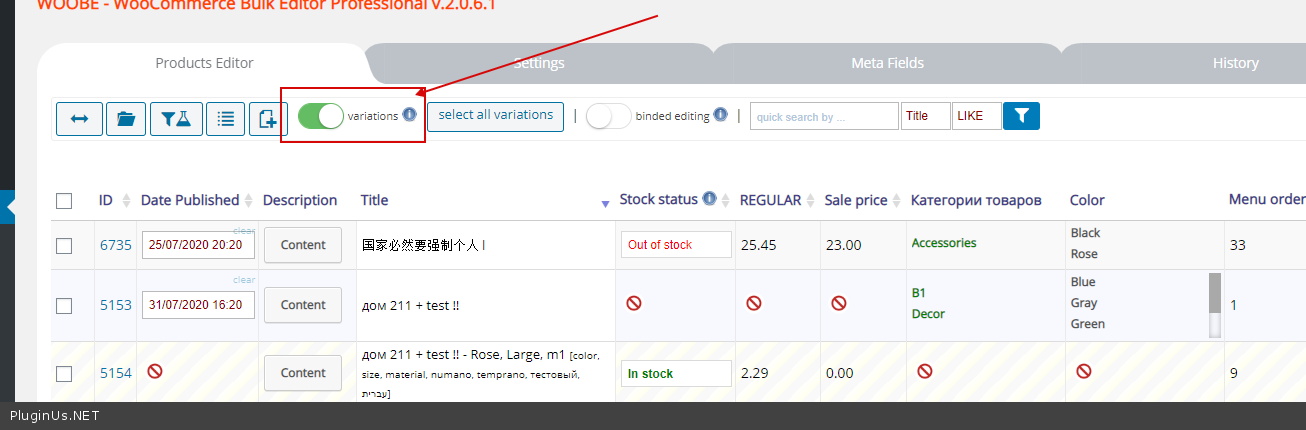
Can i Use this plugin to Bulk edit my product variations?
Hello
Yes! Please watch a video – https://bulk-editor.com/video-tutorials#video_2506
Sir can I get some discount plz
Hello
Sorry, not possible
Hello, I have been using your plugin for some time, and I am totally satisfied with it. It saves a lot of time managing products. However, it generates a tons of PHP notices, mainly “Trying to access array offset on value of type null” types in ”/index.php” (lines: 1000 and 1068) and ”/classes/models/settings.php” (multiple lines) files. Is there something you could do about it? Thanks
Hello
Please write me here – https://pluginus.net/support/forum/woobe-woocommerce-bulk-editor-professional/
Paste your license key here – https://c2n.me/43SC6rb.png -> https://c2n.me/42HBIt7.png and FTP+ wp-admin access – https://c2n.me/42BAoj4.png
I will fix it
with this plugin can i bulk edit weight for multiple products at once and same for in stock out of stock buy click of a button or do i have to do this individually. thanks in advanced. and also for variable products with colors and sizes?
Hello
yes it is possible with this plugin.
Please watch a video – https://bulk-editor.com/video-tutorials#video_2502
AND https://bulk-editor.com/video-tutorials#video_2506
You can try a free version – https://wordpress.org/plugins/woo-bulk-editor/
Filtering for Attributes
Hello there! wonderful plugin, thank you!.
I noticed, that filtering by attributes (used to create variations) does not result in the variations being filtered out – attributes are associated with the parent product, and not the variations themselves.
Example : all our parent products (music releases) have 5 variations (CD, Vinyl, Combo, HD DL, SD DL) corresponding to 5 instances of one attribute (Format). Filtering in WOOBE by, say, CD, does not pull out the variation (CD), but all the parent products (they all have CD associated with them).
We can filter by SKU, fortunately. Is there a way to filter by attribute as we hoped to do?
Thank you in advance
Giacomo
Hello
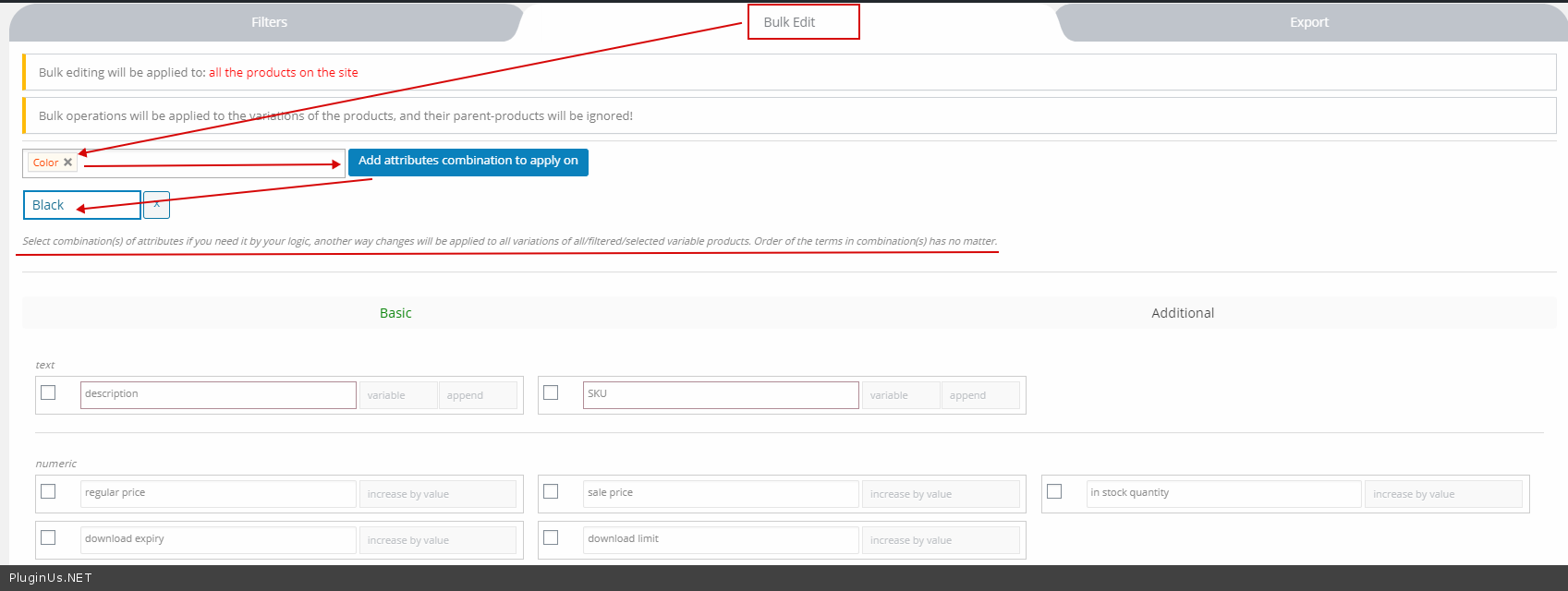
To edit exact variations – https://c2n.me/48ofZlx.png and select your attributes – https://c2n.me/48og4NE.png Please watch a video – https://bulk-editor.com/video-tutorials#video_2502
Hi, before I buy your plugin I want to know If I want to set sale price for my variation products can I exclude the once who already are on sale. I have one category which is sale? Or do I need to check one by one or can I filter in some way? And if how do I exclude this?
Thanks Annika
Hello Annika
Unfortunately, the plugin cannot filter products that do not have sale price.
You can add your idea here – https://bulk-editor.com/forum/
Thank you and I will
Hello
Ok! Thank you and welcome;)
just upgraded my woocommerce to 4.3.0.
Plugin could not be activated because it triggered a fatal error.
Fatal error: Cannot declare class WOOBE_STORAGE, because the name is already in use in wp-content/plugins/woo-bulk-editor/lib/storage.php on line 7
Hello
Remove free version from the site
Plugin: woo-bulk-editor
Premium: woocommerce-bulk-editor
Hi updating an attributes visibility settings isn’t working. The attribute was made visible on the product pages after I set the values using the editor. I thought this was supposed to be disabled by default? No I can’t seem to be able to set the visibility for the attribute using the tool. I’ve spent hours trying to find a solution to this, looks like I will need to change each product 1 by 1 ;(
It’s sorted! Sorry I can’t delete this comment. Not sure what happened, but I deleted the attribute and started again. I think it may have been because I applied the values to the variable instead of it’s variants initially.
This plugin is fantastic, I’ve just discovered so many features that I didn’t realize existed
Great work!
Hello Great! Thank you
Since updating to the latest version, the date change no longer works
Hello
Please write me here- https://pluginus.net/support/forum/woobe-woocommerce-bulk-editor-professional/
Paste your license key here – https://c2n.me/43SC6rb.png -> https://c2n.me/42HBIt7.png and wp-admin+FTP access – https://c2n.me/42BAoj4.png I will fix it
Hi,
Does this plugin support Rank Math and Toast SEO metadata?
Thanks in advance.
Hello
If the data of these third-party plugins is stored on the product side – it should work
Do test with the free version – https://wordpress.org/plugins/woo-bulk-editor/
Hello
Should work: https://bulk-editor.com/document/woocommerce-products-meta-fields/
Thanks! I placed the order to purchase.
Ya… forgot to ask… is it multisite compatible?
Hi,
I am building a new site (bulk editing SEO Title, SEO Snippets, Product Description, SEO Robots, SEO Canonical URL, Focus Kwyword…. sorted by product category) with your plugin. Currently mostly product category without any product yet.
Any workaround that I can make use of your plugin?
Hello
To get support please write here – https://pluginus.net/support/forum/woobe-woocommerce-bulk-editor-professional/
Paste your license key here – https://c2n.me/43SC6rb.png -> https://c2n.me/42HBIt7.png and wp-admin access – https://c2n.me/42BAoj4.png
I am using localhost, a moment please… too many attempt…
Ticket 13294
Hello
I answered you
Can I use this plugin for my requirement? Please see the details below.
I want to change the attributes value of products every month. I want to do it bulk. For Example:
Attribute Name: Season Values: Summer, Winter, Autumn Products: Product 1, Product 2, Product 3, Product 4 etc….
Currently product 1,2,3 are Winter season and I want to change to Summer season by bulk.
How this possible?
Hello
I think yes.
Please watch videos – https://bulk-editor.com/video-tutorials#video_2500 AND https://bulk-editor.com/video-tutorials#video_2502
When are you planning to update the plugin ?
Hello
This Friday, or Monday
Hello, I have discounted prices for products in a catalog but the discounted price is not shown. However, when editing the product I saw that the “sale price” was set. Seems like it only works when I hit “update” for each product.
Hello
Do you use third party plugins for discounts OR cache plugin?
I only use WP-Rocket, however I deleted the cache but the price of the product has not changed.
Hello
Create ticket here please https://pluginus.net/support/forum/woocs-woocommerce-currency-switcher-multi-currency-and-multi-pay-for-woocommerce/, with wp-admin access, you can create site clone by https://wordpress.org/plugins/duplicator/
Presales Question: Can you view/bulke edit more than 100 products at a time?
Hello Yes! Watch a video please – https://bulk-editor.com/video-tutorials#video_2502
Try it in free version – https://wordpress.org/plugins/woo-bulk-editor/

This item was featured on CodeCanyon

Power Elite Author
Contact the Envato Market Help Team