541 comments found.
Hello,
I have been testing the free version and noticed it processes one page at a time and can only display 10 items per page. With a lot of products this would take a long time.
How many items can you process at once in the pro version?
Hello
Please watch this video – https://bulk-editor.com/video-tutorials#video_2502
Aha, thanks. I did not even notice that tab.
To bulk create product variations I would need the pro version so I can process 100 items at a time?
Hello
no. Please watch a video – https://bulk-editor.com/video-tutorials#video_2506

Hi,
I am getting to grips with your plugin, there’s a lot to learn but it seems very useful once you learn it. Well done.
I would like to add a specification sheet in pdf format to each product and I wondered if there is a way to do this that works with your plugin?
Any solution would be very much appreciated.
Thanks again,
Hello
this plugin can edit fields that are stored on the product side. but to add new functionality you need to use a third-party plugin. Example: https://wordpress.org/plugins/woo-product-attachment/
Hi,
We tried that plugin before but it did not appear as an field in your plugin. So not a good option. Any other suggestions?
Just to be clear the product attachment shows on the product page, but not as a field in your plugin. I’m assuming your plugin should in theory pick up all database fields relating to products, so if the field shows on the woocommerce product page then it could/should appear in your pluging?
Is there a setting I’m overlooking for this?
Thanks for your great support.
Hello
Please watch videos – https://bulk-editor.com/video-tutorials#video_1290 AND https://bulk-editor.com/video-tutorials#video_3044
Hi,
We watched your videos and have managed to get the WooCommerce Product Attachment Premium by Mdots to show their fields in your bulk editor. The only unfortunate part about this is their plugin generates a unique id for every attachment added to every product (using the normal woocommerce product editor) regardless of whether it’s the same attachment used for an entire brand of 100 products. This deems their plugin useless for our needs becuase we can’t generate the new unique id and write to the db using your bulk editor.
We reached out to MDOTS but they didn’t respond.
Can you think of another way to use your plugin and add an attachment to a woocommerce product?
Thanks for your support.
Hello
Unfortunately, this is third-party functionality. And I do not know other plugins for implementing such a feature.
how to add attachments depends only on a third-party plugin
Hi,
I just purchased your plugin and I need to add variations to existing variable products, this is the key reason for purchase. Is this not possible because the variations show as locked?
If not possible then can you please authorise a refund please becuase I’ve purchased the wrong product?
I hope I’m wrong and this is indeed possible as a core feature.
Thanks.
Hello
It’s possible. Watch this video – https://bulk-editor.com/video-tutorials#video_2506
Great News. Thank you!!!!
Welcome;)
Hello. I installed the FREE version of this product but I don’t see where I can edit the URL for Affiliate/External products. Is this possible?
Hello
It is available in the paid version.
Hi can i make the edit display more compact its very big for example make the colums smaller and thinner please
Hello
unfortunately the plugin does not have such a feature. But you can add your idea here – https://bulk-editor.com/forum/
Hi is it possible to edit media libaray data please
Hello
This is a product editor. Unfortunately you can only edit data that is stored on the product side
Can i use ACF fields with option like check box, select, and so on
Hello
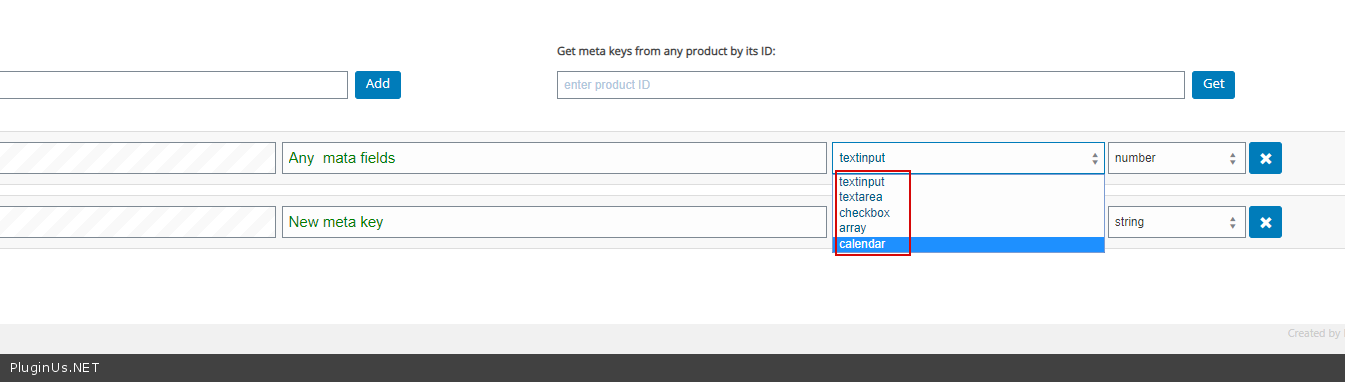
ACF fields – it’s a meta data. You can only edit meta fields as – https://c2n.me/47DmZFX.png
Please watch videos – https://bulk-editor.com/video-tutorials#video_1290 AND https://bulk-editor.com/video-tutorials#video_3044
hi, tried the free version but cannot filter on tag. Is that possible with pro?
Hello
No you can filter in all versions, but edit only in paid.
Love your Bulk editor, just learned about using meta to bulk fill other fields! Like using {id}. Has anyone used this feature to get the product attached image name to pre fill the product titles?
Not sure if theirs a simple option like {Product_image_title} or some sorta Next Systex like {meta:wp_get_attachment_image_attributes_title}. Any input would be amazing!
As an example I use WooCommerce photography to create products from imported photos. But then it just gives every product the same Title as the collection with a numerical separation. So I’m hoping to use Woobe to bulk end the product title to be the name of the product photo.
I hope everyone safe, thank you again for the Woobe Bulk editing, so much time saved!
Hello
Unfortunately, the plugin does not have such a feature. You need customization of the code
I have noticed that if I apply a filter, say products in stock and published, after going through a few pages the results start to show products that are out of stock, and the number of results returned increases ( it happens consistently but not always on the same page, sometimes by page 5 sometimes 8 or 9)
Hello
please write me here – https://pluginus.net/support/forum/woobe-woocommerce-bulk-editor-professional/
Paste your license key here – https://c2n.me/43SC6rb.png -> https://c2n.me/42HBIt7.png and wp-admin access – https://c2n.me/42BAoj4.png
I will check it
Hi if I bulk update the published date/time for a collection of products it doesn’t matter the time I set, the date is correct but the time is always set to 8am (my time zone is GMT+8) This seems like a bug
Hello
Thank you! I passed this data to the developers
I don’t see “Gallery” as an option in the settings? I want to test this before I buy pro. Can this be done?
Hello
This is only available in the paid version.
Hello, i have set a variable product but i can’t edit the price for all the variations. How?
Hello
Please watch videos – https://bulk-editor.com/video-tutorials#video_2502 AND https://bulk-editor.com/video-tutorials#video_2506
When will be new update?
Hello
Unfortunately I can not tell you the date.
Do you have problems with the plugin?
Hello
This spring. WOOBE is compatible to the latest woo version
Dear Developer. Your plugin isnt working anymore. It just loads when I open it. This has been going on for months. How do we resolve this issue?
Hello Please update plugin to latest version – https://bulk-editor.com/howto/how-to-make-auto-update-for-wordpress-plugins-and-themes-bought-on-envato/
If no luck – Please write me here – https://pluginus.net/support/forum/woobe-woocommerce-bulk-editor-professional/
Hello, presale question: Can i make cron job to update products weight in every hour?
Hello
Unfortunately, the plugin does not have such a feature
Hello, presale question: if I enable variations, I can only see the NAME of the product in each line. But I do not see NAME + red + Xl, for example. Why this happens?
Hello
Try to add this code in functions.php
add_filter(‘woocommerce_product_variation_title_include_attributes’, function($should_include_attributes, $product){ return true; },99,2);
Thanks, added – but some results. I believe the name of the product itself is too long, so the variation is not added?
Hello Ok! Try in file – \plugins\woocommerce-bulk-editor\classes\models\products.php – change code – https://c2n.me/46pA3H9.png
Yes, perfect, thank you so much for your kindness and time! 
Hello
Welcome;)
Hello, Greate plugin! When adding new attribute to Variable Products it’s automatically used for variations but we don’t want to use it as variation how can we disable that
Regards
Hello
Please watch video – https://bulk-editor.com/video-tutorials#video_2506
When bulk appending an attribute how can i determine if it should be used in variations or not ?
It seem like the software auto applies it as “in variations”..
How can this be done ?
Hello
Please watch video – https://bulk-editor.com/video-tutorials#video_2506
When are you planning the next update with this new feature? https://bulk-editor.com/forum/topic/filter-only-parent-category/#postid-159
Hello
In the March 2020
Hello
Try in file – functions.php – add code :
add_filter('woocommerce_product_variation_title_include_attributes',function($should_include_attributes, $product){
    return true;
},10,2);Great, works!
thank you very much and best regards
Hello, can you give invoice after buy?
Hello
All invoices provided by Envato only after purchase to your email, for example you will get: https://c2n.me/45VXVan.png

This item was featured on CodeCanyon

Power Elite Author
Contact the Envato Market Help Team