12 comments found.

I can’t get the plugin to work, I use the porto theme that includes bootstrap 5.5.4. It must be because of that?
I can’t get the plugin to work, I use the porto theme that includes bootstrap 5.5.4. It must be because of that?
Hi as we agree I purchase your plugin to test with contact form, we already setup the modal and select to use shortcode.
In our page we add the modal shortcode but nothing appears, we use wpbakery page builder (we don’t use gutemberg editor).
How can we add an custom link in some object to trigger the modal? Example: #my-button if click trigger the modal 01 and #another-button if click trigger the modal 02 ?
Thank you!
Hi,
Thanks for using our product. Please provide us a live preview or link of your site where you are using it.
Also watch this video :
https://www.youtube.com/watch?v=hfVSgGSg9UI
Regards,
szthemes
szthemes1@gmail.com
Hi, it works with latest wordpress version 5.5? Since 2019 I saw that there’s no new updates.
Its possible to open an contact form 7 form from my wordpress inside the modal? The size of modal we set manually or globally?
Hi,
Thank you for taking interest. No, It is not compatible with contact form 7.
Regards,
szthemes
szthemes1@gmail.com
Then shortcodes function of your plugin is limited? Because contact form works with shortcodes !
Hi,
This plugin works with shortcodes but we did not test it with contact form 7.
Regards,
szthemes
szthemes1@gmail.com
Did you mind if we purchase and test it ? But if not work can we have an refund? Or can you please install (its free) and test in local to let me know if works before I purchase? I like your plugin but in my case I need use with contact form.
Hi,
We shall refund you if it will not compatible with contact form 7.
Regards,
szthemes
szthemes1@gmail.com
I downloaded the zip and the installation failed.
Hi,
Thanks for using our product. Please follow the instructions from the video:
https://www.youtube.com/watch?v=hfVSgGSg9UI
Or
1 – Extract files from downloaded zip file.
2 – Find “BootstrapModal.zip” file from extracted files.
3 – Install this file.
Regards,
szthemes
szthemes1@gmail.com
Is this plugin compatible with the Avada Theme? Using WP Version 5.3.2 also.
Hi,
Thanks for using our product. Yes it is compatible.
Regards,
szthemes
szthemes1@gmail.com
I installed the plugin and it’s not loading… all I see is a gray screen (overlay background)  https://imgur.com/a/IG8WHQe
Can you please provide us a link or live preview of your site where you are using it?
here is the link to an image of what I am seeing : https://imgur.com/a/IG8WHQe
Here is a link to the site: http://bit.ly/2TQ7Ijo Now part of the popup is showing but it is not scrollable on desktop nor mobile.
We have visited your site and found it is working.
https://imgur.com/eZ2RLWP
Go ahead and attempt to scroll, it won’t scroll to display the text. Also, the overlay should be behind the popup.
This is how it looks on a mobile device: https://imgur.com/a/ey9PyKG
Ok, we have checked this and it is due to z-index value. Because Avada is also using Bootstrp in the theme.
So how should I proceed?
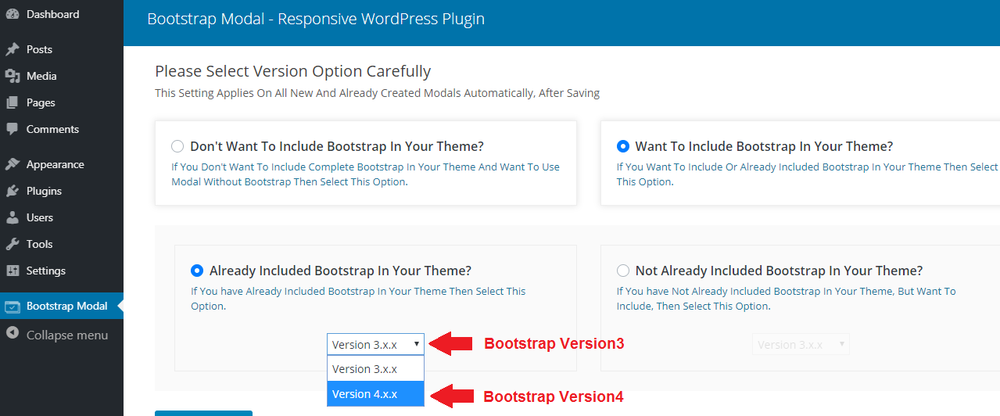
Please try to change the version of bootstrap and select the following option :
Don’t Want To Include Bootstrap In Your Theme?
https://imgur.com/LDNRTJX
I know see a black overlay and no popup/modal content.
We have updated the plugin for you. Please remove the plugin and reinstall it, after downloading from CodeCanyon. And use the Bootstrap 3 version that you were using.
Or follow the instructions from documentation section “How to update”.
https://previews.customer.envatousercontent.com/files/266257328/documentation/documentation.html
No, Please select “Not already included Bootstrap in your theme?” option and then version 3.x.x
You guys are amazing!!! 5 ⭐⭐⭐⭐⭐ Thank you so much!! Unbelievable customer service/support.
Its our pleasure to provide the best customer support. We are always at your disposal. If you further have any queries, please do not hesitate to contact us. Please do rate item as well.
may PC 546b4c41-bf1e-438f-a9d3-1098f80d332c
Hi,
Thanks for using our product. Please follow the instructions from the following link.
https://imgur.com/f5EYpSq.png
Regards,
szthemes
szthemes1@gmail.com
What code to register in the line so that a modal window pops up when clicked
https://yadi.sk/d/XhjUJyhMY_ZdQgHi,
Thanks for using our product. Please follow the instructions from the following link.
https://imgur.com/f5EYpSq.png
Regards,
szthemes
szthemes1@gmail.com
Hi.
Thank you for your work. Great update
I have a problem. When I associate a modal window to a menu (onclik event) that appears on several pages, it only works correctly on the main page, not on the rest. I have copied the shortcode in the different pages that are required. I have verified that the menu ID does not vary from one page to another.
On the other hand, thank you for the update that allows you to import and export.
Some suggestions to improve your plugin: 1.- That the button X of the window can be changed by other selectable designs.
2.- That the modal window can be visualized directly, without the need to test it in situ
Thank you very much again
Hi,
Thanks for using our product. Can you please provide us a live preview or link of your site or page where you are using it?
Regards,
szthemes
szthemes1@gmail.com
Hi,
https://auladeortografia.com/ https://auladeortografia.com/curso-basico/At menu item “Publicar”
Hi,
We have found that you are using bootstrap 3.3.5 on second page where modal does not appear. This is the reason, as you can see here:
https://imgur.com/8WmA9hrPlease delete bootstrap or choose another option from “Version Page” instead of choosing “Don’t want to include Bootstrap In Your theme” option. As you can see here :
https://previews.customer.envatousercontent.com/files/266257328/documentation/assets/images/version-4.pngOr read documentation “Select Bootstrap Version” part.
https://previews.customer.envatousercontent.com/files/266257328/documentation/documentation.html Regards,szthemes
szthemes1@gmail.com
Thanks, very much. Sorry for any inconvenience. I’ll buy another license shortly.
Hi.
Thank you for your great work.
I bought your plugin. Now onpageload works well but I can not make it work with the onclik event. Also, I need a specific shortcode to work that does not work for me: formidable form. You can help.
Thank you.
Hi,
Thanks for using our product. Can you please provide us a live preview or link of your site where you are using it? And we will try our level best to solve your issue.
Regards,
szthemes
szthemes1@gmail.com
You can also take some help from this video. Watch it completely.
https://www.youtube.com/watch?v=hfVSgGSg9UIHello.
Thanks for your quick reply. Shortcodes now works fine, also formidableform. My problem is with onclick event. I have see your video (previusly i have see your bootstrap tooltip video).
I select item, I inspect and I target unique ID. I dont know previus and next arguments for my selected.
For example:
I have a button. ID=button1.
in target (general overal setting) I write button1.
What argument I need previuos or next?
.button1 < a < span ? #button1 < a
<a” class=”button” page:=””>button1
You can see that in:
https://apuntesdelenguacastellana.com/pruebasThanks for your help.
Hello.
Thanks for your quick reply. Shortcodes now works fine, also formidableform. My problem is with onclick event. I have see your video (previusly i have see your bootstrap tooltip video).
I select item, I inspect and I target unique ID. I dont know previus and next arguments for my selected.
For example:
I have a button. ID=button1.
in target (general overal setting) I write button1.
What argument I need previuos or next?
.button1 < a < span ? #button1 < a
<a” class=”button” page:=””>button1
You can see that in:
https://auladelenguacastellana.com/pruebasThanks for your help.
Hi,
Just add #button1 in target field. As you can see in below image :
https://imgur.com/a/9VrK5Mt
Regards,
szthemes
szthemes1@gmail.com
You can also get some help about, how to select an element? By visiting following pages:
https://www.w3schools.com/cssref/sel_id.asp
https://www.w3schools.com/cssref/sel_class.asp
https://www.w3schools.com/cssref/sel_element_gt.asp
Thanks. All works now.
Congratulations!!! Nice Work, Good Luck With Sale 
Thank you very much for your kind words