83 comments found.

Sent 3 emails no one responds. Our install the nav doesn’t work at all, can’t go forward, can’t go back, can’t stop the tour once started. Looks like Javascript errors. I sent 3 emails starting Feb 10th. No ones responded yet.
Hello,
I correctly received your support requests and replied to them the same day (to chris@p*elmobb.com ) . Please can you check your inbox, or indicate me a valid email address?
We only have you responding to this email no other email ever came through please send to info@pixelmobb.com
We had to shut the tours down it was creating havoc on our sites…
No way to stop the tours. Super buggy and slow.
I replied to your 2 support requests from (chris@pixelmobb.com) but I didn’t receive any answer yet . I’m going to contact you to this new email address.
what are the difference between this and the lite version?
Hello,
You can find the differences listed on the main page of the plugin : https://codecanyon.net/item/wp-ultimate-tours-builder/24096901#item-description__support
Hi, I can’t figure out how to move from one element to another element. I want each element to give the user an option to continue the tour. but the only option is within the dialog option. But I wish to do it after showing an element or section in the same page. How do I set a route between steps (tried to use the links but it doesn’t have an option). thanks
Hello,
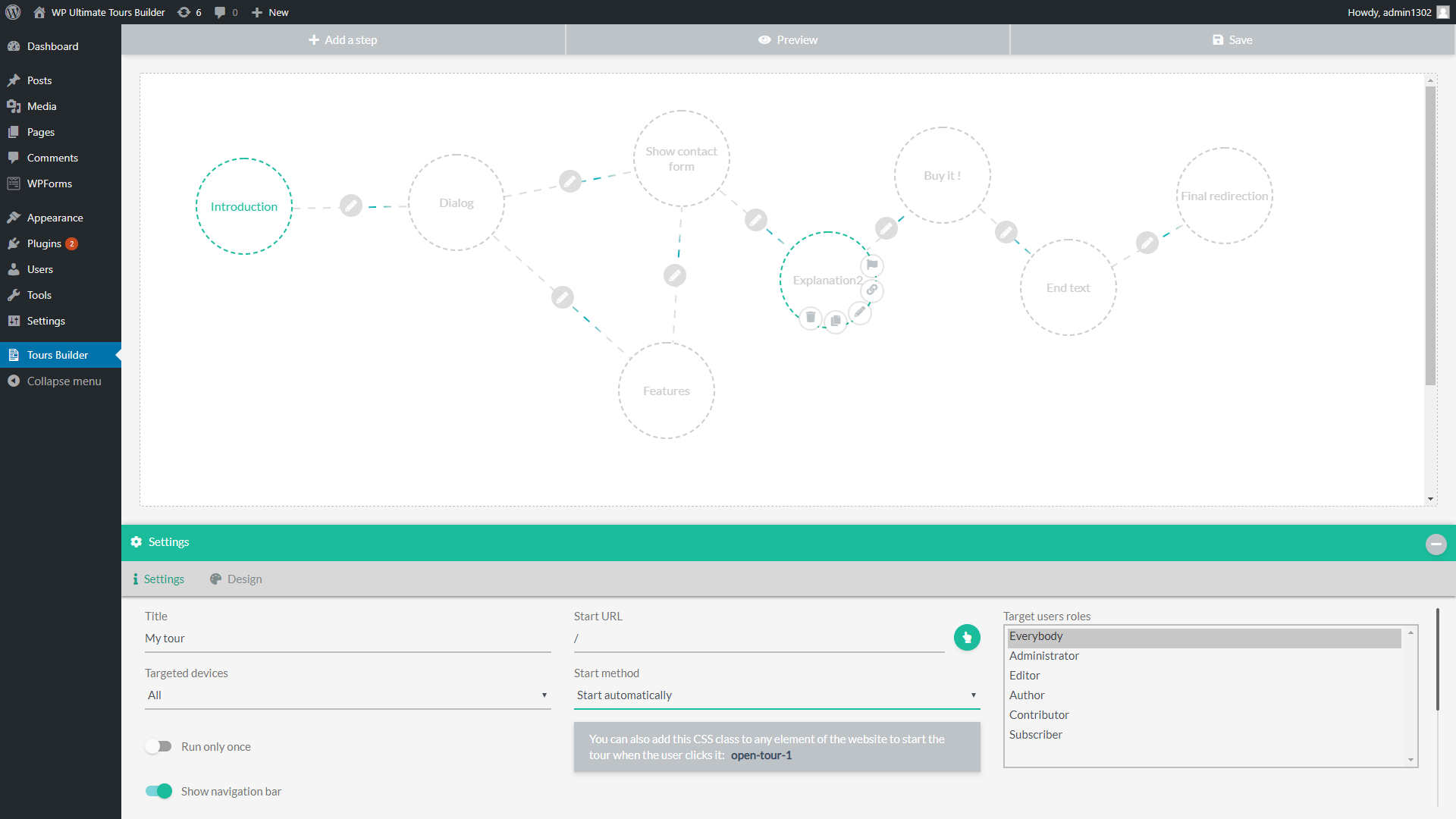
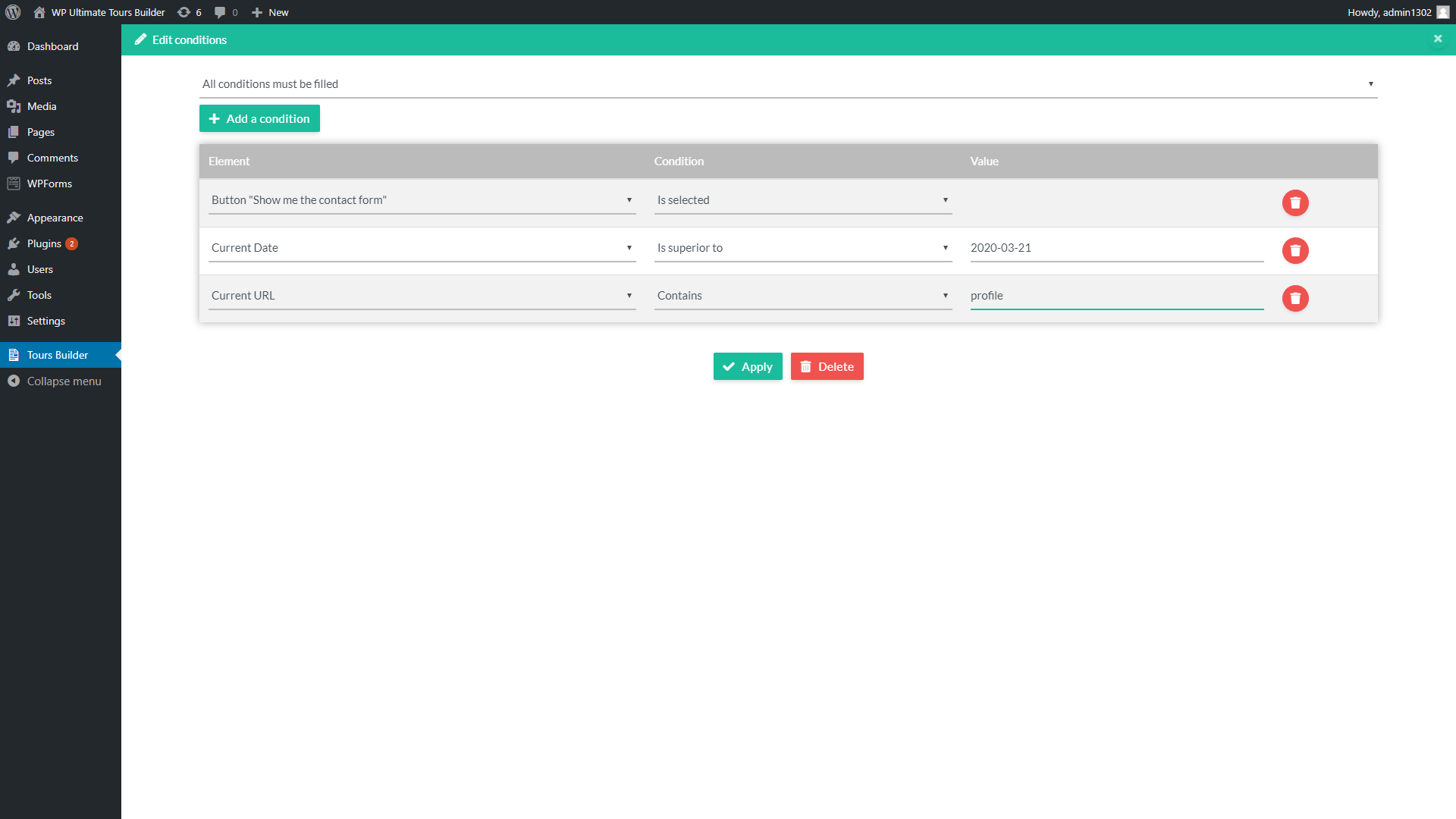
You need to create the wanted links between the different steps and use the wanted conditions on each one. After a step, the plugin will check the possible link and will call the one that has all its conditions filled.
I have created links, but elements don’t have conditions, unlike dialog box which do have. I want to move from one element to another on the same page. After creating the link between an element type step to another element type step, there’s no option to put a condition. do you understand my question?
Each link has a pencil icon at its center ( https://s3.envato.com/files/279384217/screen_5.png ), to allow you to edit it and create the wanted conditions ( https://s3.envato.com/files/279384217/screen_10.png ) .
Please can you contact me from the support page, sending me a temporary access to the wp backend ? I will check it .
It gives current url/current date options, which I don’t understand how to use
The available conditions depend on the create steps in the form. You can create a dialog step, freely edit its buttons then define conditions like “if the button A is selected”. The next step will be called only if the target button was clicked by the user.
So, the only option for the above is using dialog step, not show an element step, correct? the latter ’’click on the element’’ doesn’t lead anywhere, just stops the tour
There is no interaction in a “Show step element” that can be used as condition. The tour will be stopped after the step if there is no other valid step after it, otherwise it will continue the tour.
I’m sorry, but this means you cannot ’’show an element’’ and continue the tour to the next element? I want to highlight an element but don’t know how to manuever to the next one
You simply need to create a link from the current “Show an element” step to the target one, without using conditions on the links to do that. The tour will continue to the next step and show the second element after the first one .
finally!! I got it now. thanks!!:)
Purchase code: XXXXXXXXXX
I recorded this video for you: https://mulher.digital/2020-02-16 17-23-37.mp4
Look, I would like to guide the user in filling out a form. But whenever the user clicks on the field to fill in the tooltip it is activated, preventing it from being filled out. How can I do to open tooltip only on the first click and then no longer open?
I need to place instructions in all fields.
Note: Enabling the option to show only once does not solve. I need to activate the guidance in each of the fields of the form as they receive the click.
Can you help me?
Hello,
It is possible to ask the user to click the displayed element to continue the tour (option “Action to continue” from the step panel), but there is no specific option currently to ask him to fill a field to continue the tour, sorry . I note the suggestion, thank you .
Hi,
i contact you again for a little help please, I’m actually using bbpress for my website, you did an [USERNAME] “shortcode” for user redirection, I would like to add [GROUP] shortcode to redirect user to his group url, can you help me in this process please ?
Merci  !
!
Hello,
There was no such option until now, but I just added it, it will be a part of the next update. Feel free to contact me from the support page, I will send you the update immediately if you want.
Hello i planified to buy the plugin for the “USERNAME” function inside it which is very usefull for a forum but I saw a comment from a buyer who had a problem with that, I would like to know before buying the plugin if the problem is solved from new versions or not ? I would like to add “USERNAME” inside an url to redirect to user profile page.
Hello,
Yes, this issue was fixed. You can use [USERNAME] in the url of the tour steps. The plugin will automatically replace it by the detected username.
Is it possible to define tour fonts not using Google fonts? I use the plugin “Use Any Font” in many sites and prefer real fonts, not Google fonts….
Here is the rule to paste in the “Custom CSS” option of the theme to do that :
#wutb_stepContainer .wutb_fullscreenTitle,
#wutb_stepContainer .wutb_fullscreenTextContent,
#wutb_stepContainer  #wutb_elementText,
#wutb_stepContainer .wutb_dialog-header,
#wutb_stepContainer  .wutb_dialog-body {
    font-family: 'Your font name here' !important;
}
Please do more work on your demo. Let it display a detailed tour of your site so that prospective buyers can see value in your plugin. Thank you.
Hello,
It isn’t planned for now, but I note the suggestion, thank you .
Is it possible to show Next button right by the message and not at a navigation bar?
Hello,
No, sorry, there is no option to do that currently.
Thank you for the suggestion .
Hello, I just bought the plugin. I want to create a tour and I’m wondering how I can add a the Buddypress profile (https://www.website.com/members/johndoe/) to one of the steps.
As you know, the “johndoe” part is dynamic, it changes according to the user.
Hello,
You can use the shortcode [USERNAME] in the step url, it will be automatically replaced by the detected username . Ex : https://www.website.com/members/[USERNAME]/ .
I have a 404 error when I enter ”/members/[USERNAME]/” as the page URL
Please can you contact me from the support page ? I will debug it : https://codecanyon.net/item/wp-ultimate-tours-builder/24096901/support
Is it possible to add a page redirect at the end of the tour?
Hello,
Yes, you simply need to create and link a “Redirection” action step as final step to do that
Hi there,
is this plugin usable with the envato-market-plugin to make updates inside wordpress?
Best regards,
Steve
Hello,
No, it currently uses another automatic update system, but I note the suggestion, thank you .
ah ok, than I don’t need the one from envato. Thats good, too.
Thank you for ur answer as lightspeed as always : )
Have a great day,
Steve
Thank you, have a great day too !
Is it possible to use Ultimate Tour Builder with Elementor? Meaning can I use the tour on a page where Elementor is open for editing?
Hello,
It works on the frontend pages created from Elementor, but currently it can’t target the elements and menus of Elementor on the edition page, sorry .
Nice to see that every multisite website can has it’s own independet tours <3
Hi
can we use your plugin on a multisite?
For instance: We would build a tour on one site (1.domain.com) and then duplicate the complete site within the multisite with all contents and create a new subdomain (2.domain.com).
Would that tour work on the other site aswell?
; )
Martin
Hello,
It can be used on a multisite installation, but it must be activated from the wp plugins panel of each website, not from the network admin one .
You will simply need to export the created tours from the first website and import them on the new one to transfer the tours .
The plugin causes major javascript errors, is throwing mixed content errors because the URL Source for the iframe used in the backend is not secure. Additionally I ran into issues selecting objects and doing tooltips that way – kept saying there was an issue with the server and displayed the URL in the error like this “domainnamehttps’ like it was jumbled. Love this concept but it’s pretty buggy.
Hello,
The backend iframe uses the url filled in the wp general settings to show the frontend side of the website . Feel free to contact me from the support page, sending me a temporary access to the backend, I will debug it : https://codecanyon.net/item/wp-ultimate-tours-builder/24096901/support
does not work selected element scrolls up and select a other element
Hello,
Please can you contact me from the support page of the plugin ? i will debug it : https://codecanyon.net/item/wp-ultimate-tours-builder/24096901/support
Hello, we have 2 questions/potential bug reports. We’ll be glad if you could get back to us with solutions for these. Thanks!
1. We cannot select any target user roles under settings. Everyone is selected by default and any other user roles are not clickable.
2. We cannot deactivate any tours. Even if we deactivate them from settings, they still keep running.
Hello,
Please can you contact me from the support page, sending me a temporary access to the backend ? I will debug it : https://codecanyon.net/item/wp-ultimate-tours-builder/24096901/support
Hello, We did debug the system. Your plugin does not update the database correctly. It might be related to a JS interference.
We sent you the staging site details and really appreciate if you could get back to us asap
I correctly received it, thank you, I replied. There is something that blocks the ajax call that save the tour. I am debugging it .
does this support multi languages ? for websites that uses loco multi language
Hello,
No, sorry, there is currently one language for each tour. If the url is different for each language on the website (ex: www.mywebsite/en/ , www.mywebsite/es/ ), it is possible to duplicate a full tour in one click, translate its texts and use the “Start URL” option to start the good tour depending on the current url.
This plugin does not work
Please provide me a refund.
Hello,
I just corrected a possible js problem and sent the update to codecanyon . You can download it from https://codecanyon.net/downloads . If you need help or want a refund, feel free to contact me from the support page : https://codecanyon.net/item/wp-ultimate-tours-builder/24096901/support