541 comments found.

How to update I am already using paid version, I want use latest version, How to use it?
Hello
Read this please: https://pluginus.net/make-auto-update-wordpress-plugins-themes-bought-envato/
Hi, I am trying the free version of the plugin before buying.. I cannot find the option to enable gallery column.. The documentation say :
Enable column ‘Gallery’ in the tab Settings and press Save button there
But i cannot see Gallery in the setting
Can you please help?
Hello
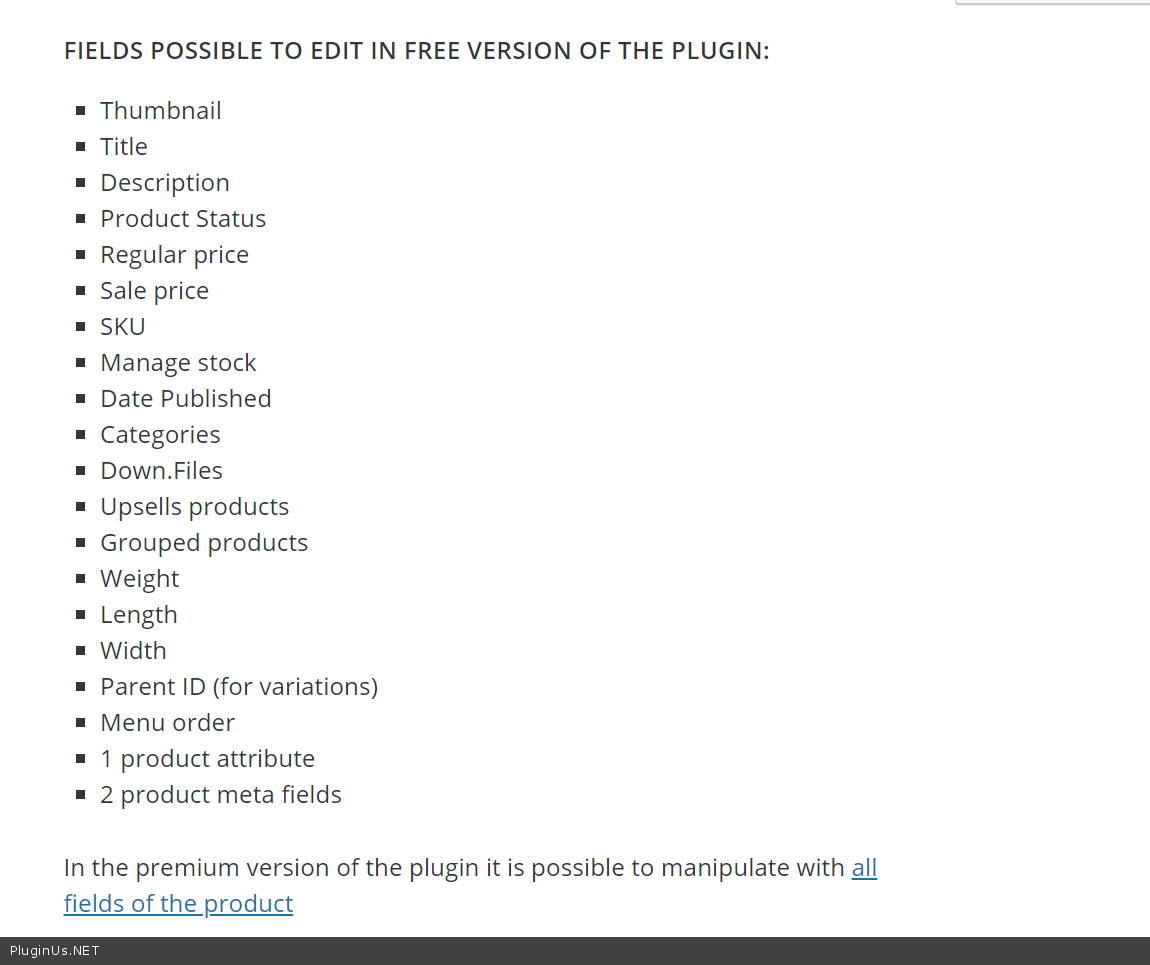
In free version only this fields enabled: https://c2n.me/44FLOhS.png
so the gallery is on paid version only?
Hello
Yes
Latest version stopped working with latest woocommerce version.
Hello, works, update to 2.0.5.1 and reset all kinds of cache, if no luck https://pluginus.net/support/
Hello,
I am interested on your plugin for woocommerce. I need to know, whether your plugin is doing these two functions:
1. I have lot of variation of a product, every variation-lines price could be set with standard woocommerce function manually, but we have per product about 2000 variation-lines, it is very hard to type in the prices after by after for each variation-line. Is there a possibility to give to the attributes of the variations unique prices, to calculate the variation line automatically?
Example: Product T-shirt
Sizes: L and XL (Price for L=50 for XL=100) Color: black and white (Price for black=5 for white=0)
Variations lines MANUALLY: L and black—> 55 (Prices typed in and calculated manually) L and white—> 50 (Prices typed in and calculated manually) XL and black—> 105 (Prices typed in and calculated manually) XL and white—> 100 (Prices typed in and calculated manually)
Variation lines AUTOMATICALLY
define prices for every attribute at first: L=50 XL=100 and black=5 white=0
L and black—> 55 (Prices calculated automatically) L and white—> 50 (Prices calculated automatically) XL and black—> 105 (Prices calculated automatically) XL and white—> 100 (Prices typed in manually)
2. By changing prices: Filtering all Variation lines with color black to change their price at one time.
Can handle your plugin with these two requirements? Do you now other plugins, can handle better with these requirements?
Hello
I think yes.
Please watch video – https://bulk-editor.com/video-tutorials#video_2502 AND https://bulk-editor.com/video-tutorials#video_2506
AND my short video – https://c2n.me/44GwsMu
Hello, i need to add new variations to my products in eshop. is this plugin right for me? thank you
Hello
Yes! Please watch video – https://bulk-editor.com/video-tutorials#video_2506
Try free version – https://wordpress.org/plugins/woo-bulk-editor/
Good Morning.
1- Is there any way to eliminate more than 1000 products at a time or only I can eliminate every 100 products maximum?
2- How can products be moved to trash in Woobe?
Hello
Read this please – https://bulk-editor.com/howto/how-to-delete-woocommerce-products-by-bulk/
Thx for the fast update, Woobe is working again!
Welcome 
Hi Folks
Announcement: after update to WordPress 5.3 WOOBE has javascript conflicts and doesn work – Update will be today 13-11-2019 GMT+02:00!
Update is done, WPBE as gift removed for some time to make it compatiblr with WordPress 5.3
This is a must have plugin for WooCommerce. Absolutely superb. Working though a few kinks to get some data to show correctly but excellent plugin.
Thank you!
I am getting this error on wordpress 5.3 Uncaught TypeError: Cannot set property ‘Zebra_Tooltips’ of undefined and data-tables.js?ver=2.0.5:96 Uncaught TypeError: $ is not a function at init_data_tables (data-tables.js?ver=2.0.5:96) at HTMLDocument.<anonymous> (data-tables.js?ver=2.0.5:28) at i (load-scripts.php?c=0&load[chunk_0]=jquery-core,jquery-migrate,utils,moxiejs,plupload,jquery-ui-core,jquery-ui-widget,jquery-ui-mouse,jquery-ui-sortable&ver=5.3:2) at Object.fireWith [as resolveWith] (load-scripts.php?c=0&load[chunk_0]=jquery-core,jquery-migrate,utils,moxiejs,plupload,jquery-ui-core,jquery-ui-widget,jquery-ui-mouse,jquery-ui-sortable&ver=5.3:2) at Function.ready (load-scripts.php?c=0&load[chunk_0]=jquery-core,jquery-migrate,utils,moxiejs,plupload,jquery-ui-core,jquery-ui-widget,jquery-ui-mouse,jquery-ui-sortable&ver=5.3:2) and this error too GET https://nosted-cms-pro.softiware.no/wp-admin/__IMG_URL__ 404
it happens suddenly!
Hello
Your site updated to WordPress 5.3 and it brought troubles. We know it, update will be within 24 hours – even less
Write me here please https://pluginus.net/contact-us/ to get update first!
Hello, Im ready to buy your Premium version but I have checked that in Free is not work the feature that I need.
I want to change bulk the Published Date. When select 10 products and go to => Bulk Edit => Additional => and select Date Published ( 1 August 2019 for example ) and checked and click “Do Edit Bulk” then after succesful bulk edit there is no any change on these product for the published date, continue display the same date. Is something that not do it right from my side? Thanks
Hello
Try update 1.0.5 please, I just did the test in the way you described and its updated the Published day
Thank you for your quick reply. I just tried 1.0.5 version but still not work. Check please the video below if something is wrong on my side.
https://marketingbusinesspro.com/not-work.mp4Hello
Please write me on support – https://pluginus.net/support/forum/woobe-woocommerce-bulk-editor-professional/
I will check it
Hi, Thanks a lot for the gift included in last update’s download!
Welcome
I just bought this and it keeps saying i have the free version. How do i update it to the premium version. I already installed it.
Hello
Read this please: https://bulk-editor.com/howto/i-just-bought-the-plugin-and-cant-install-it-error/
By the way 1 minute ago update is done: https://bulk-editor.com/update-2-0-5/ , read also: https://pluginus.net/make-auto-update-wordpress-plugins-themes-bought-envato/
Hi, Can we duplicate Variations after purchase because it shown locked in your free version ?
Hello
You can only duplicate parent products
Hello, before bying this plugin i would like to know if is possible in paid version to filter categories in combined way. For example show me products that are in Cat A & Cat B but not on Cat C (in case a product is in 3 categories). On the free version i only see Or, And, Not in i a single line. Thank you in advance
Hello
Unfortunately, the plugin does not have such a feature
hello, the plugin can display and edit the custom fields of ACF?
Hello
I think yes.
Please watch video – https://bulk-editor.com/video-tutorials#video_2502 AND https://bulk-editor.com/video-tutorials#video_3044
Hi,
I will also get and the updates of the wordpress gift plugin?
Thanks
Hello
Yes! Gift will be included in the new bundle. Just download it
Hi, can I edit the name of Downloadable files with your plugin? Many thanks!
Hello
Unfortunately, the plugin does not have this feature
Hello
With WOOBE you can change next: https://clip2net.com/s/44vFM5d + https://clip2net.com/s/44vFNkH titles of downloads, maybe you meant this
all the installation went ok but the changes that I apply , tried on different fields are not getting processed and saved
Hello
Please write me here – https://pluginus.net/support/forum/woobe-woocommerce-bulk-editor-professional/
Paste your license key here – https://c2n.me/43SC6rb.png -> https://c2n.me/42HBIt7.png and wp-admin access – https://c2n.me/42BAoj4.png
I will check it
hai, the license is valid only for primary domain or can used for subdomain too ?
thank you
Hello
or can used for subdomain too ? - Yes!One license – one domain

This item was featured on CodeCanyon

Power Elite Author
Contact the Envato Market Help Team