540 comments found.

How to bulk edit ” menu order” in some products , I cannot achieve this ?
Hello
” menu order” – it is not available in bulk editor
Only in table – https://c2n.me/43XABgm.png ( https://c2n.me/43XAKF2.png )
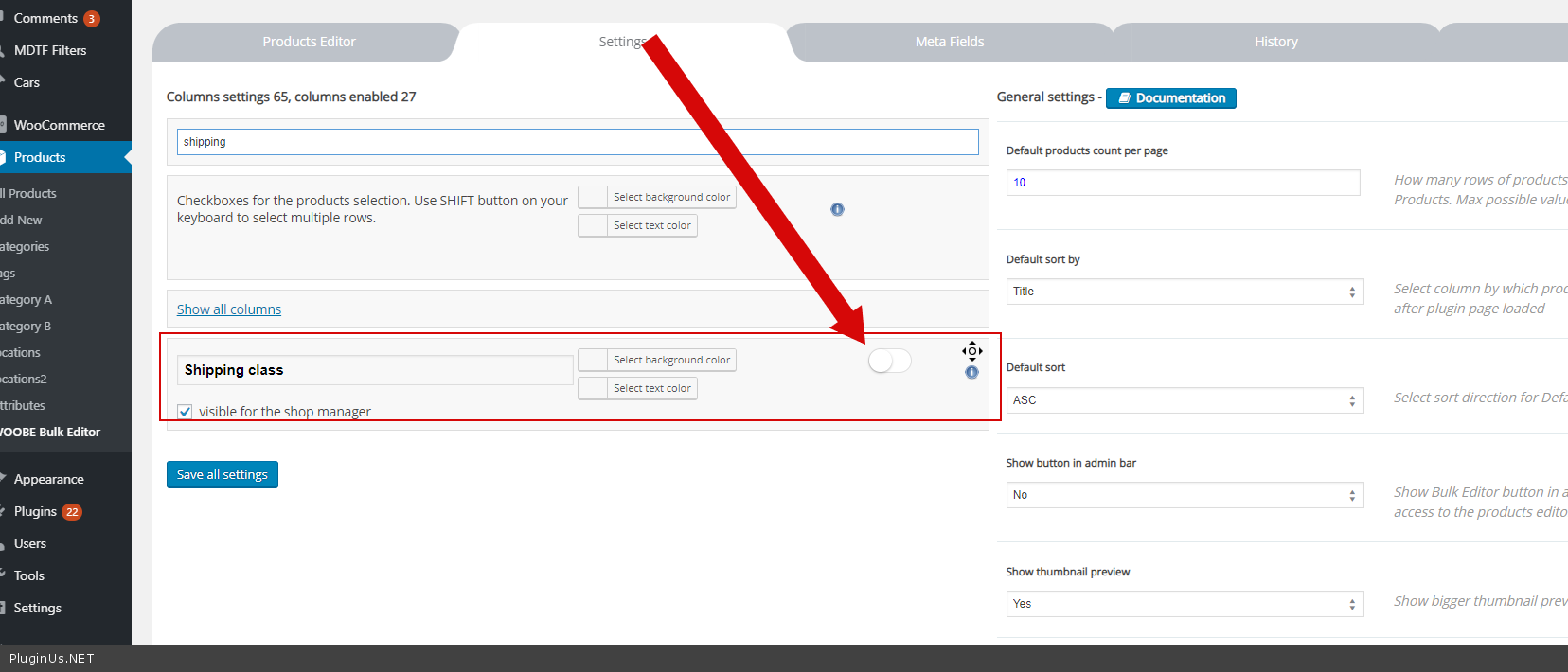
Hi there, I am trying to show the GTIN section and Attributes in the free version of your plugin. Unfortunately I cant see this. I already watched your help videos and I am looking for the products Attributes on the columns settings but cant find them! Is this something with the free version of the plugin or is this a bug? Thanks
Hello
Only two taxonomies are available in the free version
Of course. But that was not my question  If I put in a product ID and click “Get” nothing is showing – compared with your help video. Further via the official Wordpress Plugin install section, only version 1.0.4. is available. On your Help video you are working with version 2.0.0. instead. Is this a bug? I would purchase the plugin if I would knew that everything is working like it should be. But if I cant “Get” the taxonomies, It is useless for me – nuff said. Furthermore the product attributes should be visible as standard or do I miss anything? Thanks
Hello
I am looking for the products Attributes on the columns settings but cant find them! – Only 2 taxonomies are available in the free version (categories, tags, attributes).
GTIN – this is not a standard product field – Watch video please – https://bulk-editor.com/video-tutorials#video_1290
I have watched the video already. I will purchase the plugin in the next days. If it isn’t working like expected I need to ask for a refund. Cheers
Hi again. I have purchased the plugin recently. The “get” button doesn’t work as I wrote before. This means if I enter a product ID in the “Meta Field” section and click “Get” nothing happens. Can you please help?! Thanks in advance.
Hello
Please write me here – https://pluginus.net/support/forum/woobe-woocommerce-bulk-editor-professional/
Please paste your license key here – https://c2n.me/43SC6rb.png -> https://c2n.me/42HBIt7.png and FTP+ wp-admin access – https://c2n.me/42BAoj4.png
I have created a ticket. Thanks
Hello Ok!
Hello I just have a quick pre-sales question if you don’t mind. Would I be able to change the variable choice for a variable product from the editor?
For example :
I have a product : Tshirt 1 Tshirt 1 comes in Black, White and Grey and in sizes small, medium and large.
What I would like to do is remove variables Black and Small from Tshirt 1. Would this be possible via the editor? Or do I have to still go back into the standard product editor to edit/remove these variable options.
thank you Dimitri
Hello Dimitri
Yes it’s possible
Try free version – https://wordpress.org/plugins/woo-bulk-editor/
Watch a video please – https://bulk-editor.com/video-tutorials#video_2506
Can you export the country of the user using the WooCommerce Geolocation option, without the user having selected any Country or State option? Can you export the IP of the user?
Hello This plugin only works with products.
is it possible using your plugin to delete all orders that have cancelled status by one process ?
Hello
No! This plugin only works with products
Pre-sale Question
I’m using WooCommerce Cost of Goods plugin which add cost field to a product, both simple and variable. Will this plugin see and enable to change that field?
Thanks
Hello
I think yes! Try to use meta fields -https://bulk-editor.com/video-tutorials#video_1290 AND https://bulk-editor.com/video-tutorials#video_2506
Free version – https://wordpress.org/plugins/woo-bulk-editor/
Hi guys,
I have 5-6 attributes on my products – but for some reason I can only find 1 when I search for columns in the ‘Settings’ tab. Is this because I’m on the free version or is something else wrong?
Hello
Yes, in the free version only two taxonomies are available
Great thanks
Welcome;)
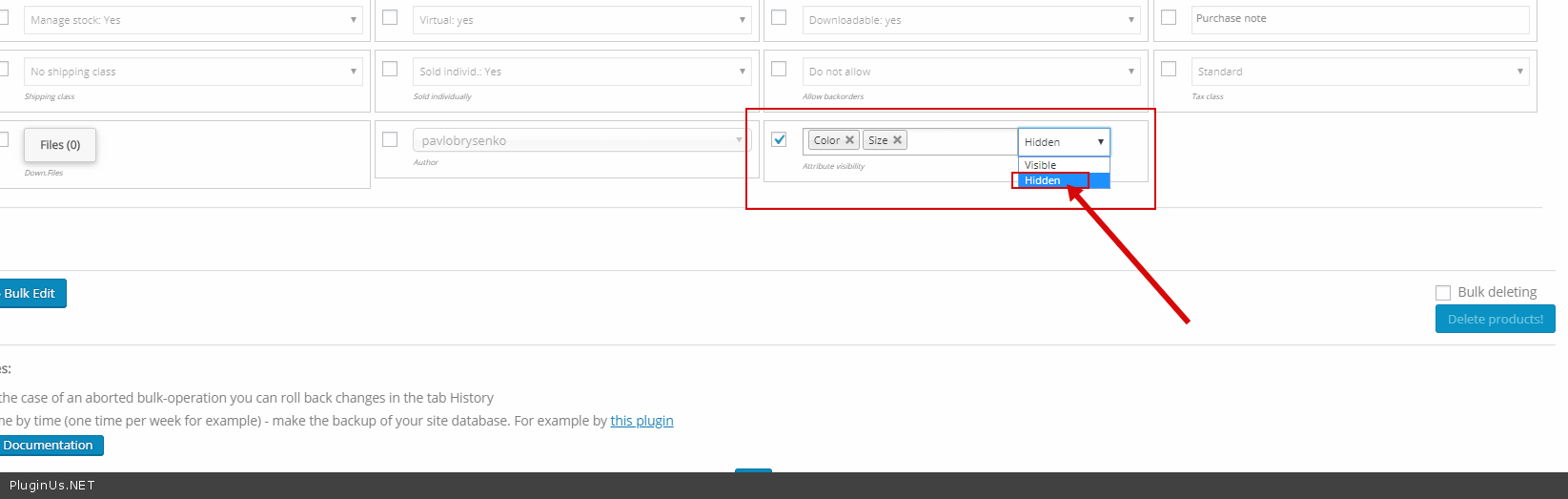
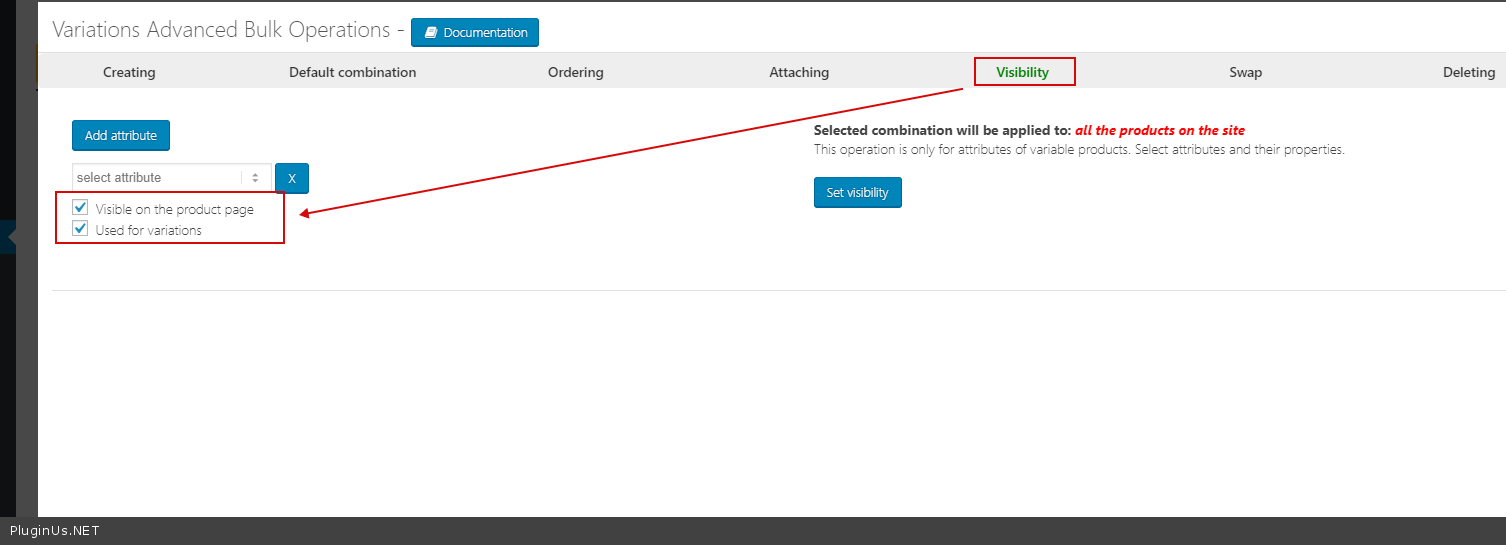
Hi! Is it possible to add attributes without showing them in product page (with unchecked “show in product page” field)?
Hello
Yes! Add attribute and change visibility – https://c2n.me/43EginG.png
Hello
Not sure that it depends on my plugin
please write me here – https://pluginus.net/support/forum/woobe-woocommerce-bulk-editor-professional/
Paste your license key here – https://c2n.me/42HBIt7.png and wp-admin access – https://c2n.me/42BAoj4.png
Hello, awesome plugin! Will it allow me to update shipping class (set in woocommerce) for product variations? Thank you.
Hello
Yes! Please try free version – https://wordpress.org/plugins/woo-bulk-editor/
Hi, If I buy the Regular License, it includes updates lifetime? Or I will have to renew the license to get updates after a while?
Hello
it includes updates lifetime? – Yes!
Hi! I have a pre sale question.
I have a website with 1000+ products and each product has 5 variations with different weights. I need to put weights on those 5 variations. All 1000+ products has the same variations and weights so I need to edit only 1 product that can replicate to the rests. Can I do that using your plugin?
Thanks!
Hello
I think yes!
Try free version – https://wordpress.org/plugins/woo-bulk-editor/
Watch video – https://bulk-editor.com/video-tutorials#video_2506
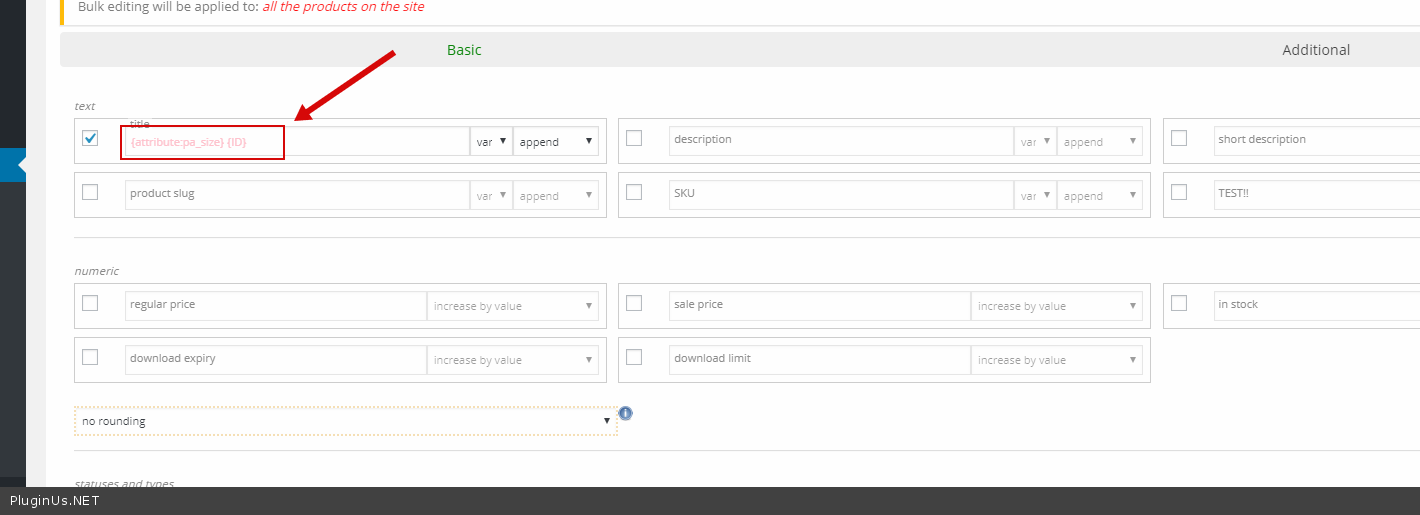
I have many product. This is the rules: 1. I have product with attributes: size, brand, color, materials 2. I use (brand name + ID) for my product title. 3. I use just size for variation product.
How to do it with fastest way? FYI now I change my product title manually, because in the bulk edit title is any option to change brand title with attribute like brand attribute. Please help me, You can save many of my time.
Hello
Looks like I didn’t understand you.
Please read this – https://bulk-editor.com/document/woocommerce-products-bulk-edit/
You can try this – https://c2n.me/43kfyoh.png
can you mass edit variation to virtual with this?
Hello
Do you mean make products downloadable.
I think yes. Try free version – https://wordpress.org/plugins/woo-bulk-editor/
I have many attributes: size, color, brand, materials. But I want to have “size” only for my product variation.
because now my product page like this https://ibb.co/9NHFyRs and I want to change like this https://ibb.co/jLGKC5R
how to edit it with bulk editing?
Hello
Please watch video – https://bulk-editor.com/video-tutorials#video_2506
This option – https://c2n.me/43gLXYS.png
Здравствуйте ! Возникла проблема с фильтром. Не верно фильтрует. Например -в категории 32 товара, но через фильтр показывает только 19. Таким образом теряется весь смысл пакетного редактора.С чем это может быть связано ?
Здравствуйте
Пожалуйста напишите мне на форум – https://pluginus.net/support/forum/woobe-woocommerce-bulk-editor-professional/
Добавьте лицензионный ключ сюда – https://c2n.me/42HBIt7.png и wp-admin доступ – https://c2n.me/42BAoj4.png
Hi pabloborysenko,
You and your team created a nifty tool. I have used the free version for a while and I do like to upgrade to the premium version. I have a specific question.
I have around 3000 digital downloads which I’d like to edit using the WOOBE bulk editor for WooCommerce. I am using Amazon S3 storage for the digital downloads (YITH Amazon S3 Storage).
As I have noticed, when I use WOOBE Bulk Editor, to upload files, it’s uploading files to:
https://bucketname.s3-eu-west-1.amazonaws.com/2019/08/test.ziprather than uploading it to:
https://bucketname.s3-eu-west-1.amazonaws.com/woocommerce_uploads/2019/07/test.zipThe difference is the woocommerce_uploads slug. Would you be able to fix this issue when I buy the version of WOOBE premium?
Please check this screencast: https://www.screencast.com/t/T4qSAei9Lq
Thanks.
Pre-sales question. I glanced through other questions and wasn’t totally sure if what I need is covered.
I have about 130 products that each have different variations, and all the variations are priced differently. Will this plugin allow me to edit the sales price of each product as well as set the sale expiration?
Hello
Yes. Please watch video – https://bulk-editor.com/video-tutorials#video_2506
Try free version – https://wordpress.org/plugins/woo-bulk-editor/
Hi, Woobe can show more the custom fields created by ACF (Admin Custom Field) ? (ex: I create custom field name: Brand, Release date, Cost Shipping,... => Woobe can you these colum to Product Editor screen). Thanks.
Hello Yes. Please watch videos – https://bulk-editor.com/video-tutorials#video_1290 AND https://bulk-editor.com/video-tutorials#video_3044
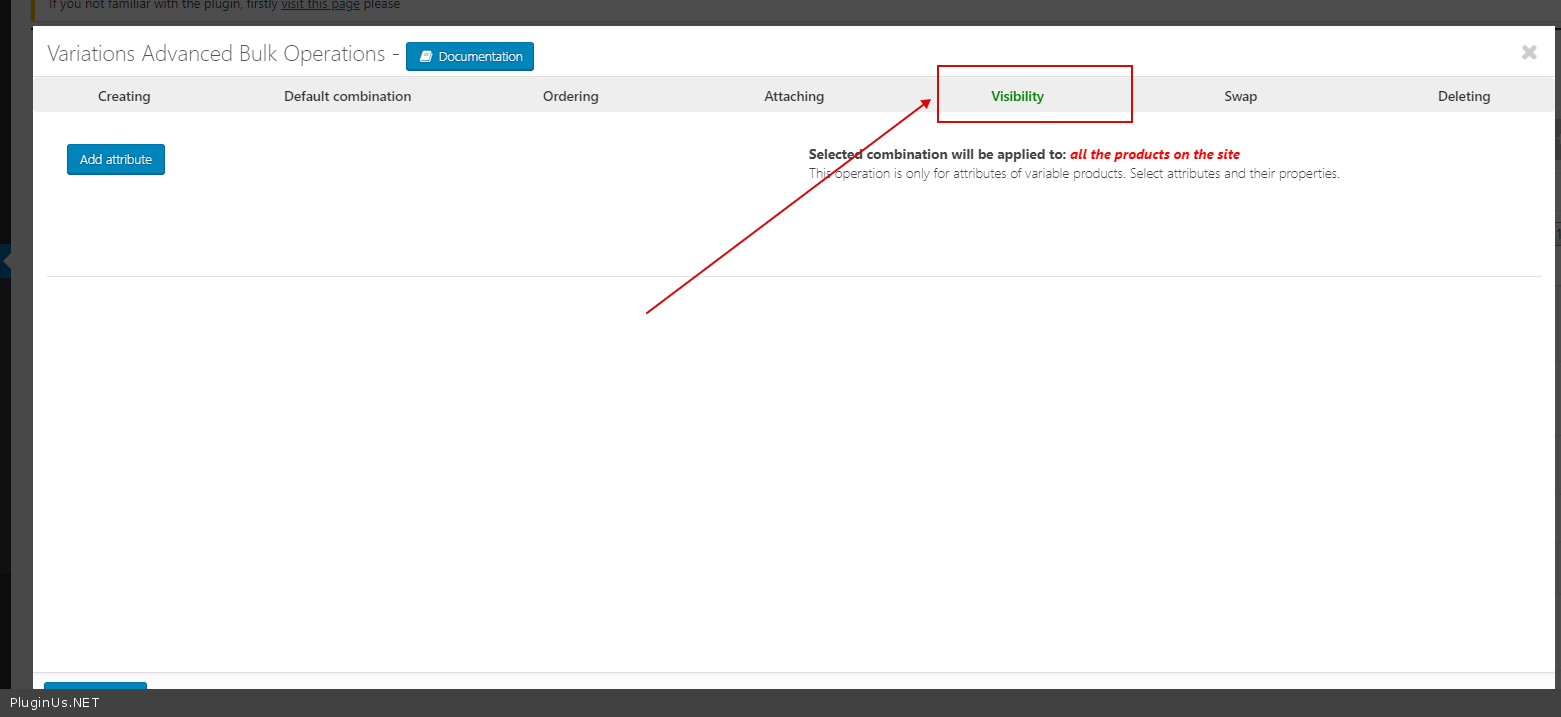
Hi, Trying to just simply edit attributes (taxonomies) for the parent of a variation so that it can be searched on using a product filter. When I add an option for example ‘product size’ with values of ‘100’, ‘200’, ‘300’. When saved it is automatically adding them as variations instead of just simply as an attribute for the specification. It has me scratching my head as to what im missing? Tried doing it with Bulk Edit and Binding Many thanks in advance for help.
Hello
Please watch video – https://bulk-editor.com/video-tutorials#video_2506 Use this tool – https://c2n.me/42WM8Tm.png
Does it have to be attached first as a variation variable and then removed from being a variation variable using the used for variations option?
Hello
Add attribute as a variation variable( or add an attribute in a simple way ) then change a visibility of the attribute

This item was featured on CodeCanyon

Power Elite Author
Contact the Envato Market Help Team