541 comments found.

Hi! Is it only possible to add a maximum of 250 variations to a product? When I only need 150 variations, the plugin works great. But for the products that need 300 variations, the bulk editor finishes after adding 250. Trying again doesn’t help. I have had this error on several products, it always stops at 250. Btw I have the payed version. Please help. Thank you in advance!
Hello
Very strange.
Please write me on support – https://codecanyon.net/item/woobe-woocommerce-bulk-editor-professional/21779835/support
Paste your message + wp-admin access
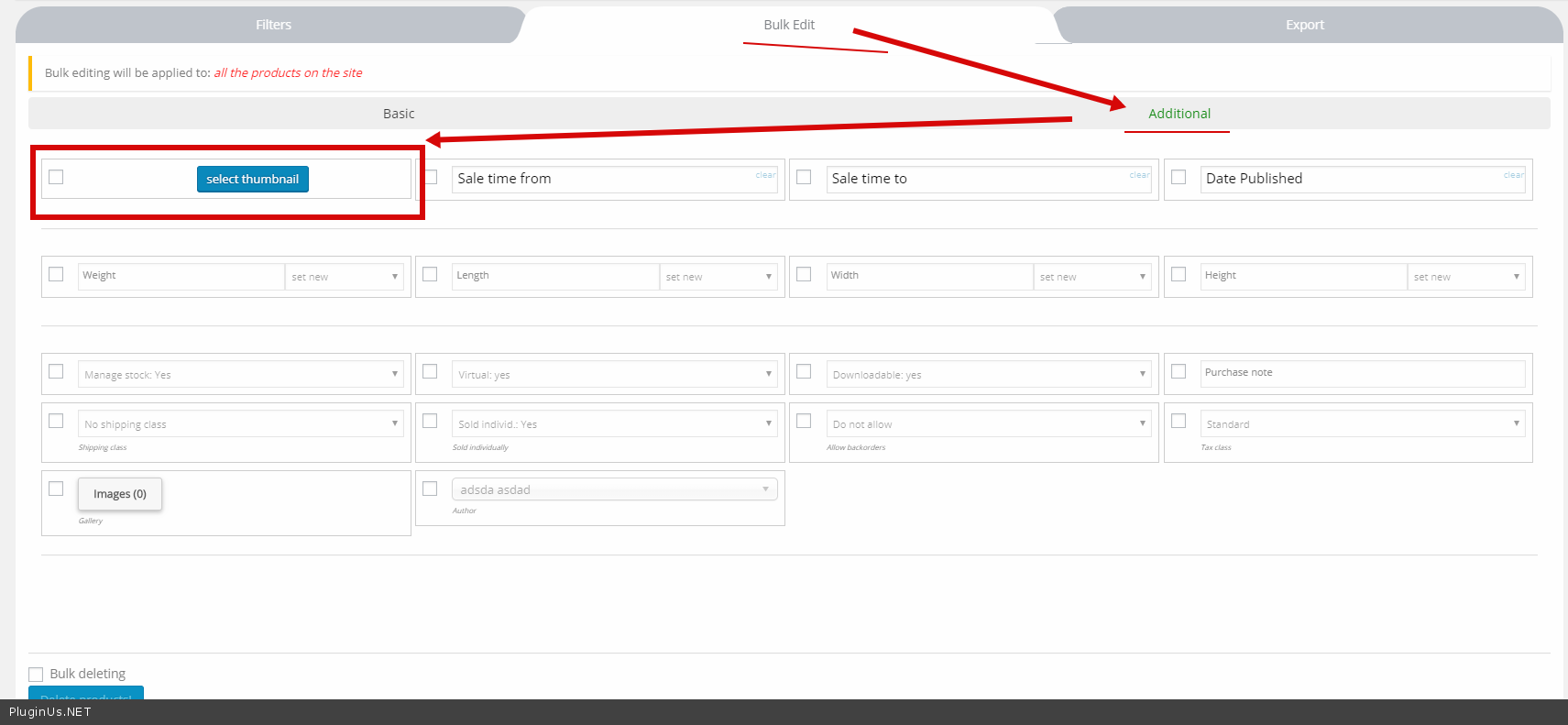
I’m trying to edit around 1000 products to use the same thumbnail, but the max amount of products per page is 100. Is there a way to select all pages to change the thumbnail in bulk?
Hello
Please watch video – https://bulk-editor.com/video-tutorials#video_2502
To edit it – https://c2n.me/40dKuaJ.png
I see that the max amount of products per page is 100. Is that also the max amount of products that can be edited at any one time?
Hello No! Please watch video – https://bulk-editor.com/video-tutorials#video_1290
Hi, I just purchased this plugin and it’s stuck in a loading loop.
Hello
check the browser console – maybe it’s a JS error
If no luck:
Please drop write me on support – https://codecanyon.net/item/woobe-woocommerce-bulk-editor-professional/21779835/support
Paste your message AND wp-admin+FTP access I will check it
Really annoyed after buying the bloody premium and not being able to install the plug in. Getting a message that the folder already exists or something like that.
Also yes, I am talking about the plug in and not the whole zip file before someone says this.
Hello
Uninstall free version and install premium one. Read docs: https://products-filter.com/i-just-bought-the-plugin-and-cant-install-it-error/
Also read: https://pluginus.net/make-auto-update-wordpress-plugins-themes-bought-envato/
Still not working…...............How do I cancel this? it’s just ridiculous
Hello
What exactly not working? You can not install the plugin?
Write request on support here https://codecanyon.net/item/woobe-woocommerce-bulk-editor-professional/21779835/support with exact desription what not working
I have written there and I have done everything you guys are telling me, I don’t know how more clear I can be… I am receiving an error that the pulug in can’t be insalled because the folder already exsist. /home/u583342013/domains/ipteve.nu/public_html/wp-content/plugins/woocommerce/
Ok, lets try 2 ways step-by-step:
WAY 1- go to yor site backend page wp-admin/plugins.php
- find all plugins with name “WOOBE – WooCommerce Bulk Editor” and delete it
- refresh the page and try to find the same plugin again and delete it if you will see it there
- open any ftp client and go to your site plugins page
- find and remove folder ‘woo-bulk-editor’
- find and remove folder ‘woocommerce-bulk-editor’
After deleting in any of that ways – download Codecanyon bundle. You should unpack downloaded zip file from Codecanyon and you will find there woocommerce-products-filter.zip which should be installed using page wp-admin/plugins.php
Done WAY 1… Went to do WAY 2 and there are no such folders there.
Hello
Please write me on support( use contact form ) – https://codecanyon.net/item/woobe-woocommerce-bulk-editor-professional/21779835/support
Paste your message and wp-admin+FTP access
Hello
is there option to add bulk attributes?
Hello
Yes. watch video please – https://bulk-editor.com/video-tutorials#video_2502
The free version only works with two taxonomies.
Hey. What happens if I disable the plugin after editing products? Will the changes stay or will everything will break? I want to only enable the plugin when I need to make changes. And another question. Am I allowed to buy the plugin to use single time uses on client’s website (install, make the changes, uninstall, move to another website). I have clients who only need to change stuff once. Do I need to buy a license for each one?
Hello
Will the changes stay or will everything will break? - all changes will remainDo I need to buy a license for each one? – Yes
Try free version – https://wordpress.org/plugins/woo-bulk-editor/
Hello its possible to bulk add attributes using the free version?
Hello
In the free version it is possible to work only with two taxonomies(Category, tag or attribute)
I bought a plugin, but Variations Advanced Bulk Operations is not working in it. I cannot add attributes, just nothing happens. http://prntscr.com/mjosp1 writes 100% progress, but in fact this is the result http://prntscr.com/mjot0r, changes do not occur
Hello
I answered you on email
I’m trying to filter but it isn’t working. I’d like to only see product variations with “China” in the title. Seems so simple, but no products are being returned and I know there are many that exist.
Hello
Please write me on support( use contact form ) – https://codecanyon.net/item/woobe-woocommerce-bulk-editor-professional/21779835/support
Paste your message and wp-admin access I will check it
hello, are this plugin compatible with dokan?
Hello
I think yes. This plugin can edit any fields on the product side.
If you have a problem – write on support – https://codecanyon.net/item/woobe-woocommerce-bulk-editor-professional/21779835/support
I have the demo version but I only see one product when there are actually 5 in my store. Is this because it’s the demo? What else could be causing this?
Hello
No! it should show all products.
Try to deactivate all plugins except woo + woobe and do test.
If no luck – please drop me screenshots of the plugin settings
How can I set the default profile to load? thanks
Hello
Watch video – https://bulk-editor.com/video-tutorials#video_1291
Check it please – https://c2n.me/3ZsYw5j.png
How to column to show and edit Custom Product Tabs content?
I notice the plugin Compatible with – Custom Product Tabs for WooCommerce, and how can I show the tabs in column to edit? thanks
Hello
Please watch video – https://bulk-editor.com/video-tutorials#video_3044
hi, is it possible to show variable products attributes/terms when listing variations?
Hello
You can see this in the title. Example: https://c2n.me/3Zo6SHk.png
my title is probably too long, so it does not show up. Is there a workaround?
Hello
Please write me on support – https://codecanyon.net/item/woobe-woocommerce-bulk-editor-professional/21779835/support
Paste your message + wp-admin access
Problem with infinity load, no error ;/
Hello
Try to deactivate all plugins except woo+woobe and do test
If no luck:
Please install and activate this plugin – https://wordpress.org/plugins/error-log-monitor/
After you can see the reason for this error.
I tested the trial versions and did not understand how to add a massive attribute so that it would not be used for variations.
Hello
Please watch video – https://bulk-editor.com/video-tutorials#video_2506
Use this option – https://c2n.me/3ZmxM1g.png
hello this is a pre purchase question can i make a product price ediitting by category using an automated task like cron jobs or somthing like that
Hello
Unfortunately the plugin does not have this feature .
Pre purchase queation.
With this plugin i can bulk delete all products variations? (also from DB)
Hello
Yes. Please watch video – https://bulk-editor.com/video-tutorials#video_2506
Hello. I bought the professinal product today. But have the following problem. I sell “simple” products (so no variable products) for which some properties are necessary (color, size, quality, manufacturer, etc.) Unfortunately, I can not figure out how I can see and edit all these properties in the Bulk Editor. In the settings, only one property is shown to me. Second problem is that I can not change the number from 10 to 100 in the settings “Default products count per page”. Under “Default products count per page” stands in red “premium version” although I have WooCommerce Bulk Editor Professional v.1.0.3. Please help me.
Hello
I answered you on email

This item was featured on CodeCanyon

Power Elite Author
Contact the Envato Market Help Team