541 comments found.

Thanks!
Hello
Yes! It is available in a paid version.
Hello I want to add certain attributes with out having it in the variations of the products - want to added as a bulk edit ?
Hello
I answered you on email
Hi I manage an escort website. Every escort is a product with variations of price The variations are the time you book the escort, so till 2 hours,4 hours, 8hours,24hours… all the escort have the same variations.
Then there are 2 groups of escort (gold or platinium) .We use attributes for this. All gold escort have the same variations and prices All platinum escor have the same variations and prices
So I would like to bulk edit a variation price, let’s say “till 4 hours” on all the platinum escorts.
i dont know if its possible with free or paid version and how to do it I’m testing right now Thanks a lot
Hello
It’s possible in free version.
Please watch video – https://bulk-editor.com/video-tutorials#video_2502
ok wow thanks a lot !
hello
Welcome;)
Hello,
Purchased your plugin. Works very nice! How can ik bulk add Tags to a product. Like copy paste multible tags ad ones. One text file separtated by comma’s. new, large, white, ......
Verry nice, thank you!
Hello
Welcome;)
Could this be used on the front end by users? ( I would need to hide some fields or options) ..but could a very basic version for users to update their products be possible?
Hello
Unfortunately this plugin cannot work like this
Hello, thank you for idea, we will review it as [shortcode]
Is it possible to also have image / label filter types for meta_fields? In the documentation it are only the basic filter types.
Hello
This plugin is bulk editor. It has only standard filters. – https://c2n.me/3Z1E088.png
Hello, I had sent you a message but I don’t see a reply. When we edit the price, it doesn’t get saved. Can you please help?
Hello
Please check your spam – https://c2n.me/3Z0LTE9.jpg
There is no option to detele multiple variation of 1 product ? For example, I have 10 Variations for iPhone case, now I want to delete 7 variation, any way to delete in bulk ?
Hello
it is available only in the paid version
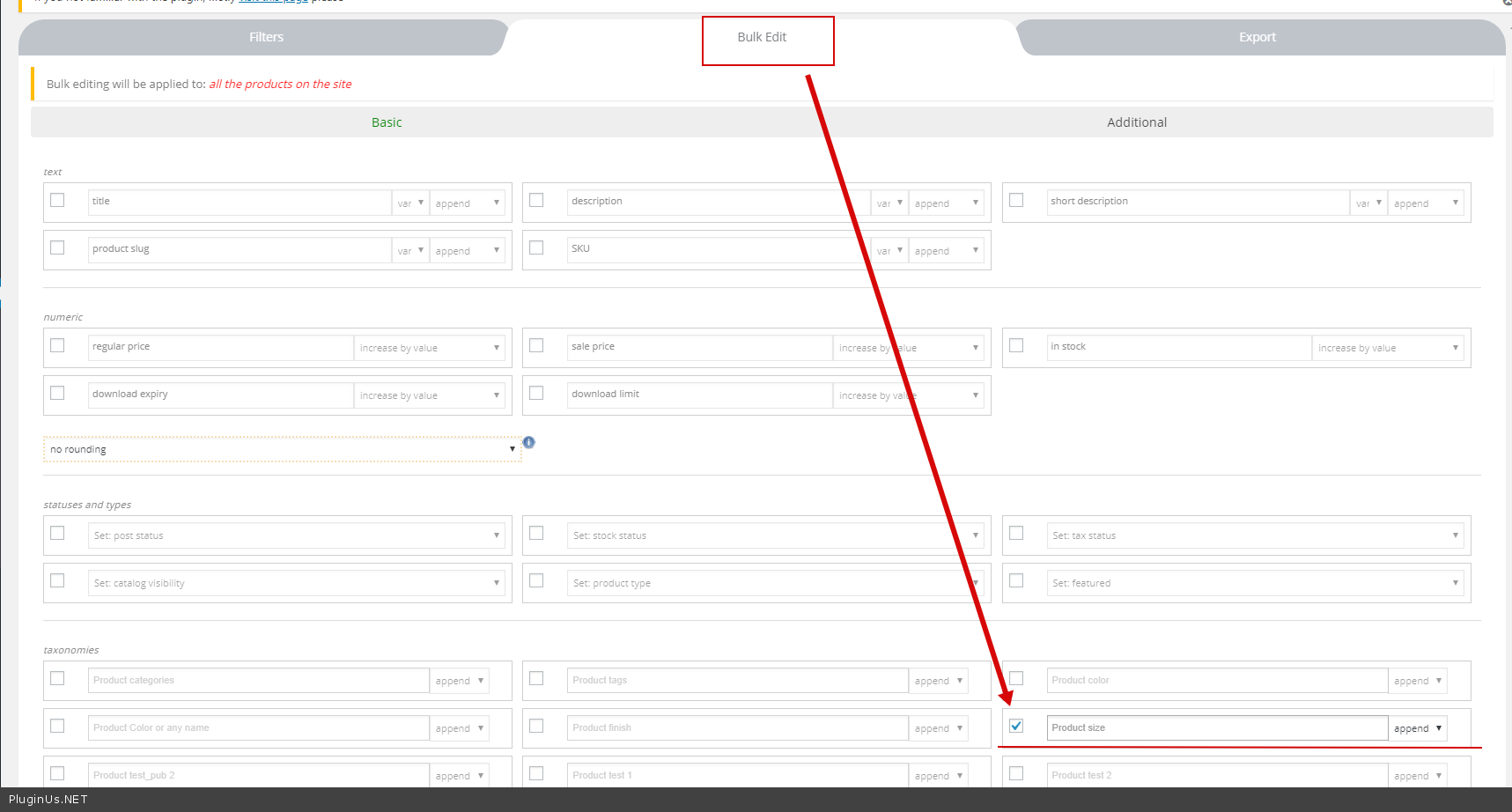
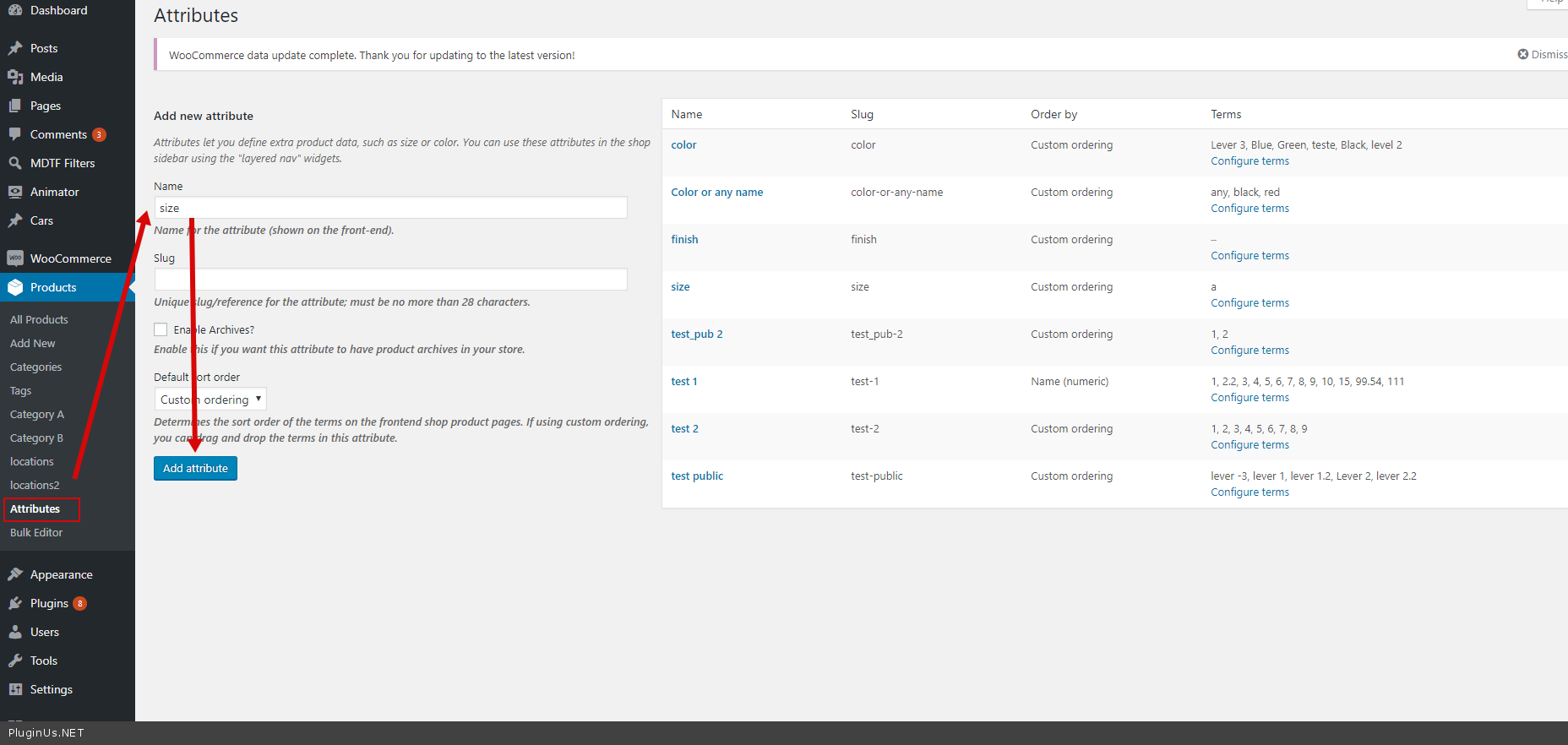
I would like to add “size” attribute to several products but I don’t see how to do it. Please help
Hello
Use bulk edit – https://c2n.me/3YU0IEF.png
If you do not have this attribute – please create it – https://c2n.me/3YU0RPC.png
Please watch video – https://bulk-editor.com/video-tutorials#video_1291 AND https://bulk-editor.com/video-tutorials#video_2502
Hi, Does the WOOBE Bulk Edit plugin work with the Aelia Currency Switcher for WooCommerce ? Can I update in one shot different currencies for all the variations and also upload files for virtual products ? thanks
Hello
Does the WOOBE Bulk Edit plugin work with the Aelia Currency Switcher for WooCommerce ? - we did not do testsCan I update in one shot different currencies - It depends on how this third-party plugin stores currencies. But I think notupload files for virtual products ? – Yes, you can upload the files for the virtual products
Try free version – https://wordpress.org/plugins/woo-bulk-editor/
Hello
I think it is possible as the data of that plugin is in meta data, read this please: https://bulk-editor.com/document/woocommerce-products-meta-fields/
Hi, I purchased the plugin but find out that the Aelia Currency Switcher is not integrated even throught meta fields. I found another problem on the current pro version. I cannot modify the download files for virtual products in variation, nor see if the variation is active. I will need support and submit a ticket for that.
Hello
I answered you on email
Hi .. I use the Woobe Bulk Editor plugin for my website https://www.devranj.com/ purchased on 25 Jun 2018 (Regular License). The plugin had been working fine until 5 days back, but suddenly does not seem to open up any more, with only the loading animation displaying on the screen. I just want to also confirm that I had not made any coding changes or plugin updates to any part of my site since I last used the Editor for my shop catalog update work. I further tried uninstalling and reinstalling the latest downloaded version and and still no luck with opening the Editor. Can you please help fixing this. Fyi. I use Woocommerce 3.5.2 and Php 7.0.33 versions. My email address : dejits@gmail.com Thanks.
Hello
I answered you on email
hello can i add or change or delete attributes for particular products or category ?? can i add variation from that attributes all at once for some products i chose ?
Hello
Yes! Please watch video – https://bulk-editor.com/video-tutorials#video_1291 AND https://bulk-editor.com/video-tutorials#video_2502 AND https://bulk-editor.com/video-tutorials#video_2506
Try free version – https://wordpress.org/plugins/woo-bulk-editor/
Hi, Would be great if there was a way to preview bulk replace changes before actioning them to we can see products affected and their new fields before committing to the changes.
Thanks, Chris
Hello Chris
Unfortunately, the plugin does not have this feature. But you can add your idea – https://bulk-editor.com/forum/
Hello i am trying your plugin free version. I am shortening my product names, However, can i also update the slugs? Is it possible with free version, or premium version
Thanks
Hello
Yes it’s possible. Please check option – https://c2n.me/3YwWoTo.png
Hi, Is it available only in premium version? Because i do not see it.
Hello
Sorry. Yes it is available in the paid version.
Thanks for the reply.
Hey there, I used this plugin to change the categories of some of my products. However when using the filtering option it appears that the product have never been moved. For example when I’m filtering items in one category the items from another category shows up. This only applies to the products I’ve edited with this plugin.
Yep there is definitely some sort of bug with this plugin. I went to one of the products I edited with this plugin that was having the issue explained above. After saving it outside of this plugin it no longer have the filtering issue.
Would love to know how to fix this issue.
Hello
Please write me on support( use contact form ) – https://codecanyon.net/item/woobe-woocommerce-bulk-editor-professional/21779835/support
Paste your messages + wp-admin access I will check it
Hi, It seems I am unable to edit individual variation attributes in the products editor, only the parent product. I have selected the variation switch and some fields are editable such as price and dimensions but I am stopped from editing any attribute fields. Not shy why this is. Thanks.
Hello
It is possible to edit fields that are in variation.
Please watch video – https://bulk-editor.com/video-tutorials#video_1291 AND https://bulk-editor.com/video-tutorials#video_2506
I am trying to Bulk Delete all product variations that have “Ship From China” variation. Your plugin doesn’t delete those variations. I have followed your tutorial. I think it’s a bug in your plugin.
Thanks.
Hello
I doubt this is a bug. I tested on my plugin everything works well
please write me on support( use contact form ) – https://codecanyon.net/item/woobe-woocommerce-bulk-editor-professional/21779835/support
Paste your message + wp-admin access. I will check it
Thanks in advance
Hello
I answered you on email
Good evening,
Unfortunately, I am unable to filter products. He does not filter by price, but only by name. He does not filter on variables. How can I solve that?
Nor do I see any variables in the title. See: https://ibb.co/M2CCdTM
Can someone help me?
Thanks in advance!
Hello
Please write me on support(use contact form) – https://codecanyon.net/item/woobe-woocommerce-bulk-editor-professional/21779835/support
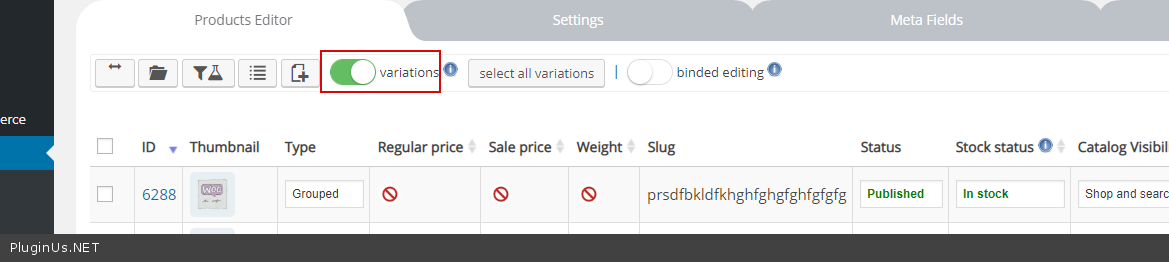
This plugin filters only parent products. If you want to edit exact variations: 1) check option – https://c2n.me/3YqajIb.png
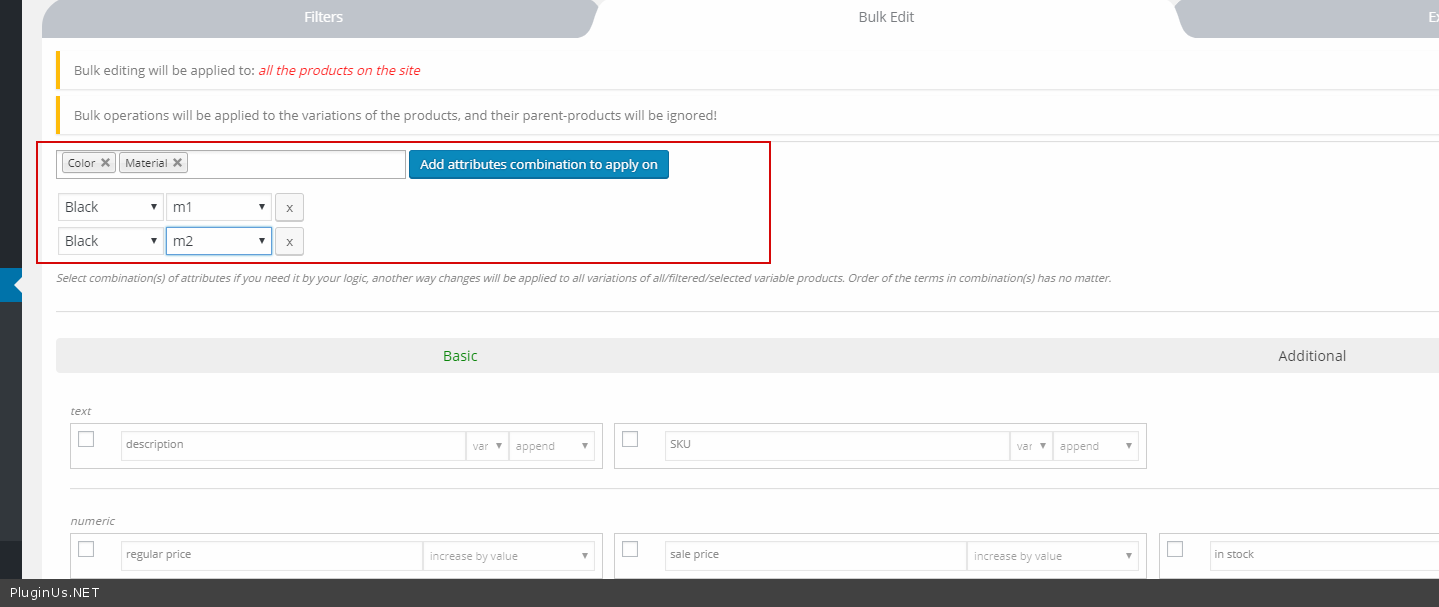
2) select exact attributes – https://c2n.me/3YqaFap.png
I installed the free version but when I tried to use it, I received this error: “Fatal error: Allowed memory size of 1xxxxxxxx bytes exhausted (tried to allocate 72 bytes) in….”
Hello
Please add more memory – https://wordpress.org/support/topic/increasing-memory-allocated-to-php-1

This item was featured on CodeCanyon

Power Elite Author
Contact the Envato Market Help Team