19 comments found.

We are upgrading our existing gravity form that uses this plugin.
What happens when you have 3 drop downs (conditionally displayed in gravityforms)
Linked to the same “Zoho CRM Module Field”Zoho Picklist ?
Will only the conditionally displayed gravity forms dropdown write into the ZohoPicklist field with this integration?
Or could they overwrite each other if they are blank?
Thank you this plugin has been working reliable for over a year and solved many issues for us!
Hello jamesunbrandeddigital,
We regret the inconvenience caused.
Yes, Would you please submit a support ticket: https://obtaincode.net/support/
Let us know if any concerns!
Thanks
Hi i just purchased. but after submission for the
it shown Invalid Client Client ID passed does not exist
i show what i request from zoho crm api consolve Client based application – fill up everything JavaScript Domain -> this file up the domain name?
after create the 2 key i input to the plugin and show the error.
aiks …i solved it. must choose with server based applciation
Yes, doc: https://obtaincode.net/documentation/gravity-forms-zoho-crm-integration/ - Click on ‘Server-based Applications’ button.
mandatory field not working
Hello wpplugincoder,
We regret the inconvenience caused.
Would you please submit a support ticket: https://obtaincode.net/support/
Let us know if any concerns!
Thanks
- Easily integrate your Gravity Forms form with Zoho CRM Lead, Contact or Case.
- Integrated Gravity Forms form can automatically add/update your site new form submissions to your Zoho CRM Lead, Contact or Case.
- Easily map your Gravity Forms form fields to your Zoho CRM Lead, Contact or Case fields.
- Action Event option for 'Create Module Record' and 'Create/Update Module Record'.
- Support Zoho CRM Custom Fields (Phone, Picklist, Multi-Picklist, Date, Email, Text, etc…).
- Support Gravity Forms form 'File Attachments' and upload form file attachments to your Zoho CRM 'Attachments'.
- Support Zoho CRM Campaign. Campaign select option for Contact and Lead. Add Contact or Lead to your Zoho CRM Campaign.
- Support 'Lookup Relationship' type fields (Lead Owner, Contact Owner, etc…) of Zoho CRM Module.
- Enable/Disable triggers (Workflow, Approval and Blueprint).
- Support layouts
- Support tags
- 'Zoho CRM Module Field' dropdown fields sorted in alphabetical order.
- Section for view Zoho CRM API error logs.
- API Error Notification option for will be sent Zoho CRM API error to the specified email.
Pre-purchase question: Do you support uploads?
Hello amsoUG, Thank you for contacting us. Not at the moment but when we release with it, we will let you know. Thanks!
Hi, just wondering if the plugin supports updating of records as well as creating i.e. if a case record already exists, can the plugin update the existing fields in that record rather than create a new record?
Hello s4wdweb,
We regret the inconvenience caused.
Apologies. As per described in the product description, our plugin will help you to add automatically Contacts, Cases and Leads into ZOHO CRM when people submit a Gravity Forms form on your site. Also, you can cross-check it here:https://codecanyon.net/item/gravity-forms-zoho-crm-integration/20174524
For update, we can customize this plugin and develop functionality for update. Let us know about your thoughts for customization and contact us: http://www.obtaincode.com/contact-us/
Let us know if any concerns!
Thanks
Hi there,
I’m interested in buying this plugin, but have some questions please:- Is this price a one-time buy?
- Would the plugin integrate with project management software (Projectopia) as well, or is it just intended for Zoho?
- Would it work for Zoho mail (in case I use another CRM)?
Cheers!
Hello MarwaSaudi,
Thank you for contacting us.
Yes, it’s one time buy with 6 month free support. This plugin is for Zoho CRM. It will help you to add automatically Contacts, Cases and Leads into ZOHO CRM when people submit a Gravity Forms form on your site. Also, developed plugin with new and better Zoho CRM API 2.0.
Let us know if any concerns!
Thanks
Hi there, thanks for your reply. I wanted to know if I download the plugin and it doesn’t work for me, will you refund me?
Thanks in advance.
Hello MarwaSaudi, No. This plugin is for Zoho CRM. Thanks!
Could you please tell about the “Custom Fields” . You say on the page that it’s there. but nothing shows it. Also, I would like to ask about the conditional logic?
Hello Brandofpeople,
Thank you for contacting us.
Our plugin support custom fields and conditional logic, you can map fields as per your needs.
Let us know if any concerns!
Thanks
Hello Brandofpeople,
If you fetch any issue, would you please submit support ticket: http://www.obtaincode.com/submit-a-request/
Let us know if any concerns!
Thanks
2 questions
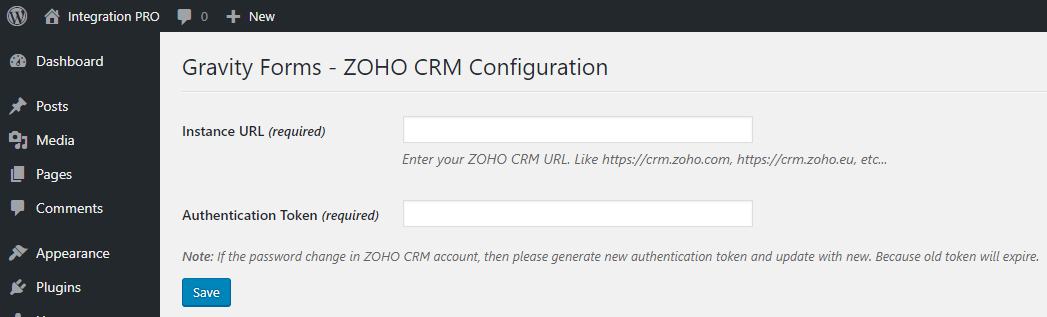
1) Where do we find the ZOHO CRM link “Like https://crm.zoho.com" <- Is this out of date/correct still?
2) Where in Zoho do we find the Authentication Token?
prepurchase questions relate to your guide at http://www.obtaincode.com/gravity-forms-zoho-crm-integration-guide/
Note, we are interested because this plugin seems to offer a Token Authentication option (unlike the Gravity Form Pro add on which requires email/password authentication, which does not work when 2 factor authentication for an account is turned on in Zoho)
Looking forward to your answers and hopefully purchasing your solution today.
Hello Brettbum,
Thank you for contacting us.
1 ) Where do we find the ZOHO CRM link “Like https://crm.zoho.com" <- Is this out of date/correct still?
- It’s depend on your data centres. https://crm.zoho.com/ or https://crm.zoho.eu/ or http://crm.zoho.com.cn/.
2 ) Where in Zoho do we find the Authentication Token?
- The Guide is in admin side Configuration tab.
Let us know if you need more details.
Thanks
What do you mean by ‘your data centres’?
I’m located in the US. Our Zoho account was setup in New York. Our CEO works out of Australia. Our website serves clients globally from Singapore to the United States to UK and Europe.
So when you say ‘your data centres’ does that mean wherever a visitor comes to our site from and uses a form?
Or does it mean our hosting platform for our website? (We run on WPEngine which also has data centers around the world)
Or does it mean where we bought our Zoho plan from?
Hello Brettbum,
For EU Data Centre: https://crm.zoho.eu/
For CN Data Centre : http://crm.zoho.com.cn/
Other Data Centers: https://crm.zoho.com/
So your Zoho Instance URL will be https://crm.zoho.com/.
Let us know if any concerns! Thanks
Thanks much! btw bought the plugin tonight and working on getting the token setup now.
Fingers crossed for luck! (not really, I’m typing) 
quick update, so Zoho Support sent us this 6 minute video on how to create an auth token via the developers console….
The link in their video didn’t work, yada yada…. ( I mention this in case anyone else gets a similar run around from Zoho support)
So in your plugin, I clicked the click here link (while logged into zoho in another tab) and it generated the token, and connected it, and it was soooooo easy.
Thank you for that!
Next up, setting up the integrations and mapping some fields.
Question – What is the Workflow trigger and Approval mode? (leaving unchecked for now per the instruction guide, but curious why they are there and what they are for, if we need them or not)
Wondering what this means in the instructions?
Does this mean that I need to double map a gravity form last name to a contact? And then also map both a Last Name and a Company name to a Lead?
this part is very confusing.
Note: Bellow module wise fields are required in ZOHO CRM and it must be mapped in Form. Contact: Last Name Case: Subject and Case Origin Lead: Last Name and Company Name
Hello Brettbum,
We regret the inconvenience caused.
Would you please submit support ticket: http://www.obtaincode.com/submit-a-request/
Let us know if any concerns!
Thanks
Does this work with the basic license of Gravity Forms, and does it offer all the same features as their own Pro Add-on for Zoho?
Already using your other WordPress Users to Zoho plugin, top notch work!
Hello Contempoinc,
Thank you for contacting us.
Gravity Forms – ZOHO CRM Integration plugin can integrate Contacts, Cases and Leads between your WordPress Gravity Forms and ZOHO CRM. Easily add automatically Contacts, Cases and Leads into ZOHO CRM when people submit a Gravity Forms form on your site.
Let us know if you need more details.
Thanks
Hi Can you able to share demo url
Hello Smartcoderslab,
Thank you for contacting us.
No, we have not any trial or demo. You can the documentation for how it works.
Documentation: http://www.obtaincode.com/gravity-forms-zoho-crm-integration-guide/
Let us know if any concerns!
Thanks
Worked perfectly for zoho.eu. Support helped with an issue I had within hours. Great service.
Thank you very much for having faith on us and your positive response in our product.
I had an issue with the install and they were very prompt and fixed it. Great service and the product is working well
Thank you very much for having faith on us and your positive response in our product.
How is this different from the Addon offered by Gravity Forms directly?
Hello,
Thank you for interest in our product.
Yes, We are giving easy way to map forms fields with ZOHO CRM modules fields. Dynamically selection which created in ZOHO.
Let us know if you required more details of this.
Thanks
The way they map it in the addon from Gravity Forms is already SUPER easy to use.
We are giving one time purchased.
I don’t see the benefit.
Thank you for interest in our product.
Excellent plugin, very simple to follow and use. I had one issue during install and support was fast and thorough. All perfect now. well done! I plan to use this on many sites
Thank you. I thing you was buy a single site licence.
yes, eventually, just one site for now
Ok fine!
does this set a hidden field called “zc_gad” so adwords data can be passed back to Zoho? By default gravity forms changes the name of all field names and ID’s
Hello,
Yes, You will create one hidden field in Gravity Forms form and map with ZOHO module field.
Let us know if you need more details of this.
Thanks
Hi there, does it works with Zoho.EU and not Zoho.COM? I need an integration between GravityForms and Zoho.CRM but another plugin that I’ve tried doesn’t work with EU Zoho Datacenter.
Hello leonardodestefanis,
Yes, It’s working. You can purchased and send us your order id in bellow form and we can send you working plugin within 5 minutes
Contact Us: http://www.obtaincode.com/contact-us/
We looking forward you reply
Thank You
One of our client is using zoho.eu and it’s working fine with our plugin.
Will you refund me if it won’t work?
Ok No Problem!
We have give support for zoho.au and released. Would you please have look once.
SS: https://s3.envato.com/files/231037430/screenshorts/screenshort-1.png
Clean and Professional. GLWS DCSF
Thanks a lot for your best wishes. We are hopeful that customer’s will like this product.
Good work… Good luck for sale…
Team CloudBerriez
Thanks a lot for your best wishes. We are hopeful that customer’s will like this product.