751 comments found.

Hello, I’ve just bought your woocommerce one page shopping plugin and I don’t understand how to use it. I want to create the same type of page as this http://onepage-demo.optart.biz/product-shortcode-2/ with the slim cart up the top and the 2 column checkout details below.
Could you please tell me the exact shortcode I need to use and exactly where i need to put it. Currently I have pages set up with woocommerce e.g. shop, cart, checkout etc but I would like to send my customers to the checkout page only displayed as per I described above
Thanks Rachelle
Hi Rachelle. Do you have your product ready? Than, find its id by opening it in admin panel (it’s in the url) and on page you want to use for one page shopping add ops_to_cart id=”ID_OF_PRODUCT”
Hi, Yes I have my product ready and I’ve tried adding the product id code and I still can’t get it working. I found the product id and have added it but it isn’t working?? If I can’t get it working then I’d like a refund. Thanks
can you send us your site url, product id, site you’re entering shortcode to and admin access to contact@optart.biz? then we’ll be able to verify it
what’s the changelog of the latest 2 updates? i’ve received an email from codecanyon but i can’t find what was updated and its compatibilities.
Hi! sorry for lack of info. We’ll update product description shortly. Here it is: 2.5.15 (2017-11-22)
Fixed coupons 2.5.14 (2017-11-22)
Added compatibility with cart widget
Hello, When I apply a coupon code for the first time, I get a 403 response from admin-ajax.php with the body of 0 or -1. But if I reload the page it works. I think the nonce might not be set up correctly for coupons.
Hi, thanks for letting us now. We have confirmed the issue and will send you updated plugin as soon as it is ready.
My options page is totally blank. I’m guessing the plugin won’t work efficiently without me deactivating something I need. What’s the refund process?
Hi! Most probably you’re lacking memory. You may be able to check it out by either checking your server error.log or turning in wp-config.php WP_DEBUG to true and seeing if/what appears on that page. Your hosting provider should be able to help you out with that. If you prefer refund though, you can proceed from your Envato account.
Hi, I love your plugin “one page shopping”, in fact, I transitioned to it from another similar plugin and I believe it is way better!
I have a problem that I need help with, I am using the following code to check the terms and conditions checkbox if a cookie is detected:
function GetPopUpCookie() { $popup = get_field( “upsell-popup” ); if(isset($_COOKIE[$popup])){ function patricks_wc_terms( $terms_is_checked ) { return true; } add_filter( ‘woocommerce_terms_is_checked’, ‘patricks_wc_terms’, 10 ); add_filter( ‘woocommerce_terms_is_checked_default’, ‘patricks_wc_terms’, 10 );
} }
When the page refreshes the box is checked but then the order field is refreshed and the box gets unchecked.
My code works with woocommerce checkout but not with your plugin!
Please let mo know what I need to change to make it work
Hi! What do you attach GetPopUpCookie to? Which action?
Thanks for the prompt reply I attach it to the header:
add_action( 'wp_head', 'GetPopUpCookie' );thx for the prompt reply I attach it to the header: add_action( ‘wp_head’, ‘GetPopUpCookie’ );
add_action( 'woocommerce_review_order_before_cart_contents', 'GetPopUpCookie' );
It worked like a charm! You are Awesome! Thx!
Hi, i just buy for your plugin
I success to install the plugin, but i need to remove tittle in cart and checkout. you check this pic => http://prntscr.com/hfxabv
How to remove tittle from cart and checkout ?
Thanks
.one-page-shopping-header {
    display: none;
}
You can add additional CSS in wordpress customizer.
Hi, I purchase you plugin and try to test it,
I add [add_to_cart id=”4837”] to some page, but on click on add button not open the checkout\cart page at the bottom. With short code of Add Product should i use?
Please see my site: http://originalgift.co.il/test-woocommerce-one-page-shopping/Thanks a lot!
Hi, please provide access to jakub.ptak@optart.pl.
Need help with setup. Trying to do one page checkout on a landing page for a digital item. See here: https://traineatthrive.com/the-paleo-method/
When testing in Stripe test mode I add item to cart, fill out checkout info. But when i checkout I keep getting an error. One says payment won’t go through. Then when I refresh and the item is already in my cart the payment will work but the password field is gone and I get an error that I need to create an account.
This shortcode setup was best I found so far. I want as few clicks as possible and ideally not lead user to the actual WooCommerce item page.
[ops_to_cart id=”ID”]
[ops_section cart]
[ops_section checkout]
Hi, do you have “Enable Stripe Checkout” checked in Stripe settings? It should be not selected.
Bug report regarding update 23/07/2017
Installing the plugin… Destination folder already exists. /customers/f/9/3/easysower.com/httpd.www/wp-content/plugins/woocommerce-one-page-shopping/
Plugin installation failed.
Hi! can you try to uninstall previous version of the plugin first or overwrite files via ftp?
I was hoping this would be a good plugin but there’s a lot of negative comments about it not working, and then additional costs for setup. Also, the demo page isn’t working.
Hi WeirdMike, our plugin has list of uncompatible plugins and everything else should work just fine! There is no extra setup cost unless you’d want some extra customisation/adjustments for your theme. Also, I just checked our demo and all seems to be fine – once you click on add to cart, cart and checkout are loaded below the product (in one of demo products product is added to cart automatically – that’s one of options you’ve got with our plugin)
PRESALE QUESTIONS:
I read quite a bit of comments regarding the ability to have the cart and checkout within the same page in the cart page not the product pages. You mentioned two years ago that you would incorporate that in the next update. It’s been several updates, has it been incorporated?
What I’m looking to do is the following:
Option 1. Product page>Click add to cart>Click on the the cart once done shopping>checkout in one page without having to click a checkout button in cart page
Option 2. Product page> click buy now>Go directly to one page checkout with cart and checkout fields in the same page
So something similar to what Amazon does I guess, where you can easily checkout if you’re only buying one product. That’s what most of my customers do.
I tried checking out your demo, but it’s not working correctly. When I go to the cart, I don’t see the checkout underneath it and I tried clicking the checkout link there to see the checkout page and it takes me to an error page.
Also, we have installed WooCommerce ShipStation plugin, I don’t see any mention of it not being compatible, but can you please confirm?
Thanks.
Hi, we used a standard woocommerce cart on the cart page on demo before, now it is changed to One Page cart + checkout. Thanks for noticing that!
Option 1 is definitely possible (check our demo now).
Option 2 – you could make it feel like it by changing Add to cart button’s text to “buy now”.
We can’t test our plugin with every woocommerce plugin, but you can buy the plugin and if it doesn’t work with your setup we’ll give you a refund. The plugin you mentioned works primarily on the backend, so there shouldn’t be any problems.
Plugin not working properly with my site, asking for refund.
hi Kibis, please send us your site info so we can check and help you with setup. For refund, you have to proceed from your envato account
Site was already sent to you via email. Extra paying for your support to setup your plugin does not fit to my budget, so i’m asking for refund.
I see, in that case you need to proceed from your account. More info about refunds can be seen here: https://help.market.envato.com/hc/en-us/articles/202821460-Can-I-Get-A-Refund-
Refund request sent.
I installed One Page shopping today on a new installation (WP 4.9) I does not look correct to start with. Only top is shown. I get errors regarding outdated files. Will it be compatible with 4.9 soon?
Kind regards Kenneth
hi! sure it’s only new wp and woo and our plugin? can you provide access? seems to be fine on our end
Yes it was added to a clean install with woo and replacing storefront theme. Tried 3 times and the latest kept as 4.8.3 quick-sales/woocommerce/global/quantity-input.php version 2.1.0 is out of date. The core version is 3.2.0, quick-sales/woocommerce/single-product/add-to-cart/simple.php version 2.1.0 is out of date. The core version is 3.0.0, quick-sales/woocommerce/single-product/add-to-cart/variable.php version 2.3.0 is out of date. The core version is 3.0.0 (easysower.com) I am happy to provide access.
It helped to add [ops_section] on the checkout pages.
good to hear you have it solved!
theme outdated files – they work fine for now but we’ll update them soon too
Hi There,
Great plugin, 3 questions:
1. Why is the page not opening at the top? https://goo.gl/Pob43r 2. Where to find te latest version? 3. Where to find this template? https://codecanyon.net/item/woocommerce-one-page-shopping/screenshots/7158470
Thanks in advance!
JB
Hi, do you have the latest version installed? It should be 2.5.12. It should solve scrolling issue. You should be able to download it from your envato account. Template – here you are: http://onepage.optart.biz/
Thanks for your reply. Installed 2.5.12 but the scrolling issue still exists as you can see in this shop: https://goo.gl/Pob43r
This URL: http://onepage.optart.biz/ Only provides a newsletter subscription
can you send us your site access to contact@optart.biz? after subscribing you get link to newest version. you can grab older one here https://wordpress.org/themes/quick-sales/ but it wasn’t updated to woo 3+, we hope to make updates to wp repository next week
done 
Hi, we have localized the issue and will update the plugin during the weekend (probably tomorrow)
Hello. I bought your plugin but i got a problem with it. Problem:
Adding product to cart, deleting item from it, making page refresh and product is still on the cart sometimes.
What we can do here? Link to checkout page https://www.kibis.lt/pirkti/
hi, didn’t you set up in options to auto add 1 product to cart? if not, please try first if that’s not related to your theme/other plugins as I can see some js issues – Failed to load resource: the server responded with a status of 403 () on admin-ajax
Before refreshing page i waited for 15 seconds and after resfresh product finally gone from cart. Seems like there is time gap till product deleting process reach his destination. Also, deleting adding few products and when starting do delete it from cart sometimes few products moving out from cart or instead of gone, product stays and one more comes to the cart from no where.
I hope i’m clear. Try by your self.
that seems like server issue – time to make ajax call should be in miliseconds. in case of issues with solving (you can try first if it happens on defualt theme/with other plugins disabled as there are some js issues I mentioned), we can make copy of your site on our server for comparison but we’d have to count that as custom development. To discuss details, you can mial us: contact@optart.biz
Email sent.
Hello,
I bought the plugin but unfortunately it is not working. I would like to receive my money back.
Thanks in advance.
hi! please send us your site access for verification – surely we can help you with your issue. if you prefer refund – please contact envato directly from your account.
Hi!
lovely plugin! congratulations!
Please a need support!
how i can set the woocommerce default widget cart on sidebar when the plugin its on?
Regards!
hi, do you mean cart widget auto update? you can set it up in plugins advanced options. in case of issues, please mail us your admin access to contact@optart.biz
Hi! i sent you a email with the admin login. Did you recieve?
hi, yes, sorry it got stuck somewhere in between my and programmer, thanks for contacting us again. You should get answer today!
Hi there, this is working well so far, but one issue with it.
We have the option turned on to Automatically Add to Cart on visit…but we need to not have it scroll down on the page, when this happens…it should stay at the top of the page. Is this possible?
Hi, do you have the latest version installed? It should be 2.5.12.
Hi,
I am using “WC Vendors” and “name your price” plugins and i would like to know if they are compatible with One Page Shopping plugin.
Thanks in advance, Selmo
hi! unfortunately most probably they’ll cause issues toegether
Hi! We rewrote the checkout functionality. WC Vendors and Name Your Price should work now. In case of any issues – please let us know!
Hello, before buy:
I need to put 3 products and let my customer select which one. This plugin allow this?
like this? https://chat.google.com/downloads?attachment_token=AJaqQBqN5B3hRDL70UECWiebDeHi5%2BbfDotVFlTyu%2F6Tkv68e7d4guNzf2icNAix3VQOcCf7BNAe3WnG1OaahWB0F%2Bs32sni1spk7JWpWNKMArcwoXy2gqY6For4zJPmVguTixAvK4has99LZJ2OZdeSwtr%2FGtmdbZNsIOxvCdiL%2FJMVoDujYSDkLQQ34X1DNRaJLsEGjoaIebUmJDBO%2BBcFfcRIqZoap2lk%2B%2FXGzOZ%2FaaRGxeBJ6P5a%2Byp5VxJP7rZntCDlCu8i&content_type=image%2FjpegOR
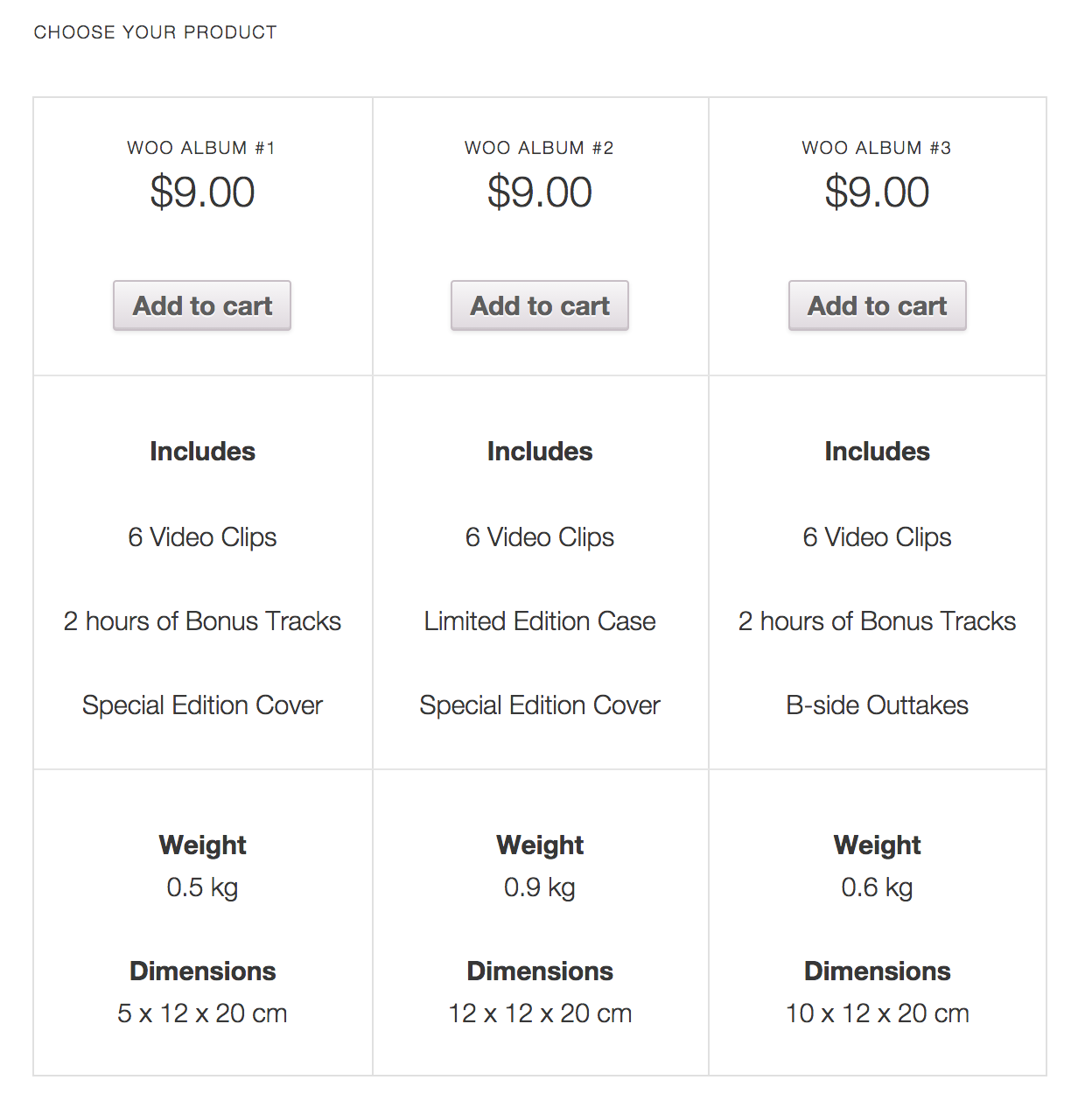
With tables: http://docs.woocommerce.com/wp-content/uploads/2014/10/template-pricing-table.pngWorking good with DIVI?
Tks
hi, this plugin allows one page shopping – adds checkout when you purchase product on the same page. you can create similiar experience to shown on links with our shortcodes – see http://onepage-demo.optart.biz/product-shortcode-2/ but you’d need extra styling for that