117 comments found.

Hi,
Is it possible somehow to monitor “hosting expiration”?
Ideal would be if i can create a hosting expiration date under a domain so i can get a notification later.
Probably let user add any software name or Web URL and set monthly or yearly recurring. and alerts.. so user can monitor their subscriptions in this. just an addon and will be useful in think?
Hello varoon,
Yes, you can create a monitor and set up a conditional check for when a specific text is missing (e.g: your website title).
The alerts are sent when conditions are exceeded (e.g: when you’re expecting to renew your domain 30 days before, and you did not do that, or when you’re expecting your SSL certificate to be renewed within 30 days and you did not do that). There’s no way for us to check for “hosting expiration” per se, because there’s no way for us to know if you’ve renewed your hosting or not, unless it has already been expired, case in which, you can use the above mentioned alert condition.
Regards,
Lunatio.
Hi, thanks for the info.
i understand there is no way to check hosting info.
Mentioned that, I will manually select the expiring date or recurring date. So I will get a notification from this script. its not for hosting alone. i wanted a text box and date selection. so people can keep track of any subscription product in this script.
Hello varoon,
Never seen an Uptime monitor having such functionality. In fact, it sounds to me like an Alarm system (as there’s no prior checking to ensure the Alerts should be sent, based on a check condition), so no such plans at the moment.
Regards,
Lunatio.
Haha yeah. just a thought for managing subscription plans in this. Never mind.
Suggestions for improvement: ( Note: I’m using 100 crawlers from webshare.io )
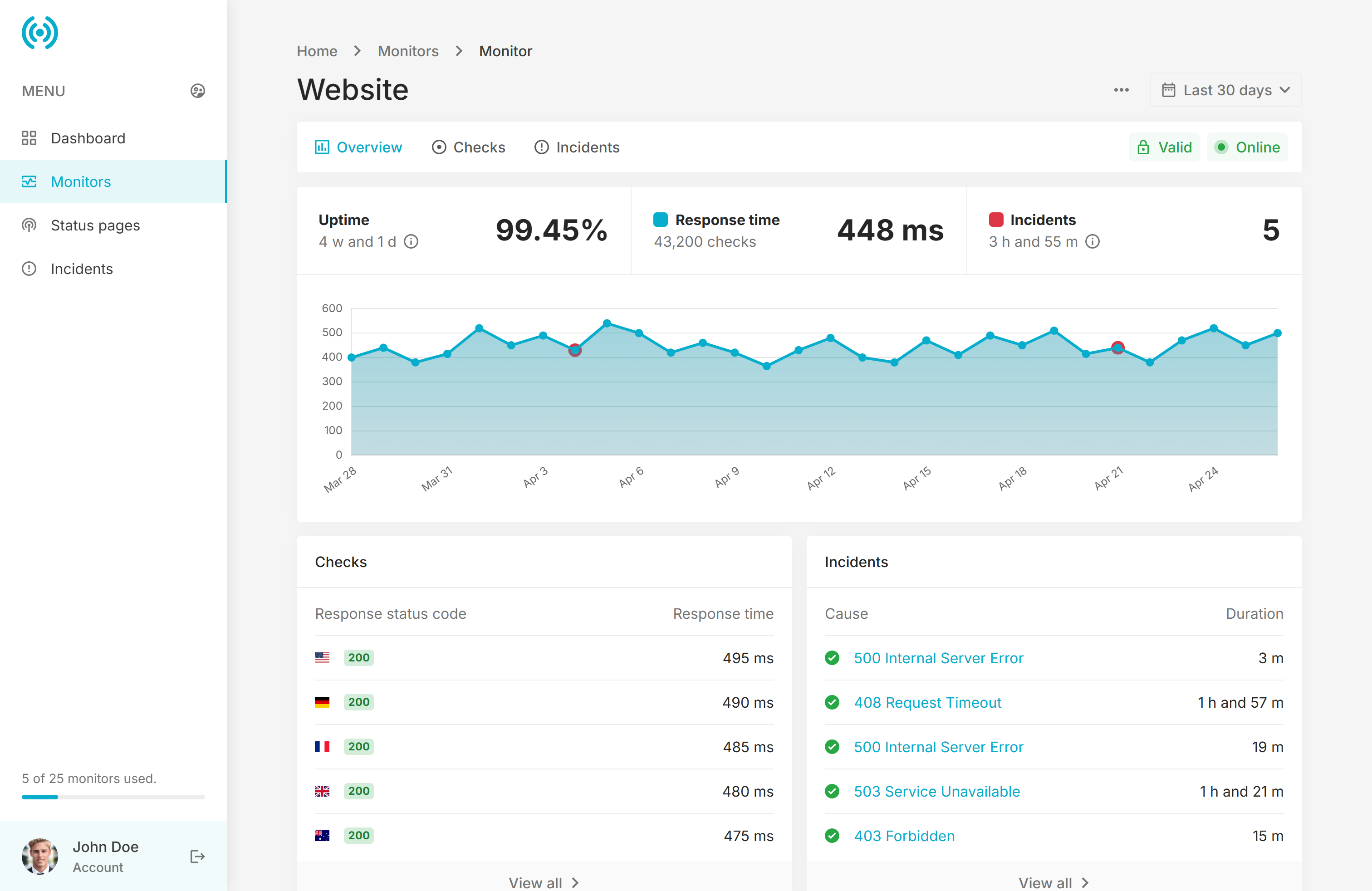
1. When looking at Monitors, the incidents on the graph provide no information as to where to “incident” occurred. Listing the country flag or name would help there.
2. Same goes for the Incident Page: An error like this:
Cause cURL error 28: Connection timed out after 12001 milliseconds (see https://curl.haxx.se/libcurl/c/libcurl-errors.html) for https://www.xxxxxx.com?jXPYNT5uKNquvzx2=1
without letting me know the “where” is unhelpful. If it’s a bad proxy, I can’t identify it and replace it without knowing the where. On the admin side of things, it would be nice to see the IP of incidents to see if all users are having the same issue with a proxy.
3. Same issue again with the Alerts. Email, SMS alerts are way too vague, and we shouldn’t be telling folks that their monitor is offline: ie; The Website monitor is now offline. (not very helpful)
Instead, How about an email like this?
An incident occurred for 2 minutes Date: July 1, 2025 at [Incident Time] Incident: The reason was a Timeout. Details:The server timed out waiting for the request. Location: Los Angeles, California
Hello usadomains,
1. Not possible, as if you’re looking at a 1 year report, you’d be filling the tooltip hover with potentially tens of flags.
2. Great suggestion! I actually thought of it during the initial development, but somehow forgot about it. Added on the suggestions list with high priority, may be available in our next release. 
3. The issue with this is that SMS may contain a maximum of 160 characters. Most of the mobile carriers do NOT allow URLs in SMS, unless it’s a trusted source. Additionally, having lengthy SMS will also mean an increased bill for you, as the site owner.
I agree that emails could provide more details, added on the suggestions list.
Stay tuned!
Regards,
Lunatio.
Wasn’t looking for URLs in SMS, just Location (USA)(France) or IP of Monitor, so a user has an idea of “where”.
That’s great, thanks for looking to add additional info someplace, because I was looking at my email, SMS, and the incident page, going Hmmmm, uh, OK to myself. LOL!!!!
Hello usadomains,
I started looking into this. I’d like to ask you, do you actually need the IP address, or the Country and City name would be sufficient? I’m thinking that generally you’d have a single IP for a city (e.g: an IP address for New York, one for San Francisco), case in which, we wouldn’t need to store an addtional field with the IP address.
Regards,
Lunatio.
Ya, Country and City would be fine. One other idea/thought I was thinking of was, on the Advanced page, when adding in a Proxy, allow for a field or maybe a tag, where the admin can give the name he wants. NewYork-1, USA-1, USA-2, USA-East, USA-West, etc.. Maybe save some resources by not having to parse it each time if it was static. And then by looking at the advanced page, you can know which proxy was the issue. That keeps the proxy IP’s private too.
Well Darn … UptimeRobot just announced this morning. (7-15)
DNS Monitoring is now available on UptimeRobot! With DNS Monitoring, you can easily:
Detect unauthorized DNS changes
Monitor A, CNAME, TXT, MX records, and more
Get notified instantly if your record values are alteredHello usadomains,
I had a look at what others are practicing and it seems common to include the server’s IP, here’s an example from BetterUptime: https://i.imgur.com/Hlfiqt6.png
The proxy IP shouldn’t be a matter of privacy concern, as the user can easily find out the proxy IP just by looking at the server’s access_log records, since the check request is just like any other HTTP request.
Perhaps showing the IP address just for the Admin Panel would be a good move, and we could add it in the future for regular users too, if this would be requested.
As for DNS monitoring, no such plans at the moment, I’ve seen this on several services but sounds more like a gimmick to be honest. For someone to change your domain DNS records it would require complete access to your registratar / hosting account, and therefore bypass your already existing security measures (password, 2FA, etc.), case in which, you have much bigger problems.
Regards,
Lunatio.
Hi Lunatio,
we have now circled back to having the IP. I’m all for it, and since folks will be paying to use this SAAS, and after looking at the BetterUptime screenshot, I agree, that is the norm. Give the IP to everyone is my vote.
We still can’t monitor ports, which I need, and most of my clients want. Such as;
SMTP – UP being – 220 mail.<server name> ESMTP POP – UP being – +OK POP3 <server name> vXXXX.XX server ready
as a few examples. Port Monitoring would put this more at par with other solutions out there in my humble opinion.
oh, and to rickymdq below - that’s what the status pages are for. place a link on your site (most put it in the footer) a link to see website status.
A better idea, is to be able to place a “Incident Status Message” with date and time so a site’a users can see what’s up and why.
While there are many ways to do this here is one example. See the Resolved and Investigating sections at the top Example: https://shorturl.at/rFMbF
Hello usadomains,
We’ve made a final decision, and we’ll include the IP address too, but just for the Admin for the moment, see: https://i.imgur.com/TkwPgi7.png (this information will also be available in the Summary section, not just Timeline).
So bascially, your customers will see the location’s name, just like they see it for the Checks section under the Monitors section, however if you’re an Admin, when you’ll hover over the location, you’ll be able to see the IP address that has triggered this issue.
This way, if you have 2 IPs in the same city (but different ISPs or datacenters), you’ll be able to differentiate between them.
Regards,
Lunatio.
Thanks Lunatio!!!
Hello usadomains,
We’ve pushed phpUptime v7, which features the Country and City details on the Incidents pages, alongside the ability to manually mark as Incident as “resolved” (very useful when you don’t want to wait for the next check to happen if the issue is already resolved), improved uptime percentage calculations, and more.
Emails still do not contain additional information, but this is something that I’ll be looking into in a future update.
Once again, thank you for your feedback, and stay tuned, as there’s more to come.
Regards,
Lunatio.
Hi, will there ever be an option for customers to subscribe to the status page and receive an email when a site goes down?
Hello rickymdq,
Sorry for the delay, I must have missed your message (just saw it as I was scrolling through comments).
No plans to add an email subscription for Status Pages, as that would be very resource intensive on the server, and we’re already battling with resources when mass-checking for Monitors.
With that said, I am going to look into RSS feeds for the Status Pages, so the customers can use an RSS feed to check the status of the services. If this is something that interests you, I can update you if, and when this feature becomes available.
Regards,
Lunatio.
Hi, I need to know 2 things: 1) Does it check if SSL is active? 2) Can I view all the websites on a live grid view? (I don´t want a list with small icons). Thanks!
Hello divad771,
1. Yes, it can monitor both the URL, as well as the SSL certificate expiration date. Additionally, you can also monitor the domain name expiration date.
2. The UI comes as seen on the live demo. For anything extra, you’ll have to hire someone to program it for you.
Regards,
Lunatio.
Hello any option to add urls in bulk?
Hello theextremehd,
For such operations you should use the API endpoints. When setting up a monitor, not only that it requires an URL, but also a Name, a Request Interval, a Request Method, and the Alert Condition. You can loop over your list of websites programatically and define the additional required parameters for each of them.
Regards,
Lunatio.
Im on the fence with this due to price to be able to charge customers as its a lot of money compared to others.
One thing I noticed is you can send SMS information on incidents but there is no way to set alphabetic sending ID ie FlexiDesk rather than number and also with SMS it would be good if you could set a delay on sending texts ie only send SMS if site is down for more than 5 minutes.
Hello flexidesk_cloud,
I don’t see how we’re charging more than others, if anything, we’re on the cheap side compared to our competitors when it comes to Extended license: https://codecanyon.net/search/uptime
I have no idea what do you mean by alphabetic sending ID. We have webhook integrations, which means that you can send out alerts using webhooks to any webhook listener.
Simply set the Monitor’s interval to 5 minutes if you want to be alerted only after 5 minutes. I’ve never seen an Uptime Monitor that offers the option to delay the SMS to be sent after 5 minutes (and I’ve tested pretty much all the big solutions, BetterUptime, Hyperping, Cronitor, UptimeRobot, etc…).
Regards,
Lunatio.
hi,
Since the payment plan only available on Extended license, what is the advantage with Regular License over Open Source like Uptime Kuma which is support more monitoring type and notification channel?
Hello JFOC,
Besides the obvious differences in UI, with Regular license phpUptime has several key advantages:
- phpUptime has multi-user environment, which means you can share your service with your friends for example. Kuma does not.
- phpUptime has Incident management. Kuma does not.
- phpUptime sends signed notifications, which means that the notified people can view both the Monitor page, as well as the Incident page, using the uniquely generated URL (for example if you have a team of people).
- phpUptime has unlimited Monitor history. Kuma only shows a maximum of 1 week for monitors.
- phpUptime monitors the domain name too, which is essential, as we’re focused on monitoring websites. Kuma does not.
- phpUptime has Status Pages Privacy, which means you can securely share your Status Pages with your team members. Kuma does not.
- phpUptime is written on PHP, which means it can run on the vast majority of servers. Kuma is containerized, and requires Docker and a dedicated server to run.
- phpUptime has no known issues. Kuma has over 686 issues reported (at the time of writing this message).
- phpUptime comes with 6 months of support as part of the Support plan. Kuma does not.
Regards,
Lunatio.
Just checking that Kuma has incident management and unlimited monitory history as well
Hello JFOC,
There’s no incident management on Kuma. No way to search for incidents. No way to to add comments on them (to later find them). There’s no way for you to know WHO got notified during an incident, which is extremely important, especially if you later on change who gets notified.
There’s also no mentions of incident management on their features page either: https://uptimekuma.org/#features-and-requirements – so not sure where you’ve seen the incident management features.
As for Monitor history, all I’m seeing is up to 1 week of history for the charts: https://i.imgur.com/8xUz9gx.png
Regards,
Lunatio.
Here the screenshot of Kuma:
https://imgur.com/a/2T74pjvUnlimited Monitory History and Manage the Incident
Hello JFOC,
That’s NOT incindent management, that’s not even an incident  . What you’re showing is a mere “Message” that you can write at the top of the Status Page. What does that have to do with actual incident management?
Incident management is when you have an Incident Hub, like we do at: https://phpuptime.local/incidents – or like BetterUptime.com has, or Hyperping.io, or Spectate.net, or any other major uptime platforms, and it allows you:
- View all incidents;
- View the incident details (when it happened, why it happened, who got notified, when it got resolved, etc.).
- Search and filter the incidents;
- Leave notes on incidents (that are searchable)
- Delete them;
As for the monitoring history, indeed you can customize the data retention, but the graph is still limited to 1 week. Apart from that, everything else we’ve mentioned still stands.
Regards,
Lunatio.
Is your sale for regular license not for extended license? Regular license sale would have made sense if it could be used to charged clients so this does not make sense having extended license not on sale.
Hello dropmailtushar,
Sorry, we never discount the Extended license, as we consider it a fair price for a business, given that this is a turn-key solution. Also, Envato does not have an option to run sales for Extended license. The option they offer is strictly for Regular licenses. Furthermore, not everyone is looking for Extended licenses, so this is a very good deal for someone wanting to monitor their websites .
Regards,
Luatio.
but in regular we can’t charge users or can we?
Hello dropmailtushar,
Correct. To charge users money, you need an Extended license, as per the Envato License Terms.
Regards,
Lunatio.
Is SaaS locked in regular license?
Hello dorpmailtushar,
Yes. You can only create “Free” Plans on the Regular license. For the Payment System (Checkout, Invoices, Tax Rates, Coupons, Subscription), an Extended license is required.
Regards,
Lunatio.
Any chance of decreasing pricing for extended license? Your sale is worthy if you decrease extended license price as well. If you give sale price for extended license surely i will buy.
Why have you used “Domain certificate monitoring”?
Is that “Domain Name” or Domain Expiry?
Hello varoon,
Oh, that’s definitely a typo. Will correct it immediately.
Regards,
Lunatio.
Hello varoon,
You can update it in /resources/views/monitors/edit.blade.php if you need this updated now.
Regards,
Lunatio.
will you plan to add telegram support? thanks
TElegram should be the must on uptime systems. your scripts are the best ones ever.
Thatsssssss perfectttttttttttt. Thanks for hearing the community. Now one more suggestion. Like a notification manager. I add teelgram, slack other notification chanenls and when i add a website i choose where i should get the notification. like dont need to copy and paste manualy the telgram bot api all the time to 100 websites i have i just click telegram channel , email channel. This is nessesary too. maybe you had lots of work and dident found this as an option but is nesessary too Thanks
Hello juxhin20,
We’ll look into a “Duplicate” or “Clone” resource option in the future, so you can easily create a new monitor with the same settings, but we’ll wait and see what other buyers are suggesting too. For now, we’ve implemented your Telegram request.
Regards,
Lunatio.
will you add option to add multi location checker plugin liek other uptime script providers? thanks
Hello juxhin20,
Yes, we do support multiple end points by using Proxies. Head over to Admin > Settings > Advanced > Crawler tab > Proxies field. Your server will ping a proxy in another country, and that proxy will ping the URL, and return the response to our software, so you’ll essentially check the availability of the website based on the proxy location.
You can use a service such as webshare.io, lunaproxy, etc. to get quality proxies. Just make sure the regions you’re selecting are regions that have global availiablity (Germany, United States, etc.).
Have a look at the “Checks” section on this page: https://s3.envato.com/files/634869965/Preview/03_User_Monitor.png
Regards,
Lunatio.
Thank you for your answer. Your scripts are always amazing and super fast. Just don’t forget Telegram is a must add feature for notifications !!!! Have a nice day
Hello juxhin20,
Sorry, no plans for Telegram at this moment.
Regards,
Lunatio.
Hello. Thank again for your amazin work Please ping me up whe you get telegram and centralize notifications. like a settings notification and when i add a monitor i just can choose from precofigured notification settings. Appriciate your work you have done an amazing job Please ping me up or register me on a newsletter when you add telegram and centralized notifications realla wanna move from other open source scripts and other providers to this one Have a nice day
Any plan to add server monitoring (RAM, CPU, disk, network etc) with custom alerts (eg. if exceeds x > send notification)
Hello andreamad,
phpUptime is focused on website monitoring (URL, SSL, Domain). At this moment, we do not plan on adding server usage monitoring.
Regards,
Lunatio.
Hi, I just wonder; 1- Any planned date for v3? 2- How does requesting service is working? I want to understand it if i have 50k urls to check per minute, how will handle and what is the technical way you implemented there that I can see the big picture how works and it will not be late for the metrics etc.
Thank you.
Hello mehmetcanhoroz,
1. phpUptime v3 is now officially released.
2. Here’s an extensive response: https://codecanyon.net/comments/31498830 – you won’t be able to reach 50,000 website checks per minute, unless you scale this horizontally, which isn’t supported by default – so you’ll need to look into services such as Laravel cloud (read the whole response).
Regards,
Lunatio.
Thanks for your reply. it seems, horizontal i can provide in infra level but it seems code level, it is not managed. Right? Would be great to review code. Or maybe whole implementation could be redeveloped but then i may need to invest too much time… Hmmm, thanks for your reply.
Hello mehmetcanhoroz,
Correct, we don’t have any implementation for horizontal scale, other than what Laravel supports out of the box. If you’ve done this before, then it shouldn’t be any different than with any other Laravel apps.
Regards,
Lunatio.
you should connect a plugin linked to the main script to be linked in another server. because if the server with the script goes offline you can’t monitor
Hello alexpesavento,
That would be rather complicated to do, and also difficult to set up. If your server goes down, your database is probably down too, so how would we do the checking to being with? Ideally, you’d be installing phpUptime on a server with extremely high uptime, something with preferably 100% SLA.
Regards,
Lunatio.
Hi,
Possible for this:
1. the incident log grouped
For example:
Power Maintenace:
Incident 01-01-2025 :
- 01-01-2025 10:00 initiate power cleaning
- 01-01-2025 12:00 Power cleaning takes more time
- 01-01-2025 01:00 Power restoration
Resolved: 01-01-2025 01:02 Power Maintenance Completed
2. Grouping the monitoring based on category/location in one status page?
Example:
Asia
- MAIN WEB
- SSL MAIN
Europe
- WEB
- SSL Cluster
Billing System
- API Server
- HOOK Control
Hello JFOC,
Sorry, no such plans at the moment.
Regards,
Lunatio.
hi! would it make sense to also include phpAnalytics in this script?
Hello alexpesavento,
Sorry, but phpAnalytics and phpUptime serve completely different purposes.
phpAnalytics monitors the traffic your website gets, while phpUptime monitors the availability of your website.
Stay tuned, as we’re about to launch a major update for phpUptime with some nice new features. 
Regards,
Lunatio.
with the same login can you access uptime and statistics? without registering twice?
Hello alexpesavento,
We have social Authentication with Google, Microsoft, and Apple accounts, so you can easily login / register with 2 mouse clicks.
Regards,
Lunatio.
Can you add these in the next update?
1. Can you guys add the option to change the colour theme? (#31c4df)
2. Domain Expiry notification?
3. Purchase addons (purchase 1 or more monitors is the existing paid plan)
4. Home page customisation (Add/Edit/Delete blocks)
5. Google Analytics / Pixel code support.
Hello varoon,
1. We’ll look into it later this year, for now you’ll need to do it using one of the following options: https://codecanyon.net/comments/29738924
2. Yes, our next update will bring Domain Expiration alerts.
3. No such plans at the moment.
4. No such plans at the moment.
5. This is already possible, via Admin > Settings > General > Custom JS field.
Regards,
Lunatio.
Hello varoon,
Domain monitoring is now available: https://lunatio.com/phpuptime/changelog?v3 alongside new features & improvements.
Stay tuned, as there’s more coming soon.
Regards,
Lunatio.
Hello, please add gotify and ntfy for notifications.
Hello ricardo3456,
We already have “Webhooks” support for services that can listen, parse, and send a notification for post requests.
I did a quick test, and I was able to receive a message on Ntfy, see: https://i.imgur.com/7fw5SPK.png
However, we have no plans to add dedicated notification channels for these services as stand alone, as they are not popular services. Gotify has like 10.000 downloads, and ntfy has 50.000 downloads, which is an extremely small number when you compare it to the likes of Discord, that has 500.000.000 downloads for example.
We’ve just released phpUptime v3, with major new features & improvements, and there’s more updates coming soon. Stay tuned.
Regards,
Lunatio.
great, webhooks is compatible with ntfy and gotify.
Hello ricardo3456,
I haven’t tested with Gotify, but if it’s similar with Ntfy, then yes – it will work. See this image to see how the notification will look like: https://i.imgur.com/7fw5SPK.png
Regards,
Lunatio.
for page creation can we support html currently only one type of text can be added
Hello thextremehd,
You can already use HTML, CSS, and JS code in pages.
Regards,
Lunatio.
All monitors are “pending”.
Seems there is an issue on the cron job or some update query
Page: www.domain.com/admin/settings/cronjob
Last executed at:
2025-05-19 22:12:01.
2025-05-19 22:15:02.
The time is updated every minute correctly.
I’m using Digital Ocean VPS and Plesk panel.
Any solution to debug?
Hello varoon,
Can you please send us FTP or cPanel credentials via: https://codecanyon.net/item/phpuptime-website-uptime-monitor-saas/57971097/support – so we can have a look at this for you? Thank you.
Regards,
Lunatio.
Sent ftp details.
Seems PHP config issue on the Server level.
Fixed and working fine.

This item was featured on CodeCanyon

Elite Author
Contact the Envato Market Help Team