61 comments found.

Hi, I just buy for bulk edit for a multilanguage Project maked with WPML and when I update in “X” language the title, automatically, use that title on all language of the post. Can you explain how to translate in bulk in multilanguage? Thanks.
Hello
Please write me here- https://pluginus.net/support/forum/wpbe-wordpress-posts-bulk-editor-professional/
Please paste your license key here – https://share.stackovergo.com/image/i20210618130558.png -> https://share.stackovergo.com/image/i20210618130614.png and FTP+ wp-admin access – https://share.stackovergo.com/image/i20210618130637.png – I will check it
The plugin should only edit posts in the current language
So I created a new focus keyword meta field. Enabled it and can enter a keyword in the posts editor. But how the hell do you save it once you’re finished? I can’t see a Save button or am I missing something?
Hello
Try to press “Enter”
Now it won’t let me enter or edit any keywords
Ignore that comment. It appears there is a conflict with another plugin, Content Protector by 42Theme. When I deactivate it, then it works – including enter. Do I need to do anything after pressing enter, or is is saved automatically?
Hello
To save data in text inputs you should press [enter]
Hey, how can this be used to batch edit the SEO Title, Keywords, description and so on?
Hello
If you need edit meta fields generated by any plugins (for example SEO meta title of any SEO-plugin) use tab Meta Fields to add new meta keys, save, select them in tab Settings and press save button – now all them are visible and ready for editing in the Posts Editor. Usually a meta field has long key, so to avoid making its column too wide in tab Meta Fields set short title for the meta key.
Read please: https://bulk-editor.pro/document/wordpress-posts-meta-fields/
Здравствуйте, рассмотрите пожалуйста возможность, сделать пресет с индивидуальным набором мета полей для каждого типа записи.
Здравствуйте
Ok! Я передам это разработчикам
Hi, on my site https://ciib.org the plugin only picks up Status = Published, but it doesn’t do so with scheduled posts. Is there a way to make it display scheduled posts as well?
Hello
unfortunately the plugin does not have such a feature
But I will pass this to the developers
Здравствуйте, это только у меня проблема с массовым редактированием содержимого поста? Мне нужно во всех постах полностью очистить содержимое записи. https://www.loom.com/share/4ad85383396743b28db548ca53e61de1
Здравствуйте
Пожалуйста напишите мне в поддержку – https://pluginus.net/support/forum/wpbe-wordpress-posts-bulk-editor-professional/
Добавьте ключ лицензии – https://c2n.me/43SC6rb.png -> https://c2n.me/42HBIt7.png и wp-admin+FTP – https://c2n.me/42BAoj4.png
Мы поробуем решить это
Отправил
Спасибо! Мы напишем тебе как только получим результат
Здравствуйте, заметил что дата изменения не меняется если редактировать пост в вашем редакторе https://prnt.sc/118tvuh , это можно как-то исправить?
Здравствуйте
Это должно работать. Попробуйте обновить страницу
Не работает, посмотрите https://www.loom.com/share/00c3b536ef99440794c2f5fba5386993
Здравствуйте
напишите сюда пожалуйста – https://pluginus.net/support/forum/wpbe-wordpress-posts-bulk-editor-professional/
Вставьте код лицензии – https://c2n.me/43SC6rb.png -> https://c2n.me/42HBIt7.png и wp-admin доступ – https://c2n.me/42BAoj4.png
Мой тест – https://c2n.me/4bFO3BE
Hello team!
I purchased the pro version and it’s a great tool to edit multiple fields (even custom ones) from various posts efficiently!
Question/Feature request: Because the WPBE interface looks very similar to Excel, I’d like to copy from Excel the cells from X number of rows from a single column and paste each cell of them in X number of posts. Is this possible?
This would be ultra helpful to make my process faster because I could update my Excel cells with various complex formulas and then easily I’d paste them in multiple posts.
Thank you in advance. 
Hello
Unfortunately the plugin does not have this feature.
You can write me here – https://pluginus.net/support/forum/wpbe-wordpress-posts-bulk-editor-professional/ – We will discuss the possibility of implementing your idea
Thank you pabloborysenko! I’ll do so!
Hello
Welcome;)
Do not display product regular prices and sale prices
https://xenangtrungquocso1.com/wp-content/uploads/woocommerce_uploads/123.pngHello
To edit products – https://codecanyon.net/item/woobe-woocommerce-bulk-editor-professional/21779835
To add prices in WPBE add it as meta field – https://bulk-editor.pro/document/wordpress-posts-meta-fields/
Keys: _sale_price, _regular_price, _price
Hello
For woocommerce use only WOOBE please
Hi there, I made a mistake and bulk edited a bunch of posts (bulk operation). So I wanted to undo it in the history tab but I pressed Delete (x button) instead of Restore (refresh button). I know its my mistake but is there any way to restore the delete history action? Probably not… let me know please. Thanks so much!
Hello
unfortunately I cannot help you with this. Data has been removed from the database. All I can advise is to check if you have a database backup(table: woobe_history).
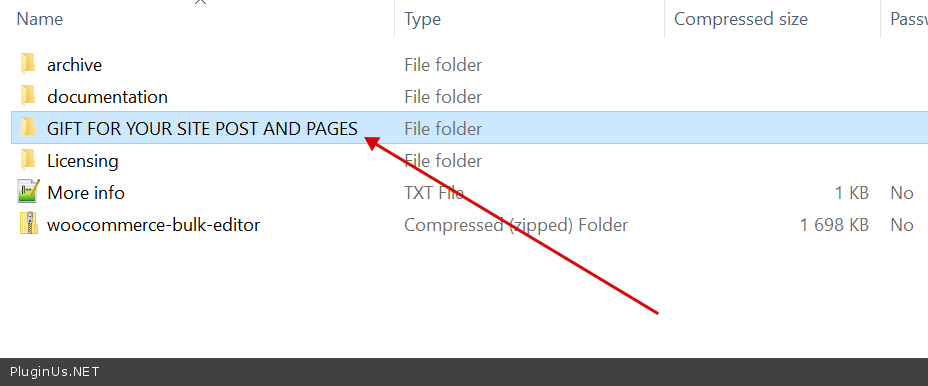
hello can i ask how we can get this plugin without support as a gift if we purchased woobe? Thanks in advance!
Hello
You will find it in downloaded zip after buying in folder ‘GIFT FOR YOUR SITE POST AND PAGES’ – https://c2n.me/4b21ZP2.png
Hi,
i tried the free version, great plugin,
how to edit by status “Pending Reviews”?
Regards
Ok, i found the filters above!
Hello Ok! Great
Hello i have tried the free version, some questions. I am using Houzez theme for Wordpress. We have custom post type “Properties” with each own custom fields and custom taxonomies.
1. Can i edit the custome fields and taxonomies for each custom post type ? 2. it seems that it is working by saving every edit of every field instead of bulk saving ? am i correct ?
Hello
1 Yes. https://wp.bulk-editor.com/document/posts-editor/ AND https://wp.bulk-editor.com/document/wordpress-posts-meta-fields/
2 two ways Read this – https://wp.bulk-editor.com/document/wordpress-posts-bulk-edit/
You can try free version – https://wordpress.org/plugins/bulk-editor/
Hello,
Pre-purchase questions:
1) With your plugin is it possible to set all my wordpress posts to “draft” at once?
2) Is it possible to change multiple featured image at once?
Thanks in advance
—GM
Hello
Yes
Read this – https://wp.bulk-editor.com/document/posts-editor/
Please try a free version of the plugin – https://wordpress.org/plugins/bulk-editor/
Hi, I’m using wp-client.com plugin which has portal page. I’m looking for a bulk post edit that work with this plugin to edit their pages. Do you know if your plugin is compatible?
Hello
Unfortunately we do not have such information
You can test it with the free version – https://wordpress.org/plugins/bulk-editor/
Hi
I have purchased your plugin and have a question:
I have added custom fields to my posts using the Toolset plugin. Is it possible for your plugin to show those custom fields that I have appended to my post type using the View plugin of the Toolset plugins?
Best regards,
Hello
I think yes.
Please read this – https://wp.bulk-editor.com/document/wordpress-posts-meta-fields/ AND – https://wp.bulk-editor.com/document/bulk-edit-of-serialized-jsoned-wordpress-posts-meta-data/
Hi,
Is it possible to delete all post data but not the posts themselves?
Hello
Yes, but you should know all the fields that need to be deleted
Hi,
Is it possible to delete all the data of posts but not the posts themselves?
Hello
But you need to know these fields. You should delete each field
Hi Folks
Announcement: after update to WordPress 5.3 WPBE has javascript conflicts and doesn work – Update will be today 13-11-2019 GMT+02:00!
Update is done
Installed your free version but loads a blank page ?
Hello
Please write me here – https://pluginus.net/support/forum/wpbe-wordpress-posts-bulk-editor-professional/ I will check it