164 comments found.

Hello there, a quick question. Can the calendar be moved to the top?. That´s the most common thing to see when booking.
Hi,
Yes, it can be moved to the top by applying some custom CSS maybe (because the default presentation of the calendar is as we are showing in our live demos). To know more you can contact the Support Team.
Kind regards,
Fluent-Themes
Hi Fluent,
Your plugin looks very flexible.
My questions are: 1. Is it possible to create hook before an order is processed? I want to use local payment options i.e MPESA instead of paypal or just pay later.
2. Can I customize the fields in the check out, eg remove the shipping address, and also add fields to collect info from client.
3. Is a percentage advance payment say 10% allowed?
With thanks, Vivian
Hi Vivian,
Thanks for your interest in ARB booking plugin.
Here are the answers to your questions:
1. ARB is a WooCommerce add-on. So, all the WooCommerce hooks can be used for this plugin. All the WooCommerce supported payment methods can be used. If your local payment method is supported by WooCommerce, you can use that as well.
2. ARB does not alter/add/remove any options or fields of WooCommerce checkout features. If you have a standard coded plugin to alter the WooCommerce checkout page as needed, you can use that plugin.
3. ARB plugin does not have this feature yet.
Kind regards,
Fluent-Themes
Hello. Did you test the plugin with some caching plugins (W3 Total Cache, Fast Velocity Minify)? I have problems with mobile phones. I am not sure where the problem is. Here the screenshot: https://imgur.com/a/2HgqBAl
Hi,
Thanks for reaching out.
If your cache plugin minify the scripts incorrectly you might have face issues like this. To find exactly what is the source of the issue, please provide your site’s details to the Support Team and they will check and solve the issue for you within 48 hours.
Kind regards,
Fluent-Themes
Hi Fluent, I’m interested on this plugin, but I have some questions before to buy it, can you answer me please?
1. Can I add different timeslots for week and saturdays? Example: Monday-Friday/ (09:00 – 18:00), and saturdays (10:00 – 15:00 only) ?
2. The customer can pay using his debit or credit card (visa/master) before appointment, right?
3. This plugin is fully compatible with Elementor?
Just let me know soon  thank you.
Hi,
Thanks for your interest in ARB.
1. Yes you can add different time slots for different days of the week.
2. Yes.
3. The compatibility lists of ARB is given at the right sidebar of this page.
Kind regards,
Fluent-Themes
How can i export all reservation in csv or xlsx..?
Hi,
Thanks for reaching out.
Would you please contact the Support Team with the question and your purchase code? Support for ARB plugin is provided through the Support Team and they will help you within 24 hours.
Kind regards,
Fluent-Themes
Hello I have just purchase, running the up to date version of wordpress.
There is a problem with the “Add Range” button in the admin dashboard area, it does not work and instead returns the user to the top of the screen – javascript / link error?
Hi,
Thanks for reaching out.
The source of the issue could be any 3rd party plugin conflict or older version of WordPress Or older version of your theme. To find out the exact source of the issue, we (our support team) needs your site’s wp-admin access. Please contact the support team by clicking on the Support tab of this page and provide them the details. They will help you within 24 hours.
Regards,
Fluent-Themes
Can this be used on a site where people have to ask for a quote on each product?
Yes, the “quote request” option is also available in ARB. To check the “quote request” feature at live, please view this demo.
Thanks
Fluent-Themes
Thank you. I have just sent you a message via your support ticket to show you how I would like to use the plugin
No problem, they will get back to you as soon as possible.
Regards, Fluent-Themes
Hi. I have a pre-sales question similar to user nikpise’s. Can there be various types of booking (day based and overnight based) calendar with a single product? Example, a villa that can be booked for “1 day, 9am to 6pm” or “overnight stay, 3pm check in & 12pm next day checkout”.
Thanks!
Hi,
Thank you for your interest in ARB plugin.
A bookable product can have one type of booking slots. It can be ‘hour based’, ‘minute based’, ‘day based’, or ‘month based’. One single product cannot have 2 types of booking slots. Though, you can create as many bookable products as you need using ARB.
Kind Regards,
Fluent-Themes
What about inventory? Can there be a single inventory set for multiple bookable product? Example a single villa can be booked for day use or overnight stay, but availability has to come from a single calendar inventory. Thanks for your quick response!
Also is the license based on a single site domain? Currently we are on an older version of our website and will be phasing it out to the new one by end of the year. Wondering if there will be any issues moving the plugin over to the new site? It will be in the same domain and server.
Hi,
Thanks for your replies.
Each bookable product will have its own calendar inventory. Booking a certain calendar slot of one bookable product does not affect any other bookable product’s calendar.
Licensing:
Yes the ‘regular’ license is for single site domain. You can transfer the license from one site to another though. More details about licensing can be found here.
Kind regards,
Fluent-Themes
Thank you!
I got reference from one of the comment in mylisting theme. This is a pre-sales question. 1. I have product with mylisting theme where each vendors have different time slots and reservations. Is it supported with mylisting ? 2. Can I create vendor specific bookings option ? 3. Can each vendor manage there bookings themselves ? (Like photographer can be booked for 1 full day or half day. Banquete hall can be booked for 1 day or for 2 day function.) - To satisfy above requirement do we require to create booking calender for each vendor ?
Hi,
Thank you for your interest in ARB plugin.
1. We tested the ARB plugin with Mylisting once and didn’t face any issue. The ARB plugin worked perfectly with Mylisting theme. When we tested, the mylisting theme version was different as well as the ARB plugin version. Right now both of them are updated with new codes. We didn’t test latest version of ARB with the latest version of Mylisting theme yet. So, we are not sure about that.
2 & 3. Are you asking if the following things are possible with ARB?
i) Is it possible to create more than one bookable product (like 1 bookable product for Photographer, another bookable product for Banquete) using ARB? The answer is: Yes, you can create as many bookable product as you need.
ii) Each bookable product will work individually? The answer is: Yes, each bookable product will work individually. If a slot of Photographer booking form is booked by an user, the other product (Banquete) will have no effect. Users/visitors of your site will be using your Banquete booking form and Photographer booking form individually.
Kind Regards,
Fluent-Themes
ohhh that’s cool. I am gonna buy this for my dreamwedding website. Thanks Team for your detail answer.
Thank you too
Hello,
Is it possible to have something like pre set range of dates (multi day event), where people can apply for that (something like conference or similar)? To apply as a person, or as a number of persons (not necessarily a ticket).
Thanks in advance.
Hi,
Thanks for reaching out.
Yes it is possible. The duration can be customer defined (input on the front-end) or admin defined (fixed slot). You should choose ‘Fixed Slot’ of multiple days (as you need). Please check this section of the documentation. And then just create a ‘Resource’ (for your event) and set the price for the resource (check this section of the documentation). Now people will be able to book the event for the pre-set date ranges.
Please contact the Support Team, if you need more assistance to setup your booking form as required.
Kind Regards,
Fluent-Themes
your documentations is not complete. wheres the complete documentations on creating this ?
https://prnt.sc/tz3ejwHi,
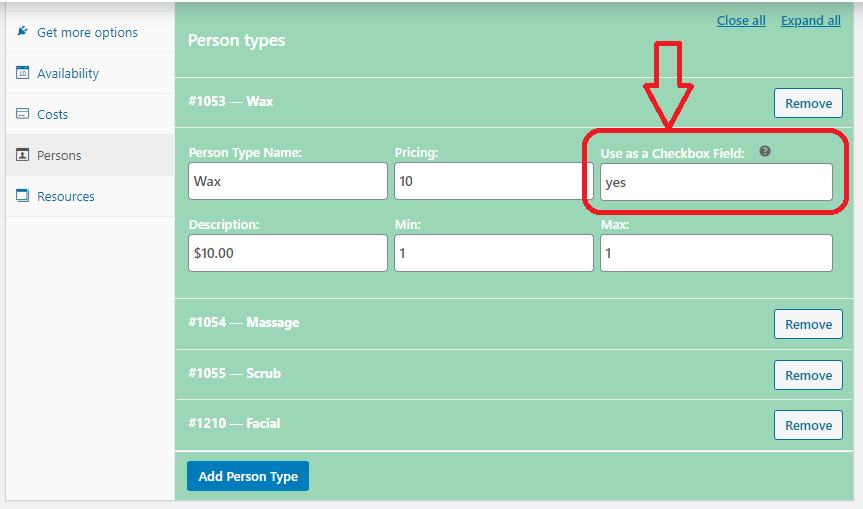
The option fields are quite self explanatory, which are easy to understand without needing any extra information or explanation. For example, the ‘Checkbox’ options can be enabled easily by following the instruction given with the option field “Use as a Checkbox Field”. In addition there is a ‘question’ mark above the field. If you mouse over on that ‘question mark’, you will find the additional instructions right there. No need to visit the ‘Documentation’ site again for this.
This screenshot will help you understand my explanation above more easily.
Please do not hesitate to contact the Support Team, if you have any other questions.
Kind Regards,
Fluent-Themes
how can i add amount field in all reservation
Hi,
We are not sure what you meant by ‘amount’ field. Are you referring to the ‘Price’ of the product? The price can be added easily like any other WooCommerce products.
Kind regards,
Fluent-Themes
Yes I want to show price in report.like all details show in all reservations
The price of the product can be added of course. If you visit some demo products given in the Live Preview of ARB, you will find the ‘Price’ of the product displayed below the Title of the Product. If you use ARB, the ‘Price’ will be working exactly like the demo.
Hi. I have just bought your bookings plugin and after reading through the Documentation I still don’t understand how to set up Availability and Time slots. Do you have more detailed info than what is available on the Documentation page as I don’t understand how to do it yet? Thank you
Hi,
Thanks for reaching out.
Would you please contact the Support Team with the question with some more specific details? Support for ARB plugin is provided through the Support Team and they will help you within 24 hours.
Kind regards,
Fluent-Themes
Hi Two quick presale questions: 1. Can I integrate the ARB Bookings plugin with Woocommerce so the customer follows the same procedure as when they book a simple or variable product? IE they are required to make payment in order to complete their booking.
I don’t want to have to email invoices before the customer makes payment.
2. Will date and time slots become unbookable/unavailable for a specific product once a customer makes a purchase, and leave the same date and time slots available for a different product?
Thank you
Hi,
Thanks for your interest in ARB booking solution for WooCommerce plugin.
1. As you can see in the details of this plugin, its an extension of WooCommerce. That means, you do not need to integrate ARB with WooCommerce. ARB is already integrated with WooCommerce. The customers will be able to follow the same procedure as when they book a simple or variable product (i.e they are required to make payment in order to complete their booking).
2. An specific product is not related to any other products. So, if someone book ‘product-one’, then that won’t affect ‘product-two’. After booking ‘product-one’ the date/time slot will be unbookable/unavailable for that product only. Not for ‘product-two’. Each bookable product runs individually, exactly like the other WooCommerce products (simple product, variable product etc).
Best Regards,
Fluent-Themes
Hello, When I create booking per person, and I have for example Adults 1-2 900$, 3-4 800$, etc… can they be all under same label, and not one below the other, since it is the same person type?
Hi,
Thanks for reaching out.
The support team can take a look and give you correct answer if you contact them with the urls of your products. They will get back to you within 24 hours.
Regards,
Fluent-Themes
Thank you for your respond. However, before I decide to proceed with this, can you tell me is your plugin compatible with bulk discount plugins (which apply in the cart). I have tried to test the that, but I got no changes in the cart whatsoever.
Thank you in advance.
Hi,
Thanks for your reply.
The compatibility list is given at the right sidebar of the plugin details page (under ‘Compatible With’ section). We didn’t test our plugin with any other 3rd party plugins apart from those which are given in the ‘Compatible With’ section.
Kind regards,
Fluent-Themes
Ok, can you just tell me one thing. When the product is set by Person, this person is in woocommerce terms like variation, or is it some other taxonomy type?
Hi,
That ‘Person’ is a custom post type.
Kind regards,
Fluent-Themes
Ok, thanks
And the price for that custom post type in woocommerce terms is?
The price for that custom post type is a variable which is connected to the WooCommerce product price.
Is your plugin compatible with the Wcfm marketplace?
Hi,
We didn’t test our plugin with Wcfm yet.
Regards,
Fluent-Themes
Hi, I really like your plugin. It looks very user friendly. Just a few pre-sale question.
1. Is it possible to add three different timeslots to a day for one rental product. Like: morning/noon (09:00 – 17:00), evening (18:00 – 00:00), whole day (09:00 – 00:00). So if someone rents a car for the evening another customer can still rent the car for the morning/noon, but not the car for a whole day on that date.
2. Is it possible to extend the above situation that a customer can not only rent the car for a timeslot (09:00 – 17:00 or 18:00 – 00:00 or 09:00 – 00:00) but can also rent the same car for multiple days. If a customer rents the car for multiple days it won’t be possible to rent the same car for a timeslot or whole day on those specific dates.
Thank you!
Hi,
Thank you for your interest in ARB plugin.
1. From the ‘availability’ settings tab you can add as many time variations as you need. You can make your product available to book for certain time slots in the morning, afternoon, evening or night. But it is not possible to overlap any time slots. In your case your morning or evening time slots for your car rental will overlap the ‘whole day’ slots, which is not possible with ARB yet. Maybe in future we will implement this feature in the ARB booking plugin.
2. We are afraid, it is not possible to add 2 features (time slots and date slots) together in a single product. You can enable either date slots or time slots; for example, in this product date slot is enabled, and in this product time slot is enabled.
Best Regards,
Fluent-Themes
Hi, Again i have a new issues. simple products Add to cart is not working on a single product page, when i disable the plugin it start working fine
Hi,
ARB is used to create reservable product, not simple product.
However, the support team can take a look if you contact them with the urls of your products. They will get back to you within 24 hours.
Regards,
Fluent-Themes
Hi, you have made very nice plugin.
I checked your demo https://fluentthemes.com/wp-plugins/arb-reservations/product/spa-treatment/ and have following queries before I purchase:
1. Can we have addons in radio button instead of checkbox?
2. Is there any option to remove $20 extra for sunday? I want same pricing on all days.
3. Can we integrate with woocommerce payment gateways?
4. Is this plugin compatible with any wordpress theme?
Awaiting for valuable revert.
Thanks.
Hi,
Thank you for your comment.
1. Checkbox cannot be converted to radio buttons.
2. Yes you can remove $20 extra for Sunday. You can apply same pricing for all days.
3. All WooCommerce payment gateways can be used to accept payment.
4. This plugin should be compatible with any standard themes which are WooCommerce compatible. We did not check the plugin with all the WP themes of the world .
Regards,
Fluent-Themes
Hi, you have made very nice plugin.
Thank you