

57 comments found.

I purchased the plugin and didn’t know it required a WP Bakery Page Builder to work
Hello,
No problem. Please submit a refund request from your CodeCanyon account. I will issue a refund.
Regards
Thank you I submitted a refund request now Waiting for you
Hello,
I have approved the refund. You will get a confirmation from Envato with more details.
Regards
Thank you Is there a copy that works directly on Word Press ?
No, actually there is a plain HTML version which can work on any static site without requiring any page builder. The plain HTML version is included in main download.
Regards
Thank you, I am looking for an plugin that works directly on Word Press, I hope that it will be available from you in the future
Just purchased the plugin, great job! We need to change the color of the Daily Value from Red to Black for values over 100%. There are many supplements that use DV’s of over 100% but the red color makes it look like that is a bad thing which could hurt product sales. Can you please let us know the proper CSS to change those values back to black? Thank you!
Hello,
Thank you for purchasing the plugin. Kindly add the following CSS inside your current theme’s style.css or inside Appearance > Customize > Additional CSS:
.nflc .nutrition-table > li > span > b {
    color: #000;
}
Regards
Thank you very much, that works well. It did however make the other values turn “bold” in Safari. The values that were red before now look great. The values that were already black (under 100%DV) are now black/bold, so it makes them stand out unnecessarily. This happens in Safari, Firefox, etc – but not in Chrome. Can you look at whether that can be fixed? Otherwise the plugin works great and does exactly what it’s supposed to. Thank you!
Hello,
Kindly change the previously sent rules to the following:
.nflc .nutrition-table > li > span > b {
    color: #000;
    font-weight: 400;
}
This will set font weight to normal.
Regards
Hi, I requested the option to have both the per 100gram and per serving listed in a comment. If this is not an option you would consider doing as a general furthur development of the plugin, what would it costs us as a custom development for us?
Hello,
Sorry that would not be possible to add at this time.
Regards
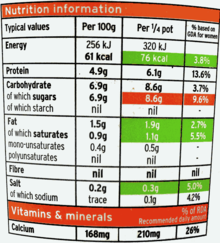
Hi, this label creator is exactly what we are looking for. However, in Europe each country MUST list the nutrition facts per 100 gram and per serving (example: https://upload.wikimedia.org/wikipedia/en/thumb/0/02/Nutrition-Information-UK-Label-Yoghurt.png/220px-Nutrition-Information-UK-Label-Yoghurt.png). Europe is a pretty large target group. Would be awesome if you could add this feauture (a per 100 gram column, next to a per serving column)
Hello bardolino,
Thank you for browsing the plugin. The serving size can be changed in this plugin as required. For example, in the demo where you see serving size as 70g, you can change it to 100g. The daily value is based 2000cal diet. So this DV number may differ. In that case you can use custom nutrients option which allows you to add your own nutrient with custom standard Daily Value.
Regards
Thank you for the reply. For Europe we would need both columns/values: Per 100 gram and per serving. Can you make this possible?
Hello your plugin looks good.
I was wondering can you add custom nutrients i.e. Gluten?
And also if you don’t use all the nutritions labelled, will they appear on the table? For example there is no vitamins in the product, will the vitamins titles still appear on the table?
Thank you
Hello David,
Thank you for browsing the plugin. Yes you can add custom nutrients using built in option. See http://prnt.sc/r23d4q
If you do not specify any nutrient, it’s label will not be shown.
Regards
Thank you! I do have a nutrition table (New Zealand standard). Is there anyway of achieving this? https://prnt.sc/r3u2jb
Hello David,
Sorry, the current style is not as per New Zealand format of Nutrition Table. The content hierarchy is also different than the one used in the plugin. If it were only the CSS styling, we could do some override. But the content placement, hierarchy and columns are different.
Regards
Hi there, I really hope your still giving support for this great plugin.
Is there a way to customize table size? As it is right now, it takes up all available space, so in desktop version of website it looks humongous ^^‘
Hopefully there is a way to fix this.
Thank you.
Hello,
Yes it is possible to limit the width of the Nutrition Table. For that, kindly navigate to WordPress admin’s Appearance > Customize > Additional CSS:
.nflc.nutrition-section { max-width: 400px; }
Then click on Save and Publish button.
Regards
Wahooo thank you so much, now it looks like the pros! 
You’re welcome. 
Regards
Hi, I am looking for a nutrition panel plugin that allows me to show each component (salt, energy etc) per serving and per 100g standard. Can this plugin do that? Cheers
Hello szo,
Thank you for browsing the plugin. The nutrition facts chart is based on serving size and amont per serving as one entity. Based on this, all nutrients are shown for this quantity. You can set amount and servings as required, but not for individual nutirents. It will be for the entire recipe.
Regards
Hello. Does Nutrition Facts Label Creator have pre-load standard food like vegetables, fruits and grains?
Hello KhAiRiNhO,
Thank you for browsing the plugin. It doesn’t have pre made food or recipes. It has pre made fields for all nutrition properties like protein, vitamin, fat, etc. You need to fill the nutrition value amount in these fields.
Regards
Thanks, Does a user can change the quantity of food from list and generate auto calculated values?
Unfortunately, no. Front end quantity selector is not available yet. Furthermore, that is a feature of ingredients list in a recipe. Nutrition table is a separate element.
Regards
Please cancel and refund… this is not working for me!
Hello entre_tek,
I will issue you a refund if you want. For that kindly submit a refund request from your CodeCanyon account. If you want me to check the issue and fix it, kindly email me at xconsau[at]gmail[dot]com with the details of the problem.
Regards
I am trying to figure out how to round up or down the daily value percentage to the nearest percentage. Saw this was answered about a year ago but the code suggested to edit is no longer in the files. Any help on how to achieve this now? Thank you!
Hello anlinares,
In order to round the daily value percentage, kindly follow these steps:
1. Copy the plugin template file
/wp-content/plugins/nutrition-facts-label-creator/nflc_templates/default.php
and upload on to your current theme folder as:
/wp-content/themes/your_theme/nflc_templates/default.php
2. Next, edit default.php file in any text or code editor and look for line no. 90:
$dv = round( (float)${ $nf['id'] } * 100 / $nf['sv'], 2 );
Change the function name “round” to “ceil” or “floor”, as shown below:
$dv = ceil( (float)${ $nf['id'] } * 100 / $nf['sv'], 2 );
Ceil will round up whereas floor will round down to the nearest integer.
Regards
Thanks for the amazing plugin! Just what I was looking for! I do need to change the unit measurement of Vitamin D from IU to mcg. Could you tell me how to accomplish this? Thanks!
Hello anlinares,
Thank you for purchasing the plugin. I am releasing an update in which the standard values and units will be updated as per latest RDIs. I will also change IU to mcg. The update will be available in a day or two.
Regards
Thank you! I figured out a workaround but the update is much better. I appreciate you!
Does this plugin REQUIRE using WP Bakery ?
==========
Does the Nutritional Facts Calculator automatically generate the information?
Or does everything have to manually inserted ?
==========
If it is automatically generated, where is it pulling the information from ?
Hello turner2f,
Thank you for browsing the plugin. Yes, it requires WP bakery Plugin. The Nutrition facts daily reference values are taken from Wikipedia.
You have to manually insert daily value contained in the recipe. The plugin will automatically calculate the percentage of that value against pre-defined standard value.
The plugin does not automatically finds what nutrients are in a recipe.
Regards
is Support RTL and Arabic lang.?
Yes it supports RTL.
Regards
I’m looking for the new 2018 Nutritional Facts label. I would gladly buy your add-on if I could copy paste the html5/css label code on my (non-WordPress). Can you confirm your label is the new one from 2018? https://goo.gl/sPMKkp and it would be awesome to have the bilingual Canadian version also. https://goo.gl/k22ZtU
Hello lptornade,
Thank you for browsing the plugin. The new 2018 style will be added soon in next weeks. Currently it is old one. I will also consider the Canadian version. (Thank you for sharing the resource URL).
Regards
Hi, I have more intrested of your plugin. This plugin is customabile? Can you see me a plugin?
Hello,
Thank you for browsing the plugin. Yes you can add custom nutrients and nutritional values as required. Currently I do not have a demo version for testing out. But you can ask me any questions if you have regarding the plugin.
Regards
I have product nutrition values as Product Attributes (Woocommerce) Can we sync that data into this plugin?
Hello madhurebba,
Thank you for browsing the plugin. The product attribute values (as nutrients) can only be synced manually in this plugin. The plugin will not detect these values automatically. Using the custom nutrients option, or using existing ones you can add nutrient values in the plugin.
Regards
Hi, I can’t get the plug in to work. I am using WP Bakery Page Builder, will it work this way?
Hello sergiohk,
Thank you for purchasing the plugin. Can you describe a bit about the issue please. Like, the display is improper, or the WP Bakery Page Builder is not showing the Nutrition Facts module at all.
Regards
It’s not showing anything at all.
Hello sergiohk,
Kindly send me your site URL and login details at xconsau[at]gmail[dot]com. I will check the issue.
Regards
The second question, I’d like to adjust one of the nutrient labels and units. I’m fairly certain this can be done with a filter placed in functions.php I’m just not 100% sure how to go about this.
I’d like “Vitamin D (Cholecalciferol)” changed to just “Vitamin D” and the unit to be blank (remove the UI).
Thanks again for a great plugin.
Hello again,
The text “Vitamin D (Cholecalciferol) is translation ready, but if you wish to change it in core files, you will need to edit the same file default.php which I mentioned in your previous comment. In that file, look for line no. 134:
'label' => __( 'Vitamin D (Cholecalciferol)', 'nflc' ),
Change the text and save file. This will override the text in front end. The filter is for entire array, which would be an overkill. Direct filters are only for changing standard RDIs.
Regards
Perfect solution again. Thank you.
You’re welcome.
Regards
Hi There, love the plugin. I had a question.
For the daily value percentage is it possible for the value to round up or down to the nearest percentage?
For example 10.3% would appear as 10%, 0.35% would appear as 0% and 11.72% would appear as 12%?
Thanks for your time!
Hello MediaCutlet,
Thank you for purchasing the plugin. Yes it is possible to round off percentage values, but will involve overriding the nutrition template in theme. For that you can follow these steps:
1. Copy the following file from Nutrition Facts Label Creator plugin:
wp-content/plugins/nutrition-facts-label-creator/nflc_templates/default.php
and upload to your current theme as:
wp-content/themes/your-theme/nflc_templates/default.php
2. After the file is copied, edit it in any text/code editor and look for this code at around line no. 454:
(int)$dv <= 100 ? $dv . '%' : '<b>' . $dv . '%</b>'
Change this to:
(int)$dv <= 100 ? round($dv) . '%' : '<b>' . round($dv) . '%</b>'
3. Save this file and check the site. All decimal values will be rounded off to nearest integer.
Regards
Worked like a charm. Thanks a lot.
Hi,
I use your product for my woocommerce shop. When I add a nutrition facts label, save the product and open it again, the natrion facts label object is a normal text block. How can I prevent this since I cant edit if it was saved before?
I translated all Values with Loco to german if this matters.
Best regards, Markus
Hello Markus,
Thank you for purchasing the plugin. Do let me know which version of Visual Composer you are using. If using any caching, auto optimize or minify plugin, try clearing all caches.
Translation shall not affect the save functionality. If clearing caches doesn’t work, please send me your site URL and login details at xconsau[at]gmail[dot]com. I will check the issue.
Regards



.)