390 comments found.
Referring to the custom templates plugin comment, I bought this plugin too. Can you help me with the same task mentioned here:
oh btw.. it would really help to have a display CSS settings (or class) for your vs field items, cause if I move many of them to a VC column, they are shown in one line if the columns width is wide enough. Something like “enter class for item” or “display: inline, inline-block, block etc. would really help
Hi, great.
Please send me a private message with wp admin credentials and link to a page where you’re doing it. I’d rather setup a sample for you than trying to explain it in words.
Best, PR
I already found a solution but it´s not a table I think.
I will send you the credentials soon.
Maybe you can check another thing in your Plugin. When using an ACF field with select values (standard acf), and I predefine some values like “inventory : Inventory, the result shown is only
Hello,
I’m using your plugin to edit woocommerce category descriptions with wpbakery. I’m getting a bug when trying to insert a revolution slider. If I insert a slider on a regular page it works fine. If I insert other type of contents to woocommerce category description it also works fine.
Here are the errors showing :
SyntaxError: expected expression, got ’<’ bordures-circulaires:360:7 SyntaxError: ’’ string literal contains an unescaped line break bordures-circulaires:370:31 SyntaxError: ’’ string literal contains an unescaped line break bordures-circulaires:383:31 SyntaxError: ’’ string literal contains an unescaped line break bordures-circulaires:396:31
Thank’s for your help!
Hi,
Strange behavior. Could you send me a private message with credentials to your wp admin and link to that category?
Best, PR
ok just did
hello Pavel, did you get my email?
Hi Paul, yes. Will update you soon
I’ve just uploaded a newer version 1.6.4. Please download and install it once it will be approved. Usually within 24hrs.
Please confirm afterwards if all is fine on your end.
Works perfect. A really great plugin! thanks
Great, thanks for confirming!
Hello Pavel. I found another bug you might want to look into. When using wpbakery on a category and trying to insert a previously saved template.. nothing happens. Have a good day
Hello. my Item Purchase Code is not working anymore…please send me a new one asap. thanks! regards Tobee
Hi Tobee,
Purchase code is a unique number issued by Envato (not me) and assigned for each license purchased. It can’t expire or be renewed.
Where and how are going to use it? Maybe this information will help me understand the context and I could suggest then anything useful.
Best, PR
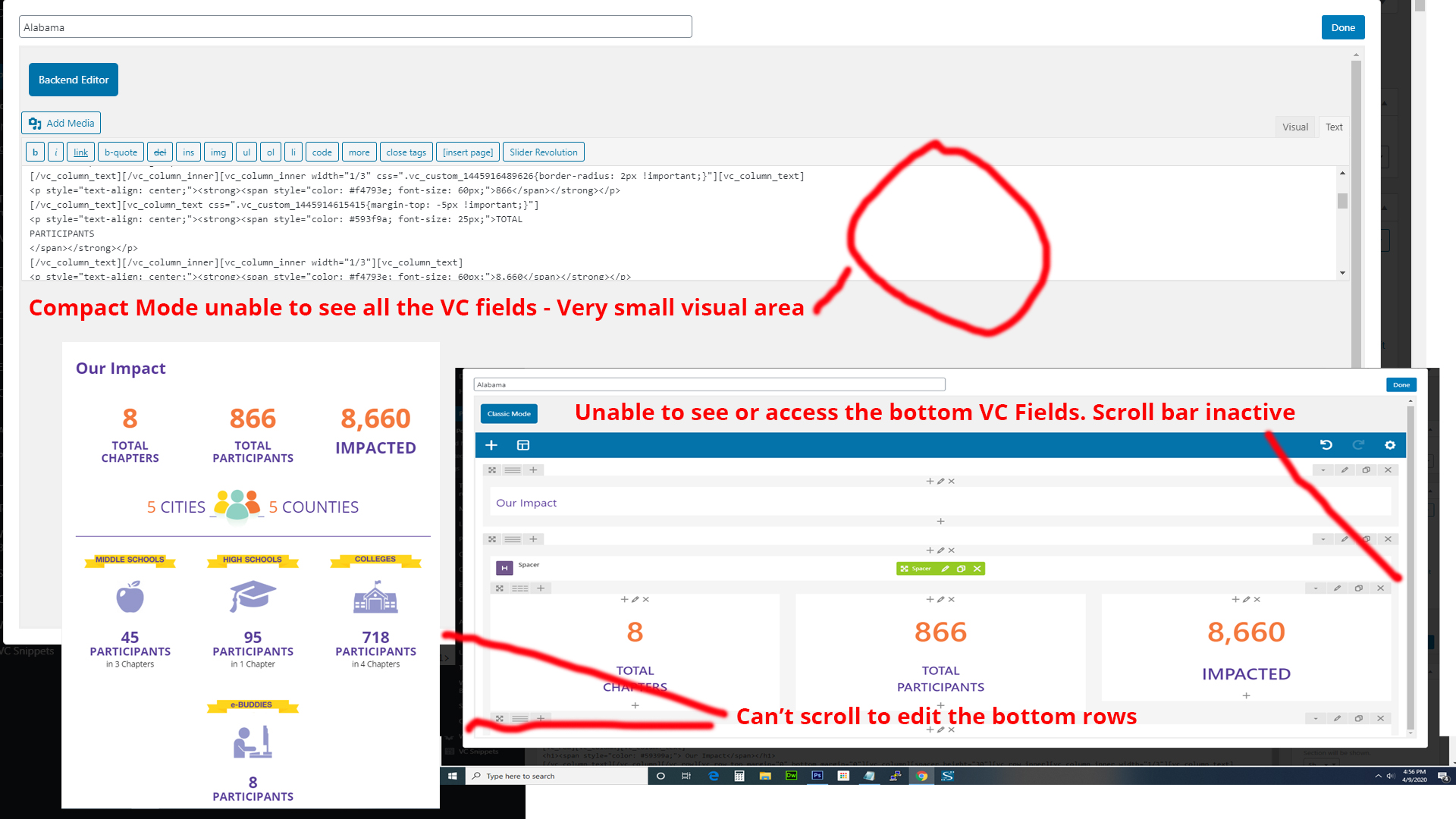
Hello, I am having an issue using compact mode. When you click to edit, the pop up only displays the first two rows of Visual Composer and I am unable to edit the bottom rows. I switch to Classic and as you can see in the attachment, it is very small editor area. Kindly advise on a fix, thanks. https://www.bestbuddies.org/wp-content/uploads/2020/04/issue.jpg
Hi,
Thanks for reporting the bug. I’ve just submitted updated version 1.6.3 so you can download it as soon as it’s approved. Usually within 24hrs.
Best, PR
Already approved. You can download it now.
Can I just say how awesome you and your plugin are! Thanks for the quick fix and response. 5 Star Author and Plugin! Thanks again!
Thank you 

You sir, are a hero for creating this fantastic plugin.
The only flaw I found is that ‘Menu Item’ ACF-fields aren’t showing back-end, while ‘Menu’ ACF-fields do show… but I’m guessing it’s an ACF bug unrelated to yours.
Thanks for this wonderful plugin.
Hi, glad to hear your positive feedback!
I never heard of such bug and would appreciate if you could send me a screenshot(s) showing this problem if possible, so I can fix it if it’s related to WP ACF-VC Bridge plugin.
Thanks, PR
Hi there, thanks for your reply.
If you’d like to recreate the ACF issue: Simply create a new custom field in ACF and set the rule to “Menu Item – is equal to – All”.
In the backend this should now show a custom field in each ‘Menu Item’ found at “Appearance -Menus”. But it currently doesn’t show…
Strangely enough, it does work for “Menu” but not for “Menu Items”. (Creating a field for “Menu – is equal to – All” does show a custom field underneath each Menu.)
(The official guideline: www.advancedcustomfields.com/resources/adding-fields-menu-items)
Thank you very much for the details!
It must be related to ACF itself.
However, to clarify Menu and Menu Item have different purposes. 1) When targeting Menu https://prnt.sc/rsrtdp , it assigns custom fields to the Menu object itself, displaying them below menu items https://prnt.sc/rsrt0t
2) When targeting Menu Item https://prnt.sc/rsrtpw , it assigns custom fields the each Menu Item object, displaying them inside each Menu Item https://prnt.sc/rsrtyo
So, these “Menu” and “Menu Item – All” are not mutually replaceable.
Doesn’t it work this way on your end?
Best, PR
You’re absolutely correct pavelreva.
The reason why I mentioned that ‘Menu’ fields are working (while ‘Menu Item’ fields aren’t) is that it might help to isolate the problem.
I discovered that my theme is actually causing this issue. After deactivating it and using a standard WP theme the field does show.
Thank you very much for your answers though. Will definitely buy more in the future for other projects.
Have a great day, Tim
Hi Tim, got it!
Glad it’s clear where this is coming from.
Thanks, PR
Hello I can’t update form 5.8.3 to 5.8.8 / I put in the purchase code but it don’t work. I made exatly this: Licence key not found. Make sure you have copied your licence key exactly as it appears in your receipt.
Thanks for your support.
regards Tobee
Hi Tobee,
Sorry for delay and that you’re experiencing the issue. Unfortunately, I don’t recognize such error. Are you sure it’s related to WP ACF-VC Bridge plugin? Can you send me a private message with the screenshots showing this problem or wp admin credentials, so I can see myself?
Best, PR
Hi, can you update to last acf 5.8.8? Thanks
Hi, just uploaded. Will be available for download as soon as codecanyon team approves it. Usually within 24hrs.
Best, PR
Thanks 
You bet. Plugin has been approved already, so you can download.
Hello, Recently I had my fellow designer buying this plugin and we tried to get support for more than a week now but our e-mails are not being answered even though we supplied the needed purchase code. How can we receive support regarding our problems?
With best regards,
Hi,
I’m sorry to hear you didn’t get a reply. Did you send a direct email or what was the contact method?
The most reliable is either comment here or private message. You can PM me all the details and I’ll take a look.
Best, PR
THank you, I will send you a PM. I had it indeed send wthrough the contacat form on your website.
Hi, I’m getting the following warning when using a ACF Relationship field type with the “Featured Image” Element unselected. When “Featured Image” is selected in ACF it doesn’t give me a warning.
“Warning : in_array() expects parameter 2 to be array, string given in /home/customer/www/websiteurl.com/public_html/wp-content/plugins/wp-acf-vc-bridge/includes/vc-acf-field-picker-filters.php on line 206”
Please help.
Love the plugin. Great work.
I’ve also just discovered when updating a page with the above I also get this error message:
“Warning: Cannot modify header information – headers already sent by (output started at /home/customer/www/websiteurl.com/public_html/wp-content/plugins/wp-acf-vc-bridge/includes/vc-acf-field-picker-filters.php:206) in /home/customer/www/websiteurl.com/public_html/wp-admin/post.php on line 223”
Hi, could you send me private message with wp admin access and link to that page?
Best, PR
Dear pavelreva,
my name is Francesco. I bought your plugin yesterday for my company website and I have a problem.
Everything is up to date: WP, Wp-ACFVC plugin, WPBakery plugin, ACF Pro plugin. I am able to create an ACF field of type “Visual Composer”. I am able to add elements to the “Visual Composer” field.
The problem is that the layout of the columns (e.g. 1/4+3/4 etc..) are not rendered as they should. To be more precise, if I create 1 row with 2 columns to be shown side by side, the 2 columns are shown one under the other instead of side by side. I am getting crazy.
I can send you a video privately.
Thanks a lot, Francesco
ZERO support provided. Please let me know how to proceed with a refund. Thanks, Francesco
Hi Francesco,
Sorry for delay, it was a long pipeline.
I need link to that page and wp admin credentials to check it. You can send it over private message.
If you still want a refund, please find a refund request button on this page https://help.market.envato.com/hc/en-us/articles/202821460-Can-I-Get-A-Refund-
Best, PR
Ok, Pavel, I am about to send you what you need. I am sorry if I have been a bit rude but I do really need this plugin. Thanks, Francesco
Hi Francesco, no worries. Looking forward for your message.
Thanks a lot Pavel for your kind help! Now everything is working super smoothly! Have a great day! I am sorry again if I have been a bit rude but I was a bit in a hurry! Have a great day! Francesco
No worries, glad you have a solution now.
Hello,
What is the ACF fields template settings used for?
How to add the full group of fields at once in the VC editor?
In my case, ACF fields template settings show drop down menu with empty results, and when I added VC snipet template, still showing no results in its drop down menu.
Would you please advise?
Thank you
To make my previous question easier, How to make master template for my fields for the page type?
I need to make one template for my page, once the field it will be selected, the data will show.
I dont need to design the same page every time.
Thank you,
Hi,
Fields template is used for defining layouts for fields like Group, Flexible Content and Repeater right from WP Admin. Particularly, you can create VC Snippet with custom layout allocating ACF Template Fields in right places t match desired layout. Then you set this VC Snippet in Group, Repeater or Flexible Content ACF Field’s settings.
Here are two articles showing how to use it for Repeater field and Flexible Content field.
Note: ACF Template Field can be used for this purpose only.
Let me know if you have questions.
Best, PR
Hi Pavel, can you please refund me? I have visual composer, but the plugin is actually for WP Bakery, not VC.
The page states it’s for VC, that’s why I purchased it.
Thanks, Alex.
Hi Alex, no worries.
Please fill this refund request form http://themeforest.net/refund_requests/new and I’ll approve it.
Best, PR
Hello, I am trying to get this to work on product category woocommerce and it will not work for WPBakery FAQ Questions and Answers element. It just shows the question and answer, normally you will click question and the answer will show as accordion. really bought this plugin specifically for getting this element to show on product category page.
Any clue what is wrong?
The FAQ element does work properly on wordpress category
Hi, sorry for delayed reply. Please send me private message with wp admin access and link to the product category where you’ve put FAQ element, so i can investigate/fix this.
Best, PR
I have replied to you. waiting on a reply back. very urgent
Replied
Hello. How can i get the updates for ACF pro ?
Please download the latest version of the plugin. ACF PRO was updated to 5.8.6
Hi
I have problem trying to add visual composer in product category Woocommerce
Don’t Work
http://prntscr.com/pwx5ndHi, what do you see on frontend?
Hi
How can add visual composer in category product in woocommerce?
Hi, seems you know this already, based on the screenshot you sent in next message.
I have updated all of my Plugins and my Wordpress to the newest version, but WP Bakery Page Builder(former visual composer) doesn’t work properly anymore since I updated ACF Pro and Wordpress.
I can’t use the frontend editor at all and also the backend editor appears to be broken. Will this plugin solve the issue?
Hi,
Nope, I don’t think so based on your description.
Best, PR
Hi
I want buy this plugin, but i have question?
i want use Woocommerce “Product Category” page with visual composer.
I’m just wondering if I am able to edit the “Product category” and “product tag” page with the Visual Composer editor?
I find your plugin, its possible?
Hi,
You can add Visual Composer field (one or multiple) to product category and product tags. However, it won’t replace regular descriptions. Instead, you’ll need to manually specify where you want to display VisualComposer content.
See this article with video, which demonstrates how to add Visual Composer to category.
Let me know if you have questions.
Best, PR
Hi, I’ve bought your plugin to add Visual Composer editor to ACF custom fields, but it doesn’t work. Could you help me please?
The field is desc2 in https://stancanelli.angrybean.net/wp-admin/edit.php?post_type=acf-field-group
-> Expertise Group
I have also sent an email to your contact form.
Could you help me please to understand? Thanks
please, it is really urgent to solve this issue. Thanks
Hi,
Please send me private message with wp admin credentials, so I can take a look.
Best, PR
I’ve resent the message. Let me know if you have receveid please. it’s really urgent! Thanks!